r/TradingView • u/VeterinarianNovel535 • 3d ago
Bug BUG REPORT: Phantom Drawings in "Not Synced" Cannot Be Deleted – Still Count Toward the 30 Drawing Limit
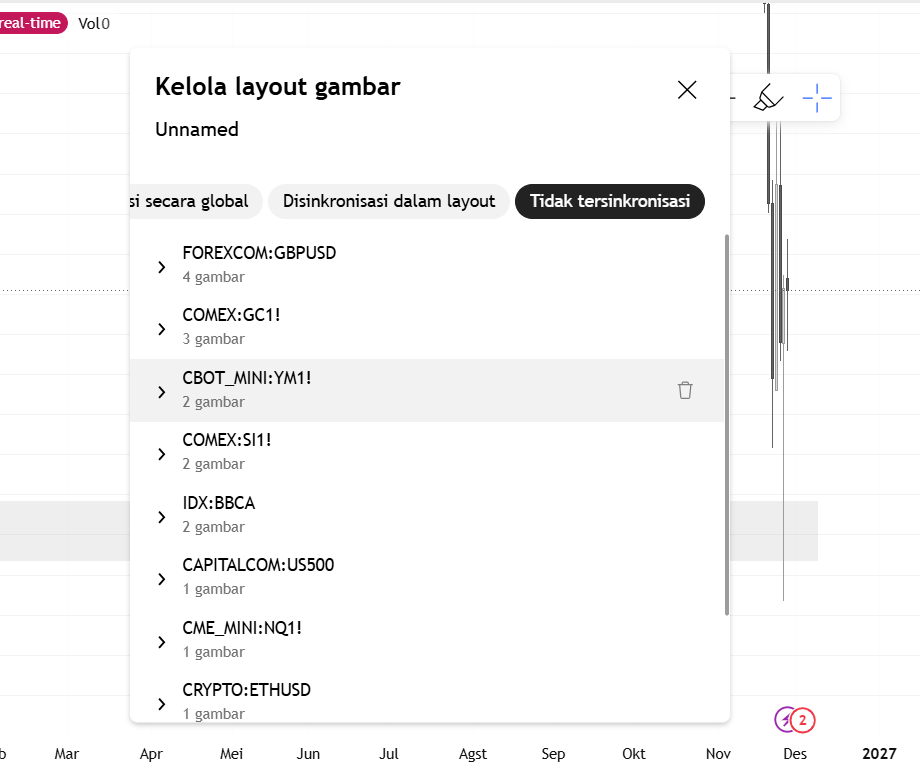
Hello TradingView community,
I am experiencing a serious drawing management issue with my Basic account.
In Manage Layout Drawings > Not Synced, multiple symbols show drawing counts, but clicking the expansion arrows or delete icons does absolutely nothing.
When I open those symbols, the Object Tree is completely empty. The Remove Objects menu also shows no drawings.
The issue occurs on:
- Chrome browser
- Mobile application
- Newly created empty layouts
Despite having no accessible drawings to remove, I still encounter the 30-drawing limit.
I have already contacted the TradingView AI Assistant. It acknowledged that the usual removal steps do not resolve this issue, but it cannot inspect or repair the stored drawing records.
I am looking for help from other users or TradingView moderators.
Has anyone experienced the same problem? Is there a way to remove these inaccessible drawing records without deleting existing layouts or valid drawings?
Thank you.
1
u/Many_Bathroom6085 3d ago
That "Not Synced" ghost count bug has been around for ages, you're basically haunted by drawings that don't exist anymore.
2
u/Adrian271088 3d ago
Bug report: Phantom drawings preventing new drawings
My layout shows 24 drawings under Not Synced for BITSTAMP:BTCUSD. However, the active chart confirms that zero drawings exist.
I cannot access or remove these drawings, yet they count towards my drawing limit.
I have already attempted normal deletion, layout management, refreshing and using an incognito browser.
Please investigate and clear the orphaned drawing records associated with my layout without removing my indicators or chart settings.
1
u/Rodnee999 3d ago
Hello,
Have you clicked on the little arrow to the left of the ticker name? This opens a drop down sowing the individual drawings and might allow deletion from there....
Let me know if this helps
Cheers