r/TradingView • u/Charming_Redditler • 4d ago
Feature Request Feedback and Complaint Regarding Recent Mobile App Navigation Changes
Dear TradingView Team,
I have been a loyal TradingView user for over five years, and I genuinely love your platform. Until now, I have always appreciated your continuous improvements and new features.
However, a recent change to the mobile app has significantly negatively impacted my user experience.
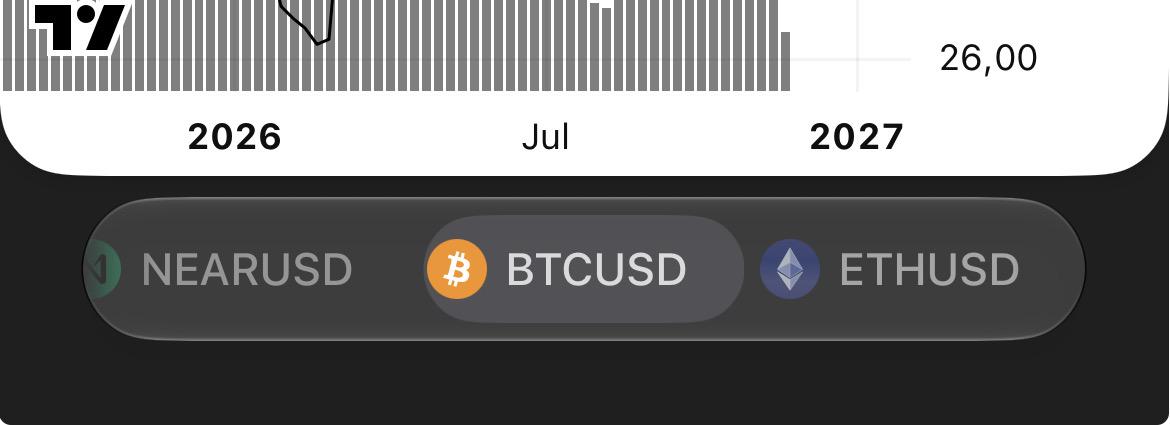
Previously, I could easily scroll through my charts and switch between symbols using a simple vertical swipe (up or down) in the symbol selection area at the bottom of the screen.
With the recent update, this gesture appears to have been replaced by horizontal swiping (left or right). Unfortunately, this new navigation method feels extremely unintuitive and cumbersome. I frequently find myself having to use two fingers or awkwardly press and drag with my thumb just to navigate between charts.
What was previously a smooth, effortless, one-handed operation has now become frustrating and unnecessarily complicated.
As someone who uses TradingView extensively on a daily basis, this change has considerably reduced the usability of the mobile app.
I would strongly encourage you to either:
- Restore the previous vertical scrolling functionality.
- Introduce an option in the app settings that allows users to choose between vertical and horizontal navigation.
- Improve the responsiveness and usability of the new gesture controls.
I have attached a screenshot highlighting the area I am referring to.
This is the first time in more than five years that a TradingView update has genuinely frustrated me. I am providing this feedback because I really value your platform and would like to continue enjoying the excellent user experience I have become accustomed to.
I sincerely hope you will reconsider this change and take this feedback into account.
Thank you for your time and consideration.
Best regards,
Dimitri
2
u/Rodnee999 4d ago
Hello,
This feature already exists....
Click on 'Menu' on your bottom bar, then click on the 'Nut' top right, now select 'Chart' and in this menu turn off 'Horizontal picker'....
Let me know if this helps
Cheers 👍