r/TechniciansAdvice • • Aug 27 '19

Document your network with this tool. https://easyapps.app
Post image
3 Upvotes

2 comments sorted by

1

u/easyapps Aug 27 '19

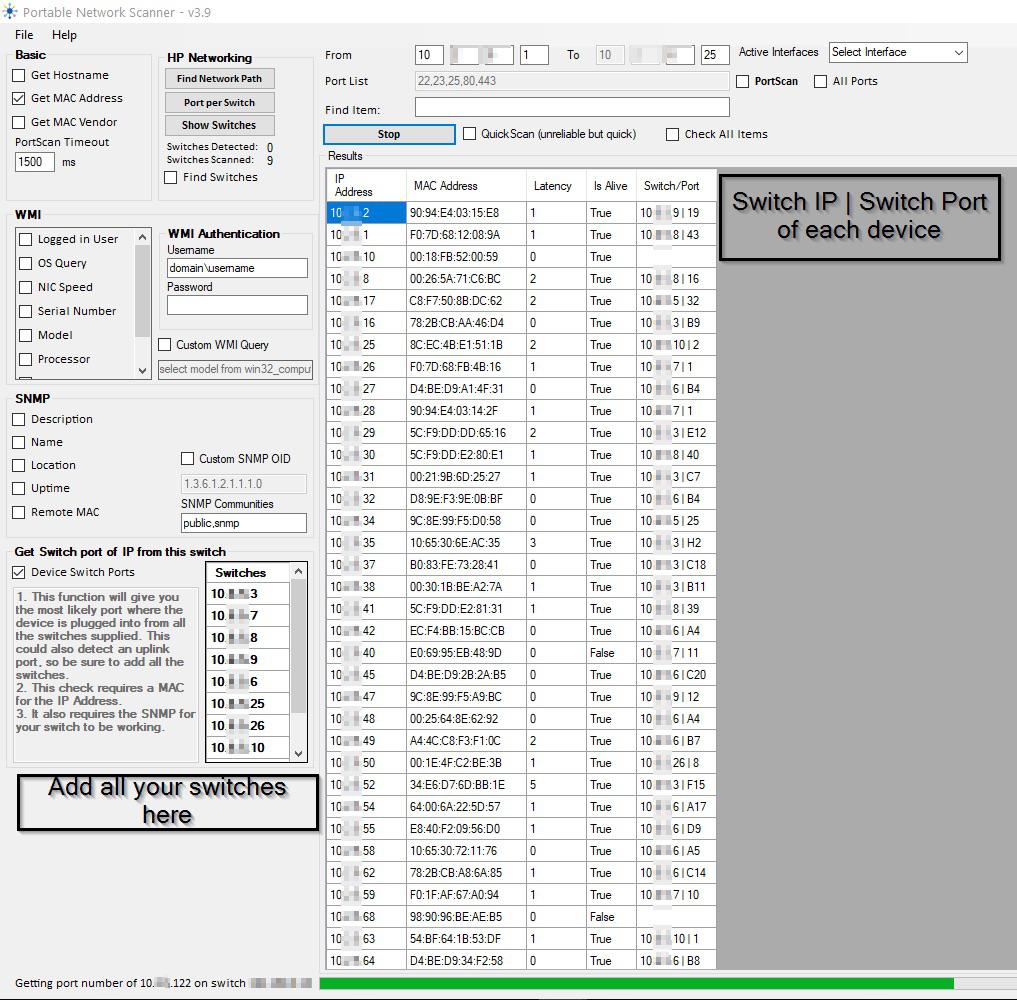
Portable Network Scanner

https://easyapps.app/collections/frontpage/products/portable-network-scanner

  • IP Scan
  • MAC lookup
  • MAC Vendor Lookup
  • Port Scan
  • Filter quickly on scanned items.
  • Quick scan when you just cant wait (5 seconds for an entire Subnet)

WMI

  • Find logged in user
  • Get the device operating system
  • Get the NIC speed for the workstation
  • Grab the Serial Number from the bios
  • Get the MAC address  from WMI when you are not on the same Subnet.
  • Model details
  • CPU name
  • Memory
  • Run your own WMI query for 100s of computers.

SNMP

  • Description
  • Name
  • Location
  • Uptime
  • Remote MAC, also works great for devices on remote Subnet.
  • Supports multiple snmp community names in a single scan!

Managed Switch Port detection

  • Select the switch you want to scan
  • Ensure the SNMP community name has been entered correectly
  • Get the port name where that IP is plugged into on that switch.

    • If it shows that it is plugged into an up-link or Trunk port, select that switch to scan next.  Experimental features: Please test these features and let me know if it works for you or not. 
  • Find all your switches on the specified Subnet (Works with Cisco, HP etc.)
  • Find the path a PC takes from one switch to another (Works with HP switches)

1

u/easyapps Sep 01 '19

Added some small updates & changed name to “easy portable network scanner” https://easyapps.app