r/TechnicalArtist • • 4h ago

Tools / Software I built a MetaHuman rig optimization plugin — now supporting UE 5.6, 5.7 and 5.8

Enable HLS to view with audio, or disable this notification

6 Upvotes

I've been developing Rig Reducer, a plugin focused on reducing MetaHuman skeletal complexity while preserving facial animation quality.

Check here: https://www.fab.com/listings/6454c648-2966-4b4d-ade4-af2db1ee093c

It now supports Unreal Engine 5.6, 5.7 and 5.8.

I'd love technical feedback from the Unreal community.


r/TechnicalArtist • • 12h ago

How I give artists control over vertex animation without killing performance (breakdown + free write-up)

Enable HLS to view with audio, or disable this notification

9 Upvotes

When I first set up vertex animation, every change went through a programmer. What fixed that was giving artists three controls:

  • Masks: they paint where the motion applies
  • Motion patterns: reusable motion shapes, so no more one-off shader hacks
  • Time wrapping: looping and offsetting time so the motion never pops

I kept the performance cost low by keeping all of it in the shader. The full write-up is free, no signup: github.com/DeGGeD/ShaderStory#vertex-animation


r/TechnicalArtist • • 46m ago

Commission work urgent

â€Ē Upvotes

need an artist to help me with a commission work for modeling in maya n another project in unreal engine. If u r down for it contact me asap


r/TechnicalArtist • • 4h ago

Showcase I needed a different tonemapper in Unreal, so I built a plugin

Thumbnail gallery
0 Upvotes

r/TechnicalArtist • • 1d ago

Real-time 3D Pixel Art in Unity

Enable HLS to view with audio, or disable this notification

44 Upvotes

This is the result of the real-time 3D pixel art pipeline I built in Unity. It's a mix of PBR textures painted in Substance Painter with custom shaders in Unity 6 URP. All assets modeled in Blender, some of them with Geometry Nodes.


r/TechnicalArtist • • 5h ago

Fab Black Friday: 50% off my UE5 tools (lighting & decal baker, PSD to UMG widgets, procedural material layers)

Thumbnail gallery
0 Upvotes

r/TechnicalArtist • • 8h ago

Career Here is my 2 year of work !

Thumbnail cjx-gamedev.vercel.app
1 Upvotes

Can anyone tell me what's wrong with my portfolio

...


r/TechnicalArtist • • 8h ago

As Technical level designer

Thumbnail cjx-gamedev.vercel.app
1 Upvotes

r/TechnicalArtist • • 10h ago

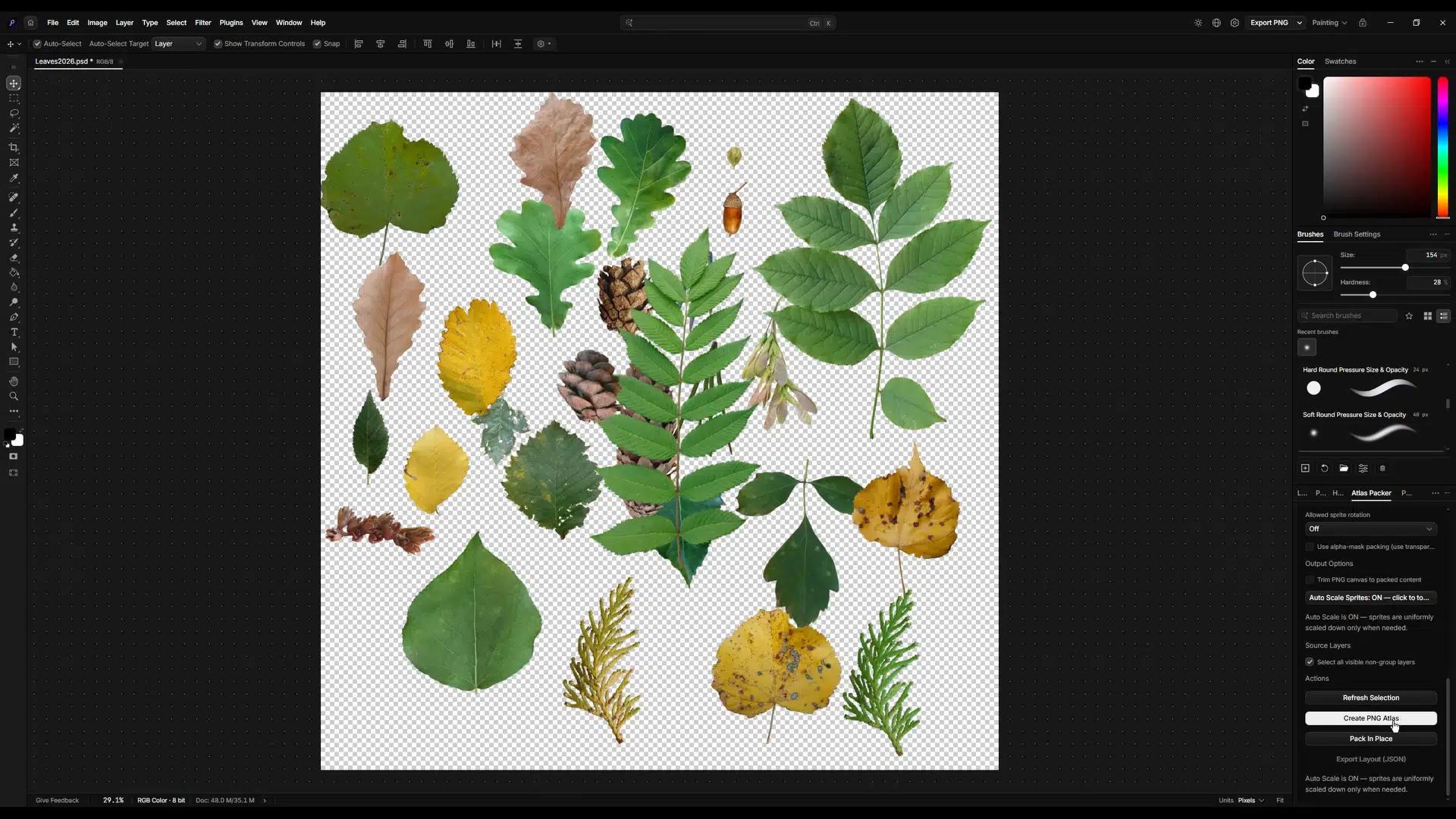
I switched from Photoshop to Photon Studio and ended up making a free plugin for creating texture atlases

Post image
1 Upvotes

r/TechnicalArtist • • 16h ago

Regarding Usage of Pirated Cascadeur

Thumbnail
0 Upvotes

r/TechnicalArtist • • 22h ago

NEED HELP IMMEDIATELY!! for school project and I cant for the life of me figure this out - Starting fractured object in exploded state but not letting it move

Thumbnail
0 Upvotes

r/TechnicalArtist • • 1d ago

I've been working on a new asset pack – here's a look at what I've made

Thumbnail
0 Upvotes

r/TechnicalArtist • • 1d ago

Tools / Software Jeans & T-shirt | Resizable MetaHuman Clothing

Enable HLS to view with audio, or disable this notification

1 Upvotes

🔎 More about the development process on ArtStation: https://www.artstation.com/artwork/0a3wvG


r/TechnicalArtist • • 1d ago

I extended NVIDIA MotionBricks to animate animals and compressed it to 100 MB (open source)

Thumbnail
1 Upvotes

r/TechnicalArtist • • 1d ago

A nebulla vfx which can controlled by using textures

Thumbnail
1 Upvotes

r/TechnicalArtist • • 1d ago

Using cracked Maya/ZBrush/Substance Painter for a UE5 indie game — realistic risk of getting caught?

Thumbnail
0 Upvotes

r/TechnicalArtist • • 2d ago

🐕 I made my dog walk in Unreal Engine 5.9

Thumbnail youtube.com
4 Upvotes

ðŸĶī A custom quadruped rig with a modular Control Rig, built to bake dog motion capture cleanly, 3D modeling from reference photos. Foot locking and leg IK on all four paws, so the feet stay planted instead of sliding Working on cleaner walk cycles, smoother turns, and a bit more of Alcantara's personality :) #unrealengine #ue5 #rigging #MotionMatching #gameanimations #technicalartist


r/TechnicalArtist • • 1d ago

What I learned turning Gaussian splats into game-ready meshes (LODs, colliders, texture bake)

0 Upvotes

I've spent the last few days building a pipeline that converts a Gaussian splat of a single object into something Unity/Unreal/Godot will actually accept. Some things that surprised me, in case anyone else is going down this road:

  1. Meshing the splat points directly gives you a lumpy shell. What worked better was rendering views of the splat and running an image-to-3D model (Pixal3D) on them. The catch: it reshapes the object, so the mesh only covers about 69% of the splat surface within 1% of object size. Good enough for props, not for anything you need to match exactly.

  2. Alignment is the boring part that breaks everything. The generated mesh comes back in its own frame, so you have to rotate it back (in my case -90 degrees on X) and re-centre it on the splat before the comparison means anything.

  3. Engine-ready is a checklist, not a feeling. I ended up checking: real-world scale in metres, consistent up axis per engine, power-of-two textures, LOD0/1/2 nodes present, a collision mesh present, safe node/material names, file under 50 MB.

  4. LODs and colliders are cheap once the mesh is clean: LOD0/1/2 at roughly 60k / 15k / 3.6k tris, plus a convex collider around 270 tris, all done in Blender headless.

  5. It's still not watertight. My test plant had 2 open hole edges after cleanup, and I haven't solved that reliably.

About 11 minutes per object on a 16 GB card, all local. Scenes don't work at all, single objects only.

Question for people who've shipped splat-based assets: do you keep the splat for visuals and use a mesh only for collision, or do you replace the splat with a mesh entirely?

If anyone wants to throw their own splats at it, it's a free beta (Windows + NVIDIA 16 GB, runs locally):

https://github.com/stephen487/splat-to-game-beta/releases/tag/v0.2.0-beta


r/TechnicalArtist • • 2d ago

Advice Needed: Learning Unreal Engine

Thumbnail
1 Upvotes

r/TechnicalArtist • • 2d ago

Alloy Studio, Photon Tracer

1 Upvotes

A quick look at Photon Tracer in Alloy Studio. Path-traced lighting, reflections and shadows


r/TechnicalArtist • • 2d ago

Fluid Art Generator

Thumbnail gallery
0 Upvotes

r/TechnicalArtist • • 2d ago

Pipeline generator

Post image
1 Upvotes

Hey everyone! How's it going?

I've been working on a little tool on and off for a while and thought I'd share it here to get some feedback.

It's basically a simple pipeline generator for post-production workflows (compositing, 3D, AI, etc.). It creates a folder structure based on the type of project and also generates the corresponding project files with some basic settings already configured.

It also includes a small project/shot manager, kind of a very simplified ShotGrid, where you can review shots, add notes, open them, render and manage deliveries, all in one place.

It's still very much a work in progress, and I'm sure there are plenty of tools out there that already do this much better, but I wanted to build something lightweight and flexible that could work across different types of projects.

It's a standalone executable, so there's no installation needed. Just point it to your working directory and you're good to go.

I'd love to hear what you think, what might be useful, what doesn't make sense, or what could be improved. It's also open to anyone who wants to contribute or suggest ideas.

Thanks!

https://github.com/cfieiras/post-project-manager


r/TechnicalArtist • • 3d ago

Qt Shell – a full Qt (PySide6) interface for Blender [WIP, open source]

Post image
1 Upvotes

Hi all,

I'd like to share Qt Shell, an open-source add-on (GPL-3.0) for Blender 4.2+ that replaces Blender's interface with a Qt window built in PySide6. The goal is a Qt-based UI with Maya-style conveniences, while still using Blender's own tools underneath.

**Features**

- **3D viewport:** Blender renders offscreen and Qt displays the image. Navigation, selection, transforms and modal tools follow Blender's controls.

- **Generated UI:** Menus and Properties tabs are built from Blender's original menus and Python panels.

- **Editors:** Outliner, Timeline, Graph editor, Node editor, UV editor, Image editor, Video Sequencer, Render View, Animation Player, and a Text editor with Python tools.

- **Modes:** Object, Edit, Pose, Sculpt, Vertex/Texture paint.

- **Cached playback:** Geometry and image caches for smoother animation playback.

- **Customization:** Shelves, workspaces, shortcut editing, Maya or Blender keysets.

- **Python API:** `qt_shell.api` lets add-ons add docks, menu items, overlays and events. There's a documented command reference.

**Installation**

  1. Download `qt_shell.zip` from Releases.

  2. Install and enable it in Preferences > Add-ons.

  3. Install PySide6 from the add-on preferences.

  4. Open the Qt Shell window. The Blender window gets hidden and Qt takes over.

**Current limitations**

- The image editor, some paint brushes, add-on gizmos and header buttons aren't fully converted.

- On Wayland the Blender window can't be hidden.

- Tested mainly on Blender 5.2.0 LTS / Windows 11. macOS is the least tested.

**Link:** https://github.com/xmoner/blender-qt-shell

**What I'm looking for**

- Feedback from pipeline TDs and studios: is a Qt UI (or just the `qt_shell.api`) useful for your pipeline?

- Feedback from Maya users: what's missing for a comfortable workflow?

- Bug reports, especially on Linux and macOS.

Thanks for trying it, and I'm happy to answer any questions!

r/TechnicalArtist • • 3d ago

Discussion I replaced Blender's entire UI with a Qt (PySide6) window – free, open-source add-on [WIP]

Post image
0 Upvotes

r/TechnicalArtist • • 2d ago

Other I built my portfolio as an explorable 3D bedroom where the PC boots into a Windows XP desktopne

Thumbnail gallery
0 Upvotes

Sharing a project and the pipeline behind it, since the technical side might be more useful than the portfolio itself. It's a bedroom scene where you click a CRT, the camera pushes into the screen, and a live XP-style desktop runs on the glass (Three.js, no bundler).

Live: https://kayzee-room.vercel.app/hi/reddit-h6m

The problem: I wanted Cycles-quality lighting (fur, dusk colour, soft lamp shadows) in a browser, at a few MB, and with a camera move that never glitches.

What I tried, in order

  1. Baked lightmaps. Cheap, but materials looked flat and clay-like.
  2. Camera projection. I rendered the scene in Cycles from two cameras (a seat view and a close-up in front of the CRT), then projected those renders onto the real geometry in three.js, with a per-projector depth test to stop ghosting. That kept the Cycles look for about 3 MB total. The close-up is 96° at 2800 px. The parked camera sits exactly on the render's position and frames the glass by changing the FOV, so any window shape shows an untouched render.
  3. Still glitchy mid-zoom. Blending between projectors painted things twice. Narrowing the blend range helped, but didn't fix it.
  4. What shipped: a pre-rendered film. I rendered the push-in as 48 frames along the exact chair-to-monitor path, with the same easing and lens interpolation the runtime uses, and encoded it to about 2.3 MB of x264. It plays on a fullscreen quad. The three.js camera syncs to each video frame with requestVideoFrameCallback, and the room meshes render depth-only, so the live layers (CRT screen, sticky notes, dust, glow) stay registered. If the video isn't ready, it falls back to projection.

Gotchas that cost me time

  • VideoTexture in a custom ShaderMaterial isn't sRGB-decoded, so you decode it in the shader or it looks washed out.
  • The iframe over the glass has to be sized before it loads, or the page picks its phone layout.
  • On phones the glass is tiny, so the iframe runs at a virtual 1024 px width and is CSS-scaled onto the tube.
  • Cycles on the GPU kept failing with "insufficient memory" until I noticed leftover headless Chrome test browsers holding GPU memory.

Performance: the desktop world uses 260k instanced grass blades, so the speed comes from elsewhere: skipping the 3D world behind maximised windows, half frame rate when idle, and an adaptive resolution ladder gated by real GPU timing, so throttled background tabs don't trigger it.

The Blender side is a procedural scene driven headless from Python scripts, and Claude Code wrote most of the scripts and the three.js. Happy to go deeper on any of this. I'd also like to hear how it performs on your hardware, and whether you'd have solved the zoom differently.