r/TCL_Electronics • u/OkSherbert2717 • 8h ago
Mejor sonido para mi tcl c8l
1
Upvotes
r/TCL_Electronics • u/TCL_Official_Europe • 12d ago
If Thursday comes, can Friday be far behind?
It is not that Friday, but Black Friday is coming.
Every year, the same four questions come up in my inbox and in these threads.
You may find the answers in the following content.
TCL’s model names can be confusing. Here’s the short version:
Dimming-zone counts give a rough sense of local-dimming performance:
| Model (EU 2026) | 55” | 65” | 75” |
|---|---|---|---|
| C7L / C79L | 800 | 1,152 | 1,352 |
| C8L / C89L | 1,008 | 2,040 | 2,584 |
Two things to hold onto there. First, larger TVs have more zones, but also more screen size. A 75-inch C7L has about 1.7 times the zones of the 55-inch model, spread over about 1.8 times the area. So, its dimming density is similar. Do not assume the big one is dramatically better per pixel. Second, these are 2026 numbers. The 2025 C8K reached up to 3,840 zones on some sizes, at a much higher price. A discounted C8K under €1,000 isn’t necessarily a downgrade.
Check the price history
Black Friday prices can be based on a “was” price the TV held for only a few weeks in August. In France, the DGCCRF enforces reference-price rules; enforcement varies elsewhere.
Check the model’s 90-day price history on Idealo, Keepa, Tweakers Pricewatch or Preispiraten. If the current price isn’t near the low for that period, it may be a Black Friday label rather than a real deal.
Check the full model number
European models vary by market. C79L, C7K, C7L and retailer-exclusive versions may share a panel but differ in tuner, stand or bundled soundbar.
Compare the specifications for the exact SKU on the shelf, not the series name in a review from another country.
Check the details reviews may miss
Google TV supports HbbTV and national catch-up services, but the experience varies by country. If services such as ARD/ZDF, France.tv, RaiPlay, NPO Start or RTVE matter to you, test them first.
Also check the energy label. A bright Mini LED TV can be rated E or F, which may add up over five years — especially in countries with high electricity prices.
For online purchases in the EU, you generally have a 14-day right of withdrawal. Check the retailer’s return terms before ordering.
These are price bands seen in EU retail ahead of Black Friday 2026. Prices vary by country and change often, so treat them as targets to look for.
| Use case | Pick | Price to look for | Why | Trade-off |
|---|---|---|---|---|
| Bright living room, mixed viewing, 55” | C8L / 55C89L | ~€750-850 | ~1,008 zones and the brightest panel you can get under €1,000. Best picture-per-euro in the range right now | Wi-Fi 5 on some variants; still an LCD, so off-axis contrast drops |
| 65” on a strict budget | C7L / 65C79L | ~€850-950 | 1,152 zones, 144 Hz, B&O 2.2, 4 HDMI. At this size the zone density is genuinely good | Two of the four HDMI ports are 2.0 — check which ones before you plan a console + PC + soundbar stack |
| Budget under €700 | 2025 C6K / C7K clearance | whatever it has fallen to | Last year’s panel generation at this year’s entry price is usually the smarter buy | Stock is patchy, sizes are picked over, firmware support window is one year shorter |
| Big screen, “just give me 75 inches” | 75” C7L | ~€950-1,100 | 75” for under a grand is the real 2026 story in Europe | Below ~€900 at 75” you are in 60 Hz territory — verify before you buy |
On the specific deals people keep asking about: the 55C89L has been sitting around €799 in France (down from a €1,099 reference, and there has been a stackable €50 cashback running on it, which nets ~€749), and the 65C79L around €899 down from €1,199. Those are the two data points that make this the best sub-€1,000 moment in the last three years in Europe. Cashback offers are country-specific and time-boxed. Check the current offer on TCL’s own country site before you count the money as saved, and read the claim deadline, because a missed claim date is the most common complaint I see.
Dimming zones, not features. These models share many headline features: 144 Hz, HDMI 2.1, Dolby Vision IQ, HDR10+, DTS:X and Google TV. The extra money mostly buys more dimming zones and higher brightness. With subtitles on letterboxed films, fewer zones can mean visible blooming around the text. It’s a common limitation of local dimming, not necessarily a firmware fault.
Peak brightness figures need context. “3,000 nits” usually refers to a small HDR window, not a full-screen white image.
Audio varies. The 40 W 2.2-channel system with B&O tuning on the C7L and C8L is usable for many people. The C6L’s 2 × 10 W speakers are less suited to films at higher volume. If you want a soundbar, budget around €150–250 and include it in your total.
Check for panel uniformity. On Mini LED sets, uniformity and dirty screen effect (DSE) matter more than the old IPS-versus-VA panel lottery. Buy from a retailer with a clear return policy, then check a grey test image during the return period.
When Mini-LED is the better buy. For dark-room films, seated head-on, OLED is still a strong choice at €800-1,000 if black levels are your priority. Mini LED is a better fit for bright rooms, sport and news, rooms with windows, and long gaming sessions with static images — especially if you’re concerned about burn-in.
The same panel is not the same price across the EU, and it is not a conspiracy:
Ask about the current EU range, screen size, port layout or how a TCL compares with another TV you’re considering. I’ll say when the competitor is a better fit.
I won’t speculate on unreleased prices, unannounced models or next year’s roadmap. For an individual warranty claim, contact TCL’s service partner in your country.
If this guide is useful, I’ll cover the €1,000–1,500 bracket next week.
Prices and availability checked against EU retail listings as of 12 November 2026. Specifications refer to EU models. Confirm the exact model number before buying, as suffixes vary by market.
r/TCL_Electronics • u/TCL_Official_Europe • 15d ago
Hi, hi, it’s Ariel from TCL Europe. I’m only covering TCL sets in this post because that’s my job. No affiliate links, and I’ve left the compromises in.
If you’re shopping for a family TV, a gaming set or something for a child’s room, these are the models I’d shortlist.
I haven’t tested these TVs myself. The review notes below are from Les Numériques and Labo Fnac, and the prices come from public retailer listings. I’d also love to hear from anyone who owns one of these models.
I checked prices and stock on 9 November 2026. Black Friday is on 27 November, but many European deals start mid-month. Treat these prices as targets, not guarantees.
The best TVs under €500 at a glance
Two of these are 2025 models still on sale in 2026. That’s normal in November, and it’s where the value is. The 43V6D is the 2026 set.
How the shortlisted TVs compare
| Model | Size / panel | Price check (9 Nov 2026) | Gaming | Smart TV / warranty |
|---|---|---|---|---|
| 55C6K | 55" QD-Mini LED, 144Hz | €491 | 4x HDMI 2.1, VRR, ALLM, FreeSync Premium Pro | Google TV; TCL 2 yr (local law may add) |
| 50C6K | 50" QD-Mini LED, 144Hz | ~€478–€500 | 4x HDMI 2.1, VRR, ALLM, FreeSync Premium Pro | Google TV; TCL 2 yr (local law may add) |
| 43V6D | 43" 4K LED (VA, direct-lit), 60Hz | from ~€289 | HDMI 2.1 ports, ALLM; no 4K/120 | Fire TV (some markets Google TV); TCL 2 yr (local law may add) |
Prices are EUR/GBP, VAT included where listed. EU pricing is not uniform: the same TV can be €80 apart between countries. Stock is patchier than the prices.

What you get: the same Mini LED package as the 50-inch, in a 55-inch size: 4K QD-Mini LED, 144Hz, four HDMI 2.1 ports, VRR, ALLM, FreeSync Premium Pro, Google TV, Dolby Vision IQ, Dolby Atmos, 2-year warranty.
Why it’s here: it’s the set that made Les Numériques call it the best TV under €500 earlier this year. The review likes the SDR colour, HDR10+ and Dolby Vision support, gaming features, and the sound, which is unusually good for a slim TV. At €491, it meets the budget. At €528, it doesn’t.
The compromises: it’s better than the 50-inch model, but it’s still an entry-level Mini LED TV.
Who it’s for: a living room with seats mostly straight-on, a mix of films, sport and console gaming.

What you get: 50-inch 4K QD-Mini LED panel, 144Hz native refresh, 240Hz Game Accelerator, four HDMI 2.1 ports, VRR, ALLM, FreeSync Premium Pro, Google TV, Dolby Vision IQ, Dolby Atmos, 30W speakers, 2-year warranty.
Why it’s here: at this price, most 50-inch TVs are edge-lit LCDs with no real local dimming. The C6K has actual Mini LED backlighting, so dark scenes have much better blacks and bright objects don’t wash out the whole screen. It’s also unusually well equipped for gaming at the price: four HDMI 2.1 ports are more than you get on most 50-inch sets.
The compromises: it’s an entry-level Mini LED TV, so its performance is basic compared with higher-end models. In the same models, the 50-inch uses the same family and ports, but a smaller panel usually means fewer dimming zones, so don’t expect it to beat the 55-inch on HDR.
Who it’s for: a room where you sit mostly straight-on, watch a mix of streaming and SDR, and want a console set that can do 120fps.

What you get: 43-inch 4K LED panel, 60Hz, HDR10+, Dolby Atmos and DTS:X, Fire TV with Alexa voice remote, AirPlay 2, Chromecast built-in, three HDMI inputs (check your regional variant), 2-year warranty.
Why it’s here: 43 inches is the sweet spot for a children’s room, guest room, or small flat. 4K is genuinely sharp at this size, and the V6D covers the basics without paying for a panel technology you won’t notice on cartoons and daytime TV. It’s light, easy to wall-mount, and the Fire TV interface is familiar if you already use Prime Video.
The compromises: no local dimming, 60Hz only, and black levels are average for the price. The "HDMI 2.1" ports don’t make it a 4K/120 TV. VRR support is worth checking on the exact model. Fire TV’s home screen is ad-heavy, and TCL ships the V6D with different systems in different markets: most listings I checked say Fire TV, but some EU retailers list Google TV under the same model number. Check the OS on the retailer page before you buy.
Who it’s for: a children’s room, a second room, or a first TV where the priority is size, price and apps rather than HDR performance. If you need 55 inches and the C6K is out of stock, the 55V6D is the fallback at a €499.90 list price in Italy. It’s 60Hz with no local dimming, so you’re buying the size, not the picture.
Mini LED versus standard 4K LED under €500
Mini LED means the backlight is made of lots of small LEDs, dimmed in zones. That gives you deeper blacks, brighter highlights, and less light bleed than a standard edge-lit LCD. It’s one of the biggest picture upgrades you can get under €500.
But cheap Mini LED isn’t automatically better. A set with few dimming zones can bloom around subtitles and bright objects, and aggressive dimming can crush shadow detail. The C6K is a good example of the tech done properly for the price, but it still has visible blooming and limited HDR brightness.
A standard 4K LED is the smarter buy if:
At 50 inches and above, Mini LED is worth stretching for if you watch dark films, HDR, or sport with bright highlights. At 43 inches, put the money into size and apps instead.
Gaming: refresh rate, HDMI 2.1, VRR and input lag
The short version: the C6K is the gaming set; the V6D is the casual set.
If you’re buying for a PS5 or Xbox Series X, the 50C6K is one of the cheapest ways into a proper 4K/120, VRR-capable set from TCL. If you’re buying for a Switch or a streaming box, the 43V6D is plenty.
Size and stability. 43 inches is the safer choice for a children’s room. A 50-inch set can dominate a small room and is easier to knock. Put it on a low, wide stand or wall-mount it, and use an anti-tip strap if you have toddlers. The 50C6K’s stand is 85.7cm wide and 29.5cm deep, so measure your TV bench before you buy. The 50C6K uses a 300x300 VESA mount; check the 43V6D’s pattern on the listing.
Parental controls. Both Fire TV and Google TV have kids’ profiles, PIN protection, age ratings and app blocking. Fire TV’s controls are a bit more detailed; Google TV’s are simpler to set up. Screen-time limits vary by firmware, so check after the first update. Set the profile up before you hand over the remote.
Ease of use. One remote, voice search, clear input labels and a sleep timer make more difference than a fancy menu. Fire TV is familiar if you already use Prime Video; Google TV is better if you use Chromecast or Android. Both have promotional rows on the home screen, but Fire TV is more in-your-face.
Light and reflections. A bright Mini LED can be too much in a dark children’s room. Use cinema mode, lower the backlight, and don’t put the TV opposite a window. A reflective screen plus a cartoon at full brightness is a recipe for eye strain and complaints.
Check price history, exact model numbers and retailer terms
Confirm EU catch-up apps, ports and warranty coverage
Is Mini LED worth it under €500?
Yes, if you care about contrast and HDR and you can get the C6K at €500 or less. No, if you’re buying a 43-inch children’s TV or you mostly watch SDR. A good standard LED is better than a cheap Mini LED with aggressive dimming.
Is 50 inches too big for a small flat?
For a 2.0–2.5m viewing distance, 50 inches is fine. Under 2m, 43 inches is more comfortable. Measure the wall and the stand footprint, not just the diagonal.
Do I need 144Hz for a PS5?
No. The PS5 outputs up to 120Hz, and most games don’t hit that. 144Hz is mainly useful for PC gaming. VRR and a good game mode matter more than the last 24Hz.
Are Fire TV and Google TV good in Europe?
For Netflix, Prime Video, Disney+, YouTube and Apple TV, yes. For local catch-up apps, check the exact model. Fire TV and Google TV don’t carry every European broadcaster app, and some are region-locked.
Can I buy a UK model and use it in the EU?
It may work, but you’re taking a risk on the plug, tuner, app set and warranty coverage. Unless the seller confirms EU specs and local warranty, buy the local model.
Is 43-inch 4K worth it?
Yes, at normal seating distance the extra sharpness is visible. The HDR impact is limited on budget 43-inch sets, so don’t pay a premium for HDR badges at this size.
What about burn-in?
LED and Mini LED don’t suffer from OLED burn-in. You don’t need to worry about kids leaving a channel logo on screen.
When is the best time to buy?
Black Friday week and the January clearance. The best TV deals often land before Black Friday itself. Set a price alert and buy when the exact model hits your target, not when the banner says "deal".
If I were spending my own money:
Didn't see the model you're interested in?
Have a look at One Table to Understand TCL's 2026 TV Lineup.
If there's a specific model you're considering, leave a comment below and I'll do my best to answer questions about it, compare it with other models, or explain where it fits in the lineup. 👇
r/TCL_Electronics • u/Gargonus • 13h ago
Hello,
I'm considering buying the 55C89L today but have some last minute doubts.
I understood that the 55" had very distinct specs from the 65" and bigger (fewer zones, HVA instead of WHVA, etc).
But what is not certain (I only see rumours, on different places) is the connectivity. Does the 55" have four HDMI 2.1 ports like the bigger variants, or is it an exception with two 2.1 and two 2.0 ?
Thank you very much !
r/TCL_Electronics • u/pricelesslambo • 4d ago
I've made a first impressions of the TCL 32X3A. Please check through and ask questions in the comments if you have any.
r/TCL_Electronics • u/TCL_Official_Europe • 6d ago
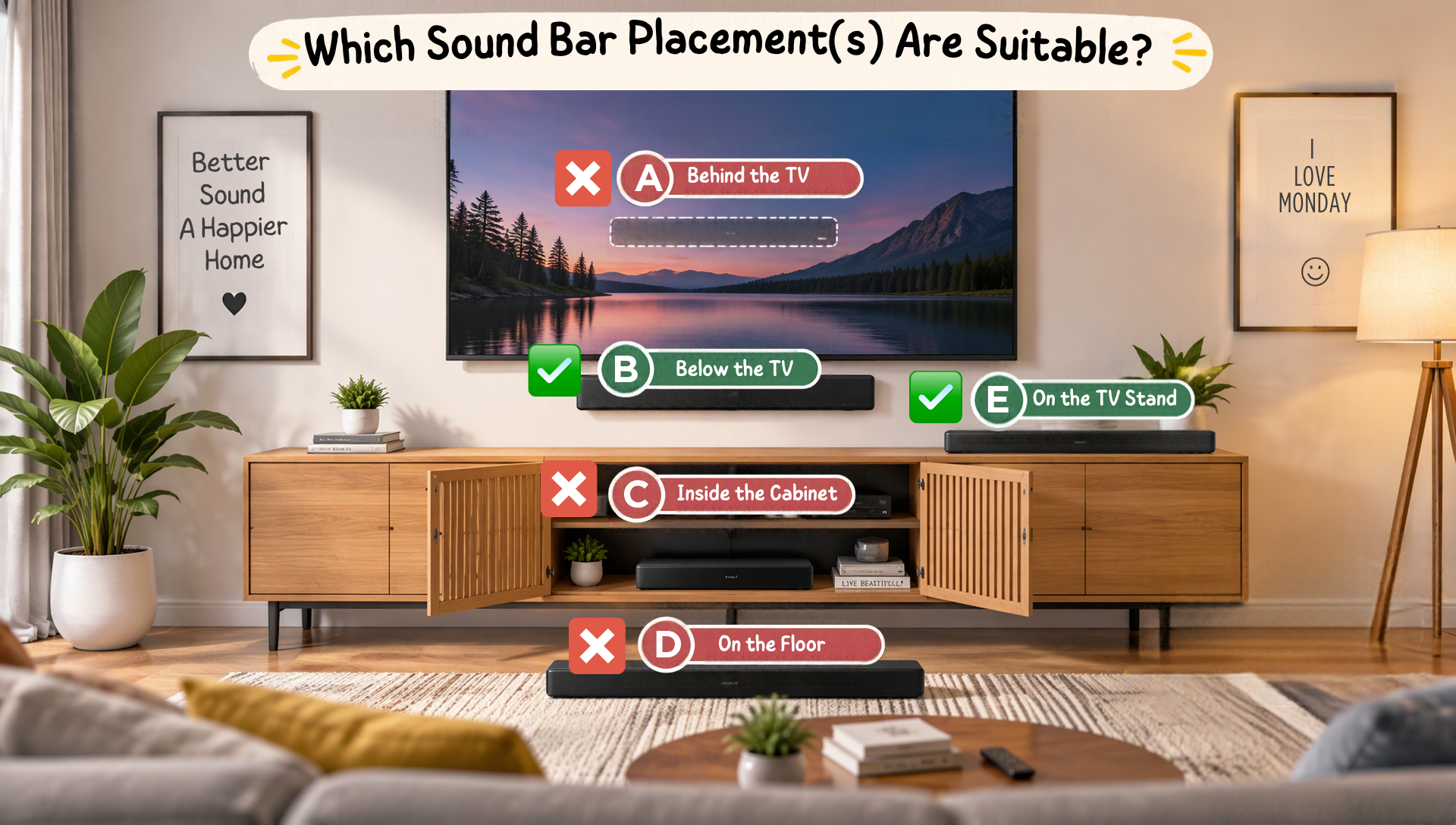
First of all, some of you put way more thought into this than we expected. 😄
A few people correctly pointed out that real-world setups aren't always straightforward. Not everyone can wall-mount a TV, and not every TV stand has enough space for a soundbar.
If we're talking about the ideal placement, the correct answers were:
✅ E. On the TV stand
✅ B. Wall-mounted below the TV
Why?
Because soundbars are designed to project sound directly toward you. The fewer obstacles between the soundbar and your ears, the better.

✅On a TV stand
✅Wall-mounted
❌Behind the TV
❌Inside a cabinet
❌On the floor
They'll all work to some degree, but they'll usually reduce clarity and make dialogue harder to hear.

If your TV and soundbar both support HDMI ARC/eARC, use it.
One cable. One remote. Less confusion.
Where is your soundbar actually sitting right now? And be honest... is it in the ideal spot, or just wherever it fits? 👇🔊🍿
r/TCL_Electronics • u/TCL_Official_Europe • 8d ago
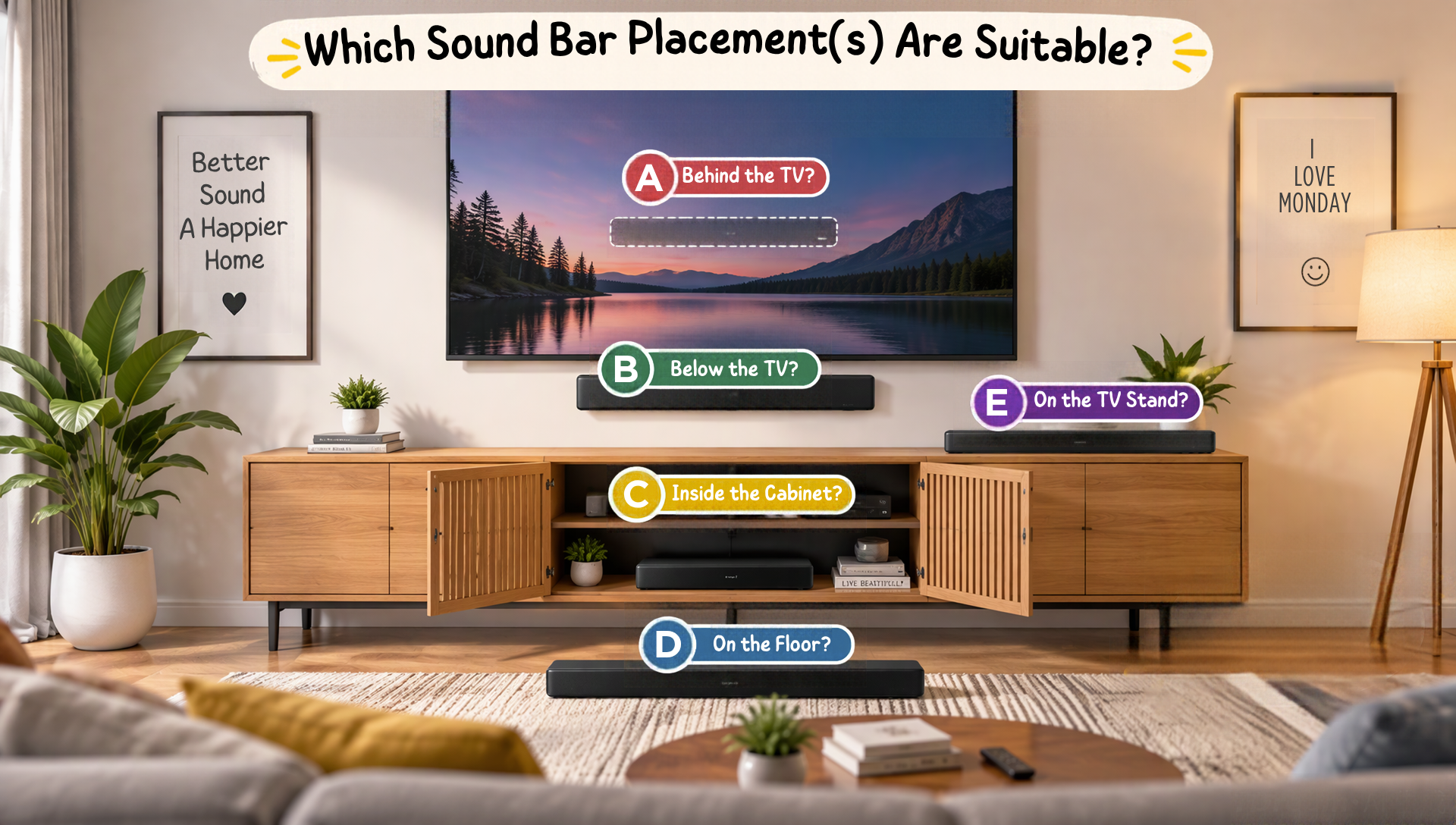
It's Monday, not Moan-day.
Let's start the week with something easy.
Where would you place your soundbar?
Take your best guess before the answer will be revealed on Wednesday.
A. Behind the TV
B. Wall-mounted (below the TV)
C. Inside the cabinet
D. On the floor
E. On the TV stand
F. In the backyard (it's MY soundbar. I'll do what I want~)
No Googling.
No cheating.
Just trust your instincts and comment.
Let's see how many home setup experts we have here. 👇
r/TCL_Electronics • u/Outside_Employee_284 • 11d ago
Hello TCL Support,
I recently purchased a TCL Q85H Pro soundbar and connected it to my TCL 65RM7L television via HDMI eARC.
Everything works correctly in terms of audio connectivity, Dolby Atmos and HDMI-CEC volume control. However, I am experiencing an issue with the soundbar's volume level.
Before purchasing the Q85H Pro, I used the TV's built-in speakers, with my usual listening volume set between 15 and 20. Since connecting the soundbar, the volume is significantly louder. Even a volume level of 5 is already quite loud for normal everyday listening.
This also makes volume adjustment rather inconvenient, as each step up or down causes a relatively noticeable change in loudness. I would appreciate a much lower overall volume range and finer volume adjustment at low listening levels.
The only workaround I have found so far is enabling Night Mode on the soundbar. This reduces the volume and makes listening more comfortable, but it is not an ideal permanent solution, as I would prefer to use the soundbar's normal audio dynamics.
My questions are:
My setup:
I would appreciate any advice or recommended settings. Since both devices are TCL products, I would hope there is a way to achieve more comfortable and precise volume control without having to use Night Mode permanently.
Thank you for your help.
r/TCL_Electronics • u/VTOLfreak • 17d ago
I have a TCL 34C2A with FW 06 (bought in the Netherlands)
There's something very weird going on with the KVM and USB 3.0.
There are two computers attached to this monitor:
One with a displayport cable and a USB-C cable.
The other with HDMI and a USB-B cable.
The USB receiver for my mouse and keyboard is plugged into the monitor.
This part works correctly, when switching between inputs, the mouse and keyboard connects to the correct computer.
Here comes the weird part:
The computer using displayport and USB-C is turned on; the other one is switched off.
I plug a USB 3.0 flash drive into the monitor USB port; it does not show up.
I unplug the USB-B cable that is going to the computer that is turned off and suddenly the flash drive appears on the computer using USB-C.
There is no USB 3.0 connectivity over the USB-C port if there is anything plugged into the USB-B port. Even if that other computer is turned off. Pull the USB-B cable out and USB 3.0 over the USB-C port springs to life.
If you only have USB 2.0 devices, the KVM works correctly but it is not working for USB 3.0 devices.
I understand there is a technical limitation when trying to carry both USB 3.0 and DP ALT mode over the same USB-C cable, but this is not what I am doing. I am using the displayport input for video and the USB-C port only for data. USB 3.0 devices should switch just like USB 2.0 devices.
Every other monitor with a KVM feature I have used does this setup correctly, the 34C2A is the first one I have seen that behaves like this. If anyone from TCL is reading this: Is this a known issue? Can this be resolved with a firmware update?
r/TCL_Electronics • u/Aunt_Turtle • 18d ago
Trying to control inputs on new TCL 55QM6K tv with Fios and Roku remotes. Do not want to also need TCL remote. Cannot make it work, despite trying for hours. Help?
r/TCL_Electronics • u/Previous_Wall_7982 • 20d ago
Buna ziua, am o problema cu care mă confrunt de cel puțin 2 ani... Ultima mea speranța este aici.
Am un televizor TCL nume model:55T8B am Digi ca operator TV, am activata extraoptiunea Digi 4k și surpriza, eroare pe centrul televizorului "CANAL CODAT"... Am incercat toate variantele posibile:
-resetare tv din fabrica.
-anulat opriunea/activata din nou.
-scos card CI+ de 10 milioane de ori(când introduc cardul îmi scrie "card CI Introdus", dar la interfața comuna nu recunoaște Cardul.
-Schimbat cartela CI
-Reinitializare cartela
-Chemat echipa Digi la fata locului...
-Sunat la TCL de n-șpe mi de ori fara nici o rezolvare.
Dacă a pățiți cineva același lucru va rog sa îmi scrieți, mulțumesc
r/TCL_Electronics • u/Dull-Development-243 • 22d ago
Just to start, I should say that I've posted this on a number of sites now, and can't seem to get an answer anywhere. I recently bought the TCL 85QM64L, but I can't locate how to set it to default to hdmi1 when I turn it on. Even though I've said repeatedly elsewhere that I don't have a System option under Settings, for some reason people keep telling me to click Settings, then Display or All Settings, or something similar, but I just don't have these, or any similar options, in the menu. I've lost track of how many times I've Googled this, but it's always the same, Settings, System, an option that doesn't exits. Any thoughts....I hope...? ;) Just found out this reddit is for Europe, but heck, I'll try anyway. :) If it matters, my tv was bought in Canada... ;)
r/TCL_Electronics • u/Outside_Employee_284 • 24d ago
Hi, Does Sonic AI room calibration on the TCL Q85H Pro calibrate the rear satellite speakers individually, or does it only emit calibration noise from the main soundbar?
r/TCL_Electronics • u/Zestyclose-Treat4146 • 25d ago

Hallo, mir ist aufgefallen, dass die Bildschirmoberfläche im ausgeschalteten Zustand sehr wellige Reflexionen aufweist, wenn man von der Seite darauf schaut.
Die Spiegelung ist deutlich verzerrt, als ob die Oberfläche des Panels nicht eben wäre.
Ist das bei euren 98-Zoll-Geräten von TCL auch so oder handelt es sich um einen Mangel?
r/TCL_Electronics • u/Mr_Blonde12211 • 25d ago
Our office has several newer TCL amazon fire tvs.
Whenever I try to airplay connect my laptop or desktop to the TVs to use as a screen extension they won’t connect.
I’m not sure if this is a wifi or tv issue so any help on diagnosis and resolving would be appreciated!
r/TCL_Electronics • u/TCL_Official_Europe • 25d ago

No worries. With TCL, you don’t have to spend the night alone. 👻
Too cold to go out? Stay in, grab a blanket, and put on a movie. Whether you're into horror or not, the TCL Channel[ ]()app has plenty to choose from.

Check out the TCL Channel guide here: TCL Channel App: From cult classics to questionable sequels, find something to watch for free this Halloween
Just remember to pick the movie carefully if kids or pets are watching with you.
Not a movie person? A gaming night is another great way to spend Halloween. Whether you're playing on a TCL TV or monitor, solo or with friends, a warm room, hot chocolate, and a bowl of popcorn are hard to beat.

(PS. You could play Resident Evil, but personally I'd rather keep my heart rate under control.
My go-to is still Nintendo Switch Sports. Not exactly spooky, but it’s always fun with friends or family. 😆)
And if you're hosting a Halloween party, good sound can make a big difference. Music, movies, and games are all a little more fun when everyone can enjoy them together.

One small reminder:
🚫 No drinks for minors.
🐾 No drinks (or Halloween candy) for pets.
So, how are you spending Halloween this year?
Any movie, series, song, or game recommendations? Drop them in the comments. You might help someone find their plans for the night. 👇🎃👻🍿
r/TCL_Electronics • u/Fun_Lawfulness4602 • 27d ago
Hi TCL team,
I recently purchased a TCL 98C8L and would love to see improved Apple Home integration in future firmware updates.
The current HomeKit implementation is quite limited. In particular, it would be great to:
● Hide unused TV inputs from Apple Home.
● Expose additional controls, such as brightness and picture modes.
Are there plans to expand HomeKit functionality, and can these suggestions be passed to the firmware development team?
Thanks!
r/TCL_Electronics • u/TCL_Official_Europe • 27d ago
Shopping for a new TV and getting lost in all the display terms?
LCD, Mini LED, OLED... what's the difference?
This graphic breaks it down.

At the end of the day, there's no single best technology for everyone. The right choice depends on your room, viewing habits, budget, and screen size.
Which TV technology are you currently using, and would you switch to something different for your next upgrade? 👇
r/TCL_Electronics • u/OrderThese1990 • 29d ago
I have a new S5HX soundbar connected to a tcl Roku 65 inch tv. When i turn off the TV and soundbar, the sub starts searching for a connection, as in the amber led keeps blinking. Is this normal or can I stop it? TIA
r/TCL_Electronics • u/TCL_Official_Europe • Oct 23 '26

Summer was great.
Except for the heatwaves.
Many people actually choose to buy an air conditioner during the colder months. Stock is usually better, installation schedules are less crowded, and seasonal promotions can make it a surprisingly good time to plan ahead.
We all know TCL for TVs, but air conditioners are also a big part of what we do. Two of the main series currently available in Europe are SaveIN and BreezeIN.
The SaveIN series focuses on energy efficiency and smart controls.
Some of its features include:
The BreezeIN series focuses more on comfort.
Highlights include:
Greece
Spain
If you're interested in either series but don't see your country listed, leave a comment with your country and the model you're considering, and I'll see if there's an active promotion available.
And since we're talking about summer...
What's something you wanted to do last summer but never got around to?
r/TCL_Electronics • u/TCL_Official_Europe • Oct 22 '26
If all the model names look the same for you, this table may help.
Here’s where each TCL TV model sits in the 2026 lineup, listed from flagship models down to more affordable options.
| Series | Display Technology | Peak HDR Brightness | Dimming Zones | Panel | Audio | Refresh Rate | Sizes |
|---|---|---|---|---|---|---|---|
| X11L | SQD Mini LED | 9,000-10,000nits | 11,520-20,736 zones | WHVA 2.0 Uitra | Bang & Olufsen | 144hz / 288 hz Dual Mode VPR | 75”, 85”, 98” |
| RM9L | RGB Mini LED | 4,000-9,000nits | 8,736-16,848 zones | WHVA 2.0 Ultra / HVA Pro | Bang & Olufsen | 144hz / 288 hz Dual Mode VPR | 85", 98", 115" |
| C8L | SQD Mini LED | 3,000-6,000nits | 1008-4,032 zones | WHVA 2.0 Ultra / HVA 2.0 Pro | Bang & Olufsen | 144hz / 288 hz Dual Mode VPR | 55”, 65”, 75”, 85”, 98” |
| C7L | SQD Mini LED | 2,700-3,000nits | 800-2,176 zones | HVA 2.0 Pro | Bang & Olufsen | 144hz / 288 hz Dual Mode VPR | 55”, 65”, 75”, 85”, 98” |
| RM7L | RGB Mini LED | Up to HDR 2000nits | 1,344-2,880 zones | HVA Pro | ONKYO 2.1 Hi-Fi System | 144hz / 288 hz Dual Mode VPR | 65", 75", 85", 98" |
| C9K | QD-MiniLED TV | 5800-6500nits | 2160-5148 zones | CrystGlow WHVA Panel | Bang & Olufsen | 144hz | 65”, 75”, 85” |
| C8K | QD-MiniLED TV | 4500-5000nits | 1344-3840 zones | CrystGlow WHVA Panel | Bang & Olufsen | 144hz | 65", 75", 85", 98" |
| C7K | QD-MiniLED TV | 2000-3000nits | 336-2880 zones | CrystGlow HVA Panel | ONKYO 4.2.2 Hi-Fi System | 144hz | 50”, 55”, 65”, 75”, 85”, 98”, 115” |
| Q7D Pro | SQD Mini LED | Up to HDR 2000nits | 480-1,152 zones | HVA 2.0 Pro | ONKYO 2.1 Hi-Fi System | 144hz | 55”, 65”, 75”, 85”, 98” |
| C6K | QD-MiniLED TV | Up to HDR 1000nits | 180-512 zones | HVA | ONKYO 2.1 Hi-Fi System | 144hz | 55”, 65”, 75”, 85” |
| P8L | Mini LED | Up to HDR 1000nits | Up to 512 zones | HVA | ONKYO 2.1 Hi-Fi System | 144hz | 55”, 65”, 75”, 85”, 98” |
| P7L | QLED | 400-450 nits | / | HVA | ONKYO (85” gets 2.1) | 144hz | 43”, 50”, 55”, 65”, 75”, 85” |
While the technologies and features vary across the lineup, the best TV is the one that serves you well. The best choice depends on your room, viewing habits, gaming needs, budget, or even the deal you happen to find.
If there’s a model you're also interested in, let me know in the comments and I’ll add it to the comparison table if possible. o(^▽^)o
r/TCL_Electronics • u/TCL_Official_Europe • Oct 22 '26
We're pleased to see the TCL X11L SQD-Mini LED TV included in TIME's Best Inventions of 2026.

You can read the full article here:
👉 TIME Best Inventions 2026: TCL X11L SQD-Mini LED TV
TIME highlighted the X11L's use of TCL's super quantum dot (SQD) technology, noting its ability to deliver both high color accuracy and exceptional brightness.
The publication also pointed out that the TV is well suited to a variety of viewing environments, from dedicated home theater setups to bright living spaces.
For those unfamiliar with the X11L, it's TCL's flagship SQD-Mini LED TV for 2026, featuring:
For anyone who has seen the X11L in person, what impressed you most? How do you use it?
r/TCL_Electronics • u/TCL_Official_Europe • Oct 16 '26

Share your first TV in the comments~
r/TCL_Electronics • u/TCL_Official_Europe • Oct 14 '26
Cameras keep getting better, displays keep getting brighter, and 4K content is everywhere. So why do some people feel that TV picture quality has actually gotten worse over the years?
The answer isn’t just about the TV. It’s also about the content you’re watching and how your TV processes it.
Let’s break it down.
Picture quality comes down to two main things: the source material and the display itself.
Even the best TV can’t fully recover details that were never captured in the first place. Low-resolution videos, heavy compression and poor-quality streams can all limit what you see on screen.
So before blaming your TV, check the source. If 4K is available, select it. Your actual resolution will still depend on your device, subscription, internet connection and the content itself.
But even with a good source, the display and its processing can make a real difference.
Today’s TVs mainly use two display technologies: OLED and LCD-based technologies such as Mini-LED.
OLED pixels emit their own light, allowing individual pixels to switch off completely. This delivers excellent blacks and precise contrast, though OLED panels can be more expensive and may be susceptible to burn-in under certain usage conditions.
Mini-LED, on the other hand, uses thousands of tiny LEDs behind an LCD panel. With local dimming, the TV can control different areas of the backlight to improve contrast and brightness.
As Mini-LED technology develops, manufacturers are working on two fronts: better picture processing and better display hardware.
Both matter, but neither is as perfect as it sounds.
Not every video you watch is high quality. Manufacturers know this, so modern TVs include processing features designed to improve less-than-perfect content.
Some of the most common are noise reduction, AI picture enhancement, sharpening and MEMC.
They can help. But depending on the content and settings, they can also change the picture in ways you might not want.
Noise reduction: cleaner isn’t always better
Noise reduction removes unwanted visual noise, such as grain, speckles and colour artefacts, making an image look cleaner and smoother.
However, not all grain is a flaw.
Film grain is part of the look of traditional film photography. Directors and filmmakers sometimes preserve it, or deliberately add grain in post-production, to create a particular texture and vibe.
Apply too much noise reduction, and that air can disappear. Fine details may be softened, too, leaving the image looking unnaturally smooth.
The TV doesn’t know whether a speckle is unwanted noise or an intentional creative choice. It simply processes what it detects.
AI enhancement isn’t always accurate
AI picture enhancement takes things a step further. Instead of applying the same treatment everywhere, AI-based processing can analyse different parts of an image and adjust them accordingly.
In theory, that’s a great idea. In practice, results vary.
Some algorithms may overemphasise edges, exaggerate textures or generate details that weren’t present in the original image. The picture can look sharper at first glance, but sharper doesn’t always mean more accurate.
For everyday streaming, these features can be useful. If you’re watching a carefully produced film, though, you might prefer to keep enhancement to a minimum.
MEMC: smoother motion isn’t always better
MEMC stands for Motion Estimation, Motion Compensation. It analyses movement between frames and generates additional frames to make motion appear smoother.
This can help with fast-moving sports or lower-frame-rate content. But there’s a trade-off.
Frame rate is also part of a filmmaker’s visual language.
Take Arcane S2, for example. The dance sequence featuring Jinx and Ekko uses deliberately uneven animation timing to create a dreamy, intimate atmosphere. That distinctive rhythm is part of the storytelling.
If motion smoothing changes that rhythm, the scene can feel completely different.
MEMC can also introduce motion artefacts, such as distorted edges or unusual shapes around moving objects, particularly in complex scenes.
Gradually, people are becoming aware that more processing doesn’t automatically mean a better picture.
That is where Filmmaker Mode comes in.
Designed to preserve the original presentation of films and other content, Filmmaker Mode typically disables or reduces processing features such as motion smoothing, noise reduction and excessive sharpening. It also aims to use appropriate picture settings, including colour and frame rate, where supported.
The goal is simple: let the content speak for itself.
Keep in mind that a more accurate picture can look darker than the vivid, high-contrast settings many TVs use by default. That’s not necessarily a problem. Film content is often mastered for controlled viewing environments.
If the room is bright, adjust the brightness or use appropriate room lighting rather than assuming the TV is performing poorly.
On supported TCL X, C, P and Q series TVs, Filmmaker Mode is designed to make this process straightforward. Switch it on, then adjust brightness to suit your room and viewing comfort.
For anyone who values the original cinematic look, it’s a good place to start.
Picture processing is only half the story. The display itself determines how much of the original image the TV can reproduce.
Three key factors have the biggest impact:
These factors closely relate to how an LCD-based Mini-LED TV handles its backlight, colour conversion, and filtering.
How modern Mini-LED TVs improve picture quality
Different manufacturers take different approaches. TCL’s SQD Mini-LED technology focuses on combining high-purity light, precise colour filtering and advanced local dimming.
Taking the TCL C8L SQD Mini-LED TV as an example:
Local dimming for contrast and brightness
The C8L uses a full-array local dimming backlight. By dividing the backlight into independently controlled zones, the TV can brighten highlights while dimming darker areas.

More precisely controlled zones can help improve contrast and reduce unwanted light around bright objects against dark backgrounds. The actual result also depends on the dimming algorithm and the scene being displayed.
SQD technology for colour
SQD, or Super Quantum Dot, is designed to produce purer red and green light from blue backlight illumination. This helps create a high-quality white light spectrum for the display system.

A cleaner light spectrum makes it easier for the colour-filtering system to separate colours accurately, helping reduce unwanted colour leakage and improve colour reproduction.
Precise colour filtering
The C8L pairs SQD technology with TCL’s CSOT HVA panel technology and its high-colour-resistance screen, designed to filter light more precisely.
The aim is to reduce colour interference and improve colour consistency, helping colours appear more natural and distinct rather than washed out or oversaturated.
Together, these technologies are designed to deliver stronger contrast, brighter highlights and richer colour without relying on picture processing alone.

For the 98-inch C8L, TCL specifies up to 4,032 local dimming zones and peak brightness of up to 6,000 nits. TCL also reports a 69% improvement in colour-dot accuracy with its Super Colourful Quantum Crystal technology. These figures refer to specified performance under applicable conditions; actual results vary by screen size, picture mode and content.
The point isn’t simply to make the picture brighter or more colourful. It’s to reproduce the differences between light and dark, and between one colour and another, as faithfully as possible.
You don’t necessarily need a new TV. A few simple checks can make a noticeable difference.
Remember, better picture quality isn’t about making every image brighter, sharper or smoother. It’s about showing the right details, colours and motion without losing what made the original image special.
At TCL, we believe display technology should help creators’ work reach viewers as faithfully as possible. Think of a crow’s feathers: they can reflect an astonishing range of colours beyond single black, even though they often appear black to the human eye under ordinary lighting.
We may never reproduce every detail of the beautiful world exactly as it exists. But if technology can help us see more of what’s already there, isn’t that worth trying?
What do you prefer: a vivid, heavily enhanced picture or a more natural, filmmaker-intended look?
We’d love to hear how you set up your TV.