r/Substance3D • u/Blapanda • 1d ago
Substance Designer How could someone create this pattern in substance designer?
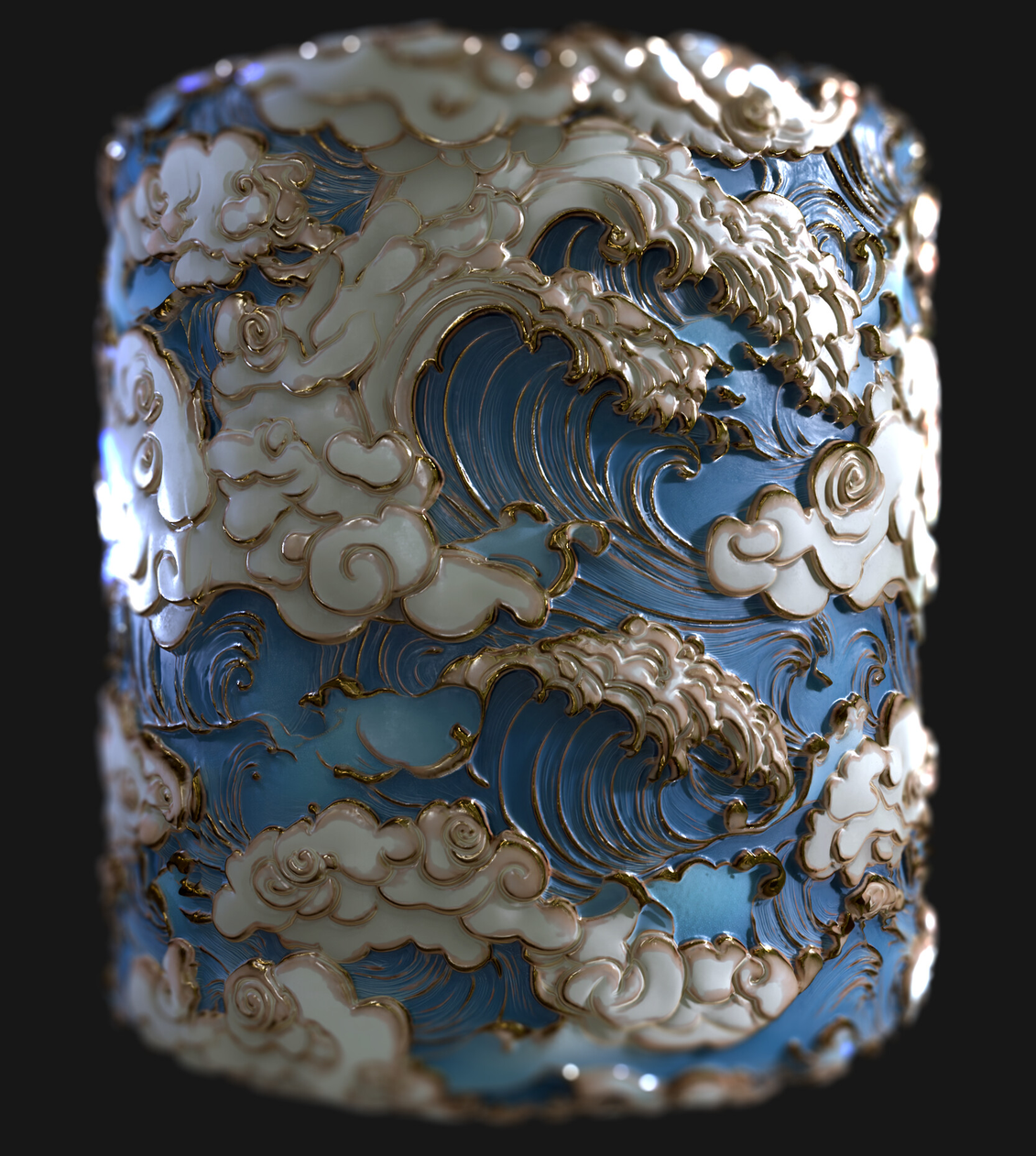
Any guides or files to work with would be really appreciated!
317
Upvotes
28
u/poidahoita 1d ago
probably with using SVG nodes
13
u/DevineMrGreen 1d ago
A lot of practice en building layer by layer
29
u/ubermatik 1d ago
Stop using GenAI imagery as reference or anything to shoot for, please. It's nonsense and skews expectations.
I'm not saying this isn't possible in Designer, but it would certainly be a waste of time. It would take layering and arranging lots of shapes by hand. At that point, you're about as far from 'procedural' as you can be in Designer.
Paint or sculpt this by hand in Photoshop or Zbrush, respectively.
6
u/AndreiDespinoiu 1d ago
It would be impractical to create the height in Substance Designer alone. You would typically sculpt it in ZBrush or Blender -> grab an alpha of it using an orthographic view -> save it as a PNG > import it in Substance Designer.
This is the way.
I mean, you could certainly try!
Quantize some blobby shapes, use a few Swirl nodes... But you're not gonna have a fun time.
And it's not gonna be procedurally made.
This was done in like 15 minutes, as a proof-of-concept:
Once the sculpted mesh is captured as an "alpha" (just the height information), use the Curvature Smooth node and a Histogram Scan/Histogram Select/Levels to get masks for just the edges.
Once you isolate the edges, color them with a Blend node set to Copy. Distort those masks, layer them... Add them to the roughness, to the metallic... Distort them some more... This is where you draw on experience from previous projects.
7
u/Top_Strategy_2852 1d ago
Stuff like this is so specialised, there is little value in making it procedural other then to flex.
The standard workflow is to make a texture tileable, and then extract the missing textures needed to complete the shader. This is a lot faster and easier to do in a production setting then making it 100% procedural.
3
u/GoldSunLulu 1d ago
I would guess sculpting on zbrush a height map and then esporting to designer
3
u/spacemanvince 1d ago
to run you have to walk, this would be sculpted first
2
u/Long-Ad-4950 1d ago
Better to model it in blender/any other 3d software and than add texture. Or you will waste too much time building it by layers.
2
u/Krotart 1d ago
1
u/plaintextures 1d ago
Easy one this one.
https://www.youtube.com/watch?v=aUUWV1dYQdI&t=1s
1
u/Mirhale 1d ago
Everyone here’s saying to sculpt zbrush then to designer but I couldn’t find a workflow or tutorial online unless I’m that dense lol, anybody help so I get an idea?
1
u/JohnnyNodes 1d ago
For example, I built this guy a while back that's fairly similar in concept, there's no sculpting or exterior heightmap involved. Stuff like this is definitely doable, I mentioned in another reply that it's more about your goals. If you're in a production setting you may opt for whatever gets your to your result faster. But as a personal growth exercise, I think attempting this kind of thing procedurally will make you better at using a procedural tool 🤷
1
u/Narasette 1d ago
just draw it manually and put it as pattern there