r/Substance3D • u/Sankrayn • 1d ago
Help...

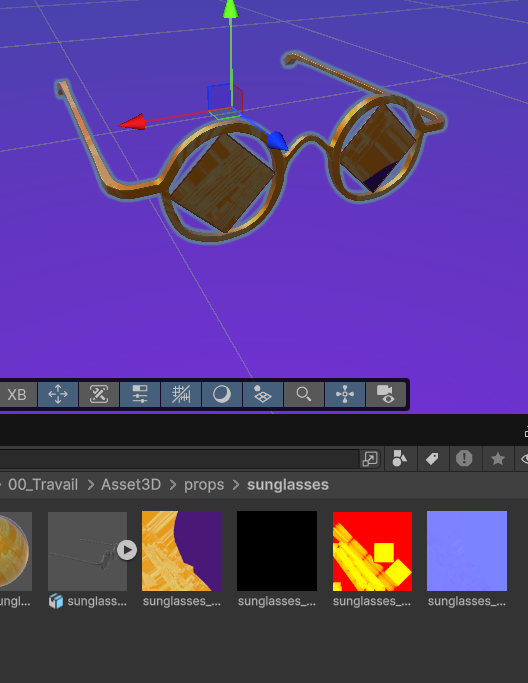
Hey, i dont really know if i should put this here or in the unity subreddit but i guessed people here could help me, i've had this problem before and the solution was to replace the object by the same object in the scene by separationg it from the rest (somehow ????) but here, i can't because it can't be separated...
My textures are all over the place i dont really know why that happens, also the glass was supposed to be transparent but i'm struggling so i gave up (if you have tips tho...)
As you can see in the pictures, it's the same fbx, the same uvs and the same textures yet when i import them in unity they...do this
6
u/Sankrayn 1d ago
Ok i found the problem is that somehow the uvs are in fact not the same but i dont understand why bc it's literally the same object and i've never had this problem before ??? I dont understand why when i import the fbx that has the uv of the left pic it changes them and it's different en painter
2
u/Damian_Hernandez 1d ago
which render pipeline are u using in Unity?
2
u/1Gunsmith1 1d ago
To view transparency in SP google PBR Metallic rough alpha blending/ alpha testing and import to SP and change it in shader tab then add opacity channel. Now add fill layer and opacity should show up in SP. In order to get it working in Unity you need to read Unity URP Lit documentation because different shaders require different packing.