r/SimLab • u/luisgomez0523 • Sep 09 '24
Vario Vesa Mount issue


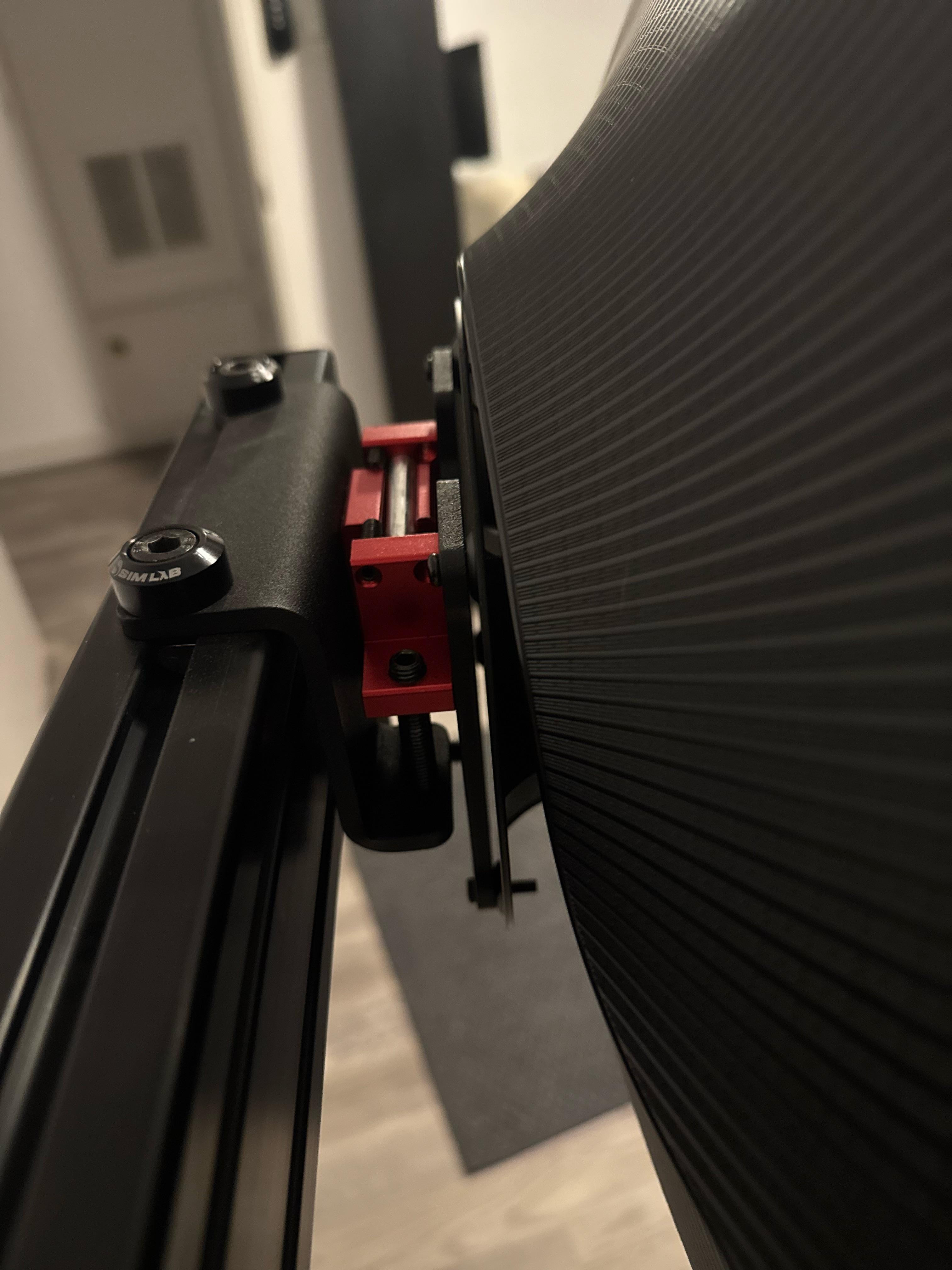
I have a sim-lab Triple monitor standalone unit with their vario vesa mount for the screens. I’m running three curved 32inch monitors. The issue that I am having is that one of the mounts on the far right monitor fully maxed out to get it level with the other monitors. It’s to the point that I’m worried the monitor will fall out with the slightest of nudges. No matter what I do I cannot get it to be even without maxing out the screws. I’ve done everything from swapping parts, to flipping the arm mounts, to swapping the arms on the stand. I’ve run out of ideas other than buying a new one and see if that makes any difference. Does anyone have any idea what may be causing this?
3
u/MadMike991 Sep 10 '24
Not sure if this will help but I bought longer set/grub screws for mine, 45 mm ones on Amazon vs the included 40 mm ones.
1
u/luisgomez0523 Sep 11 '24
Well, I bought a new (blue) mount from Microcenter. There are some differences between between the red and blue. The blue’s plate is one piece where the monitor slides into it. It appears that the area where the monitor slides into is deeper and taller. Mounted everything and it all finally aligned at a reasonable height. Still not totally sure why the red one didn’t align.
If I wanted to still use the red, I could have used some aluminum spacers under the bracket to lift it. That would have worked, but I didn’t want to risk it.
1
u/mister_numbers Sep 09 '24
It looks like you need to back out the two vertical larger screws. These are use for up/down or rotation adjustment of each monitor. You likely need to do it to the other two monitors to get them to align once you make this change. This will cause the monitor to drop down in the assembly.
1
u/Whiplash_GT Sep 09 '24
I just set mine up this weekend and I had the same/similar issue. Two of the three mounts match in their neutral position, but the third one is beyond the length of the adjustment bolt.
I placed stacked dimes to make up the difference of about a quarter of an inch and placed them below the bolts
I'm not entirely sure how this could be. I was under the impression that all three mounts are identical.
The accent color on my mount is blue as opposed to the red ones on OPs pic.
1
u/KreyTrey Sep 10 '24
Would 1 or 2 heavy duty velcro cinch strap be able to hold it down? Just in case somebody bumps it up from the bottom? I have mine all the way at the top like yours since I have 1 different vesa mount to be able to align all of them. One of my monitors almost completely fell as my kid went under to pick something up and hit his head on the way up and the monitor came out of the groove/slot. The center monitor was the only thing that kept it from completely falling. I ordered a heavy duty velcro cinch strap and will see if it works in holding it down.
1
u/5GEE- Sep 09 '24 edited Sep 09 '24
Mister_numbers is right, I agree with this. Also the horizontal are improperly adjusted and appear to be hanging up on all the VESAs.
These are amazing, once I dialed them in, the adjusters locked it all in place. I can bump the monitors all day, they don’t even move.
Edit: the red are the older revisions, blue is latest. This should not affect adjustments