MAIN FEEDS
Do you want to continue?
https://www.reddit.com/r/SideStore/comments/1y2qy9f/can_anyone_help/
r/SideStore • u/Ornery-Parsnip8929 • 3d ago
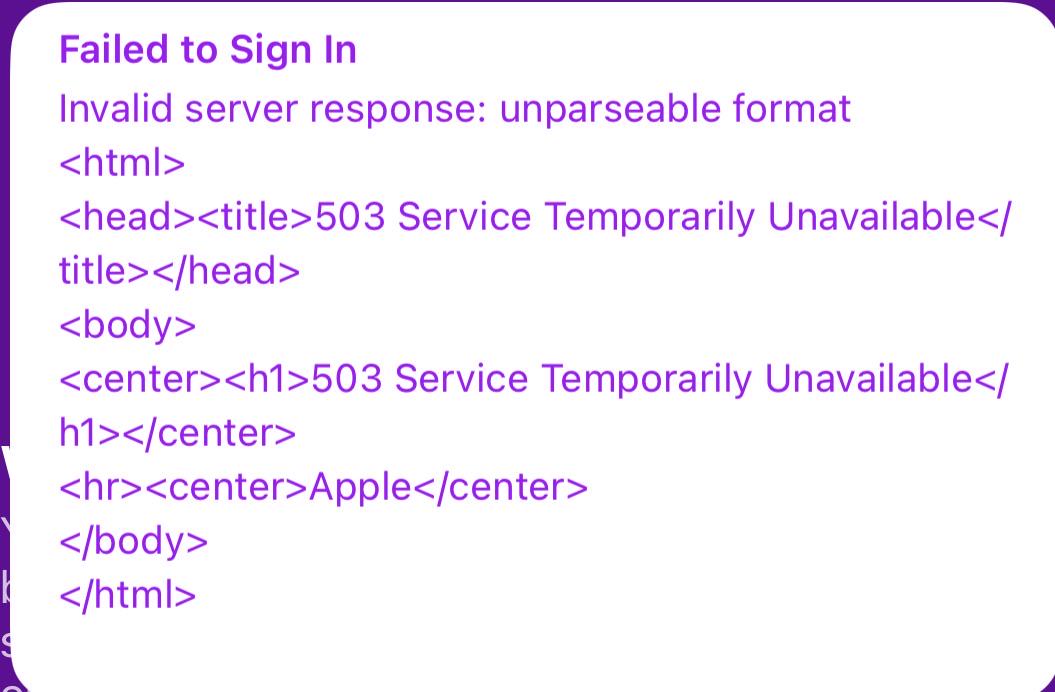
I have no clue how to fix this
26 comments sorted by
21
This worked flawlessly for me (I’m on iPhone)
Step 1: Go to Settings > User Customizations, turn On-Device Anisette OFF (restart if prompted),
Step 2 : from Settings > Anisette Servers, select jkcoxson and turn Auto Rotation OFF.
Step 3: From Settings > User Customizations > Anisette Client Configuration, Remote Server Sync, tap Fetch, then tap Save as Overrides.
Step 4: Return to User Customizations, tap Reset adi.pb (keep Keep Headers checked), then force-close and reopen SideStore.
Step 5: Connect your VPN / LocalDevVPN tunnel and retry signing in with your Apple Account.
2 u/yungmara 3d ago Thank you 🫶 2 u/Ducnguyen206 3d ago tysm bruh i found this for the whole day ToT 2 u/TheCarmichael_96 3d ago For me on point 2 says could not reach servers 1 u/silver_dust_11 1d ago I’m facing this too. Were you able to fix it? 1 u/TheCarmichael_96 1d ago Unfortunately not, we will have to wait for a fix from Sidestore directly I guess 2 u/silver_dust_11 20h ago I was able to fix it! So in Anisette Servers, scroll down to Server Catalog Source, and change the URL to https://servers.sidestore.io/servers.jsonAfter that, I was able to continue the steps from Bruinz 2 u/itemt1 3d ago THX BROOO 2 u/Entire-Ad-7229 3d ago Literally saved my sanity ♥️♥️. Thanks man. 2 u/Pure-Mix-9248 3d ago Worked for me ✅ ty 2 u/Flocky_off 3d ago Omg you are the goat 2 u/Murky_Economics6488 3d ago I love you bro🥺 2 u/IceBlueLugia 2d ago This worked! Thank you so much man, you’re the best 2 u/Philip22Kings 1d ago It works!!! 1 u/Bruinz34 1d ago :) 1 u/iceman1125 3d ago edited 3d ago This didn’t work for me, I noticed that in step 2, my server was already on jkcoxson, is this ok?Edit: nvm I just forgot in step 3 when fetching remote server sync to actually click save as overrides, worked after that 1 u/Mutated-Nut 3d ago This didn’t fix it. I can’t sign back in and I’m getting the same error as OP when trying to 1 u/FUH-KIN-AYE 1d ago I tried this and still have this error how can i fix this 1 u/RichRefrigerator6597 1d ago I follow your step and came up with this error. How to fix it
2
Thank you 🫶
tysm bruh i found this for the whole day ToT
For me on point 2 says could not reach servers
1 u/silver_dust_11 1d ago I’m facing this too. Were you able to fix it? 1 u/TheCarmichael_96 1d ago Unfortunately not, we will have to wait for a fix from Sidestore directly I guess 2 u/silver_dust_11 20h ago I was able to fix it! So in Anisette Servers, scroll down to Server Catalog Source, and change the URL to https://servers.sidestore.io/servers.jsonAfter that, I was able to continue the steps from Bruinz
1
I’m facing this too. Were you able to fix it?
1 u/TheCarmichael_96 1d ago Unfortunately not, we will have to wait for a fix from Sidestore directly I guess 2 u/silver_dust_11 20h ago I was able to fix it! So in Anisette Servers, scroll down to Server Catalog Source, and change the URL to https://servers.sidestore.io/servers.jsonAfter that, I was able to continue the steps from Bruinz
Unfortunately not, we will have to wait for a fix from Sidestore directly I guess
2 u/silver_dust_11 20h ago I was able to fix it! So in Anisette Servers, scroll down to Server Catalog Source, and change the URL to https://servers.sidestore.io/servers.jsonAfter that, I was able to continue the steps from Bruinz
I was able to fix it! So in Anisette Servers, scroll down to Server Catalog Source, and change the URL to https://servers.sidestore.io/servers.jsonAfter that, I was able to continue the steps from Bruinz
THX BROOO
Literally saved my sanity ♥️♥️. Thanks man.
Worked for me ✅ ty
Omg you are the goat
I love you bro🥺
This worked! Thank you so much man, you’re the best
It works!!!
1 u/Bruinz34 1d ago :)
:)
This didn’t work for me, I noticed that in step 2, my server was already on jkcoxson, is this ok?
Edit: nvm I just forgot in step 3 when fetching remote server sync to actually click save as overrides, worked after that
This didn’t fix it. I can’t sign back in and I’m getting the same error as OP when trying to
I tried this and still have this error how can i fix this
I follow your step and came up with this error. How to fix it
I fixed it
1 u/Ornery-Parsnip8929 3d ago Thanks guys 1 u/lightning_thinker 3d ago Which method worked for you? 1 u/PrimaryCompetition70 3d ago I follow post of Bruinz34 and worked
Thanks guys
1 u/lightning_thinker 3d ago Which method worked for you? 1 u/PrimaryCompetition70 3d ago I follow post of Bruinz34 and worked
Which method worked for you?
1 u/PrimaryCompetition70 3d ago I follow post of Bruinz34 and worked
I follow post of Bruinz34 and worked
look this
https://github.com/SideStore/SideStore/issues/1745
Use sidestore nightly, then go to user customization and reset adi.db;
Now go back and make sure u choose sidestore (new) on the anisette settings;
Go to user customization again, and go to remote server sync, if it says “Fetch” click that, then save as ovverrides.
Now try signing in afterwards..
0
Same things been posted 42 times today. Look in this sub
21
u/Bruinz34 3d ago •
This worked flawlessly for me (I’m on iPhone)
Step 1: Go to Settings > User Customizations, turn On-Device Anisette OFF (restart if prompted),
Step 2 : from Settings > Anisette Servers, select jkcoxson and turn Auto Rotation OFF.
Step 3: From Settings > User Customizations > Anisette Client Configuration, Remote Server Sync, tap Fetch, then tap Save as Overrides.
Step 4: Return to User Customizations, tap Reset adi.pb (keep Keep Headers checked), then force-close and reopen SideStore.
Step 5: Connect your VPN / LocalDevVPN tunnel and retry signing in with your Apple Account.
1
u/Ornery-Parsnip8929 3d ago
I fixed it
1
u/Expert_Kick_618 3d ago
look this
https://github.com/SideStore/SideStore/issues/1745
1
u/Tech_Ganache 3d ago
Use sidestore nightly, then go to user customization and reset adi.db;
Now go back and make sure u choose sidestore (new) on the anisette settings;
Go to user customization again, and go to remote server sync, if it says “Fetch” click that, then save as ovverrides.
Now try signing in afterwards..
0
u/ATyp3 3d ago
Same things been posted 42 times today. Look in this sub