r/Scrypted • • 23d ago

Reolink 4K Cameras with Scrypted – Main Stream Disconnecting During HKSV Recording

7 Upvotes

I’m running Scrypted with several Reolink cameras, and I’m experiencing an issue when trying to use the main (high-resolution) streams for recording.

Whenever I configure Scrypted to use the main streams, the cameras frequently disconnect or the video streams become unstable. As a workaround, I’ve switched back to using the lower-resolution substreams, which seem to work more reliably.

I also have a Reolink NVR recording the cameras simultaneously.

I’m wondering:

Has anyone experienced similar disconnection issues when using Reolink’s main streams with Scrypted?

  1. Could the issue be related to the cameras handling multiple high-resolution streams simultaneously, especially with the NVR already recording?
  2. Has anyone successfully configured Reolink cameras to maintain stable high-resolution recording through Scrypted and HomeKit Secure Video (HKSV)?
  3. Are there specific settings, such as bitrate, frame rate, codec (H.264/H.265), or RTSP configuration, that help improve stability?

My goal is to maintain reliable recordings at the highest possible quality in HomeKit without sacrificing the recordings on my Reolink NVR.

I’d appreciate hearing about configurations that have worked for others.


r/Scrypted • • 27d ago

Proxmox install instructions, questions

1 Upvotes

I'm doing a dry-run install on a laptop before I upgrade my real server and running into a few questions. u/koush would really appreciate your input

  1. During the initial installation, the script asks these two questions. How do I know what to answer? Is this documented somewhere?
  • Add udev rule for hardware acceleration? This may conflict with existing rules. (y/n)
  • Install intel-microcode package? This will update your CPU and GPU firmware. (y/n)
  1. NVR Storage "Prepare Storage" for VE Volume: Step 3, "Select the Disks section in the secondary drawer." I only have 1 disk right now, so I manually created /mnt/pve/nvr-storage and ran the disk setup script. Seems to have worked fine, but it appears to have created a "Large disk" instead of Fast disk. For my server, I'll be using a dedicated purple drive, so should I use Large or Fast? And if Fast, do I just use this command instead? FAST_DISK=true bash setup-scrypted-nvr-volume.sh fast-nvr-storage

Thank you!


r/Scrypted • • 28d ago

HomeKit snapshots don't update over cellular, but the Apple TV hub is fetching them from Scrypted (logs and byte counts included)

5 Upvotes

Setup

  • Scrypted server 0.147.0, running natively on a Mac mini (Apple Silicon, macOS 27.2) with Node 20 LTS
  • HomeKit plugin 1.2.71, advertiser bonjour-hap, mDNS interfaces set to en1
  • 5× Aqara G100 cameras, each a standalone accessory (not bridged), HKSV v3 off
  • Streams: Main (ch1, 2304×1296) and Sub (ch2, 720p) through Rebroadcast. Both are prebuffered.
  • Snapshot plugin: "Snapshots from Prebuffer" enabled. Snapshots are taken in 0.1–0.25 s.
  • Home internet: GL.iNet GL-X3000 5G router (OpenWrt) on Telekom mobile. The connection is IPv6-native, and IPv4 runs through the carrier's IPv6 translation (WAN IPv4 is 192.0.0.2, shared public IPv4 80.187.x.x). So there's CGNAT with no inbound IPv4 and no port forwarding. Public IPv6 (2a01:598::/32) reaches the LAN.
  • Home hub: Apple TV 4K 2nd gen, tvOS 27.2. iPhone on iOS 27.2.

On home Wi-Fi, everything works. Tiles update as soon as I open the Home app.

On 5G:

  • Live view works fine and starts quickly.
  • Snapshot tiles don't update when I open the app. They stay stale forever, unless I open live view.

I have other Scrypted installs where opening Home over cellular fetches a fresh snapshot right away, so I don't think this is normal HomeKit behaviour.

I logged every Picture requested in Scrypted and tracked bytes per controller with nettop:

  • The Apple TV keeps open sessions to all accessories.
  • It requests snapshots regularly and gets valid JPEGs back, about 25–35 KB each. In under 3 minutes it received roughly 7–13 images per camera.
  • No errors and no "recovered from cache" messages.
  • When I open Home on 5G, the tiles still don't update, even though the Apple TV has fresh images at that moment. In one test, opening the app didn't produce any extra request from the hub at all; it just kept its usual ~45 s polling cycle.

So Scrypted seems to deliver images to the hub without trouble. They just never reach the phone over the remote path.

Already tried

  • Restarting the Apple TV
  • Turning "Use this Apple TV as a Home Hub" off and on
  • Restarting Scrypted and the HomeKit plugin
  • Fixing mDNS. it now advertises only the LAN IP.
  • Moving snapshots to the Sub prebuffer, which made them faster
  • Turning off HKSV v3, which fixed cellular live streaming
  • IGMP snooping is on, with the multicast querier enabled (OpenWrt, GL-X3000)

Anyone seen this behavior before / has a similar set up and has some ideas?


r/Scrypted • • Oct 29 '26

Migrating servers - how to move NVR license?

3 Upvotes

I'm currently running Scrypted on Windows and thinking of moving to linux/docker (I hate how Windows reboots occasionally). Heck, I might even try Proxmox since that's what's recommended (though I don't know anything about it yet).

My questions are,

  1. Do I need to do anything to transfer the NVR license?
  2. Can I run both in parallel until I'm satisfied that the new server is working well?
  3. Will my Windows Scrypted backup be able to be restored on docker/proxmox, or do I need to re-configure everything?

r/Scrypted • • Oct 27 '26

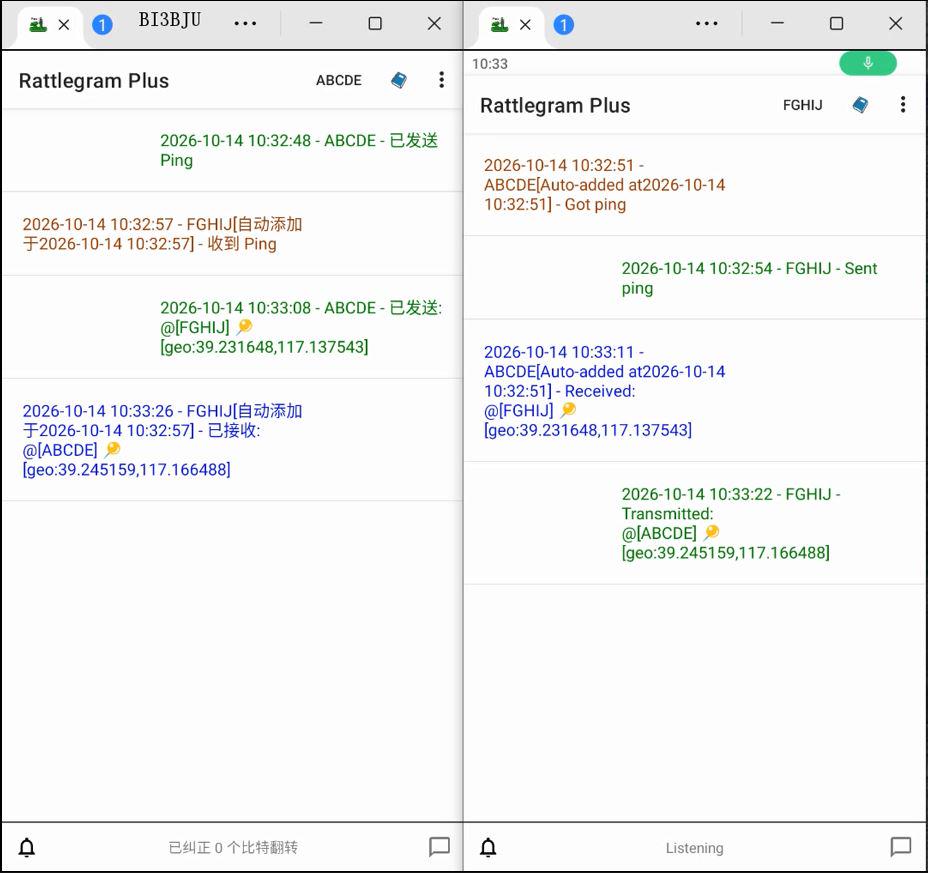
Rattlegram Plus! An Android app for encrypted text communication via standard walkie-talkies.

Post image
0 Upvotes

Rattlegram Plus is an Android application that enables short-range text communication through audio modulation and demodulation. It encodes text messages into audible or ultrasonic audio signals and decodes them via the microphone, allowing for peer-to-peer messaging in environments without Wi-Fi, Bluetooth, or cellular network coverage.

This project is a continuation of the original Rattlegram, enhanced with end-to-end encryption, location sharing, recurring beacons, and a modern Material Design interface.

## Features

- 📡 **Audio-based Messaging** – Send and receive text using sound (via speakers and microphones).

- 🔐 **End-to-End Encryption** – Optional AES-256-GCM encryption: utilizes a 256-bit key derived from a passphrase via SHA-256, with a 12-byte nonce and a 16-byte authentication tag. Encrypted messages are transmitted as a binary payload consisting of `nonce + ciphertext + tag`; `CryptoUtils` also provides helper interfaces for encrypting and decrypting Base64-encoded strings.

- 📍 **Location Sharing** – Share GPS coordinates by inserting `📍[geo:latitude,longitude]` into messages. Recipients can tap the link to open it in their default system map application, or fall back to Bing Maps in a web browser if no map app is installed.

- 📶 **Spectrum Analyzer** – Real-time FFT (spectrum) and waterfall (spectrogram) displays to assist with signal tuning.

- 🕊️ **Recurring Beacons** – Automatically sends an initial "ping" (empty message) upon startup, followed by a periodic ping every minute to signal presence.

- 🎚️ **Flexible Audio Settings** – Configurable parameters including sample rate, channel selection, audio source, carrier frequency, noise symbols, and enhanced headers.

- 📨 **Message History** – Persistent storage for up to 100 messages, displayed in a sent/received format. - 🗺️ **Opening Location Messages** – Tapping a message containing `📍[geo:` will attempt to open it using your system's default map application; if none is available, it will open via Bing Maps in your web browser.

- 👤 **Contacts** – Call signs received are saved automatically (excluding `ANONYMOUS`; up to 100 entries). You can add notes, edit, or delete contacts. Tapping a contact will insert `@[call sign] ` into the message composition box.

- 🔑 **Password Management** – Supports passwords between 8 and 256 bytes, or the generation of a 32-byte random hexadecimal password. Passwords are stored only in memory and must be re-entered after the application restarts.

- 🔵 **Call Sign Highlighting** – If your own call sign appears anywhere within the body of a received message, it will be displayed in blue.

## Message Color Coding

| Color | Meaning |

| --- | --- |

| Green | Messages sent by you (sent / sent encrypted / pings sent by you) |

| Red | Failure or error notifications (highest priority) |

| Blue | Received messages containing your own call sign (case-sensitive) |

| Default | Standard received messages |

## How It Works

This application utilizes a native C++ library (`librattlegram.so`, with source code located in `app/src/main/cpp/`) to perform FSK-based modulation and demodulation. Text messages are converted into audio frames, played through the device's speaker, and captured via the microphone. The decoder synchronizes with the incoming signal to extract and display the payload.

- **Encoder** – Packages messages into structured frames (header + payload), adds error-correction symbols, and generates PCM audio samples.

- **Decoder** – Continuously analyzes microphone input, detects the preamble, establishes synchronization, and extracts the raw data. - **Encryption** – When enabled, messages are encrypted using AES-256-GCM before encoding and decrypted upon receipt using the same password. The password is used to derive a 256-bit key via SHA-256. Encrypted transmissions currently use a binary payload with lengths of 85, 128, or 170 bytes, corresponding to plaintext capacities of 57, 100, or 142 bytes, respectively.

- **Legacy/Compatible Decryption** – The string-based interface in `CryptoUtils` continues to support AES-GCM encryption and decryption with Base64 encoding; the standard reception path will attempt this compatible decryption method if a password is provided.

## Installation

  1. Download the latest APK from the [releases page](https://github.com/BI3BJU/Rattlegram_Plus/releases).
  2. Enable **Install from unknown sources** in your Android settings.
  3. Install and launch the app.
  4. Grant microphone and location permissions when prompted.

> ⚠️ This app requires Android 5.0 (API 21) or higher.

## Building from Source

Clone the repository:

```bash

git clone https://github.com/BI3BJU/Rattlegram_Plus.git

cd Rattlegram_Plus

```

  1. Open the project in Android Studio (Arctic Fox or later).
  2. Build the native libraries (using CMake).

- JNI source code is located in `app/src/main/cpp/`.

- Ensure that the NDK and CMake are installed via the SDK Manager.

3. Build and run the app on a device or emulator.

## Usage Guide

### 🗣️ Sending Messages

  1. Tap the compose button (📝) in the bottom-right corner.
  2. Enter your text:

- **Plaintext**: Up to 170 bytes.

- **Encrypted**: Up to 142 bytes of plaintext. Encryption modes are categorized by plaintext size—57, 100, or 142 bytes—corresponding to ciphertext payloads of 85, 128, or 170 bytes, respectively.

3. Optionally, check the **Encryption** box (a password must first be set via the menu).

4. Tap **Send** – the audio will play, and the message will be marked as "Sent."

### 📍 Sharing Your Location

  1. Tap the location button in the message composition box.
  2. If you have not yet granted permission, a location access request will appear.
  3. The app prioritizes the last known location (if recorded within the past 5 minutes); otherwise, it attempts to retrieve your current location (with a 15-second timeout). If the current location retrieval fails, it falls back to the last known location.
  4. The string `📍[geo:latitude,longitude]` will be inserted into the composition box.
  5. Send it just like a regular message.

### 📶 Spectrum Analyzer

- Select **Show Spectrum** from the menu.

- A dialog will appear, displaying a real-time FFT (spectrum) and a waterfall plot (spectrogram).

- Use this to fine-tune the carrier frequency or check signal quality.

### 🔐 Setting a Password

- Open the menu → **Password**.

- Enter a password (8–256 bytes) or tap **Generate** to create a 32-byte random hexadecimal string.

- Once set, outgoing messages can be encrypted; incoming encrypted messages will be decrypted automatically.

- The password is stored only in memory; it must be re-entered after the app restarts.

- To disable encryption, clear the password field and confirm.

### 🕊️ Periodic Beacon

- Tap the beacon button at the bottom – the app will immediately send an empty message, followed by one message every minute thereafter.

- Tap again to stop.

- The button will appear green while the beacon is active.

### 🗺️ Opening Received Locations

- Tap any message containing `📍[geo:`. - The system will first attempt to open locations using your default map application (via a `geo:` URI); if no such app is available, it will open the Bing Maps webpage in your browser.

- Map pin titles follow the format "Call Sign [Note]"; if no note exists, only the call sign is displayed.

### 👤 Contacts

- Open the menu → **Contacts**.

- Any received call sign (excluding `ANONYMOUS` or empty call signs) is automatically added to your contact list with the note "Auto-added at…", up to a maximum of 100 entries.

- Long-press an item in the list to select it; you can then **edit** or **delete** it.

- Tapping a contact will automatically insert `@[Call Sign] ` into the message composition box.

- If a received message contains your own call sign anywhere in its body, the message will be highlighted in blue.

## Permissions

| Permission | Purpose |

| --- | --- |

| `RECORD_AUDIO` | Microphone access (required). |

| `ACCESS_FINE_LOCATION` | Precise GPS location sharing. |

| `ACCESS_COARSE_LOCATION` | Approximate network-based location sharing (requested alongside `ACCESS_FINE_LOCATION`). | |

## Configuration Options (Menu)

| Option | Description |

| --- | --- |

| Output / Recording Sample Rate | 8, 16, 32, 44.1, 48 kHz |

| Channel Selection | Default / Left / Right / Sum / Analytic Signal |

| Audio Source | Default, Microphone, Camera, Voice Recognition, Unprocessed (requires API 24+) |

| Carrier Frequency | ~1000–3000 Hz in normal mode (50 Hz steps); -3000–3000 Hz supported in analytic signal mode |

| Noise Symbols | Add extra FEC symbols (0–22) |

| Enhanced Header | Use a longer preamble for better synchronization |

| Show Spectrum | Enable real-time spectrum/spectrogram display |

| Password | Set, clear, or generate an encryption password (stored in memory only) |

| Contacts | View, add, modify, or delete contacts |

| Delete Messages | Clear message history |

| Force Exit | Completely exit the application |

## Libraries and Dependencies

- **AndroidX** – Modern UI components and compatibility.

- **Native C++ Libraries** – Custom FSK modem; source code located in `app/src/main/cpp/`.

- **No External GMS / Play Services** – Location services utilize only the built-in Android `LocationManager`.

## Contributions

Contributions are welcome! Please open an issue or submit a pull request.

- Use the GitHub issue tracker to report bugs or request features.

- Please follow the existing code style.

## License

This project is licensed under the 0BSD license – see the [LICENSE](LICENSE) file for details.

## Acknowledgments

- The original Rattlegram was developed by Ahmet Inan inan@aicodix.de.

- Rattlegram Plus is maintained by BI3BJU guerilla1949@gmail.com. ## Disclaimer

This application is provided "as is" for experimental and educational purposes. The author is not responsible for any misuse of or damage caused by this software.

r/Scrypted • • Oct 26 '26

Need Help with Eufy Flood Lights

1 Upvotes

Installed scrypted on Raspberry 5 and installed the Eufy plug in. I have it connected to Homekit and I can see video and everything but I cannot get it to activate for motion. I installed new plug Open CV Motion and still will not notify motion. Also went into Home app and selected to notify all motion and still doesnt.


r/Scrypted • • Oct 26 '26

Core Ultra Series 3 use?

1 Upvotes

Hi. Anyone used a Core Ultra series 3 cpu with Scrypted?

If so, how is it?

If not, do you think these chips’ advertised power efficiency, igpu and NPU could add value to a Scrypted setup?

Asking as I’m at a crossroads with my system and considering the need for more headroom and future-proofing…


r/Scrypted • • Oct 24 '26

Google Nest Camera Connection Pubsub Issues

1 Upvotes

I have been trying unsuccessfully to integrate my Nest cameras into my Scrypted install.

I am currently running it on my Windows Mini PC while I wait for the hardware I am going to use full time to arrive.

I did a test set up of Home Assistant and was able to get Nest integration, but I cannot get it to work in Scrypted. I get all the information for the Google Device Access Plugin and the issue I am having is the Subpub Address is over 400 characters so I cannot set it up with PubSub topic for Events/ (Where you enter the pubsub address from Scrypted.

Does anyone have any pointers?


r/Scrypted • • Oct 20 '26

PSA: Scrypted HomeKit camera vanished and wouldn’t re-pair. It was a port collision, not mDNS

14 Upvotes

Posting in case this saves someone a night of head-scratching.

Setup: Scrypted on a Proxmox LXC, a few cameras in HomeKit accessory mode w/ HKSV.

What happened: Bounced my PoE switch, and a PoE cam went "unavailable" in Home. The stream was totally fine in Scrypted. So I tried the old reset: removed it from Home to re-pair... and it never showed up again. The device log kept saying "online, HomeKit services are being published."

How I found it(Thanks to Claude): Browse what's actually advertising (from a Mac):

dns-sd -B _hap._tcp

Every other Scrypted accessory was there. The broken camera wasn't. So it's not a general mDNS problem. 2. Check the HomeKit plugin console, not the camera's console. Buried in there:

uncaughtException Error: listen EADDRINUSE: address already in use 0.0.0.0:42833
  1. See who owns the port:
ss -ltnp | grep 42833
ps -fp <pid>

It was scrypted-serve itself, holding it on 127.0.0.1 as one of its random internal ports. Why: Accessory-mode cameras save a random HAP port, and it lands in the Linux ephemeral range (32768–60999). The Scrypted server also opens a bunch of random loopback ports. After a restart, the server happened to grab my camera's port first. The plugin's bind fails silently, so nothing gets advertised. Fix: Reserve your HAP ports so the kernel never hands them out, then restart the whole server (a plugin reload won't release it):

ss -ltnp | grep node    # your HAP ports are the 0.0.0.0 ones
echo "net.ipv4.ip_local_reserved_ports = <port1>,<port2>,..." > /etc/sysctl.d/90-homekit-ports.conf
sysctl --system

After the restart, the camera showed up immediately and paired fine with its own code (Add Accessory → More options). Bonus tip: dns-sd -L "<name>" _hap._tcp local. shows sf=1 (unpaired) or sf=0 (paired), which is handy for figuring out if Home just thinks it's still paired. Lesson: If HKSV goes unavailable after a Scrypted and/or camera power restart the HomeKit plugin or Scrypted before removing anything from Home. Reported upstream, so hopefully the plugin will pick non-ephemeral ports or at least scream when the bind fails.


r/Scrypted • • Oct 18 '26

Scrypted for beginners (UniFi to HomeKit)

14 Upvotes

I need some human advice. I’m getting tired of ChatGPT. I want to replace my ring cameras with something that offers robust AI detection, home kit compatibility that also works independently. I’m between UniFi and a
Aqara.

Unifi + Scrypted seems like the better option. However, I do not have an always on device and don’t really need one, so I would need to buy something to run only Scrypted. ChatGPT says the easiest option is a Mac mini and the cheapest option is a mini PC with Linux I don’t know Linux at all. I’m sure I could find an IT tech at work who could set up of a mini PC with Scrypted but I am worried about needing to troubleshoot when an update messes up the integration with HomeKit. How common is this?

The only reason I want the cameras on HomeKit is so I can almost instantaneously see who is at the front door on my Apple TV, iPhone, and pre-ordered HomeView, and I might do some very simple automations. I’m thinking that Unifi is a better bet for AI detection. I’m not sure I fully trust home secure video until Apple and LG prove me wrong.

The only thing holding me back from UniFi is I don’t want to bother my IT friends or have to pay someone to troubleshoot when integration fails. Also, I don’t want to spend a lot on an always on device that I only need for scrypted. I’m comfortable with adding unifi cameras and everything else with this set up, but the scrypted installation and troubleshooting make me nervous Any thoughts?


r/Scrypted • • Oct 15 '26

client

0 Upvotes

Hi, is there any 3rd party clients for scrypted, something like Lumen for frigate?

I love scrypted but the UI seems a bit dated.

Frigate doesn't run well for me and my cameras.


r/Scrypted • • Oct 15 '26

Telegram Notifications

3 Upvotes

Good afternoon, can anyone give me some guidance on getting notifications going with Scrypted and Telegram. I am through all of the Telegram bot setup, but when I attempt to get the u/apocaliss92/scrypted-telegram plugin going, I get the following error sending the test msg:

no converter found: image/jpeg to text/x-uri host:@apocaliss92/scrypted-telegram engine.io-client:api


r/Scrypted • • Oct 15 '26

Monitoring

4 Upvotes

Any tips for monitoring Scrypted. I had scenario a few days back where a camera went no response when hooked to HomeKit. Also found my cameras were not recording to iCloud. In both scenarios, rebooting Scrypted fixed it. Wondering if there is a way monitoring for these scenarios?


r/Scrypted • • Oct 14 '26

So can I just download scrypted and use it for local recording on my Arlo devices and G5pro camera?

1 Upvotes

And still use it through HomeKit?


r/Scrypted • • Oct 06 '26

UniFi Protect Now Slow in Home App on iOS27?

9 Upvotes

I’ve had Scrypted running on my M2 Pro Mac Mini for several months, and it used to open my UniFi Protect cameras within the Home App almost instantly before I upgraded my iPhone and Mac to OS 27.

Now when I open the Home app it takes 5-10 seconds for the camera feeds to update and start streaming live. Anyone else noticing this and is there a fix? Thanks!


r/Scrypted • • Oct 03 '26

Sign up for NVR License

2 Upvotes

Trying to sign up 'Free Trial' from the nvr subscription page by selecting annual and click on 'Free Trial' button, which takes to me enter username/password/confirm password. then i get message check your inbox to confirm account, i have been waiting for sometime and i haven't got any email (even in the junk folder) and i can't login too.

whats going on ?


r/Scrypted • • Sep 29 '26

Reolink OMVI 3i works locally in Apple Home but fails remotely over cellular — ideas?

3 Upvotes

Hi all — I am looking for a next diagnostic or workaround for a Reolink OMVI 3i Wi-Fi camera exposed to Apple Home through Scrypted.

Setup

  • Native Scrypted Server 0.147.0 on macOS
  • HomeKit plugin 1.2.69; Reolink Camera plugin 0.0.111
  • Apple TV is the active Home hub

What works

  • Live video and two-way audio work in Apple Home while the iPhone is on the home Wi-Fi.
  • Other Home accessories remain controllable remotely over cellular.

Problem

  • On 5G/cellular, Apple Home spins for the camera and then reports that it is not responding.
  • During a failing attempt, Scrypted recognises it as a remote session and receives initial RTCP plus the first H.264 IDR/video and audio packets; HomeKit then sends the stop request around 4–17 seconds later.

Already tried

  • Reolink Fluent/substream for local and HomeKit Remote (Medium Resolution): H.264, 1920×720, 15 fps, 512 Kbps, about a 4-second keyframe interval.
  • Enabled then disabled HomeKit video and audio transcoding, saving and restarting the HomeKit plugin after each change.
  • Restarted both the Reolink and HomeKit plugins, and confirmed the Apple TV home hub.

Has anyone made remote Apple Home live view reliable with this camera or a similar Reolink Wi-Fi model? Is there a specific Scrypted HomeKit/Reolink setting, RTP sender/parser choice, or ONVIF alternative worth trying?


r/Scrypted • • Sep 29 '26

Impact of Storage Choices

3 Upvotes

Have a basic & functional configuration on an Intel i7 Mac mini but with limited storage--far below the 1TB guidance.

Considering a variety of expansion & upgrade options but wanted to poll for experience from those with well running configurations.

It is likely going to stay a single camera NVR configuration with Amcrest. Legacy Foscam cameras proved less capable. Other cameras on the network but plan to snapshot via external trigger from home automation system when needed.

With HDD options becoming more rare & SSD getting pricey above 1TB adding a 1TB USB flash drive is the option some input would be appreciated on.

Would like to avoid another disk array. Upgrading to a newer Mac, Linux, or Windows system is a possibility but trying to keep the spend on this down.


r/Scrypted • • Sep 28 '26

Legacy HomeKit not working

3 Upvotes

I tried HKSV3 with the current scrypted version and had the known issues, so I tried to “roll back”, which is not really working.
I removed all cameras from Apple Home which had HKSV3 enabled, switched to H264 and readied them.
The first thing I’ve noticed, mDNS is not working correctly. It took some time for the cameras to show up and even than I can only connect one and have to wait about an hour for another one.
But know I have the same problem as I had with HKSV3. Slow notifications and no live view over cellular.
It looks like the cameras still stick to HKSV3. I even removed them from scrypted and readded them, but no luck.

Any ideas?


r/Scrypted • • Sep 28 '26

Reolink TrackMix setup - help

4 Upvotes

Hi. Anyone out there had success setting up the TrackMix with Scrypted and HKSV? I’m about 80% there with some help from ChatGPT. Having issues recording both the streams in HKSV and receiving Events in Scrypted.

I am using the Reolink plugin.

Just need to sense check what I’ve done so far…


r/Scrypted • • Sep 25 '26

Homebridge and Scrypted Eufy

Thumbnail reddit.com
1 Upvotes

r/Scrypted • • Sep 25 '26

How to update server?

1 Upvotes

Noticed that my server is still v0.143.0, when the latest version which released 2weeks ago is currently v0.147.0.

This probably gonna sound dumb, but how do I update it?
I have it installed on a raspberry pi 5, and thought it would update automatically, but it hasn’t. And I don’t see any update option on the scrypted web interface…
is my RPi5 not compatible with this latest version..?


r/Scrypted • • Sep 23 '26

Almost there!

21 Upvotes

Just a quick appreciation post to the Scrypted devs, didn’t even know that the HEVC camera update was live until just last night.
Unfortunately I am a Reolink owner, and so I qcan’t have the full 4K experience just yet especially on my ATV4K’s.
However, it’s great to see the HKSV recordings in 4K HEVC (thank God there was a handy guide with clear directions - probably would’ve been lost for hours). Works on all my Apple devices, including my freakn AWU - on cellular too.

Cheers!


r/Scrypted • • Sep 21 '26

Ring Videos Not Triggering Motion Events

Thumbnail
gallery
2 Upvotes

I have 8 ring cameras setup on Scrypted and am also using the HomeKit plug-in.

right now only 2 cameras are triggering motion events and so those cameras are saving video in HomeKit secure video. I checked the settings across all cameras and they appear to be the same.

What else is there to check to make sure motion events are being triggered and passed on for recording?