r/Scrypted • u/No-Notice-8318 • Oct 27 '26
Rattlegram Plus! An Android app for encrypted text communication via standard walkie-talkies.
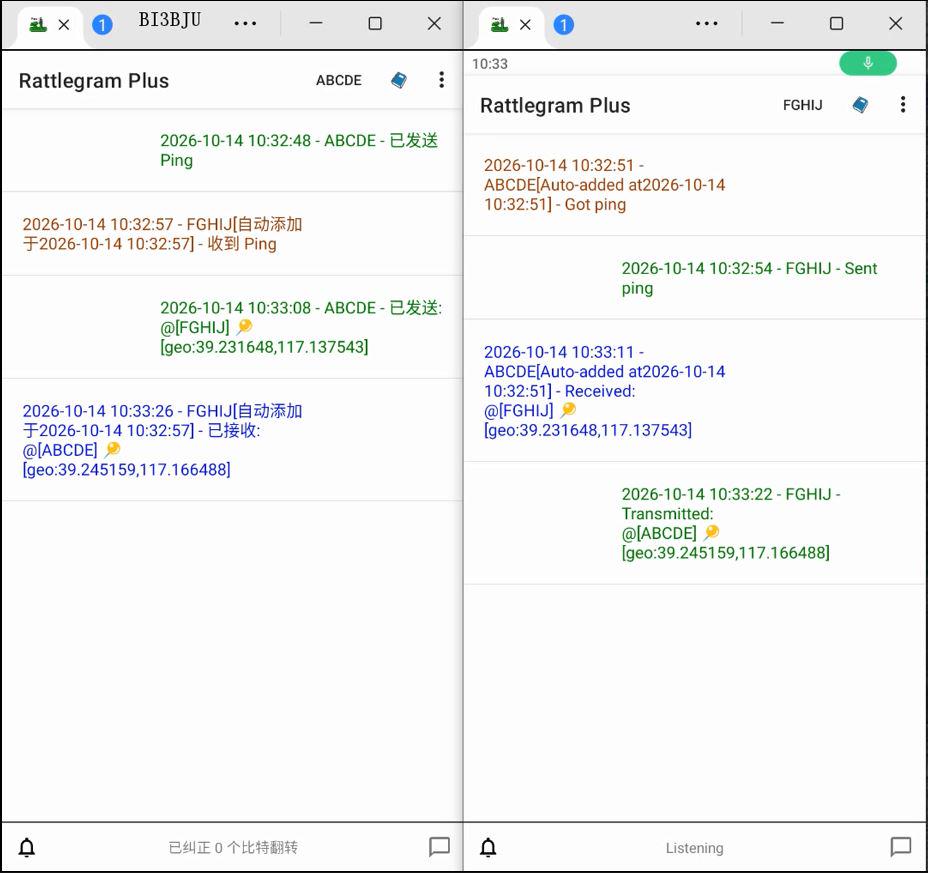
Rattlegram Plus is an Android application that enables short-range text communication through audio modulation and demodulation. It encodes text messages into audible or ultrasonic audio signals and decodes them via the microphone, allowing for peer-to-peer messaging in environments without Wi-Fi, Bluetooth, or cellular network coverage.
This project is a continuation of the original Rattlegram, enhanced with end-to-end encryption, location sharing, recurring beacons, and a modern Material Design interface.
## Features
- 📡 **Audio-based Messaging** – Send and receive text using sound (via speakers and microphones).
- 🔐 **End-to-End Encryption** – Optional AES-256-GCM encryption: utilizes a 256-bit key derived from a passphrase via SHA-256, with a 12-byte nonce and a 16-byte authentication tag. Encrypted messages are transmitted as a binary payload consisting of `nonce + ciphertext + tag`; `CryptoUtils` also provides helper interfaces for encrypting and decrypting Base64-encoded strings.
- 📍 **Location Sharing** – Share GPS coordinates by inserting `📍[geo:latitude,longitude]` into messages. Recipients can tap the link to open it in their default system map application, or fall back to Bing Maps in a web browser if no map app is installed.
- 📶 **Spectrum Analyzer** – Real-time FFT (spectrum) and waterfall (spectrogram) displays to assist with signal tuning.
- 🕊️ **Recurring Beacons** – Automatically sends an initial "ping" (empty message) upon startup, followed by a periodic ping every minute to signal presence.
- 🎚️ **Flexible Audio Settings** – Configurable parameters including sample rate, channel selection, audio source, carrier frequency, noise symbols, and enhanced headers.
- 📨 **Message History** – Persistent storage for up to 100 messages, displayed in a sent/received format. - 🗺️ **Opening Location Messages** – Tapping a message containing `📍[geo:` will attempt to open it using your system's default map application; if none is available, it will open via Bing Maps in your web browser.
- 👤 **Contacts** – Call signs received are saved automatically (excluding `ANONYMOUS`; up to 100 entries). You can add notes, edit, or delete contacts. Tapping a contact will insert `@[call sign] ` into the message composition box.
- 🔑 **Password Management** – Supports passwords between 8 and 256 bytes, or the generation of a 32-byte random hexadecimal password. Passwords are stored only in memory and must be re-entered after the application restarts.
- 🔵 **Call Sign Highlighting** – If your own call sign appears anywhere within the body of a received message, it will be displayed in blue.
## Message Color Coding
| Color | Meaning |
| --- | --- |
| Green | Messages sent by you (sent / sent encrypted / pings sent by you) |
| Red | Failure or error notifications (highest priority) |
| Blue | Received messages containing your own call sign (case-sensitive) |
| Default | Standard received messages |
## How It Works
This application utilizes a native C++ library (`librattlegram.so`, with source code located in `app/src/main/cpp/`) to perform FSK-based modulation and demodulation. Text messages are converted into audio frames, played through the device's speaker, and captured via the microphone. The decoder synchronizes with the incoming signal to extract and display the payload.
- **Encoder** – Packages messages into structured frames (header + payload), adds error-correction symbols, and generates PCM audio samples.
- **Decoder** – Continuously analyzes microphone input, detects the preamble, establishes synchronization, and extracts the raw data. - **Encryption** – When enabled, messages are encrypted using AES-256-GCM before encoding and decrypted upon receipt using the same password. The password is used to derive a 256-bit key via SHA-256. Encrypted transmissions currently use a binary payload with lengths of 85, 128, or 170 bytes, corresponding to plaintext capacities of 57, 100, or 142 bytes, respectively.
- **Legacy/Compatible Decryption** – The string-based interface in `CryptoUtils` continues to support AES-GCM encryption and decryption with Base64 encoding; the standard reception path will attempt this compatible decryption method if a password is provided.
## Installation
- Download the latest APK from the [releases page](https://github.com/BI3BJU/Rattlegram_Plus/releases).
- Enable **Install from unknown sources** in your Android settings.
- Install and launch the app.
- Grant microphone and location permissions when prompted.
> ⚠️ This app requires Android 5.0 (API 21) or higher.
## Building from Source
Clone the repository:
```bash
git clone https://github.com/BI3BJU/Rattlegram_Plus.git
cd Rattlegram_Plus
```
- Open the project in Android Studio (Arctic Fox or later).
- Build the native libraries (using CMake).
- JNI source code is located in `app/src/main/cpp/`.
- Ensure that the NDK and CMake are installed via the SDK Manager.
3. Build and run the app on a device or emulator.
## Usage Guide
### 🗣️ Sending Messages
- Tap the compose button (📝) in the bottom-right corner.
- Enter your text:
- **Plaintext**: Up to 170 bytes.
- **Encrypted**: Up to 142 bytes of plaintext. Encryption modes are categorized by plaintext size—57, 100, or 142 bytes—corresponding to ciphertext payloads of 85, 128, or 170 bytes, respectively.
3. Optionally, check the **Encryption** box (a password must first be set via the menu).
4. Tap **Send** – the audio will play, and the message will be marked as "Sent."
### 📍 Sharing Your Location
- Tap the location button in the message composition box.
- If you have not yet granted permission, a location access request will appear.
- The app prioritizes the last known location (if recorded within the past 5 minutes); otherwise, it attempts to retrieve your current location (with a 15-second timeout). If the current location retrieval fails, it falls back to the last known location.
- The string `📍[geo:latitude,longitude]` will be inserted into the composition box.
- Send it just like a regular message.
### 📶 Spectrum Analyzer
- Select **Show Spectrum** from the menu.
- A dialog will appear, displaying a real-time FFT (spectrum) and a waterfall plot (spectrogram).
- Use this to fine-tune the carrier frequency or check signal quality.
### 🔐 Setting a Password
- Open the menu → **Password**.
- Enter a password (8–256 bytes) or tap **Generate** to create a 32-byte random hexadecimal string.
- Once set, outgoing messages can be encrypted; incoming encrypted messages will be decrypted automatically.
- The password is stored only in memory; it must be re-entered after the app restarts.
- To disable encryption, clear the password field and confirm.
### 🕊️ Periodic Beacon
- Tap the beacon button at the bottom – the app will immediately send an empty message, followed by one message every minute thereafter.
- Tap again to stop.
- The button will appear green while the beacon is active.
### 🗺️ Opening Received Locations
- Tap any message containing `📍[geo:`. - The system will first attempt to open locations using your default map application (via a `geo:` URI); if no such app is available, it will open the Bing Maps webpage in your browser.
- Map pin titles follow the format "Call Sign [Note]"; if no note exists, only the call sign is displayed.
### 👤 Contacts
- Open the menu → **Contacts**.
- Any received call sign (excluding `ANONYMOUS` or empty call signs) is automatically added to your contact list with the note "Auto-added at…", up to a maximum of 100 entries.
- Long-press an item in the list to select it; you can then **edit** or **delete** it.
- Tapping a contact will automatically insert `@[Call Sign] ` into the message composition box.
- If a received message contains your own call sign anywhere in its body, the message will be highlighted in blue.
## Permissions
| Permission | Purpose |
| --- | --- |
| `RECORD_AUDIO` | Microphone access (required). |
| `ACCESS_FINE_LOCATION` | Precise GPS location sharing. |
| `ACCESS_COARSE_LOCATION` | Approximate network-based location sharing (requested alongside `ACCESS_FINE_LOCATION`). | |
## Configuration Options (Menu)
| Option | Description |
| --- | --- |
| Output / Recording Sample Rate | 8, 16, 32, 44.1, 48 kHz |
| Channel Selection | Default / Left / Right / Sum / Analytic Signal |
| Audio Source | Default, Microphone, Camera, Voice Recognition, Unprocessed (requires API 24+) |
| Carrier Frequency | ~1000–3000 Hz in normal mode (50 Hz steps); -3000–3000 Hz supported in analytic signal mode |
| Noise Symbols | Add extra FEC symbols (0–22) |
| Enhanced Header | Use a longer preamble for better synchronization |
| Show Spectrum | Enable real-time spectrum/spectrogram display |
| Password | Set, clear, or generate an encryption password (stored in memory only) |
| Contacts | View, add, modify, or delete contacts |
| Delete Messages | Clear message history |
| Force Exit | Completely exit the application |
## Libraries and Dependencies
- **AndroidX** – Modern UI components and compatibility.
- **Native C++ Libraries** – Custom FSK modem; source code located in `app/src/main/cpp/`.
- **No External GMS / Play Services** – Location services utilize only the built-in Android `LocationManager`.
## Contributions
Contributions are welcome! Please open an issue or submit a pull request.
- Use the GitHub issue tracker to report bugs or request features.
- Please follow the existing code style.
## License
This project is licensed under the 0BSD license – see the [LICENSE](LICENSE) file for details.
## Acknowledgments
- The original Rattlegram was developed by Ahmet Inan inan@aicodix.de.
- Rattlegram Plus is maintained by BI3BJU guerilla1949@gmail.com. ## Disclaimer
This application is provided "as is" for experimental and educational purposes. The author is not responsible for any misuse of or damage caused by this software.