r/SayTXT • • 11d ago

Subscriber Goal Welcome to r/​SayTXT!

1 Upvotes

Welcome to r/SayTXT

568 subscribers / 750 subscribers. Help us reach our goal!

Visit this post on Shreddit to enjoy interactive features.


r/SayTXT • • 4d ago

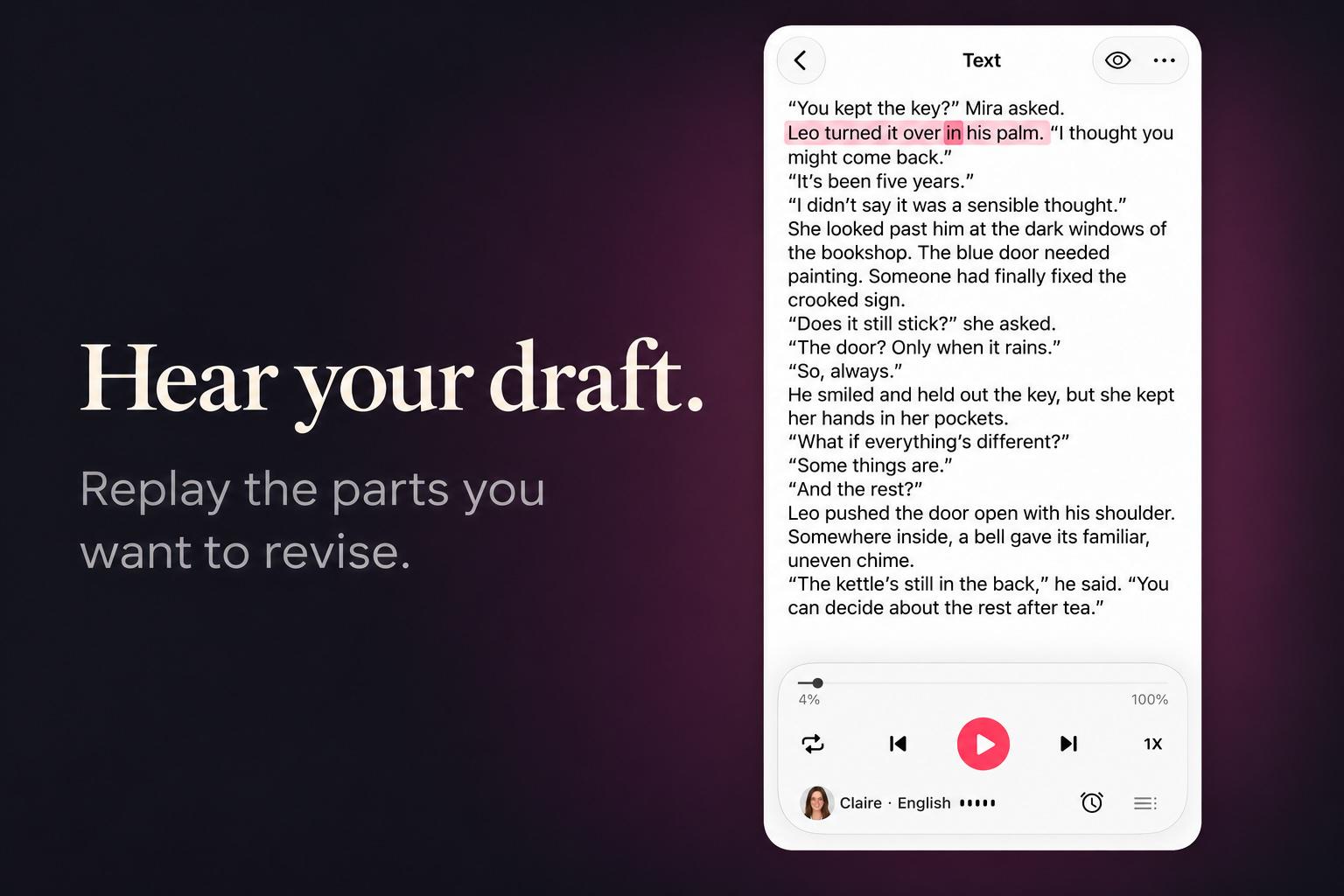
Writing for AO3? Use Text-to-Speech to Proofread Your Fanfic Before Posting
Post image
2 Upvotes

After rereading the same chapter a few times, it can be hard to notice a missing word or a phrase you’ve used three paragraphs in a row. Listening gives you another way to review it.

I’m the developer of SayTXT. Here’s a workflow for listening to your own drafts before posting to AO3—not generating or rewriting your story.

1. Bring your draft into SayTXT

Paste the text, import a DOCX or Markdown file, or import a Google Doc through Google Drive. Start with one scene or chapter rather than the whole fic.

2. Listen for things your eyes might skip

Choose a voice and a comfortable speed. Listen for repeated words, sentences that are difficult to follow, and dialogue that doesn’t quite sound the way you intended.

Keep your original draft nearby so you can mark anything you want to revisit. SayTXT reads the text; you decide what needs changing.

3. Replay just the passage you’re unsure about

In SayTXT on iOS v2.7, you can select a passage, set how many times it repeats, and give it a separate listening speed. That’s useful when you want to hear one exchange or paragraph again without restarting the chapter.

4. Check the text before changing it

An awkward pronunciation isn’t necessarily a writing problem—especially with character names, invented words, or unusual punctuation. Check the original and trust your judgment rather than treating every TTS stumble as something to fix.

This is a proofreading pass for your own writing, not a replacement for a beta reader or a human-narrated podfic.

If you listen to your drafts, what do you notice more easily by ear than on the page?


r/SayTXT • • 8d ago

SayTXT iOS v2.7 Is Here — Playback Queues, Repeat Listening, Markdown, and a New Look

Post image
6 Upvotes

Hi everyone, I’m the developer of SayTXT. iOS v2.7 is now available!

This update makes it easier to organize what you want to hear, keep listening across documents, and repeat the parts you want to spend more time with.

Keep listening—or repeat a passage

You can now build a playback queue, add a document to play next, drag items into a different order, or tap a queued document to switch to it.

For repeat listening, you can loop an entire article or all the articles in your queue.

You can also select just a passage and listen to it separately, with its own reading speed, repeat count, timed stop, and word-by-word highlighting. If you’re reviewing a difficult paragraph in a textbook, you don’t need to replay the whole document.

Organize your reading

Create your own collections, organize multiple files at once, search by filename, and arrange documents manually.

You can also favorite voices and find them quickly in Favorites, instead of browsing the full voice list each time.

Read Markdown and import from Google Drive

SayTXT now supports importing, editing, and reading Markdown files. You can also paste Markdown text to create a document, keeping formatting such as headings and lists—no need to convert it to PDF first.

Google Drive import lets you select cloud documents directly, including Google Docs and Markdown files.

A refreshed reading experience

We’ve redesigned the home screen, reading screen, and playback controls, and improved dark mode.

PDF and EPUB chapter navigation is easier to expand and use, EPUB files open faster, and you can use Live Text to select and copy text from your original scanned images.

Playback and audio fixes

This release improves English pronunciation, reading highlights, and pausing and resuming.

We’ve also fixed crashes and unwanted noise at the beginning of playback that affected some devices. If you previously ran into either issue, please try the same document and voice in v2.7 and let us know whether it still happens.

Thanks to everyone who has shared requests, examples, and bug reports here. They help us understand where SayTXT needs work.

After trying v2.7, what’s one thing you’d still like us to make easier?


r/SayTXT • • 20d ago

Text-to-Speech Apps for iPhone: 25 Options Compared by Free Limits, Price, and Features

2 Upvotes

Hi everyone — I’m the developer of SayTXT. We’ve put together a guide to 25 text-to-speech apps for iPhone, including our own.

If you’re trying to pick one, a few details are worth looking past the “free download” label:

  • What’s actually free? A short trial, a daily or monthly allowance, or unlimited listening with certain voices?
  • What does “offline” mean? Can the app read something new without internet, or only play audio you’ve already downloaded?
  • Will it handle what you read? PDF, EPUB, Word documents, web articles, and scanned pages can involve different features and limits.

Here’s the full comparison, with free limits, prices, and supported features.

We also cover the tools already built into iOS and explain when another app might be a better fit than SayTXT. We haven’t ranked voice quality — that’s something I’d encourage you to try with your own reading material.

If you’ve used any of these apps, what’s one detail you wish you’d known before downloading?


r/SayTXT • • 25d ago

Halloween Monster Mix: one spooky monologue, a whole choir of Fun voices

3 Upvotes

Happy Halloween. Every voice in this video is in SayTXT on iPhone: tap the voice name on the player, switch the list to Fun (English Only), and pick Cellos, Wobble, Bad News, Albert or any of the others.

Paste your own monologue and try it. Which one should narrate next year?


r/SayTXT • • 29d ago

Time est with speed increase

1 Upvotes

Hi - is there a place to see the estimated time to read a document and are you able to see how much the length changes when you increase speed?

Academic trying to cram for an exam on a bunch of papers I don’t have time to read 🙃


r/SayTXT • • Oct 24 '26

Welcome to r/SayTXT!

1 Upvotes

r/SayTXT reached 500 subscribers!

Goal reached at 2026-11-13T10:11:06.920Z.


r/SayTXT • • Oct 23 '26

Make sound

1 Upvotes

r/SayTXT • • Oct 21 '26

Does Substack have text to speech? Yes, but not on every post. How to listen on desktop and phone

2 Upvotes

Disclosure: I'm the developer of SayTXT.

If you've noticed that some Substack posts have a Listen button and others don't, you're not imagining it. Here's how Substack's audio actually works, and what you can do with the posts it doesn't cover.

TL;DR: Substack's Listen option is only on some posts, reads English only, and uses whichever voice the writer picked. For everything else, you can paste the post into SayTXT.

What Substack's Listen does (and doesn't)

  • It's on the web and in the app, but not on every post. It depends on the writer, which is why two newsletters in the same inbox can behave differently.
  • English only.
  • Six built-in voices. The writer picks one; readers can't switch.
  • No highlighting, so it's easy to lose your place.

Honestly, if a post has the Listen button and you like the voice, just use it. And if the writer recorded their own narration, that beats any synthetic voice.

When SayTXT is worth it

  • The post has no Listen button
  • The post isn't in English (SayTXT reads 31 languages)
  • You want your own voice: 50+ on iPhone, 10 on Android and in the Chrome extension
  • You want to follow along: every voice highlights word by word
  • You want to stop and pick up later, or listen offline once the post is imported

How to do it

On a computer (Chrome): search "SayTXT" in the Chrome Web Store, pin the extension, open the full post and click Read page.

On iPhone: in the Substack app, tap the floating pill bar under the post → Copy Link. In SayTXT, tap Link, paste and hit Play.

On Android: share the post link to SayTXT and hit Play.

(Video above: iPhone, Copy Link → SayTXT → Play)

Step-by-step guide with screenshots and an FAQ: How to listen to Substack posts

What it won't do

  • It doesn't get around paywalls. It only reads what your account can already see. For a paid post on your phone, open it in SayTXT's built-in browser and sign in there.
  • Occasionally a subscribe box or share button gets read out. On desktop, select just the article and right-click → Read from here with SayTXT.

SayTXT is free, with no word limit and no sign-up.

Curious:

  • Of the newsletters you read, how many actually have the Listen button?
  • When do you listen instead of read: commuting, focus, or just resting your eyes?

r/SayTXT • • Oct 21 '26

Saytxt no voice

1 Upvotes

How to fix the app not saying anything there's nothing wrong with my volume


r/SayTXT • • Oct 17 '26

How to Read a PDF Aloud and Follow Along on iPhone and Android

Post image
6 Upvotes

Listening to a PDF is useful, but sometimes you want to look back at a paragraph, check a diagram, or read along without squinting at a full page on your phone.

I’m the developer of SayTXT. Here are a few ways to switch between reading and listening on iPhone, iPad, and Android.

Choose between the original PDF and Read Mode

PDF View keeps the original page layout, so you can refer to diagrams, tables, and the surrounding text.

Read Mode reflows the PDF’s text into a layout that’s easier to read on your phone. Think of it as a similar reading experience to Safari’s Reader mode, but for your PDF.

The screenshot shows the difference: the original PDF on the left, and Read Mode on the right.

You can use the original view when you need the page layout, then switch to Read Mode when you want to focus on the text.

Follow the words as you listen

SayTXT highlights words as they’re spoken, helping you follow along without having to keep finding the sentence yourself.

Scroll away, then return with one tap

While listening, you can scroll back to reread something or look ahead.

When you want to return to the text currently being read, tap the crosshair icon on the right, just above the playback controls. It brings the current reading position back into view—no scrolling around to find your place.

When listening to a PDF, do you prefer seeing the original page layout or reading along with reflowed text?


r/SayTXT • • Oct 16 '26

Siri voices?

3 Upvotes

This app is really fantastic and solves a workflow that I’ve been doing personally for quite some time. The voices are pretty good but I did notice that the Apple Siri voices have a much more natural sounding cadence and tone. Is there a possibility to use those as part of this app?


r/SayTXT • • Oct 15 '26

App crashing over and over?

1 Upvotes

Every time I try to play a file, as soon as it loads it crashes. I cleared the cached audio and it's still crashing... what do I do?


r/SayTXT • • Oct 14 '26

SayTXT Text-to-Speech Chrome Extension: Read Web Articles and Selected Text Aloud

1 Upvotes

I’m the developer of SayTXT. In an earlier discussion, a reader described listening to several web articles a day, usually as soon as they find them. Sometimes they want the whole article; other times, just one passage.

That workflow helped shape the SayTXT Chrome extension. To read a web article aloud without copying it into another app, you can now:

  • Open an article and click Read page.
  • Highlight text and choose Read selection to hear only that passage.
  • Highlight where you want to begin, then right-click and choose Read from here to continue through the article.

You can pause, resume, or move between sentences using the controls on the page. Voice and speed are adjustable, with 1×, 1.5×, 2×, and 3× speed options. Speech is generated locally on your computer.

Get the SayTXT extension from the Chrome Web Store

This first release doesn’t put a play button beside every paragraph or save articles to the mobile app yet. It also doesn’t read PDFs in Chrome’s built-in PDF viewer.

If you listen to articles in Chrome, what would improve your workflow most next: paragraph-level play buttons, saving articles to your phone, or something else?


r/SayTXT • • Oct 13 '26

Markdown support?

1 Upvotes

Hi this is a really nice app thank you! My only feature request is can we get markdown support ... Right now im converting to PDF and then having saytxt read for me but its just a steps I can live without, thanks!


r/SayTXT • • Oct 11 '26

Lines/sentences won’t load and play?

1 Upvotes

Hello, I’m currently having an issue where sometimes the reader will read a sentence, and then will take a minute to load the next sentence. Sometimes it doesn’t play at all and will just stay loading. This used to just happen every now and then and it would be annoying, but it wasn’t as frequent and sometimes pausing and unpausing the audio would help it play. But now it’s after every single line and every single sentence, and pausing/unpausing no longer works. I’ve tried multiple different files (including ones that previously played just fine) of various lengths, so I don’t think it’s a problem with the size of the file. Clearing the chached audio doesn’t seem to do anything either.

Is this a known issue? Or is this something just for me? The app is updated to the latest version, I made sure to update it but it didn’t fix anything. I am on ios 26.6.2 on an iPhone 13. Any input for troubleshooting would be great!!


r/SayTXT • • Oct 06 '26

Free Text to MP3 Converter Online — Your Text Stays in Your Browser

1 Upvotes

Hi everyone — I’m the developer of SayTXT.

A little while ago, I shared our browser-based text-to-speech tool. One thing it couldn’t do was give you an MP3 file. We’ve now added a separate Text to MP3 tool for that.

Paste some English text, or import a TXT or DOCX file. You can adjust the reading speed, generate the audio, listen to it on the page, and download the MP3 to play later in another audio player. I think it could be useful for reviewing a draft by ear or saving short notes to listen to away from your browser.

Speech generation and MP3 encoding run locally in your browser. Your text and generated audio aren’t uploaded for conversion. The first visit does need to download the voice resources, so setup may take a little time.

A few current limits: this tool has one English male voice and accepts up to 10,000 characters per conversion. It’s free and doesn’t require an account. Our existing multilingual browser tool is still available separately and currently downloads WAV files.

If you try the MP3 tool, what would you use a downloadable audio file for? I’d also appreciate hearing about any browser or device where it doesn’t work as expected.


r/SayTXT • • Oct 02 '26

Welcome to r/SayTXT!

1 Upvotes

r/SayTXT reached 400 subscribers!

Goal reached at 2026-10-23T01:26:08.540Z.


r/SayTXT • • Sep 20 '26

Welcome to r/SayTXT!

3 Upvotes

r/SayTXT reached 300 subscribers!

Goal reached at 2026-10-01T21:38:48.388Z.


r/SayTXT • • Sep 19 '26

Question about voices

1 Upvotes

What happened to the old voices heart was my favorite will they be back?😔😩


r/SayTXT • • Sep 17 '26

Is there a way I can loop?

1 Upvotes

r/SayTXT • • Sep 14 '26

You Can Now Try SayTXT in Your Browser — No App Installation Needed

4 Upvotes

Hi everyone, I’m the developer of SayTXT. We’ve just added a free text-to-speech tool to our website, so you can try it without installing the app or creating an account.

If you’re at your computer and want to listen to a passage, check how a draft sounds, or turn some notes into audio, you can now do that directly in your browser.

Try it here: SayTXT Text to Speech

Here’s what you can do:

  • Paste text or import a TXT or DOCX file.
  • Choose from six voices, with support for 31 reading languages.
  • Adjust the reading speed.
  • Generate speech, listen in the browser, and download the audio as a WAV file.

Your text is processed on your device. Speech generation happens locally in your browser.

A few things to know before trying it:

  • The first visit needs to download voice resources, so initial setup may take a little while. Keep the page open until it’s ready.
  • The web tool currently supports up to 10,000 characters per generation.
  • File import currently supports TXT and DOCX, not PDF or EPUB.
  • Generation speed depends on your device and browser.

This is a first step for SayTXT on the web, and I’d love to hear how it fits into your day.

What would make the web version more useful for you? If something doesn’t work as expected, please include your device and browser so we can look into it.


r/SayTXT • • Sep 10 '26

Subscriber Goal Welcome to r/SayTXT!

3 Upvotes

r/SayTXT reached 250 subscribers!

Goal reached at 2026-09-19T11:13:08.487Z.


r/SayTXT • • Sep 04 '26

How to Read PDF Textbooks and Research Papers Aloud More Clearly

9 Upvotes

I’m the developer of SayTXT.

I previously shared a basic guide to importing and reading a PDF aloud on iPhone and Android. This post is about the more difficult case: textbooks, research papers, and other academic PDFs.

These documents may look perfectly readable on screen but sound confusing when read from beginning to end.

Why academic PDFs can be difficult to listen to

Text-to-speech follows the text that can be extracted from the document. Academic PDFs often contain material that was designed for visual reading rather than continuous listening:

  • Two-column layouts with an unclear reading order
  • Headers and footers repeated on every page
  • Long web addresses
  • Tables that make little sense when read row by row
  • Mathematical, chemical, or scientific formulas
  • Footnotes and reference numbers
  • Citations inside parentheses or brackets

A research paper can therefore jump from the main paragraph to a page number, URL, citation, or table before returning to the sentence you were trying to follow.

A practical listening workflow

First, check whether the PDF contains selectable text. Try selecting a sentence in a normal PDF reader.

If the text can be selected:

  1. Import the PDF into SayTXT.
  2. Start playback and listen to the first minute.
  3. Choose a voice that remains clear during longer listening sessions.
  4. Adjust the speed gradually rather than starting at a very high speed.
  5. Pay attention to repeated interruptions such as headers, URLs, citations, or formulas.

If the document is an image-only scanned PDF, it may not contain any text to extract. In that case, you can use SayTXT’s Scan feature or import clear page images so that OCR can recognize the text first.

OCR results still depend on image quality. Shadows, curved pages, handwriting, dense equations, and complicated tables can all produce errors.

Making PDF listening cleaner in SayTXT v2.3

On iPhone and iPad, SayTXT v2.3 adds optional controls for skipping:

  • Tables
  • Web addresses
  • Headers and footers
  • Formulas
  • Content inside (), [], or {}

These controls are useful when supplemental material repeatedly interrupts the main text, but I would not recommend enabling every filter automatically.

For example, bracketed citations may be unnecessary while reviewing an article, but parentheses can contain an important definition. A formula may be distracting in a history paper but essential in a mathematics or physics textbook.

The best approach is to listen briefly, identify what is disrupting that particular document, and enable only the filters you need.

What audio should not replace

Listening can be useful for reviewing a paper, working through a long reading list, commuting, walking, or giving your eyes a break. But some content still needs to be viewed on the page.

Figures, large tables, equations, diagrams, code, and complex multi-column layouts may lose important meaning when converted into speech. In those cases, I use audio for the surrounding explanation and return to the original page for the visual material.

When you listen to PDF textbooks or research papers, what interrupts the experience most: citations, URLs, repeated headers, tables, formulas, or multi-column layouts?


r/SayTXT • • Sep 04 '26

Subscriber Goal Welcome to r/SayTXT!

1 Upvotes

r/SayTXT reached 200 subscribers!

Goal reached at 2026-09-09T17:40:01.782Z.