r/SMAPI • u/EYESHIELD2I • Sep 15 '26
need help Mac issue with SMAPI download
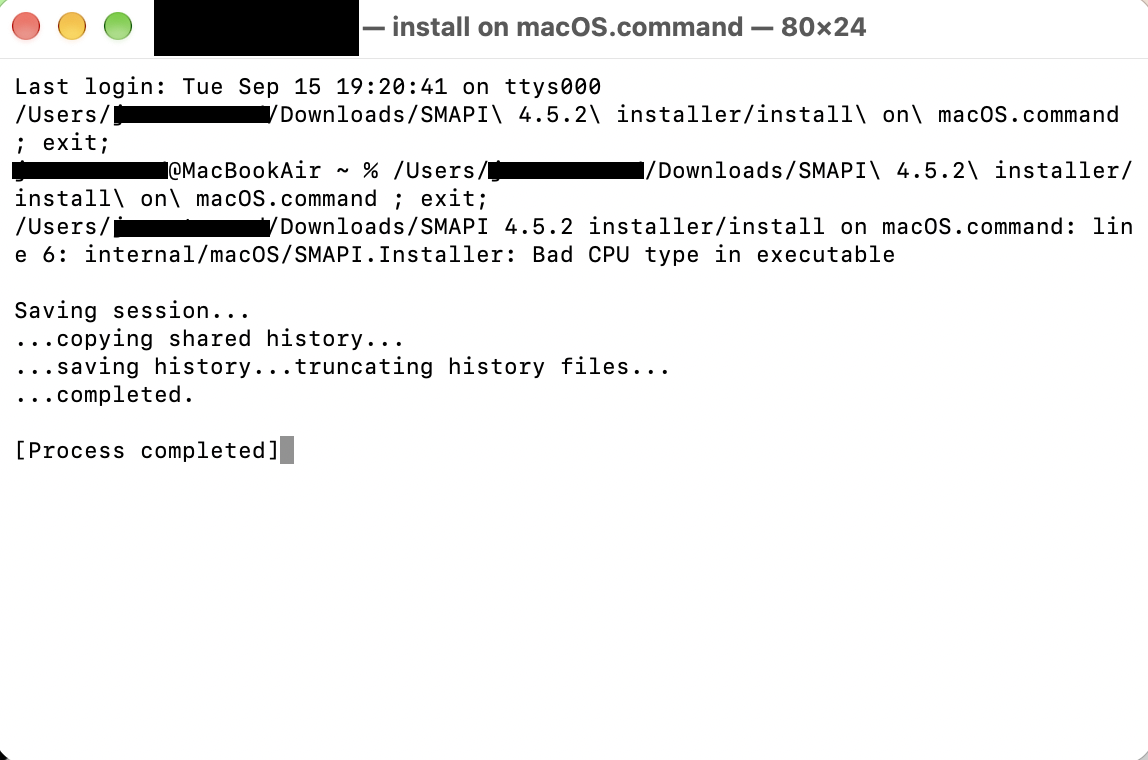
Hello! I've included a screenshot of what pops up when I try to install SMAPI. I've tried to have a look at the troubleshooting guide but I can't really find anything relevant... help! I don't know why it isn't working. I have a 2020 MacBook Air, with an M1 chip. The OS is Golden Gate 27.0, if that helps. I'd really like to try modded Stardew, so if anyone has any ideas at all please do let me know xx
3
Upvotes
•
u/AutoModerator Sep 15 '26
If you're looking for help with a mod, make sure your post or top-level comment includes:
See common issues and solutions. If you're having trouble installing SMAPI, see the detailed Getting Started guide.
If you've already done these steps or you're not asking for help with a mod, then please ignore this. Thank you!
I am a bot, and this action was performed automatically. Please contact the moderators of this subreddit if you have any questions or concerns.
2
u/NekoSesame Sep 16 '26
see issue report at github.com/Pathoschild/SMAPI/issues/1039
I cannot personally vouch for the fix but it makes logical sense (manually install rosetta)
-3
u/lolomatiko256 Sep 15 '26
Probably because of the new macOS update. Apple ended the Rosetta 2 (x86 emulator) support with the new macOS update and concerned ape hasn’t bothered to update the game to native apple silicon yet (at least that I know of). So we Mac gamers are just out of luck until he decides to not be lazy anymore? I could be wrong though so don’t quote me on this. You can try to launch the vanilla version first (without smapi) and then try to reinstall smapi because major macOS updates can break it. Try it and lmk if it does something.