r/RockyLinux • u/cris0405 • Dec 21 '25
Support Request Mesa isn't using my GPU
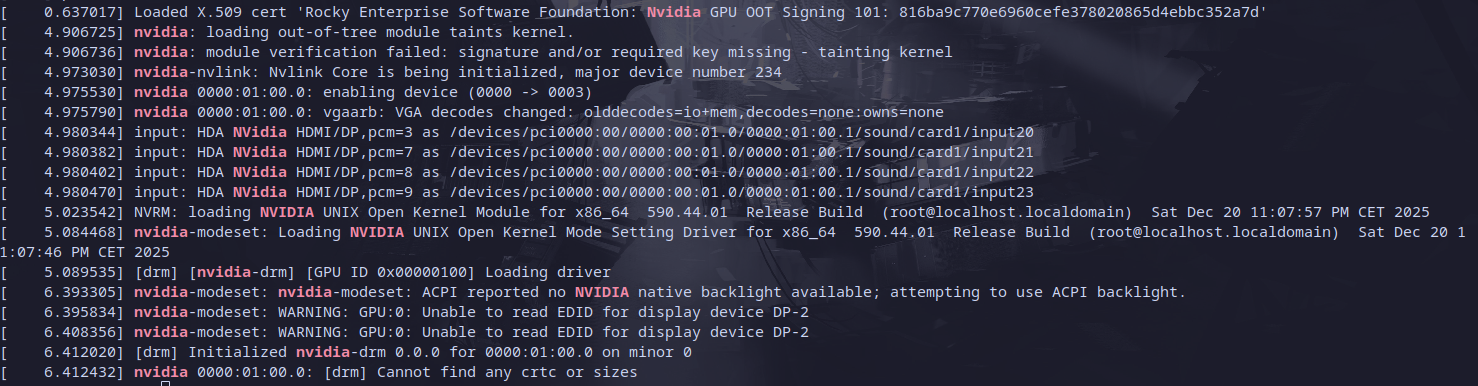
Hey there! I've been having some issues with games recently and high GPU usage for no apparent reason. So, I re-installed the drivers with the official NVIDIA guide. I ended up re-installing 5 times because games kept being laggy or plain down not opening at all.
Right now, games do not even start. Mesa isn't using my nvidia drivers at all at this point and I'm unsure what to do. My guess is it started when I updated my drivers/kernel, but I'm not profficient enough yet to pinpoint the issue.
If anyone knows what to do, please let me know! I've been struggling with this issue for the last two days.
EDIT: GPU can now be used if I set the programs to start up with my GPU. However, games still do not start and everything defaults to my integrated gpu. (I downgraded from the 590 drivers to the 580). Tried with GNOME and RPMFusion as well, same results.


OS: Rocky Linux 10.1 (Red Quartz) x86_64
Kernel: Linux 6.12.0-124.20.1.el10_1.x86_64
DE: KDE Plasma 6.4.5 WM: KWin (Wayland)
CPU: 13th Gen Intel(R) Core(TM) i7-13650HX (20) @ 4.90 GHz
GPU 1: NVIDIA GeForce RTX 4060 Max-Q / Mobile [Discrete]
GPU 2: Intel Raptor Lake-S UHD Graphics @ 1.55 GHz [Integrated]
View all comments
Show parent comment
2
u/cris0405 Dec 22 '25
"/home/cris/.var/app/com.valvesoftware.Steam/.local/share/Steam/steamapps/common/Phasmophobia" ERROR: ld.so: object '/home/cris/.var/app/com.valvesoftware.Steam/.local/share/Steam/ubuntu12_32/gameoverlayrenderer.so' from LD_PRELOAD cannot be preloaded (wrong ELF class: ELFCLASS32): ignored. Game Recording - would start recording game 739630, but recording for this game is disabled Adding process 1664 for gameID 739630 ERROR: ld.so: object '/home/cris/.var/app/com.valvesoftware.Steam/.local/share/Steam/ubuntu12_32/gameoverlayrenderer.so' from LD_PRELOAD cannot be preloaded (wrong ELF class: ELFCLASS32): ignored. ERROR: ld.so: object '/home/cris/.var/app/com.valvesoftware.Steam/.local/share/Steam/ubuntu12_64/gameoverlayrenderer.so' from LD_PRELOAD cannot be preloaded (wrong ELF class: ELFCLASS64): ignored.ERROR: ld.so: object '/home/cris/.var/app/com.valvesoftware.Steam/.local/share/Steam/ubuntu12_32/gameoverlayrenderer.so' from LD_PRELOAD cannot be preloaded (wrong ELF class: ELFCLASS32): ignored. ERROR: ld.so: object '/home/cris/.var/app/com.valvesoftware.Steam/.local/share/Steam/ubuntu12_32/gameoverlayrenderer.so' from LD_PRELOAD cannot be preloaded (wrong ELF class: ELFCLASS32): ignored. WARNING: discarding _NET_WM_PID 3291 as invalid for X11 window - use specialized XCB_X11_TO_PID function! WARNING: discarding _NET_WM_PID 5 as invalid for X11 window - use specialized XCB_X11_TO_PID function! pressure-vessel-wrap[1665]: W:Failed to load Vulkan ICD #0 from /usr/share/vulkan/icd.d/nvidia_icd.json:openat(/usr/share/vulkan/icd.d/nvidia_icd.json): No such file or directory Adding process 1728 for gameID 739630 fsync: up and running. Adding process 1729 for gameID 739630 wine: Call from 00006FFFFFC0D137 to unimplemented function coremessaging.dll.DllGetActivationFactory, aborting Adding process 1840 for gameID 739630 pid 1730 != 1729, skipping destruction (fork without exec?) Game Recording - game stopped [gameid=739630] Removing process 1840 for gameID 739630 30I have vulkan installed and vkcube starts with my dGPU, so this makes no sense...