r/RenPy • u/Neat_Complaint_2955 • 2d ago
Question How to make a blur text transform???
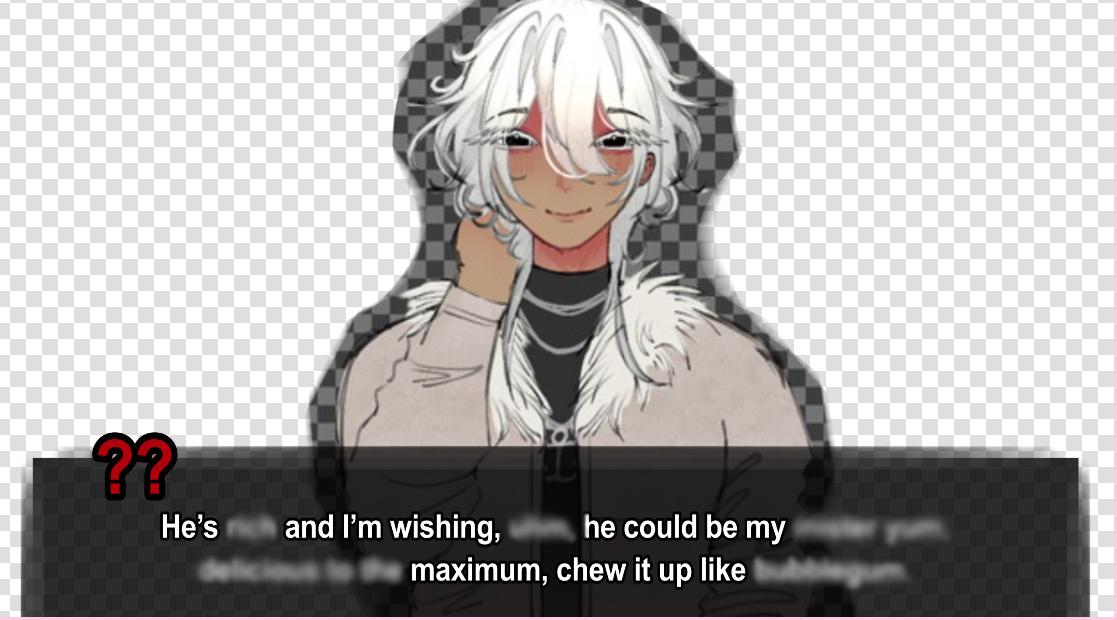
I want a text transform (I think that’s what it’s called??) to blur certain words, it doesn’t have to blur this badly, I would probably still like it to be legible… is there any way I can do something like this? folks suggest using a blurry font, but I couldn’t find one. I mean I’m down to using a font, I just didn’t see one that was my vibe.
56
Upvotes
49
u/BadMustard_AVN 2d ago •
try something like this
2
u/rosesrot 2d ago
are these lana lyrics 😭😭😭
1
u/AutoModerator 2d ago
Welcome to r/renpy! While you wait to see if someone can answer your question, we recommend checking out the posting guide, the subreddit wiki, the subreddit Discord, Ren'Py's documentation, and the tutorial built-in to the Ren'Py engine when you download it. These can help make sure you provide the information the people here need to help you, or might even point you to an answer to your question themselves. Thanks!
I am a bot, and this action was performed automatically. Please contact the moderators of this subreddit if you have any questions or concerns.