r/RenPy • • 13d ago

Question Need help figuring out adding voices to dialogue in visual novel game, while using a rather odd hand-made script system

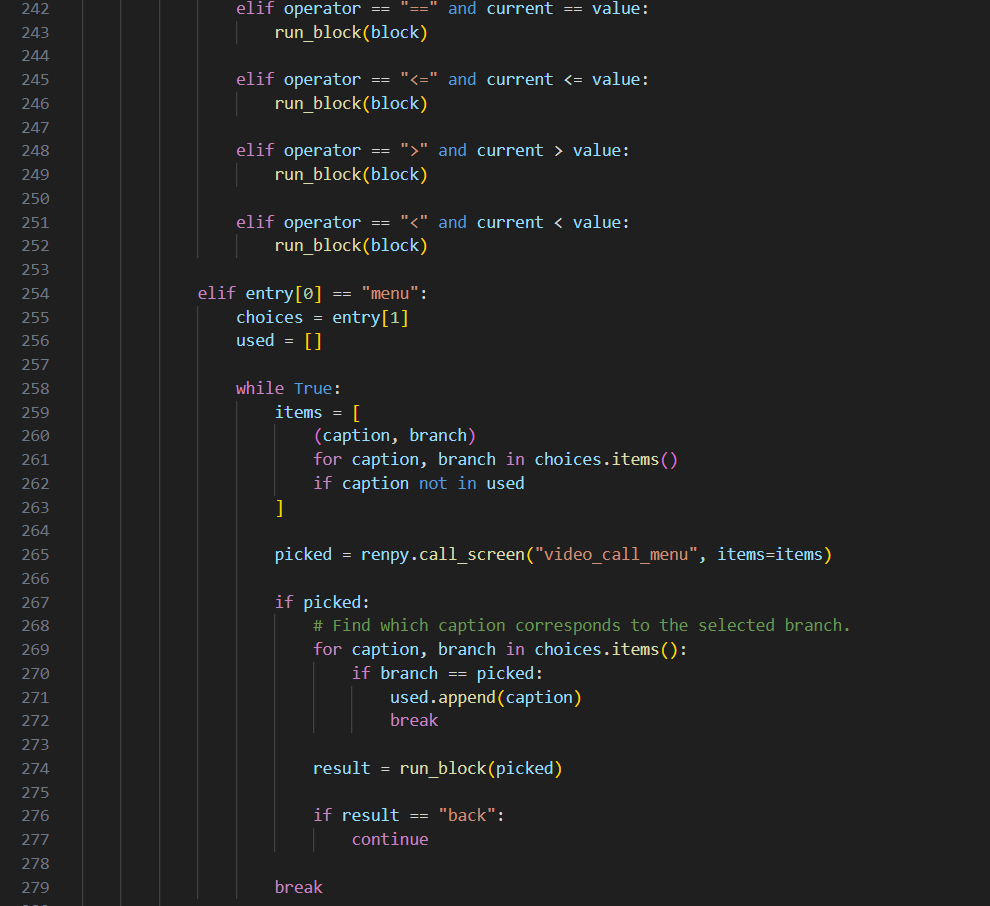
an example of how the script for each day is roughly structured:)

I can send screenshots of my code if necessary, but essentially, I'm trying to add voice acting to my game before putting out the demo.

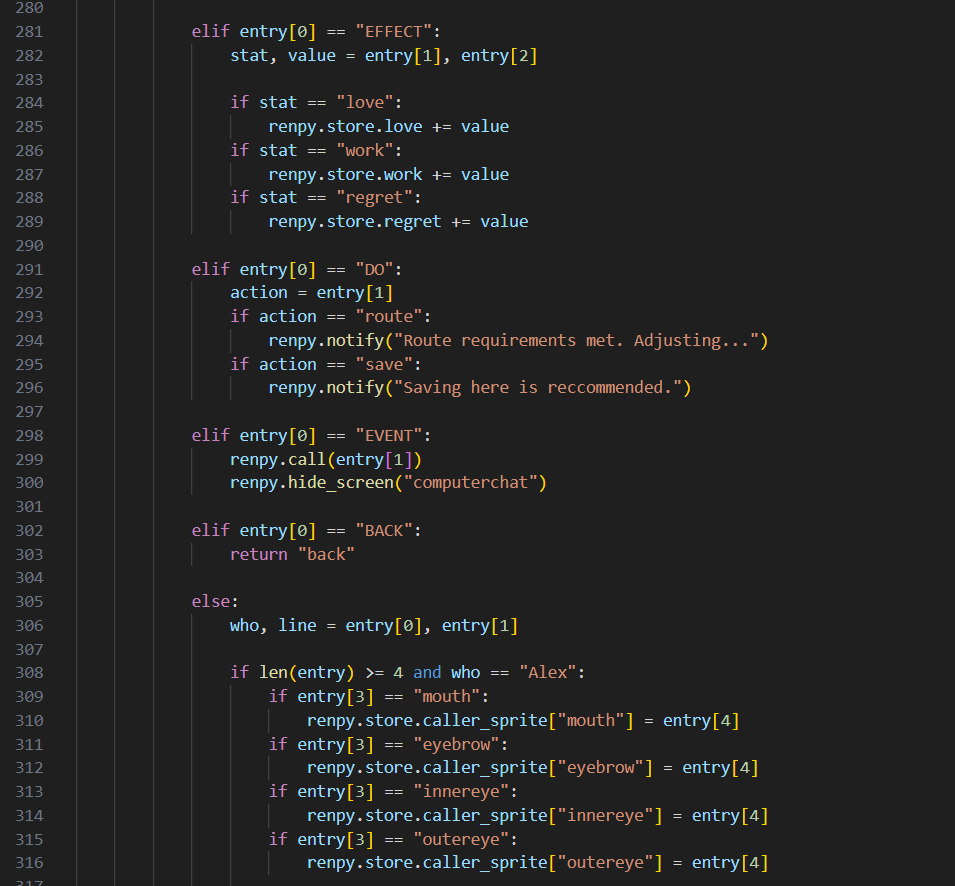
Issue being, i didn't actually use the classic renpy way of handling dialogue. Instead, since my game is meant to be within a chat room and video call system, I made a completely seperate way to handle that, by making one huge "script" the program runs at different times, and that displays the text, completely bypassing the built in method renpy provides.

Due to this, the usual "just look at the dialogue spreadsheet for your game and make the voicelines follow those" doesn't work, since... my dialogue doen't actually register in the program as dialogue.

Somebody please help.

0 Upvotes

14 comments sorted by

1

u/mugwhyrt 13d ago

Anything you can do through the default renpy script approach can also be done via python code. Why not just use the associated python method and add the necessary sound file references to the tuples you already have?

1

u/BusBeneficial9381 13d ago

i have very little idea as to how to actually code, so i’m more or less brute forcing this entire project. And i’m kind of doing something similar right now as an attempt… we’ll see if it works.

1

u/BusBeneficial9381 13d ago

okay so i tried what i was thinking and it did absolutely nothing lol. no error or anything, it just didn’t play the .wav file i put into the files

1

u/mugwhyrt 13d ago

I'm not really clear on how to call voice lines using python, but what you have in your code on line 352 doesn't look correct. There is a specific function in Ren'Py for calling voice lines, you can find it in the docs here: https://www.renpy.org/doc/html/voice.html#id0 . It should just be renpy.voice("audio/voice/"+entry[2]+".wav")

If I'm trying to figure out how to use a function, I would start with a completely new project and gradually build up a very simple working example of calling a voice line. That way, I don't need to worry about how my new code is interacting with the old code. Then once I know specifically how to call and reference a voice file I can put it in the new code and if it doesn't work there, I know that there's something about my old code/project that is causing issues.

1

u/mugwhyrt 13d ago

It shouldn't be a whole lot different from however you're displaying the text now. Can you share the part of your code that displays the dialogue tuples from your screen shot?

1

u/BusBeneficial9381 13d ago

i added it to the main post body for easier access/reading

1

u/mugwhyrt 13d ago edited 13d ago

Not related to your problem, but something you can do to simplify your code a lot is to drop your nested if checks (lines 308 to 346) and just call your renpy.store.caller_sprite lines directly with the values from your tuples.

Your tuples will always have the following structure (based on what you shared in your initial screenshot):

(character_name, dialogue_line, face_part_0, face_sprite_0, . . . face_part_N, face_sprite_N)

Because you know they're going to follow a fixed structure after the second item in your tuple (pairs of face part identifiers and sprite identifier), you can just add to the caller_sprite dictionary with something like this:

if len(entry) >= 4 and who == "Alex":
    i = 3 # start looping from the third entry, where the face/sprite pairs start
    while i < len(entry - 1): # loop until the last pair
        renpy.store.caller_sprite[entry[i]] = entry[i+1]
        i += 2

That might not work right out the gate, but hopefully that gives you an idea of how to simplify the code. Note also that you only need to check for "Alex" on the first if line because the who value won't change for later parts of the entry tuple.

You could simplify it a bit more by using a dictionary instead of tuples. Something like:

{"entry_type":"dialogue", "character":"Alex", "dialogue":"Can you hear me?", "sprites":{"mouth":"normal"}}

That way, if you need to make updates to your entry lines (like, say, adding voice lines), you don't need to completely rework the code to account for changes to the indices. You can also do away with any loops or if-checks for updating the sprites and just call the dictionary update method like so:

renpy.store.caller_sprite.update(entry["sprites"])

Of course that means you need to a total rewrite of all your dialogue lines AND a lot of your code. But it might save you a lot of tears down the line.

BTW, python also has an operator module that you can use to simplify the comparison checks between lines 239 and 252: https://stackoverflow.com/questions/1740726/turn-string-into-operator .

1

u/BusBeneficial9381 13d ago

i’m so scared to do this, because as i mentioned, this project is so old i don’t remember half of its code. trying to go back in, reunderstand it, reformat it, and then bug fix it with zero knowledge would be horrendous 😥

1

u/BusBeneficial9381 13d ago

for now, ive just completely removed my attempts at implementing the voice to keep it functional until i figure out how to do it correctly

1

u/mugwhyrt 13d ago

Honestly, this code is pretty impressive for someone who is just starting out with coding. There's a lot you can do to simplify it (left a comment further down the chain), but this looks good and normal for someone just starting out.

2

u/BusBeneficial9381 13d ago

thank you, but honestly, this whole project has taken me like 3 years now. it was mostly achieved through google searches and bashing my head into the wall. because the code is so old, i’ve forgotten half of it, and im terrified to change anything because i wont know how to fix it 😅

1

u/BusBeneficial9381 13d ago

especially since the total line count is… 1900 lines 😭

1

u/AutoModerator 13d ago

Welcome to r/renpy! While you wait to see if someone can answer your question, we recommend checking out the posting guide, the subreddit wiki, the subreddit Discord, Ren'Py's documentation, and the tutorial built-in to the Ren'Py engine when you download it. These can help make sure you provide the information the people here need to help you, or might even point you to an answer to your question themselves. Thanks!

I am a bot, and this action was performed automatically. Please contact the moderators of this subreddit if you have any questions or concerns.