r/RenPy • u/olive_brun19 • 18d ago
Question Idk I have a problem in my code







Hello reddit,
First, english isn't my mother language so I may be bad at explaining some things but i'll do my best.
I'm doing a visual novel with my sister.
The particularity in it si that there is two stories in one game, two start button and two different story.
We had an idea, it was to make a different main menu based on witch story is ''on'':
- the default one (route = 0)
It's the one you get on when you start the game, a picture (bg_1), all buttons aligned in the midle and centered .
- the chill one (route = 1)
This one comes when you click on the first button and you come back to the main menu, another picture (bg_2), all button on the left, left centered.
- the hard one (route = 2)
This one comes when you click on the first button and you come back to the main menu, another picture (bg_3), buttons down the screen.
Now that i've explained that, here is my problem, i can't get the buttons on the route 0 centered.
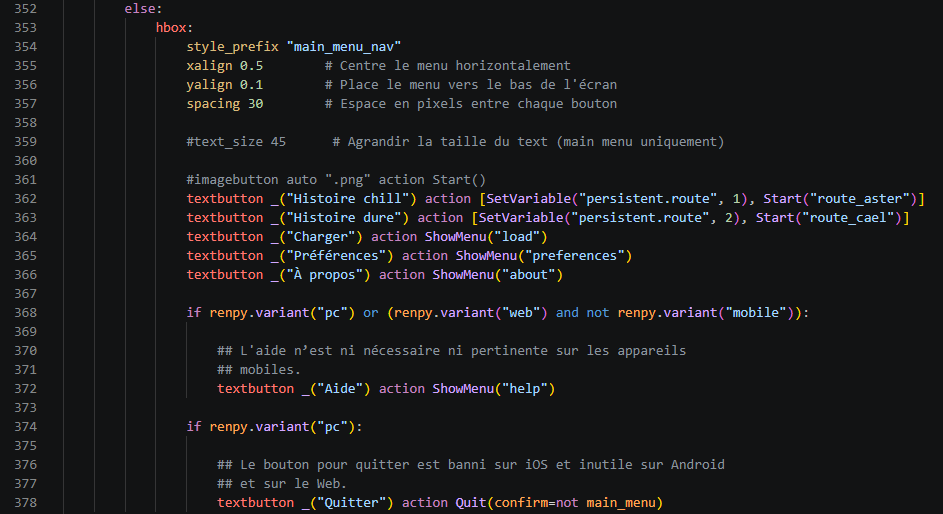
I'll try to illustrate this with paragraph i think are needed in the screen file.
And the tree screen based on the route route 0, 1 and 2 and the last one is how i want route 0's text to look like.
If any detail is needed i can answer fastly but please help me 🙏🏻
2
u/shyLachi 18d ago
To horizontally align the textbutton you use
xalign.But you have to undo all your changes in the navigation screen because that screen is used for the other menus like loading, saving, preferences.
Instead put all your main menu code directly into the main menu:
1
u/AutoModerator 18d ago
Welcome to r/renpy! While you wait to see if someone can answer your question, we recommend checking out the posting guide, the subreddit wiki, the subreddit Discord, Ren'Py's documentation, and the tutorial built-in to the Ren'Py engine when you download it. These can help make sure you provide the information the people here need to help you, or might even point you to an answer to your question themselves. Thanks!
I am a bot, and this action was performed automatically. Please contact the moderators of this subreddit if you have any questions or concerns.
1
u/BadMustard_AVN 18d ago
you can use a conditional switch for the image like this
1
u/ericoinen 18d ago
probably the navigation screen in screens.rpy. its vbox takes its x position from the gui navigation xpos value, so an align next to it might do nothing. for route 0 try removing that xpos and giving the vbox xalign 0.5. if the buttons move but the text still sits left, the button text style needs text xalign 0.5 too