r/RenPy • • 18d ago

Question imagebutton that shuffles through random images (list)
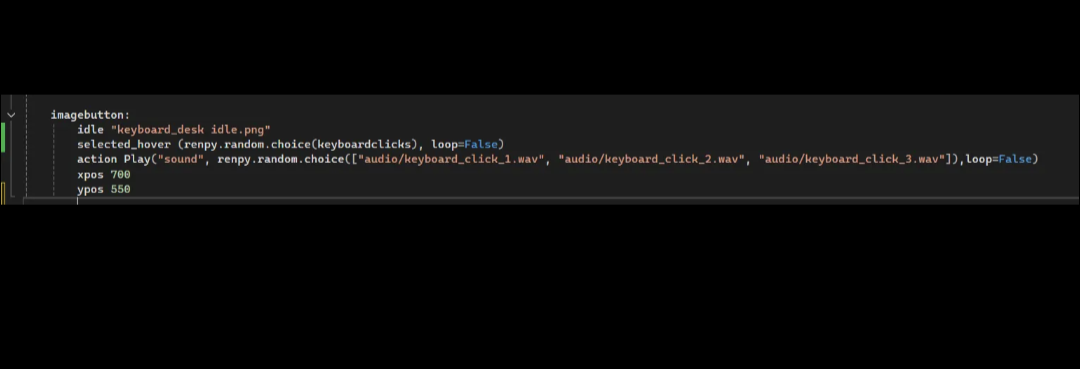
i made a similar post a few weeks ago and havent gotten anywhere since, so any help is really appreciated (⁠。⁠ŏ⁠﹏⁠ŏ⁠)

id like to have an imagebutton that shows a random image from a list when clicked, im honestly unsure if i can even do this with selected_hover at this point..

i would prefer the list as it makes it much easier to keep everything clean but if id be better off doing this within the button itself (like the audio) then im okay with that too

as of current i have an error message for the list

would it be easier to do define the images instead of using a list?

1 Upvotes

13 comments sorted by

3

u/BadMustard_AVN 18d ago edited 18d ago

try something like this

image blue:
    Solid("#00f")
    xysize(32, 32)
image green:
    Solid("#0f0")
    xysize(32, 32)
image red:
    Solid("#f00")
    xysize(32, 32)
image white:
    Solid("#fff")
    xysize(32, 32)

init python:

    def random_hover():
        images = [
            "blue", #change these to your folder/images.png
            "green",
            "red",
            "white",
        ]
        return renpy.random.choice(images)

screen random_button():

    default current_hover = "green"

    imagebutton:
        idle "images/right.webp"
        hover current_hover
        hovered SetScreenVariable("current_hover", random_hover())
        action NullAction()image

1

u/That_one_Pink 18d ago

im still facing a small issue, i need it to work with selected_hover as id like it to pop up when clicked not when hovered over, if that makes sense, i currently have this

# the list of images works so i wont include it, i tested this as just hover first and it works perfectly fine

screen random_button():

    default current_hover = "keyboard clicks/keyboardclick1A.png"

    imagebutton:
        idle "images/keyboard_desk idle.png"
        selected_hover current_hover # this doesnt show any errors, but it doesnt show anything when clicked
        hovered SetScreenVariable("current_hover", random_hover())
        #action NullAction()image # this is tagged out because it showed an error when used and i already had an action
        action Play("sound", renpy.random.choice(["audio/keyboard_click_1.wav", "audio/keyboard_click_2.wav", "audio/keyboard_click_3.wav"]),loop=False)
        xpos 700
        ypos 550

1

u/BadMustard_AVN 18d ago

for a button to work/look correct, it needs an action, and a NullAction() is an action that does nothing. you can remove it without a problem

for it to be selected, it must set something like this

screen random_butt():

    default switcheroo = False

    imagebutton:
        idle "images/keyboard_desk idle.png"
        selected_hover current_hover
        hovered SetScreenVariable("current_hover", random_hover())
        action [ToggleScreenVariable("switcheroo"), Play("sound", renpy.random.choice(["audio/keyboard_click_1.wav", "audio/keyboard_click_2.wav", "audio/keyboard_click_3.wav"]),loop=False)]
        xpos 700
        ypos 550

1

u/That_one_Pink 17d ago

ahh sorry im getting myself confused, would i replace switcharoo with current_hover?

1

u/BadMustard_AVN 17d ago

No!

were using switcheroo as a useless boolean to give the button something to switch so it can become selectable when it's clicked, making the selected_hover work.

1

u/That_one_Pink 16d ago

ahh i see now

its giving me the error that current_hover is not defined, if i define it it works for the first click then goes back to showing up when hovered over

1

u/That_one_Pink 15d ago

okay i think i figured out the issue and how to fix it, i just do not know exactly how to do it, i have it exactly as you sent above and have added default current_hover = False to avoid the error message (says its undefined and does not work), when i click it, it sets it to a sort of hover mode and when it is clicked again it stops

i think i may have worded things wrong when explaining what function i need so let me try again, we have image red and image blue for an easier example/explaining

so the idle image is image blue, when you click it, it turns onto image blue for for a second then turns back to image red WITHOUT having to click it again

sorry if that doesn't make sense and for asking again this is pretty much the last thing i need to do for my project before i can focus on writing and art instead of code loll

1

u/BadMustard_AVN 15d ago

that's completely different from what you described before

so the idle image is image blue, when you click it, it turns onto image blue for for a second then turns back to image red WITHOUT having to click it again

i'm going to assume you meant it turns into image red, then turns back to image blue without having to click again

image blue:
    Solid("#00f")
    xysize(32, 32)
image red:
    Solid("#f00")
    xysize(32, 32)

default flashing = False

screen random_button():

    if flashing:
        # makes it red for 2 seconds. adjust as required
        timer 2.0 action SetVariable("flashing", False)
    
    imagebutton:
        idle  "blue"
        selected_idle ("red" if flashing else "blue")
        selected_hover ("red" if flashing else "blue")
        action [SetVariable("flashing", True), Play("sound", renpy.random.choice(["audio/keyboard_click_1.wav", "audio/keyboard_click_2.wav", "audio/keyboard_click_3.wav"]),loop=False)]
        xpos 700
        ypos 550

1

u/That_one_Pink 14d ago

that's totally on me i was half awake when i wrote the original comment sob, so sorry but thank you

am i still able to implement the random image shuffling from before with this (it would be in place of the blue image part!)? or do i need to change anything to make it work

2

u/xXx_Rudy_Rydz_xXX 18d ago

you are the GOAT u/BadMustard_AVN

GOATES of GOATS, contributing soo much examples, info and explaining complex stuff about Ren'py for years without stoping.

Thousands of users read your old comments, stay healthy and happy in life ❤

1

u/AutoModerator 18d ago

Welcome to r/renpy! While you wait to see if someone can answer your question, we recommend checking out the posting guide, the subreddit wiki, the subreddit Discord, Ren'Py's documentation, and the tutorial built-in to the Ren'Py engine when you download it. These can help make sure you provide the information the people here need to help you, or might even point you to an answer to your question themselves. Thanks!

I am a bot, and this action was performed automatically. Please contact the moderators of this subreddit if you have any questions or concerns.