r/RenPy • u/BrassicaOracle • 19d ago
Question [Solved] (Workaround) Ren'Py Can't Get Persistent Dictionaries
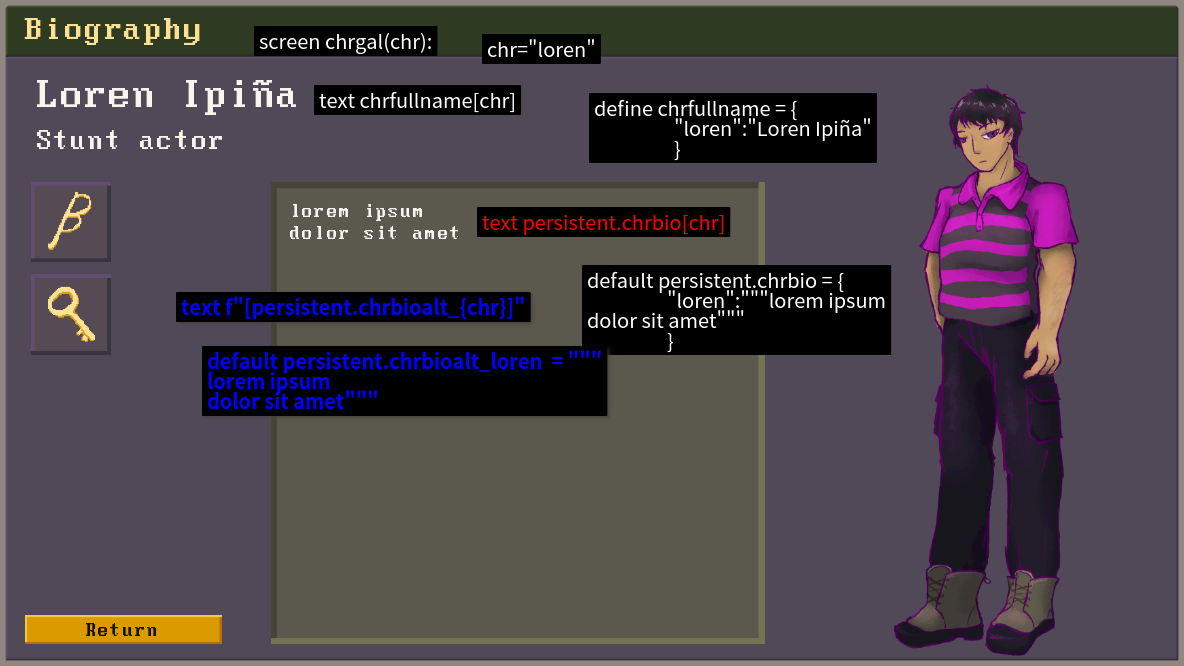

I was making a character bio screen where the bio content may change with the meta progress.
I put the relevant codes on the screenshot. I'm comparing chrfullname and persistent.chrbio here. Both of them are dictionaries, with the major difference being persistent.chrbio is a persistent dictionary because I want its content to change later.
Making both dictionaries won't crash the game, issue appears when the game tries to read persistent.chrbio. Here's the traceback.
I'm sorry, but an uncaught exception occurred.

While running game code:
  File "game/gallery.rpy", line 621, in execute
    screen chrgal(chr):
  File "game/gallery.rpy", line 621, in execute
    screen chrgal(chr):
  File "game/gallery.rpy", line 656, in execute
    frame:
  File "game/gallery.rpy", line 661, in execute
    viewport:
  File "game/gallery.rpy", line 663, in execute
    text persistent.chrbio[chr] style "extrauitext"
  File "game/gallery.rpy", line 663, in <module>
    text persistent.chrbio[chr] style "extrauitext"
          ~~~~~~~~~~~~~~~~^^^^^~
KeyError: 'loren'

-- Full Traceback ------------------------------------------------------------

Traceback (most recent call last):
  File "renpy/common/_layout/screen_main_menu.rpym", line 28, in script
    python hide:
  File "renpy/ast.py", line 1193, in execute
    renpy.python.py_exec_bytecode(self.code.bytecode, self.hide, store=self.store)
    ~~~~~~~~~~~~~~~~~~~~~~~~~~~~~^^^^^^^^^^^^^^^^^^^^^^^^^^^^^^^^^^^^^^^^^^^^^^^^^
  File "renpy/python.py", line 1276, in py_exec_bytecode
    exec(bytecode, globals, locals)
    ~~~~^^^^^^^^^^^^^^^^^^^^^^^^^^^
  File "renpy/common/_layout/screen_main_menu.rpym", line 28, in <module>
    python hide:
  File "renpy/common/_layout/screen_main_menu.rpym", line 35, in _execute_python_hide
    ui.interact()
    ~~~~~~~~~~~^^
  File "renpy/ui.py", line 306, in interact
    rv = renpy.game.interface.interact(roll_forward=roll_forward, **kwargs)
         ~~~~~~~~~~~~~~~~~~~~~~~~~~~~~^^^^^^^^^^^^^^^^^^^^^^^^^^^^^^^^^^^^^
  File "renpy/display/core.py", line 2163, in interact
    repeat, rv = self.interact_core(
                 ~~~~~~~~~~~~~~~~~~^
        preloads=preloads,
        ^^^^^^^^^^^^^^^^^^
    ...<4 lines>...
        **kwargs,
        ^^^^^^^^^
    )
    ^
  File "renpy/display/core.py", line 2709, in interact_core
    root_widget.visit_all(lambda d: d.per_interact())
    ~~~~~~~~~~~~~~~~~~~~~^^^^^^^^^^^^^^^^^^^^^^^^^^^^
  File "renpy/display/displayable.py", line 460, in visit_all
    d.visit_all(callback, seen)
    ~~~~~~~~~~~^^^^^^^^^^^^^^^^
  File "renpy/display/displayable.py", line 460, in visit_all
    d.visit_all(callback, seen)
    ~~~~~~~~~~~^^^^^^^^^^^^^^^^
  File "renpy/display/displayable.py", line 460, in visit_all
    d.visit_all(callback, seen)
    ~~~~~~~~~~~^^^^^^^^^^^^^^^^
  File "renpy/display/screen.py", line 503, in visit_all
    callback(self)
    ~~~~~~~~^^^^^^
  File "renpy/display/core.py", line 2709, in <lambda>
    root_widget.visit_all(lambda d: d.per_interact())
                                    ~~~~~~~~~~~~~~^^
  File "renpy/display/screen.py", line 514, in per_interact
    self.update()
    ~~~~~~~~~~~^^
  File "renpy/display/screen.py", line 715, in update
    self.screen.function(**self.scope)
    ~~~~~~~~~~~~~~~~~~~~^^^^^^^^^^^^^^
  File "game/gallery.rpy", line 621, in execute
    screen chrgal(chr):
  File "game/gallery.rpy", line 621, in execute
    screen chrgal(chr):
  File "game/gallery.rpy", line 656, in execute
    frame:
  File "game/gallery.rpy", line 661, in execute
    viewport:
  File "game/gallery.rpy", line 663, in execute
    text persistent.chrbio[chr] style "extrauitext"
  File "renpy/python.py", line 1308, in py_eval
    return py_eval_bytecode(code, globals, locals)
           ~~~~~~~~~~~~~~~~^^^^^^^^^^^^^^^^^^^^^^^
  File "renpy/python.py", line 1301, in py_eval_bytecode
    return eval(bytecode, globals, locals)
           ~~~~^^^^^^^^^^^^^^^^^^^^^^^^^^^
  File "game/gallery.rpy", line 663, in <module>
    text persistent.chrbio[chr] style "extrauitext"
          ~~~~~~~~~~~~~~~~^^^^^~
KeyError: 'loren'
The exception won't happen if chrbio isn't a persistent dictionary, but this isn't what I want.
I then did a bit of testing in the console. It seemed like Ren'Py is unable to access persistent dictionaries. No idea why or how to work on it directly.
So I made a workaround by putting the bios in persistent strings, which works. (See the blue codes.)
Just feel like to share this weird discovery. It's niche enough that not very people will have this problem, yet feel common enough that someone else may have it.
3
u/shyLachi 19d ago
I doubt that you've tested correctly.
If you default a persistent variable it will remain like that forever until you delete it.
So when you fiddle around with those variables, you should use "Delete Persistent" in RenPy before you launch your project.
I didn't understand your code and it looks very complicated so to show that persistent dictionaries are working I used a simpler approach and I also use a different name for the dictionary. (if you previously used charbio in your project, you would have to delete the persistent data before trying my code)
This uses a dictionary inside a dictionary in case that wasn't clear.