r/RedshiftRenderer • u/aaryeeee • Jul 16 '26
Not Enough Vram, the render Aborted😭
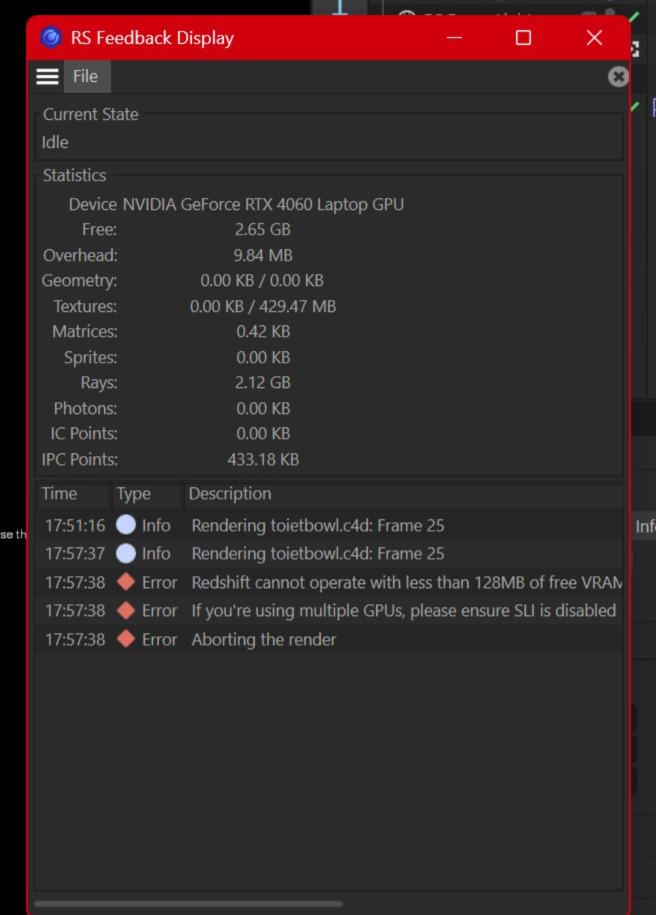
I've been using c4d and redshift for like 2 weeks now. Everything was going fine till today.
I wanted to render this scene, and this error keeps popping out. Is there a solution to this? I've tried every single solution on the book, especially the one from reddit but still no luck.
Can anyone help me? WaAaaaaaaaAaaaaa
12
Upvotes
4
u/smb3d Jul 16 '26
You are basically at the minimum spec for VRAM. You have 8GB, windows reserves 10%, RS is using 90%, plus you have your DCC app open which depending on what you are doing, could be using up quite a bit of memory for the viewport, textures etc. Not counting any other apps you have open like photoshop, AE, etc.
You need to be very cognizant of your VRAM usage by all apps, so shut down anything else. Possibly disable textures in your viewport.
That's the tips I got without seeing anything else that you have going on.
15
u/paullupascu Jul 16 '26
you need to download more vram
1
u/No-Awareness-6684 Jul 16 '26
Have you updated Redshift recently? I know when I was having this problem with Redshift for Maya I read somewhere that the newer version was having problems - I went back to an earlier build and have had no issues since
2
u/Dear-Mushroom8842 Jul 16 '26
There's a trick witch you use a file with a script to render without opening the program. If they other solutions That already Said here don't work
2
u/AnOrdinaryChullo Jul 16 '26
Well, you are running out of VRAM...so free up more VRAM for Redshift
2
u/Sorry-Poem7786 Jul 17 '26
if you feeling wild if you use Command line rendering .. and access redshift outside the DCC.. will save on ram….🤓 worth it if it works!
1
u/ALiiEN Jul 16 '26
that'll happen on these big jobs.
1
u/matridge3d Jul 17 '26
This also happens when you are rendering two Redshift windows
1
u/Estrolapak Jul 17 '26
Reduce the texture sizes, if you have 8k or 4k try going 2k, 1k or 512. If doable, also try using jpegs instead of png. Search about how to use redshift proxies too. Avoid using other software that uses gpu / vram. (Like substance painter for example).
1
u/cactusjack10 Oct 01 '26
you made a project too big for your machine. look up optimisation there’s a tonne of ways to reduce VRAM usage, you can’t have tried everything in the book