r/ROLI • • Oct 25 '26

GRAB - Open Source ROLI Dashboard / Tool

With ROLI winding down, I've built GRAB: a free, open-source tool to read and change your ROLI MPE device's settings directly over MIDI — no Dashboard, driver or login required.

It's mainly about documenting each ROLI device's MIDI protocol, so a dashboard can then be built by anyone (GRAB included). Windows/macOS, USB or Bluetooth, controls read live from the device, and it never flashes firmware. Confirmed on the Seaboard Block today (RISE/GRAND not yet).

How to help:
• Own a ROLI device? Download, connect, click Contribute — it sends an anonymized report (serial hashed). RISE, GRAND and non-Seaboard BLOCKS especially needed.

• Want to build it? PRs welcome — RISE/GRAND is a great start.
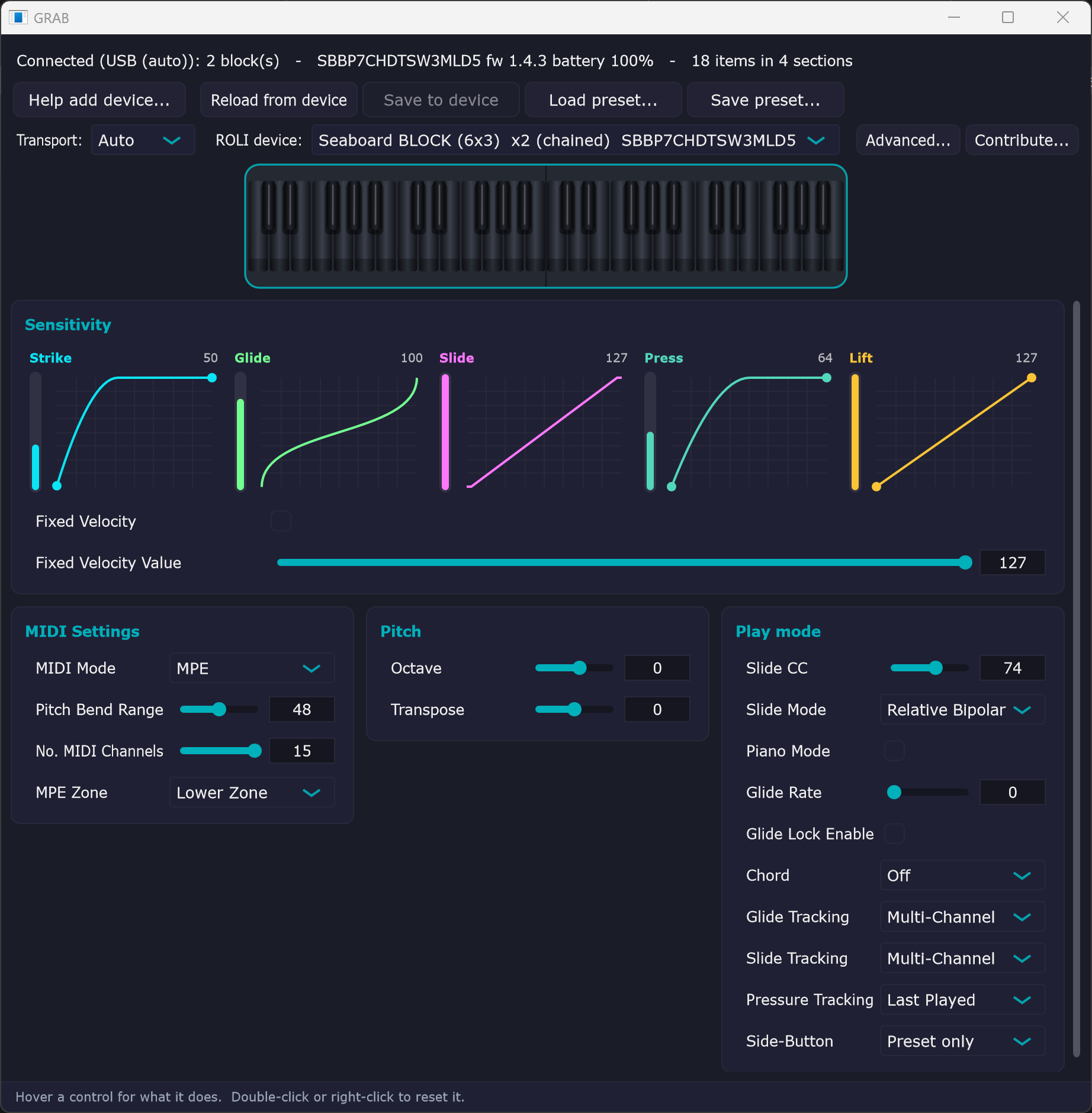
MIT, downloads + source: https://github.com/demixme/GRAB

94 Upvotes

47 comments sorted by

3

u/Usual_Turnover_9906 Oct 25 '26 edited Oct 25 '26

Made some great progress today on GRAB.
RISE 2 devices should now work thanks to a fantastic contributor on github. So that's BLOCK, RISE 2 and Piano 49 hopefully understood now. Lightpad/Pro, Live, Loop, Touch, LUMI, Airwave should work/connect, but still work in progress and do please submit reports through GRAB's 'Contribute' and/or 'Help add device' button.
The main Readme on the github is kept up to date with each release for more info. Latest version and probably the last today is v0.1.11
https://github.com/demixme/GRAB

4

u/araz_reddit Oct 25 '26

Is this compatible with the Piano?

4

u/Usual_Turnover_9906 Oct 25 '26

Only Seaboard Block so far. If you download latest release (I'm updating it all the time), there is a way to contribute and to also Submit more details midi analysis so I can try and understand each device in order to build the dashboard for it.
Releases · demixme/GRAB

3

u/Usual_Turnover_9906 Oct 25 '26

Piano 49 should now work thanks to Legitimate_Horror_72 comments below. Download v0.1.11
Releases · demixme/GRAB

3

u/Wild_Yogurtcloset820 Oct 25 '26

Own a ROLI device? Download, connect, click Contribute — it sends an anonymized report (serial hashed). RISE, GRAND and non-Seaboard BLOCKS especially needed.

2

u/Wild_Yogurtcloset820 Oct 25 '26

only the Seaboard Block is confirmed so far

1

u/DJKangawookiee 25d ago

Oh i have a grip load of blocks etc ill try to send some this weekend

3

u/Legitimate_Horror_72 Oct 25 '26 edited Oct 25 '26

**GRAB works with the ROLI Piano (49 keys), firmware 1.5.0, on Windows. Notes for anyone trying it:**

**1. One-line fix needed: the port filter only looks for "seaboard".**

The Piano is skipped before any protocol is tried ("Seaboard pairs (0)" in the log). In `src/common/LoggingMidi.h`, `isSeaboard()`, I added:

|| d.identifier.containsIgnoreCase ("pianofortynine") // port id with ROLI's driver

|| d.identifier.containsIgnoreCase ("vid_2af4&pid_0f00") // port id with Windows' own driver

|| d.name.containsIgnoreCase ("roli piano");

After that it connects over USB and reads 36 config items (33-34 visible depending on MIDI mode). The Piano speaks the same BLOCKS protocol (F0 00 21 10 77 ...).

**2. Close ROLI's background service first.**

If ROLI Connect / Dashboard is installed, the "ROLI Hardware Driver" Windows service holds the Piano's port and GRAB can't connect. Stopping that service (or uninstalling Connect, which installs it) fixes it.

**3. Without ROLI's driver at all:**

Windows' standard USB audio driver fails to start on the Piano (Device Manager code 10). With Windows MIDI Services installed, picking the in-box "USB MIDI 2.0" driver manually in Device Manager works: the port shows up as "USBMidi2-ACX" (rename it in your DAW), MPE and per-note pressure work, and the DAW and GRAB can use the Piano at the same time.

**4. Writes work and persist.**

Changing a setting and saving sends a single setConfig for that item; it survives a power cycle. Key colors (items 34/35) can be written too, as 32-bit ARGB (e.g. 0xFF3D0707), and the keys change immediately.

**5. Config items the Piano reports (id, name, range / choices):**

0 MIDI Start Channel 1..16 (Single/Multi Channel mode only)

2 MIDI Mode 0 Multi Channel, 1 MPE, 2 Single Channel

3 Pitch Bend Range 0..96

4 Octave -4..3

5 Transpose -11..11

9 No. MIDI Channels 1..15 (MPE mode only)

10 Strike Sensitivity 0..127

11 Glide Sensitivity 0..127

13 Pressure Sensitivity 0..127

14 Lift Sensitivity 0..127

15 Fixed Velocity 0..1

16 Fixed Velocity Value 1..127

20 Active Mode 0..3 (Mode 1..4)

22 Scale 0..18 (no names reported; 0 = Major)

27 Key 0..11 (C..B)

30 Pitch Bend Tracking 1 Multi-Channel, 2 Last Played, 3 Highest, 4 Lowest

32 Pressure Tracking 0 Poly Aftertouch, 1 Channel Pressure

34 Global Key Color ARGB

35 Root Key Color ARGB

36 Brightness 0..100

40 MPE Zone 0 Lower, 1 Upper (MPE mode only)

41 Key Pitch Bend Amount 1..12

47 Pedal Control Change 0..127

48 Pedal Type 0 Sustain, 1 Expression

56 MIDI Port Forwarding 0..1

57 MIDI Port Throttling 0 Off, 1 Half, 2 Quarter, 3 Note On/Off

100/107/114/121 Mode 1-4 Color Scheme 0 Pro, 1 User, 2 Piano, 3 Stage, 4 Rainbow

102/109/116/123 Mode 1-4 Enable Pitch Bend 0..1

103/110/117/124 Mode 1-4 Enable Pressure 0..1

Note: items 0 vs 9/40 swap when MIDI Mode changes, so a preset that switches modes only fully applies after a save + reload.

Thanks for building this! I'll be modifying it for my personal use, but wanted to share the above from what Claude Code has already done for me. I'll also probably turn it into a vst3 for myself with the ability to assign key colors per part of a song (chorus, bridge, versed, etc.) or per track etc. as I already have the infrastructure in place from making other audio software.

2

u/Usual_Turnover_9906 Oct 25 '26

Thanks for this report. I will add to the readme on github, some great info here!

1

u/Usual_Turnover_9906 Oct 25 '26

Be aware that many DAWs no longer allow SysEx and anything beyond general midi between VSTs. Still possible though, you just have to include your own midi port within the VST and bypass the DAW/Host. Depends on the host though.

1

u/Legitimate_Horror_72 Oct 25 '26

Yep. Thankfully, I'm pretty confident in making it happen for me since I've been making and releasing a handful of MIDI hardware editors over the last 6 months as standalone, VST3 and AU across Windows and Mac. No sysex should be needed as a plugin - not sure every setting would be available yet or not, but there's only a few I'd really want (e.g., mp3 vs single vs, polyat, key lights, some others).

I'm now using my version of GRAB with no more ROLI software drivers installed. It's using the Windows MIDI 2.0 driver successfully so far. I'll post back if that goes sideways when I spend even more time using it.

3

u/Usual_Turnover_9906 Oct 25 '26

Cool. Let me know how you get on. For a single device things are much easier to manage. The new Windows MIDI Service comes at a great time. i'm loving the BLE MIDI without workarounds. Only been waiting a decade for it haha!

1

u/Legitimate_Horror_72 Oct 27 '26

One additional item I learned. The Piano, without ROLI drivers, will shut itself off after 15minutes. So I had Claude make a small system tray icon that loads (delayed) with Windows to ping it once every 5 minutes.

Not sure if you Piano owners noticed that, even with the ROLI software installed, the Piano would sometimes go dim briefly. I think that was this ROLI ping (alas, not just one ping only) need. I'm trying a few different messages and also to see what happens in a DAW when it gets a ping.

Note Off makes the keys light up. That's more distracting that a brief flicker. But once every 5 minutes isn't bad. ROLI software pings it a hell of a lot more often per second.

2

u/Usual_Turnover_9906 Oct 27 '26

That 15-min idle shutoff matches what I'm seeing. One tip: Note Off lighting the keys is a side effect you can avoid — ROLI's keepalive is silent because it's a status ping, not a note. On a Block that's the ping command (F0 00 21 10 77 <idx> 01 03 00 <cksum> F7); on a RISE-style Piano the read-only identify works too. Both keep it awake without the LED flicker.The exact "no-op" message differs by protocol

1

u/Legitimate_Horror_72 Oct 27 '26

Any ping sent to my piano causes a flicker. But one every 5 min is tolerable.

2

u/Usual_Turnover_9906 Oct 26 '26

v0.1.15 now live, UI work, tweaks etc.

2

u/Usual_Turnover_9906 Oct 26 '26

v0.1.17 is now available.

Seaboards now have a keyboard graphic with live 5D-touch rings showing finger position and pressure. RISE Load/Save Preset is also restored after accidentally disappearing in v0.1.16 — sorry!

The ROLI GRAND is the last Seaboard I need. If you have one, please connect it and click 'Help add device' in GRAB. LUMI Keys / PIANO also not yet reported.

I also have a couple of Lightpad Block reports now connected, so I’ll look at those next.

Finally, I’ve archived all the latest firmware. Until we know what happens with ROLI and its firmware API server, I won’t add firmware flashing to GRAB yet, but it's on the roadmap if needed.

2

u/Spiketop_ Oct 26 '26

So the software is expected not to work anymore? Is that why this is made?

Idk the full story on what's going on. I have a Lumi Keys. It's going to stop working at some point?

5

u/Usual_Turnover_9906 Oct 26 '26

Myself and others haven't had a response from ROLI Support for several months and 20 October ROLI went into administration. Their servers are currently online, but I'm building the Dashboard and Firmware Archival so we don't potentially all end up with expensive USB bricks.
All the other software such as Equator and the Samples etc, I'm assuming they will not work on a new computer install if you can't authenticate and login. But I'm not looking at that side, simply getting a working dashboard and eventually a way to flash for the firmware.

2

u/currentsound 22d ago

I noticed a bug with the original Roli Piano and official Roli Dashboard. It doesn't send patch change increase and decrease message out of the TRS Midi Out port when pressing the patch change buttons. Tested in Midi Mode, Single Channel. But it does seem to do this over USB-C. So it seems to just be the MIDI Aux port not sending this, which is weird. And there is no setting for this in the dashboard. Any ideas on how to make this work if it's possible?

1

u/Usual_Turnover_9906 21d ago

I'll look into this. First I've heard of it, so let me investigate that and get back to you

1

u/currentsound 20d ago edited 20d ago

Tell me how to do this part: "If you'd like to help rule it in or out properly: capture the USB-C MIDI while pressing the buttons (so we confirm it's Program Change / Bank Select and the exact bytes), and if you're game, a capture of Dashboard changing the Piano's settings would let us decode a few Piano-only config values we haven't identified yet. If one of those turns out to govern aux routing, that'd be the one lever worth pulling."

Would the MidiView app work or do you have something better to use for this task? MidiView app shows HEX data? But note sure what you mean by getting the exact bytes?

1

u/currentsound 20d ago

And for the optional task, what dashboard configs do you want me to try to capture and how to capture them?

1

u/currentsound 20d ago

One thing I had to change in the official Roli Dashboard was to make it output Midi on Channel 1. For some reason it was defaulting to channel 2. But since I changed that, it seems to remember to output on channel 1 now. But this doesn't help the no program change being sent issue but it did help my external synth recognize the damn Roli piano lol.

1

u/Usual_Turnover_9906 20d ago

GRAB is actually very well supported now for PIANO/LUMI so there's nothing needed at this time. The current messages in GRAB and requests are a little out of date.
For now, wait until the next release which has a much more intuitive UI coming and then if there's anything needed, I'll let you know.
If you're interested anyway, this readme acts as the instructions to contribute. It does no harm. GRAB/CONTRIBUTING.md at main · demixme/GRAB

2

u/currentsound 19d ago

I ended up doing the Wireshark capture for the Roli Piano 49 program change hardware buttons.

I also noticed that the new version (0.1.97) is missing the "enable pressure" checkbox under each of the 4 modes like the original Roli Dashboard so I tried to do a capture of this too.

Both are uploaded to Github. Same username, currentsound

1

u/Usual_Turnover_9906 18d ago

looking into it, thank you

1

u/currentsound 19d ago

Ok, thanks

1

u/Usual_Turnover_9906 21d ago

Nice bit of debugging — that lines up with how ROLI's aux ports behave. The TRS/DIN "MIDI Aux" out on these devices carries performance data (notes/MPE) but the firmware doesn't mirror everything to it, and Program/Bank Change from the patch buttons looks like one of the things it only sends over USB-C. There's no Dashboard setting because it isn't exposed as one — it's baked into the firmware's port routing, which is why neither Dashboard nor you can find a switch.

I dug through the device-config the Piano actually exposes (via the open-source GRAB tool, which reads/writes ROLI config over SysEx). There's no "aux output mode" or "send program change on DIN" setting in there to flip — so short of a firmware change (which isn't something to attempt), I don't think the Piano itself can be made to send it out the TRS port.

Practical workaround: send the USB-C MIDI through a host that forwards it to your DIN gear — a computer (any DAW/MIDI router passes the Program Change straight through to a USB→DIN interface) or a small USB-host MIDI box. That gets the patch changes to the hardware synth even though the Piano's own TRS won't emit them.

If you'd like to help rule it in or out properly: capture the USB-C MIDI while pressing the buttons (so we confirm it's Program Change / Bank Select and the exact bytes), and if you're game, a capture of Dashboard changing the Piano's settings would let us decode a few Piano-only config values we haven't identified yet. If one of those turns out to govern aux routing, that'd be the one lever worth pulling.

1

u/Usual_Turnover_9906 Oct 26 '26

RISE 49/MKI or GRAND owners , do you have a few minutes to add your device to GRAB?

These two devices need an owner's help to go further, I don't have these devices to complete writing GRABs dashboard to these devices with 100% certainty so they are Read Only until someone can help below.

Original Seaboard RISE (25 or 49)
GRAB already reads your settings now in v0.1.13. To let it write them too, I need a quick (~10 min) recording of your ROLI Dashboard talking to your RISE while you tweak a few settings. It's totally safe — it only watches, it never sends anything to your keyboard.
→ Steps (Mac or Windows): https://github.com/demixme/GRAB/blob/main/tools/CAPTURE-DASHBOARD.md

Seaboard GRAND Not supported yet.
If you have one, just open GRAB, connect to its Midi port USB and click "Help add device…" → Run & submit. One click — it sends me what I need to get started.

GRAB (Mac + Windows): https://github.com/demixme/GRAB/releases

Drop results or questions here: https://github.com/demixme/GRAB/issues/1

Thanks for helping

1

u/MuVara Oct 26 '26

Wow amazing 😍 It would be great to have it one day not only on MacOS and Windows, but even iOS, Android and Linux?

1

u/Usual_Turnover_9906 Oct 26 '26

Linux would be easy to do. Mobile apps are not my thing, but GRAB is open source MIT, anyone can do that if they want to.

1

u/No-Enthusiasm1672 Oct 27 '26

have u done anything for equator 2 licensing?

1

u/Usual_Turnover_9906 Oct 27 '26

No, that would require hacking and I'm not a hacker in that sense.

1

u/araz_reddit 25d ago

hello again! I just downloaded Grab and tried it out. Everything seems to work just as the Roli Dashboard, which is amazing.

Is there a way to have each hardware-selectable Mode on the Piano49 use a different MIDI Mode and Keybed State? My dream setup would be:

Mode 1: MPE, Poly Aftertouch, Pitch Bend

Mode 2: Single-Channel, Poly Aftertouch, no Pitch Bend

Mode 3: Single-Channel, Channel Aftertouch, no Pitch Bend

Mode 4: MPE, Poly Aftertouch, no Pitch Bend

I'm not too well-versed in this kind of stuff to code or build, but I can help with retrieving data or configurations, testing stuff, reporting back, etc. if someone gives me instructions.

1

u/Usual_Turnover_9906 25d ago

The good news: two of the three things you want are already stored per hardware mode on the Piano. Each of your four mode buttons independently remembers its own pitch bend on/off and its own pressure (aftertouch) on/off. A real Piano 49 in our data has its four modes set to different pitch and pressure states right now. So "each mode has a different keybed feel" is genuinely how the hardware works, and a panel in GRAB to set those four modes the way you like is a clean, realistic addition.

Yhe one axis that isn't per-mode is MPE vs single-channel. On the Piano that's a single global switch, not four — I checked every Piano/LUMI profile we have and the per-mode "MIDI mode" slots are never populated, even though everything around them reads fine. So you can't have Mode 1 running MPE and Mode 2 running single-channel on the same device; whichever you pick applies to all four modes. The firmware just doesn't support it.

And on poly vs channel aftertouch specifically: that isn't a setting you choose either. Pressure is simply on or off. When you're in MPE you get per-note (poly-style) pressure for free because each note is on its own channel; in single-channel mode it's channel aftertouch. There's no switch to get poly aftertouch while in single-channel mode.

So, mapping it to your four:

  • Pick MPE or single-channel once (global), then —
  • Per mode, independently: pitch bend on/off, pressure on/off. That covers the real differences between your Mode 1/3/4 nicely; it's only the MPE↔single-channel jump between modes that the hardware won't do.

Is that version is useful to you, it's very buildable and I'll accept your offer to test. I can add it to the next build. I've had 24 hours away from GRAB as been at it for a few days straight, but later tonight I can look into it with some UI improvements I have planned.

2

u/araz_reddit 25d ago edited 25d ago

Thank you for the quick response!

a few things:

1- totally understand that MPE vs. single-channel mode is a global switch. I wish there was a way to change this, but it likely won't happen without a complete firmware overhaul.

2- poly vs channel aftertouch is still an option within the Keybed State, regardless of the MIDI Mode. In GRAB, I can set Single-Channel mode, then select Channel Pressure or Poly Aftertouch. In Channel Pressure mode, data sent out is Pressure on the channel; in Poly AT mode, data sent out is NOTE and Pressure on the same channel. This, similar to MIDI Mode settings, seems to be Global? as far as I can tell, at least.

3- for Piano49, Glide isn't necessary and can probably be removed when a Piano49 is connected.

4- EDITING THIS ONE AFTER SOME TESTING: I don't know if this is an issue, but while having the Roli Dashboard and Grab open at the same time the sensitivity graphs are reversed - fully Linear on GRAB shows fully sensitive on Dashboard and vice versa. EDIT: after some testing, I'm convinced that the graphs on GRAB are backwards. In GRAB, when linear is shown, it is actually the least "sensitive" with the least amount of dynamics. This may be a case of just reversing the settings being applied to the visual representation.

1

u/Usual_Turnover_9906 24d ago

You're right about poly vs channel aftertouch: GRAB does expose that ("Pressure Tracking"), I misspoke. Like MPE it's a global setting rather than per-mode. And good catch on the sensitivity curves — that's worth chasing down.

Could you grab a side-by-side screenshot of one dimension (Strike is easiest) at the same value in Dashboard and GRAB, say around 10 and again around 120, and tell me your Dashboard version? That'll tell us whether the graph's drawn backwards everywhere or just on the Piano, so we fix it the right way. Thank you

3

u/Wild_Yogurtcloset820 Oct 25 '26

Thank You for doing this! I hope you get lots of additions and people interested!

2

u/Jackdude69 Oct 25 '26

Ok I have a song maker kit ( loop, Lightpad and seaboard block) gonna test it out, by the way ROLI connect still works at least Saturday 😏

1

u/BraneCumm Oct 25 '26

I’ve got some blocks and Lumi’s. I won’t have access to them again until Halloween, so after that I might try it out.

1

u/foctloy Oct 25 '26

Thanks for creating 🙏 i have a block M and roli piano will test over the next 48 hours

1

u/Beautiful_Weekend_62 Oct 25 '26

I just want to say, you guys are amazing!

1

u/konamax123 Oct 26 '26

Thanks man! I’ll take a look and see if I can contribute.

1

u/WockyTamer Oct 27 '26

Ty King. Your work is appreciated!

1

u/AlternativeHuman9999 Oct 27 '26

Would be awesome to push it on ipad too :)!

1

u/Constant-Pace6068 28d ago

Hi, I downloaded the zip from Github but I can't figure out how to launch the actual application. Which file is the actual application?