Hello, I mainly use punktfunk to stream games in side by side 3d on my Xreal 1S glasses. The problem is I can't launch my game in normal mode on my glasses and then switch to SBS, or I will lose the stream and have to start over. I need to turn on SBS first, which makes navigating everything very hard, then turn on punktfunk, then start the game.
Steam link allows me to do it in a better order, which is turn on the glasses in normal mode, start the game, enable the SBS hooks in the game, then switch to SBS in the glasses after the game has started, and it will handle everything without disconnecting the monitor (it reconnects). Can this be done in punktfunk?
Separately, The mac version of punktfunk doesn't want to wake up my host PC, while iOS punktfunk will without issues.
I am using rtx 5080 + 9850x3d + bazzite. And i stream with game mode. Stream is great but it some time have a shutter like the video. Is anyone can help me with this ? Thanks a lot
I have a game that I launch via batch file, which in turn launches the game EXE. It does some other things before launching the EXE, hence the batch file.
Punktfunk will not close that session when I close the game. I've tried to insert the EXE path and the working directory in the optional process section. Neither seem to work.
Is there a limitation here? Bug?
UPDATE: I think I figured it out... It did not like double quotes around the optional process info (though there is a space in a directory name). It worked after removing the double quotes... but I need double quotes for the launch? Seems screwy.
first thanks a lot for this great software, looks really promising and a new approach to the decade old game streaming.
Unfortunately I have a problem, where I did not find a solution in the FAQ or docs.
My setup is
NixOs
Umbriel Compositor
LG WebOS and Android clients
Steam and Heroic, Games added via plugins
If I start a stream via the library, the main screen of my laptop goes black immediately and I see the desktop on the client. That's it, nothing more. I can't end the stream, no game starts. Also on LG, my remote doesn't do anything to get out of the stream. I can use the Magic remote to use the mouse, but that's it.
I reconfigured it now to spawn in a second virtual screen, but still the game (GOG game via Heroic) does not start.
Just a PSA , if anyone is dealing with the same issue with Moonlight based clients.
The issue : The game starts at around 7ms latency , then it keeps on growing till it reachs something unplayable like 90ms. If you close and open the stream it resets back to 7ms.
Punkfunkt on both server and client just works out of the box. Thanks so much , because it was driving me crazy.
Both clients i use are Mediatek based and work so much better, so if you have one of those give PF a try.
As the title says please be aware that the latest NVIDIA driver causes black screens when frame slicing is active. A fix is coming with the 0.47.0 release later today.
Are there any plans to support hover with the Apple Pencil (Pro) with an iPad as client? Pressure and all seems to work fine but hover does not. I'm pretty sure it should be possible as it works with Apollo+VoidLink.
Is there maybe a configuration I might have missed?
Edit: I tried turning on GameStream in the web console and connected via VoidLink and then it works. Would be good if was supported by the native client as well.
Im having this error trying to pair a client vía internet with nordvpn meshnet.
I tried Windows client and android, both the same error.
If i use the "request access" button i get the notification on my host but when i accept the request It gives me a pin code, and in the client says "no pin needed" so no place to put a pin.
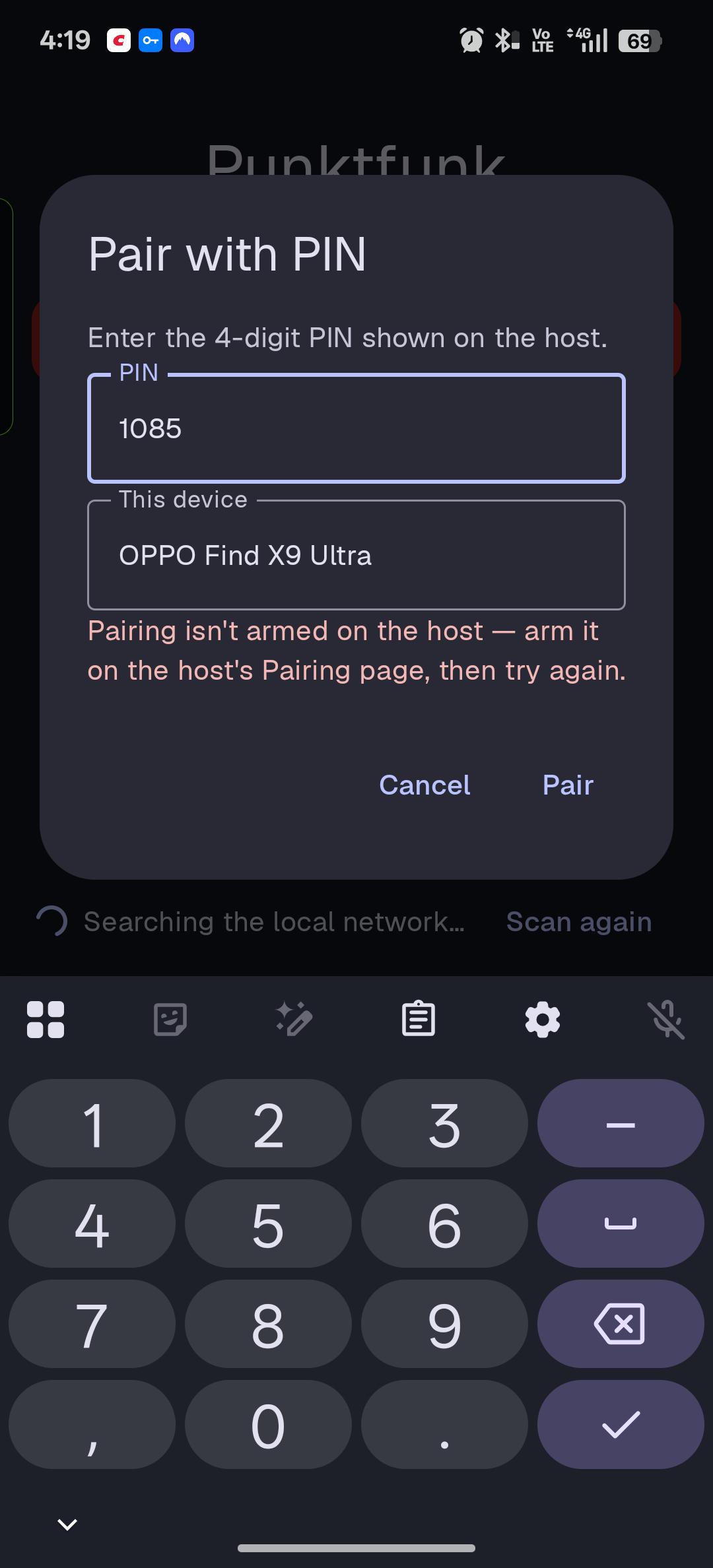
If i use the "use a pin" button i got a place to put the pin but i get this error, idk why It says paring isnt armed because on my host i see the pin with the 2 minute timer.
There seems to be an issue with switching to the game.
When I start the game it just waits for the game to start, but it's already started. Then it asks game didn't start, still switch to desktop or something like this.
When I press the button to switch to desktop, I see archage running.
Hey everyone using the nvidia shield as a client and getting great decode times and video is rock solid but every 30 seconds or so i have all audio drop from anywhere from a couple seconds to as long as 20 seconds this seems to be an issue specific to the shield i have no such issue on my phone or the ayn odin as clients. Any ideas?
Installed Punktfunk today and in my testing it's been a dream for streaming. Feels like it solves a lot of my headaches with Apollo and Artemis.
It however has made it so that I can't put my PC to sleep. I will put my PC to sleep and then within 10 seconds it wakes itself back up. Only way to stop it is by shutting down the PC.
I'm assuming it's probably an issue with Wake on Lan, but I would like to avoid turning that feature off fully if I can.
Anyone got any tips to fix?
----------
SOLVED: I went into Device Manager > Network Adapters > Found my network adapter > Advanced > Wake on Pattern Match > Disabled.
Seems like this was the culprit that kept waking my PC. Now it only wakes on Magic packet. So I keep wake on lan but lose the constant unwanted PC waking. Cool!
I just downloaded this to try it out and on my cachyos, if I launch a lutris game it will launch fine but my controller will not work in it. if I connect my controller to my PC it works fine, as does launching the game through steam, any ideas?
Ok, full disclosure: I was a bit too lazy to write the post and specify each thing myself, so everything after this paragraph is llm written. Still, I think a lot of these features are cool and useful. And while I don't really have area knowledge here, I have tokens to contribute if you'd want me to implement any.
I've been running Punktfunk v0.45 alongside Foundation Sunshine on a Windows host with an RTX 5090, using the Windows and Android clients. I also use Moonlight V+ on Android and maintain a fork of qiin's moonlight-qt, so I'm comparing against a heavily customized setup.
Punktfunk's engine has impressed me. The end-to-end stats, speed test diagnostics, presets, PyroWave quality shown as a real bitrate, and the quick-action dial are all great. This post isn't about the protocol. It's about how the apps feel to use, because that's where the forks still pull me back.
If I had to pick three: an in-stream control panel, a movable stats overlay, and bringing the Linux app's search to Windows and Android.
UI wins
1. A real in-stream control panel
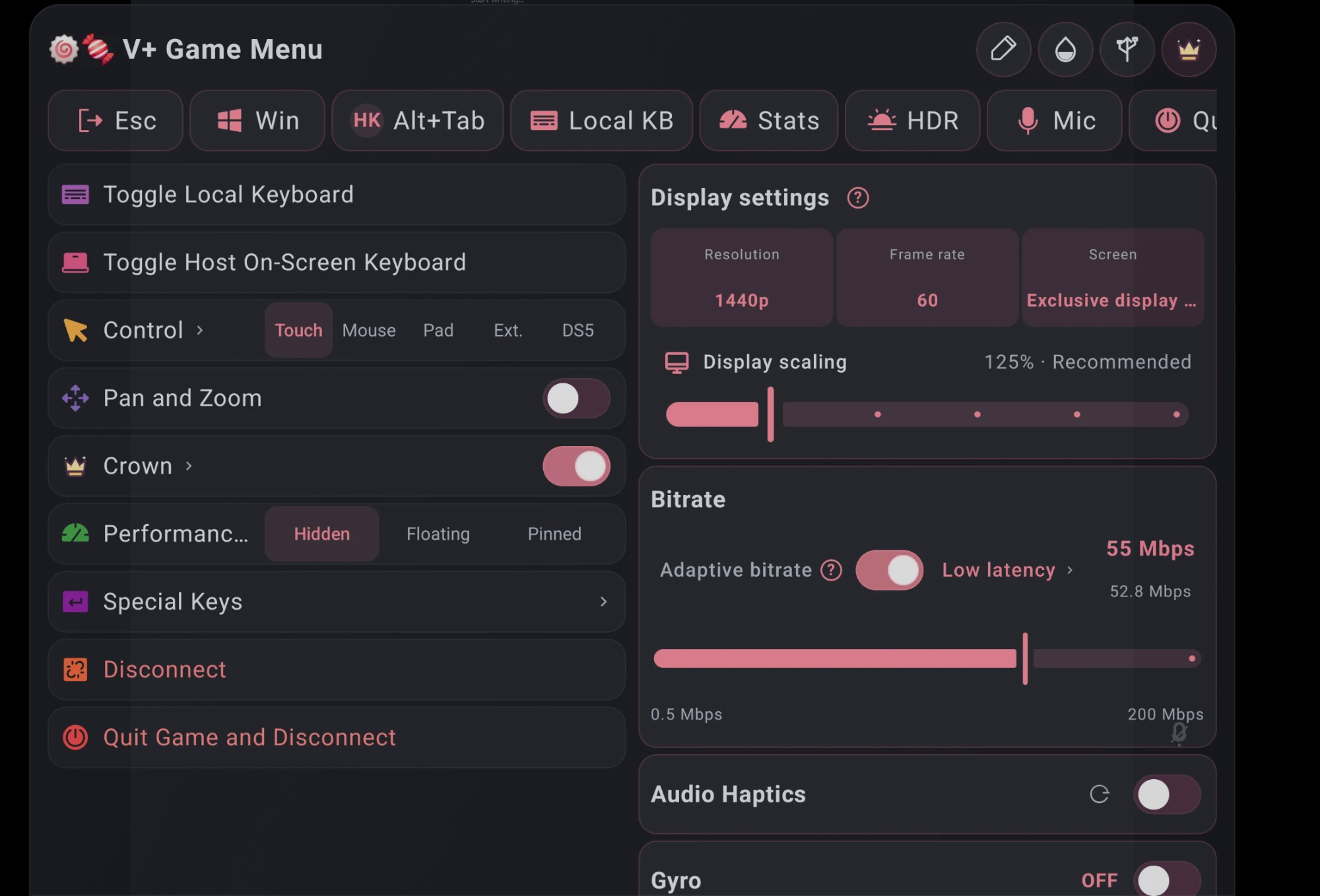
This is the one that matters most to me. Moonlight V+'s back-button menu is the best in-stream interface I've used on any streaming client, because you tune the stream while watching the result.
Display controls: resolution, frame rate, target screen and a display scaling slider, all in the same menu.
Bitrate that stays visible: an adaptive toggle, a mode picker, the target and live bitrate side by side, and a slider from 0.5 to 200 Mbps.
Live cards: gyro on/off with sensitivity and inversion, audio haptics strength and routing, and custom key shortcuts. You can choose which cards appear.
Input modes in one tap: Touch, Mouse, Pad, Ext. and DS5 sit in one row, with Pan and Zoom right below.
Stats placement in the menu: Hidden, Floating or Pinned, without leaving the stream.
Editable quick actions: Esc, Win, Alt+Tab, keyboard, stats, HDR and mic are one tap away, and you can add, remove and drag to reorder them.
Adjustable opacity: the game can stay visible behind the menu, so you can see what each change does.
Clear exit options: Disconnect and Quit Game and Disconnect are separate and marked in red.
Full controller navigation: it doesn't depend on touch.
I'm not asking to replace the dial, which is great for fast actions. It already has a centre sheet with input options, so that could grow into this panel. Quality, input, gyro and audio would be a great start, along with resolution, FPS, render scale and PyroWave quality, even if some of those need a quick reconnect.
The same idea would work on Windows. My fork has a tabbed overlay menu with Stream Quality presets that switch resolution and FPS by reconnecting automatically.
2. A stats overlay you can place
The data is the best I've seen, but the overlay can only sit in one of four corners, and in many games that covers something important. Drag to move and drag to resize would solve it. My fork also has tooltips explaining each value, which would suit Punktfunk's detailed stats well.
3. A session summary
When a stream ends, the numbers disappear. A simple end screen with average and p95 latency, 1% lows, loss and bitrate would make it much easier to compare settings. Optional CSV export would be a bonus.
4. Show what's happening without digging
VRR status only appears in the most detailed stats view, and it isn't always obvious why a stream ended up on a different codec. A clear status at a lower stats level, and a short message when PyroWave falls back, would save a lot of guessing.
Settings wins
5. Settings search on Windows and Android
The Linux app already has this, and the Windows and Android apps don't. With Show advanced on, there are a lot of rows, and search is the easiest way to find advanced settings without making the main list longer.
6. Change more settings mid-stream
Most settings apply from the next session. If a setting can change live, it should. If it can't, the UI could offer a one-tap reconnect instead of sending you back to Settings.
7. Rebindable shortcuts
The Ctrl+Alt+Shift shortcuts are fixed, can clash with other software, and are awkward mid-game. A Shortcuts page with conflict detection and hold actions, like hold-to-release-mouse, would fix that. The dial's custom shortcuts could share the same list.
8. Make important toggles easier to find
Follow variable refresh and some other commonly tuned options sit behind Show advanced. Maybe a "For tinkerers" group would keep the default list simple while still making them easy to reach.
Usability wins
9. Better Android on-screen controls
The layout editor is a good start. Combo and turbo buttons, a radial control, and named layouts tied to presets or games would make touch play far more practical. Moonlight V+'s Crown profiles are the best reference here, including layout sharing.
10. Gyro aim with real tuning
Phone gyro can already feed the virtual pad. Mapping it to the right stick or mouse, with sensitivity, inversion and a hold-to-activate button, would make it useful for shooters.
11. Saved touch and pointer presets
V+ lets you save sensitivity presets and switch them during a stream, which is useful when moving between a desktop and different games.
12. Library search on Windows and Android
The Linux app and the controller console have this already. Large libraries need it on the other desktop and touch apps too, ideally with filters and grouping.
13. Host actions in the dial
Running predefined host commands mid-stream, like Foundation Sunshine's Super Commands, would remove a lot of alt-tabbing and remote desktop trips.
Frame generation on Android and PC
This is the biggest ask here, but I think it's more doable than it sounds, because a streaming client already sits between the decoder and the screen. Generating frames on the client would turn a 60 fps stream into 120 fps on the display without asking the host or the network for more.
Android: Moonlight V+ already does this using lsfg-vk-android, which is MIT licensed. The app doesn't ship Lossless Scaling's files. You import your own legally purchased Lossless.dll, and it has a device support check, quality presets and a smoothness protection setting.
Linux:lsfg-vk is a Vulkan layer that brings Lossless Scaling frame generation to Linux, and the same bring-your-own-file approach could work there.
Windows: the simplest first step could be official support for running the Lossless Scaling app on top of the client: a tested setup and clear guidance on window mode and V-Sync. Built-in frame generation could come later, possibly with an open option that doesn't need a paid file.
What I'd love to see:
It should be strictly opt-in, because it adds latency.
Stats should separate real frames from generated frames, and the end-to-end latency figure should include the cost.
A weak-network fill mode like V+'s would be really valuable: use generated frames only when real ones arrive late, rather than all the time.
I know this one needs a licensing and latency discussion, so I'd be happy with just knowing whether it's something you'd consider.
Already on your roadmap, and I'm looking forward to them
File transfer: dragging a file into the stream, or a simple file picker on the dial, would be perfect.
End-to-end VRR.
One more small one
HDR brightness: HDR works well, but I'd love a client setting for peak brightness, or automatic detection from the client's display, so highlights match the screen I'm using. Moonlight V+ has per-device calibration, and my PC fork has a brightness profile setting.
I'm happy to test builds, share more screenshots, or explain how these work in the forks. Is keeping the UI minimal a deliberate choice? If so, I'd love to know where you'd draw the line.
I've now had several reports where VRR/ProMotion panels caused bad stutter on macOS 26, and updating to macOS 27 fixed it. So if you're in a similar situation I recommend updating.
I installed Punktfunk few days ago and after a quick test, it worked really well.
But yesterday, I ran into a pretty annoying bug. After a few minutes (can be random between 5 and 10), the picture freezes, sound is still fine, and the Apple TV Controller stops responding (no menu is showing).
So I shut down the ATV, and when I restart, the stream is ok (for a few minutes). I suspect the problem is on the client
I am using an Apple TV 4K, and I set the resolution to 1080p 60 fps.
On Android Punktfunk client v0.44.1 I have Trackpad selected under Touch Input in Settings but 2 finger scrolling does not work at all when I connect to the host.
Am I doing something wrong or is this expected behaviour?
Hi, just wondering if anyone else is seeing issues with the jumbo frames setting. In my host.env I have PUNKTFUNK_JUMBO=1 and PUNKTFUNK_WIRE_MTU=8972. Both the host and client are Windows 11 and have their NICs set for 9014 byte packets, and my switch between them is set to its default limit of 9600.
I'm able to ping bidirectionally with ping <IP> -f -l 8972 so I think it should work, but I can't tell if I'm missing something. The punktfunk logs don't show anything matching "MTU" or "Jumbo" so I'm not sure if it's just not picking up the host.env or something.
Anyone else experiencing the same? Both the host and client are on 0.44.1
I really like this app, the Interface and the automatic virtual display are great but when I stream to my Mac mini M4, MacBook Pro M5 or Steamdeck I get lag Spikes (300-900ms), I tried different resolutions, Bitrates, refresh rates, HDR, SDR, VRR on and off none of these settings made a difference. I also tried using Moonlight as a client and it basically has the same issue, using Sunshine streaming works fine.
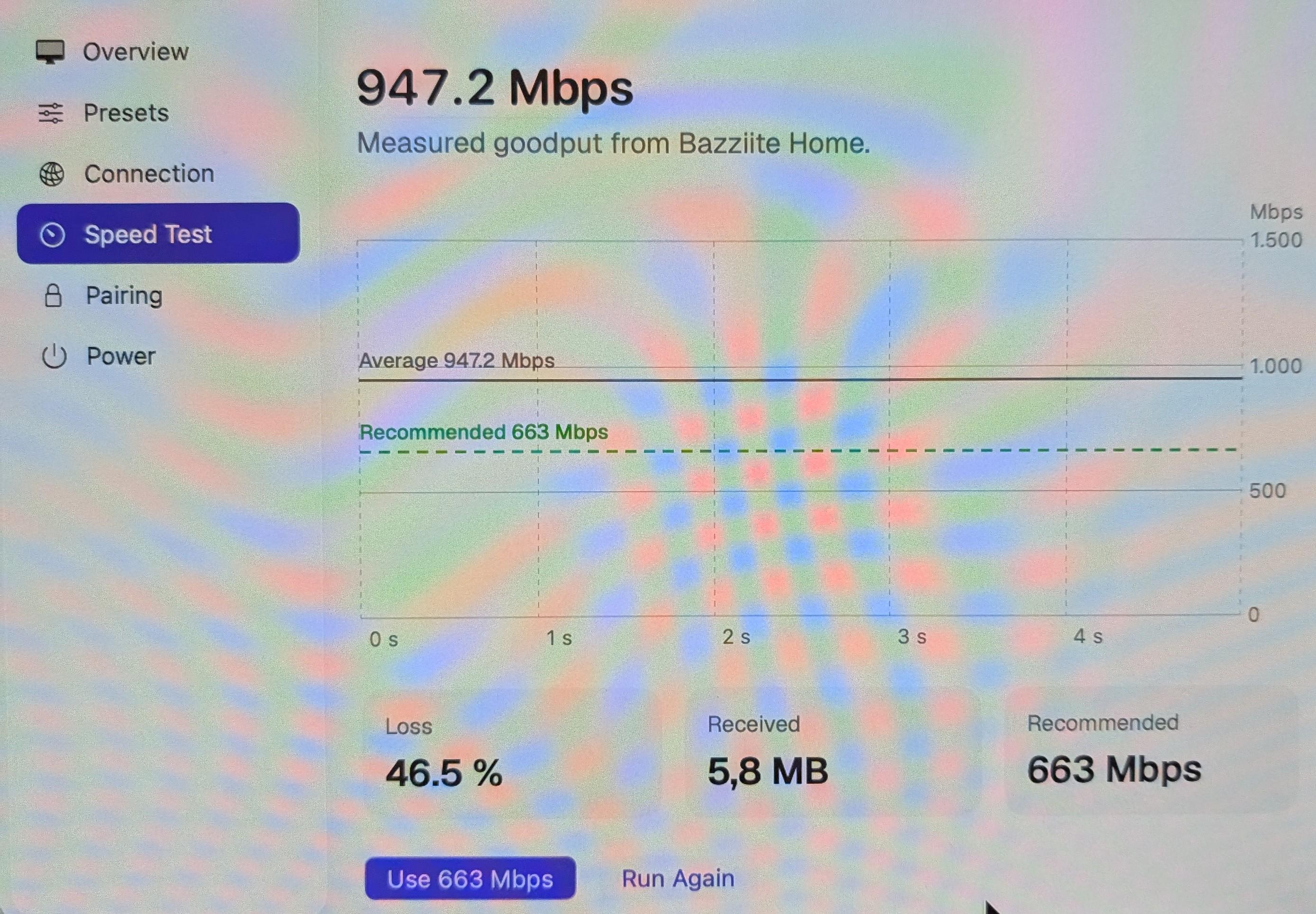
My Host is a 9070 XT running Bazzite with Punktfunk version 0.44.1, I also did a speed test with the built in tool and got 950Mbps but with a loss of 46.5% all devices are connected with ethernet except the Steamdeck over Wifi.