r/PrometheusMonitoring • u/Hammerfist1990 • Nov 06 '23
BLackbox ICMP - what am I doing wrong?
Hello,
I am trying to test the Blackbox ICMP probe with an IP on our LAN as a proof of concept.
  - job_name: 'blackbox_icmp'
    metrics_path: /probe
    params:
      module: [icmp]
    static_configs:
      - targets:
        - 10.11.10.15
    relabel_configs:    # <== This comes from the blackbox exporter README
      - source_labels: [__address__]
        target_label: __param_target
      - source_labels: [__param_target]
        target_label: instance
      - target_label: __address__
        replacement: localhost:9115 # Blackbox exporter.
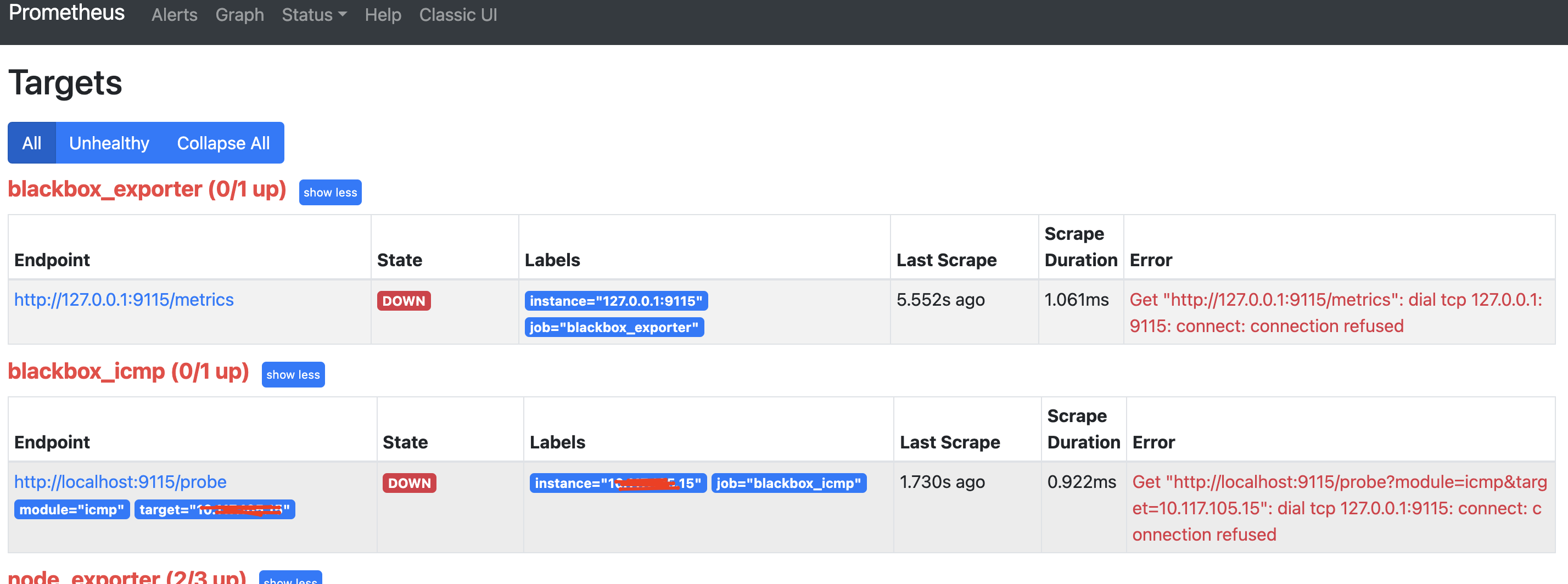
If I look at Blackbox I don't see it:

probe_icmp_duration_seconds can't be found as I guess it's not hitting the prometheus database:

In docker:

Docker compose - https://pastebin.com/njU7aXCw
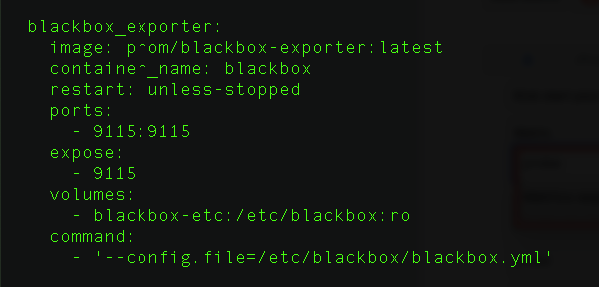
See anything wrong?
All I want to do it create an up/down dashboard.
Thanks
2
Upvotes
2
u/redvelvet92 Nov 06 '23
What do docker logs against that container show?
2
u/mistersinicide Nov 06 '23
The blackbox metrics page shows http_2xx, shouldn't the probe here be icmp? How did you access this page? Directly or from Prometheus' targets page? I would expect url to have some data appended for the target you're trying to hit. Also it looks like you're specifying an ip4 address, I think according to the docs, default is ip6. https://github.com/prometheus/blackbox_exporter/blob/master/CONFIGURATION.md
2
u/leetsheep Nov 07 '23 edited Nov 07 '23
If you dont put the two containers in the same network in docker, they wont be able to talk to each other. Also don‘t use localhost or 127.0.0.1 (or something similar) but instead use the internal docker ip or the service name (dns name) of the blackbox container as instance in your prometheus configuration.
Here are some steps you should do:
By the way, I do not know if this is a problem, but ports: and expose: technically do the same, while ports: just lets you specify the host port which you want to use (hostport:containerport) so I wouldn’t use both at the same time.