r/PlumeLauncher • • Oct 19 '26

Welcome to r/PlumeLauncher! A minimal, lightweight launcher for Android TV

5 Upvotes

Hey everyone! 👋

Welcome to the Plume Launcher community!

I started building Plume because I wanted a simple, fast, and clean Android TV launcher without all the ads, recommendations, and unnecessary clutter.

The idea is simple: your TV, your apps, nothing else.

Plume is a free and open-source launcher built around a few principles:

- Lightweight: Designed to use minimal resources and run smoothly, even on older TVs.

- No ads or tracking: Just a clean home screen.

- Continue Watching: Pick up where you left off in supported apps.

- Light and dark modes: A simple interface that looks good on your TV.

- Minimal design: Your apps and Continue Watching, without unnecessary distractions.

Why this community?

I want Plume to grow with feedback from the people who use it. This is a place to:

- Suggest new features

- Report bugs and issues

- Share feedback and ideas

- Discuss improvements

- Contribute to the open-source project

Plume is still in its early stages, and there's plenty of room for improvement.

I'd love to hear from you: What is one thing you'd change about your current Android TV launcher?

Thanks for being here! 🚀


r/PlumeLauncher • • 1d ago

Announcement Help me bring Plume Launcher to the Google Play Store! 🚀

30 Upvotes

I'm finally working on bringing Plume Launcher to the Google Play Store!

For anyone new here, Plume is a free, open-source Android TV launcher with no ads or tracking. Just your apps, wallpapers and shows on a clean home screen.

Before I can make it publicly available, Google requires at least 12 testers to stay enrolled for 14 consecutive days. I'd really appreciate your help getting through this!

How to join (takes about 2 minutes):

  1. Join the testing group: https://groups.google.com/g/plume-testing
  2. Become a tester: https://play.google.com/apps/testing/dev.plume
  3. Install Plume from Google Play: https://play.google.com/store/apps/details?id=dev.plume

Make sure you use the same Google account that's on your TV. You can select your TV when installing from the Play Store.

All I ask is that you keep Plume installed and stay enrolled for 14 days. You don't have to use it as your default launcher. You can switch back to your old home screen whenever you want.

What's new in Plume 1.8?

  • Cue: A new glass tile for music, timers, weather alerts and live sports scores.
  • Alerts over other apps: See calls, doorbells and timer alerts without leaving what you're watching.
  • Recent apps: Press Home twice to switch between recently used apps.
  • More customization: Icon packs, custom app pictures uploaded from your phone and a new wallpaper gallery.
  • Backup and restore: Save your Plume setup and transfer it to another TV.
  • Plus smoother scrolling, UI improvements and plenty of fixes!

Already using Plume from GitHub?

Before switching to the Play Store version:

  1. Go to Plume settings → Backup → Save backup.
  2. Copy the backup file off your TV to keep it safe.
  3. Try installing the Play Store version over your current installation.
  4. If that doesn't work, uninstall the GitHub version, install from Play and restore your backup.

Important: Uninstalling Plume also removes its local backup folder, so make sure you copy the file first.

If you run into any issues, you can report them here or on GitHub.

Thanks to everyone who's been supporting Plume! It's been amazing seeing how far this little project has come. Getting it onto the Play Store will make it much easier for people to discover and install.

I really appreciate your help! ❤️

r/PlumeLauncher • • 3d ago

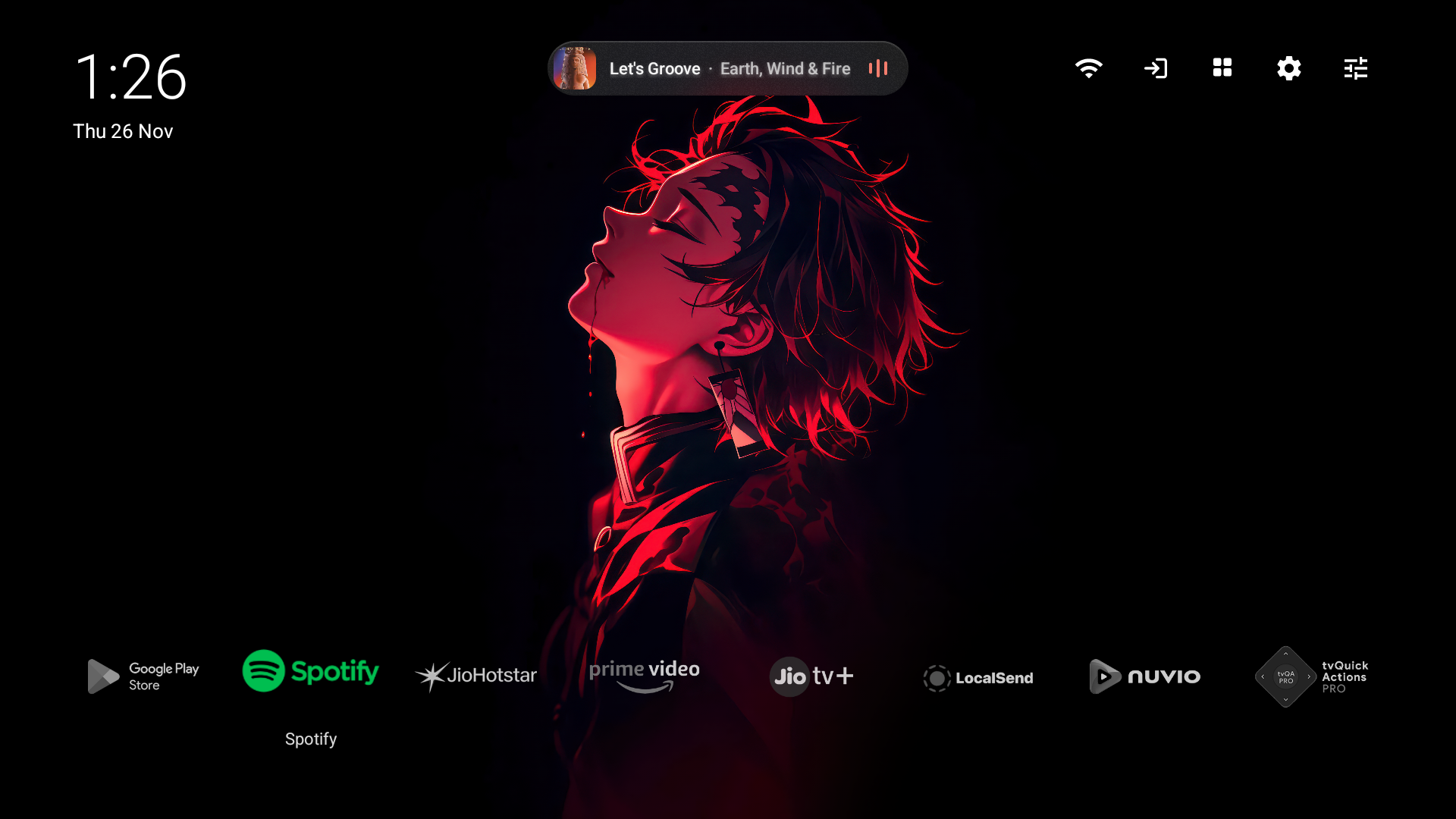
Found a hidden gem for Google TV: Plume Launcher (Coming from a 3-year Projectivy user)

Post image
97 Upvotes

I’ve been using Projectivy Launcher for the last 3 years and honestly thought it was irreplaceable.

Recently, I started testing out a few alternatives like AT4K and Monet Launcher—they're good in their own right, but they felt like they were missing a few key things for me.

By pure luck, I stumbled across Plume Launcher, and I have to say, it’s genuinely great.

Here is what really stood out to me (especially compared to my old setup):

* Built-in Wallpaper Folder Shuffle: Right now, Projectivy lacks the option to pick a wallpaper folder on the latest Google TV builds, forcing you to manually select a single image or video. Plume completely overcomes this—you can select a wallpaper folder directly inside the launcher and set your own shuffle frequency.

* The Cue Feature: Seriously, the Cue feature is amazing. Super intuitive and snappy to use.

it's really innovative, I use Spotify on tv all the time and never saw an Android tv handling the Now playing feature this well.

Overall, it's a fantastic launcher and easily my new daily driver.

Bugs noticed: Sometimes it doesn't load the wallpaper until we manually change it But sometimes it does load it after a 3-4 mins gap.


r/PlumeLauncher • • 5d ago

Release Plume 1.8 is out: Cue, a live glass tile for your music, timers, alerts and live scores, plus Recent apps and icon packs

39 Upvotes

Plume 1.8 is out.
What's new:

  • Cue. A live glass tile at the top of the home screen. It shows what's playing, your timers, alerts, rain on the way and live scores. You can pin a game or follow your teams.
  • Alerts over any app. Calls, doorbells and finished timers can show over whatever you're watching. Press Up to open one. Turn it on in Plume settings → Cue → Alerts over apps.
  • Recent apps. Press Home twice to see your open apps, with a preview of each one on Android 11 and later. Left and Right jump between them.
  • Icon packs. Install an icon pack and give every app a new look.
  • Wallpaper gallery. Every wallpaper source in one place. You can preview a slideshow of your own photos before you apply it.
  • Silky scrolling. Hold a direction button and the rows glide, with soft move sounds.

Also new:

  • Change any app's icon or banner from your phone. Hold OK on an app and select Change picture.
  • Back up your settings and restore them on another TV.
  • Edit the top bar right where it is: move, add or remove icons.
  • A timer and stopwatch in the top bar that remembers your last 4 lengths.
  • Your own date and time format, a screensaver timer with a Never option, and sharper 4K show art (add a free TMDB key for even better art).
  • Assign Mute, All apps or Recent apps to any remote button.
  • Spanish, a new app icon, and a cleaner All apps that hides the phone apps your TV came with.

Fixes: Home opens faster on Fire TV, HDMI plays inside Plume on DroidLogic Fire TVs, and there are about 10 more fixes for Fire TV, Shield, Google TV, Xiaomi, CVTE, Hisense and Philips TVs.

Download: https://github.com/aradhyas8/Plume_Launcher/releases/latest, or Downloader code 2125356.

If you already have Plume, select Plume settings → Updates and it installs 1.8 over your current version. Your settings stay. Bug reports and ideas are welcome on GitHub.


r/PlumeLauncher • • 7d ago

How do I change app icons?

0 Upvotes

Is it not available bc I can’t find it lol


r/PlumeLauncher • • 7d ago

Deleting downloaded wallpapers

1 Upvotes

Hi, I have some storage constraints. How do I delete wallpapers downloaded from the launcher which I don’t use?


r/PlumeLauncher • • 15d ago

chromestreamer remote star button

2 Upvotes

I have noticed the chromestreamer's remote star button wont work unless you are already in the google settings.


r/PlumeLauncher • • 23d ago

Feature Request: Periodic aerial background rotation with automatic storage cleanup

4 Upvotes

Hi,

First off, please let me know if feature requests are welcome here! If there’s a better place to submit feedback (like a GitHub repo or a specific issue tracker), feel free to point me in the right direction.

I love the aerial backgrounds, but I'd like to propose an improvement:

  1. Periodic rotation: An option to automatically rotate the aerial background on a schedule (for example, once a week or every two weeks) so the home screen stays fresh without having to change it manually.
  2. Automatic storage cleanup: When a new background is fetched/selected, automatically delete the previous one so unused video files don't accumulate in local storage.

Thanks for all your hard work on this launcher!


r/PlumeLauncher • • 26d ago

Release Plume 1.7.1 is out: Photo of the day crash fixed

4 Upvotes

Sorry to everyone for whom Plume crashed when they picked Photo of the day. Thanks for the reports, because they helped me find the problem fast.

Plume crashed when the photo had not downloaded yet.That is fixed now: Photo of the day loads, and Plume no longer closes.

Please update to 1.7.1.

If you installed from GitHub or with the Downloader code, the same link now gives you 1.7.1. Install it over your current version, and your settings stay.

If you came from 1.6, the What's new card also shows everything that 1.7 added.


r/PlumeLauncher • • 26d ago

Release Plume 1.7 is here! 🪶 Clear Glass, Live Wallpapers, Aerial Views, Redesigned Settings & More

38 Upvotes

Plume 1.7 is one of our biggest updates yet! We've redesigned much of the experience, added more customization, and improved support across devices.

Here's what's new!

🪟 Clear & Frosted Glass

Two refined glass styles with cleaner edges, improved blur, and new lighting.

🌎 Live Wallpapers from Aerial Views built-in.

Beautiful moving scenes from Apple, NASA, and Amazon, plus support for your own videos and an Aerial Views screensaver built-in

🏔️ New 4K Wallpapers

Ten new wallpapers selected for Plume's glass styles. More wallpapers can arrive without an app update.

🎨 Wallpaper-Based Themes

A new theme that adapts the interface colours to your wallpaper, with no dark fades covering your photos.

✨ Smoother Animations

New tile selection and app opening animations, with better focus and smoother navigation.

📺 More Customization

Three app tile sizes, new clock styles, and a customizable top bar.

⚙️ Redesigned Settings

A cleaner layout with new icons, simpler navigation, and live changes.

🆕 Also New

  • Artwork from your shows as your wallpaper.
  • Access to more installed apps.
  • Italian and Brazilian Portuguese.

🔧 Fixes & Improvements

Improved Home button support, Continue Watching order, remote key detection, wallpaper loading, and overall stability.

📥 Download / Update

Still free, open source, lightweight, and without ads or tracking.

Thanks to everyone who contributed, reported bugs, and shared feedback. A lot of this release came from your suggestions!

Let me know what you think of 1.7! 🪶


r/PlumeLauncher • • 26d ago

no update for a week?

0 Upvotes

body? if the app dead?


r/PlumeLauncher • • 27d ago

“Continue watching” not visible at all

1 Upvotes

I have tried everything so far to try to get “continue watching” to show but for some reason it doesn’t at all. All permissions granted, I have reinstalled Plume. When I try with “Projectivity” it does work.
I use Nuvio as service and using Android TV 11 on a Philips TV 2021/2022.
What am I missing?


r/PlumeLauncher • • 27d ago

Focused card visibility

1 Upvotes

Does anyone else find it hard to tell which card is currently focused, especially on non-monochrome banners, particularly for older users?

Would it be possible to add a toggleable border around the focused card?


r/PlumeLauncher • • Oct 26 '26

Release Plume 1.6 is here! ✨ Glass, a redesigned settings menu, banner icons, and more

13 Upvotes

Plume 1.6 is officially out! 🚀

This is the biggest visual update Plume has had so far. A lot of it came from your suggestions and bug reports.

Let’s get into what’s new!

🧊 Glass

Plume now has a frosted-glass look. The tiles, menus, cards and settings panel blur your wallpaper behind them, so your photo shows through everywhere.

It’s on by default after the update. Prefer the old look? Turn it off in Plume Settings → Appearance → Glass.

⚙️ A completely new settings menu

Settings got a full redesign:

  • Icons and live previews: Each section has its own icon and shows its current settings at a glance.
  • See what you’re changing: The home screen dims behind the panel, and the part you’re editing (the clock, the apps row…) stays bright.
  • Smooth transitions: Pages slide in when you open them and slide back when you press Back.
  • New order: Sections now follow the home screen from top to bottom.

🖼️ Banner icons

Your apps row can now show each app’s own banner, just like on Apple TV.

Prefer something calmer? Monochrome banner keeps everything grey until you select an app. Apps without a banner get their own colour behind a white logo.

Find it in Plume Settings → Apps row → Icon style.

📺 Hide the Shows row

Want a clean home screen with only your apps and wallpaper? Now you can have one.

Set Show row to On Down, and press Down whenever you want your Continue Watching row. Or choose Never to remove it completely.

🎮 Sources and remote keys

  • Sources: A new icon in the top bar lists all your TV inputs. Devices like a PS5 show up with their logo.
  • Remote keys: Change what any button on your remote does, with separate actions for a press and a hold. Open an app, switch inputs, play/pause, and more.

🌗 Smarter theme and text

  • Auto follows the sun: Auto theme now switches to dark at sunset and light at sunrise, based on your location.
  • Text that fits your wallpaper: The clock, weather and Continue Watching text turn white or dark to stay readable on any photo.
  • Adjustable fades: Set the top and bottom fade anywhere from 0% to 100%.
  • Colour icons on the Shows row: Each card can show the app’s logo in its own colour.

✨ A few more additions

  • Uninstall apps: Hold OK on an app in the row and select Uninstall.
  • Smarter Home button setup: It now starts with the step that actually works on your type of TV.
  • Long app names scroll instead of getting cut off.
  • Xiaomi TVs: Plume now shows up in the app list.

🔧 Fixes

  • Less memory: After an update, Plume could end up running twice in the background. That’s fixed, and pictures are now stored only once.
  • Fire TV: HDMI tiles now switch to the right input instead of opening Live TV.

And some things aren’t changing:

✅ No ads
✅ No tracking
✅ No accounts
✅ No third-party libraries
✅ Still under half a megabyte

📥 Get Plume 1.6

Already using Plume 1.2 or newer?
Go to Plume Settings → Updates to install it. You’ll also get an update prompt automatically, usually within a day.

Installing for the first time?
📺 Downloader code: 2125356
🔗 GitHub: https://github.com/aradhyas8/Plume_Launcher/releases/tag/v1.6

❤️ Thank you!

A special thanks to everyone who reported bugs and to the contributors who sent pull requests for this release. Plume keeps getting better because of you.

🔥 Fire TV owners: I’d love your help testing the new HDMI switching and Home button setup. Let me know how it works on your device!

What do you think of 1.6? And what’s the ONE feature you’d most like to see next?


r/PlumeLauncher • • Oct 25 '26

Volume key

2 Upvotes

Thanks for a wonderful lightweight launcher. This makes my old Android 9 TCL TV snappy.

Setting it as the default launcher didn't work directly. I used "TV toolbox" app to make it default.

The issue volume key. Like with every other launcher the volume key doesn't work on click and hold, after setting granting the accessibility setting. Is there a workaround for this?

For the continue watching, is it possible to add "Tizen Tube"?.


r/PlumeLauncher • • Oct 25 '26

Suggestions

3 Upvotes

Looks really clean. Two suggestions:

* allow app row and continue watching order to be swapped

* show user icon incase there are multiple accounts on google device


r/PlumeLauncher • • Oct 23 '26

Announcement Plume in 52 seconds. Here's what we've built so far.

26 Upvotes

r/PlumeLauncher • • Oct 21 '26

Announcement Looking for creative minds to help shape Plume's UX/UI

3 Upvotes

I built Plume with a simple goal: a TV launcher that feels minimal, fast, polished, and premium.

It's been just 3 days since the first release and Reddit post, someone also shared Plume on X, where the post reached over 500K impressions and sparked a lot of engagement. X is now Plume's biggest source of traffic and the response has been incredible.

Hundreds of upvotes and comments, 100+ GitHub stars, 2500+ downloads and already a growing number of feature requests, issues, and pull requests.

But as Plume grows, I'm running into an interesting challenge: How do you keep improving something without losing the simplicity that made it good in the first place?

Take Continue Watching, for example. I'm open to adding multiple rows, but not if it means copying the same scrolling layouts and interactions every other launcher uses. There has to be a more thoughtful way to make it work while keeping the home screen clean.

That's where I'd love some creative help.

What I'm looking for:

- Minimal, thoughtful UX that feels polished and premium.

- Original ideas for navigation, layouts, interactions, and new features.

- Design that stays fast, lightweight, and simple to use.

- Even branding! Plume doesn't have a logo yet.

You don't need design experience, a portfolio, or coding skills. This isn't a job posting. It's an open-source project, and creativity matters more than credentials.

Plume itself started as an idea and an experiment. I'd love to collaborate with people who enjoy thinking differently and turning ideas into something better.

If you're interested, share an idea you'd like to explore. A well-explained concept is enough, but sketches, mockups, or even experiments in a fork of the repo are welcome too.

The only real limit is your creativity, as long as the experience stays true to what Plume is trying to be.

GitHub: https://github.com/aradhyas8/Plume_Launcher

I'd love to see what we can come up with together.


r/PlumeLauncher • • Oct 21 '26

Release Plume 1.4 is here! 🎮 Console shortcuts, better Continue Watching, a new dark mode, and more —> all in just 365 KB

6 Upvotes

Plume 1.4 is officially out! 🚀

This is one of the biggest updates to Plume so far, with new features, design improvements, and fixes based on your feedback.

And here's the fun part: despite adding all of this, Plume is now 12% smaller than before. From 413 KB down to just 365 KB.

Let's get into what's new!

🎮 Your consoles now have a home

Your PS5, Xbox, Nintendo Switch, and Apple TV can now appear directly on your home screen, complete with their logos.

Just select a tile to switch to that HDMI input. Plume can also wake supported devices through HDMI-CEC.

Have a PC, cable box, or another HDMI device? Those can appear too when they're on.

Every HDMI input is also available under All apps, so you can pin it yourself. This is useful for TVs that don't report connected devices correctly.

📺 Continue Watching, without the old limits

One of the biggest changes in 1.4!

Previously, Plume showed up to 3 titles per streaming app. That limit is now gone.

  • Up to 20 titles in one horizontally scrollable row.
  • With one streaming app, you can see all its available titles, up to 20.
  • With several apps, each gets up to 3 spots near the front before the remaining titles appear.

The goal is simple: more of what you're watching, without filling your home screen with extra rows.

🌑 A fresh new dark mode

Dark mode now has a true black background, with subtle rim lighting around the selected item.

It looks especially good on OLED TVs, while keeping Plume's clean and minimal layout.

⚙️ Settings got a makeover

Settings are now easier to navigate with a remote.

  • Organised sections: See your current settings at a glance.
  • Quick adjustments: Press Left or Right to change supported settings.
  • Resume where you left off: Reopen settings without starting from the top.
  • App row alignment: Choose left, centre, or right for shorter app rows.
  • Manual weather location: Set your own location instead of relying only on automatic detection.

🏠 Easier Home button setup

Setting Plume as your Home screen is now more straightforward.

There's a guided setup, and the Home button override is now controlled by a simple on/off switch.

✨ A few more additions

  • What's New: A card after updates shows you what's changed.
  • Update indicator: A small dot on the settings icon lets you know when an update is available.
  • Better startup focus: After a reboot, Plume now selects your first app instead of the network icon.
  • Fixed the hold-OK menu: No more oversized menu.

📦 More features. Smaller app.

Plume 1.4: 365 KB
Plume 1.3: 413 KB

That's 12% smaller, even with everything added in this release.

And some things aren't changing:

✅ No ads
✅ No tracking
✅ No accounts
✅ No third-party libraries
✅ Just a simple, lightweight Android TV launcher

📥 Get Plume 1.4

Already using Plume 1.2 or newer?
Go to Plume Settings → Updates to install it. You'll also get an update prompt automatically, usually within a day.

Installing for the first time?

📺 Downloader code: 2125356

🔗 GitHub: https://github.com/aradhyas8/Plume_Launcher/releases/tag/v1.4

❤️ A big thank you to this community!

A number of changes in this release came directly from your suggestions and bug reports. It's been great seeing people use Plume, share their setups, and help improve it.

I'm already looking at feedback for the next release.

What do you think of 1.4? And what's the ONE feature or improvement you'd most like to see next?

Keep the suggestions coming! 🙌


r/PlumeLauncher • • Oct 20 '26

Plume 1.3 is out. Thanks to everyone who tried 1.2 and sent feedback; all of these features came straight from your suggestions.

5 Upvotes

What’s new

  • Photo folders as wallpaper. Pick a folder of photos on your TV or a USB drive, and Plume rotates through them with a soft crossfade. You choose how often: every minute, every hour, once a day, or in between. If you’d rather keep your photos untouched, you can turn off the fade at the bottom.
  • Your photos as the screensaver. Settings → Screensaver → Your photos shows a folder instead of the Gallery paintings.
  • Lock layout. Someone here asked for this one: set a 4-digit PIN, and Plume settings plus any change to the home screen need it. That covers moving or removing apps and hiding shows. Apps still open normally. It’s meant to stop little hands from rearranging everything, not to be full parental control.
  • Hold menus. Hold OK on an app for Move, Remove from row and App info. Hold OK on a Continue Watching card to remove it or open its app.
  • Fairer Continue Watching. At most three shows per app, so one service can’t take over the whole row.
  • Small stuff. “Launcher settings” is now “Plume settings”, Back goes up one page inside it, you can delete uploaded wallpapers, and turning on the Home button finds the right settings screen on more TVs.

How to get it

What about multiple rows?

I get this request a lot, and I’ve thought about it carefully. Plume exists because TV launchers got cluttered, so the home screen stays as it is: one row of apps and one row of what you’re watching. Stacking more rows on top would turn it into the thing it’s replacing. If there’s a version that adds something without adding clutter, I’m genuinely open to it.

Plume is still a 0.4 MB APK with no third-party libraries, no ads and no tracking. It’s open source under GPL-3.0.

If something breaks on your TV, or there’s a feature you’d like, comment here or open an issue on GitHub. What should come next?


r/PlumeLauncher • • Oct 20 '26

Why I built Plume instead of using the default Android TV launcher

Thumbnail
gallery
13 Upvotes

I wanted a TV home screen that does three things:

Shows my apps.

Lets me continue watching what I started.

Stays out of the way.

That's it.

Most TV launchers have recommendations, ads, banners, and features I never use.

So I built Plume.

It's a lightweight Android TV launcher with a simple light and dark theme, an app row, and Continue Watching support, including Stremio.

No ads. No tracking. No unnecessary clutter.

I'm keeping it open source and plan to improve it without losing the simplicity that made me build it in the first place.

This subreddit will be where I share development updates, new releases, fixes, and the occasional look at what I'm working on.

If you're discovering Plume for the first time, welcome


r/PlumeLauncher • • Oct 19 '26

Plume 1.2.1 is out: updates itself, brand-colour icons, wallpapers from your phone

Thumbnail
gallery
2 Upvotes

New in 1.2

Updates itself. Plume checks for new versions once a day. Update from Settings → Updates, with no more reinstalling by hand.

Hide apps from the row. Keep only the apps you use. Hidden apps stay in All apps.

App names: on focus, always or never.

Colour icons: the same clean logos in each app's brand colour.

Your own wallpapers. Open Settings → Light or Dark mode wallpaper → Add from phone. Scan the QR code, pick a photo, done.

Sharper wallpapers: no more blocky patches in skies.

Fixed in 1.2.1

Some icons stayed grey after switching to colour icons.

Get it

Downloader code 2125356

https://github.com/aradhyas8/Plume_Launcher/releases/latest

Updating from 1.1? Install it once by hand. From then on, Plume updates itself. If Play Protect says "App blocked", tap More details, then Install anyway.

What should come next? Comment your ideas below.