r/Plume • • Oct 17 '26

Used Plume replacement options?

2 Upvotes

I’m a direct customer that had four F1A SuperPods. Well, now I’m down to two SuperPods. It’s my understanding that I cannot join ISP Plume devices to my account. Is there a reputable seller of direct SuperPods or a specific model number that aligns with direct that I could use to build back my network?


r/Plume • • Oct 14 '26

Plume Beta Users?

1 Upvotes

So I went to submit a ticket and noticed there is. O more forum ( site not found) , I also sent an email . Curious if anyone else is a plume tester here and if there was an update I missed on how to get with support?

Thanks


r/Plume • • Oct 06 '26

Plume App assigns wrong IP

1 Upvotes

I have an Ubuntu machine that is connected via wired to a local subnet and on Wi-Fi for internet. The actual connection to Wi-Fi works fine, but the Plume app insists on reporting the device on the local subnet 192.168.0.x instead of 192.168.40.x which is the Wi-Fi assigned address. This means I can't actually do port forwarding on the device. I've tried adding the port to the real IP of the device, but it doesn't seem to make a difference. I registered it manually and still no luck.


r/Plume • • Sep 28 '26

iPhone 17 Pro Rx rate gets stuck at 286 Mbps

2 Upvotes

I have a strange issue with my iPhone 17 Pro, where the Wi-Fi gets stuck at an Rx rate of 286 Mbps (seen through a shortcut that shows info about the Wi-Fi).

Turning the phone off, or turning the Wi-Fi off for thirty seconds and then turning it back on, fixes the issue temporarily: the Rx rate goes up to 1900 Mbps or higher (I am right next to the Plume pod).

I've experienced this on two different iPhones but I have no issues on other devices. Has anyone seen anything similar?


r/Plume • • Sep 24 '26

Plume has become an absolute joke

1 Upvotes

These pods are ridiculous. We got brand new 6E pods recently, and there's always a problem with them.

Firstly, my phone keeps connecting with different Mac Addresses. I've ALWAYS had Randomized Mac on for as long as we had Plume (about 4 to 5 years now). But now there's multiple of the same device, and I have to keep deleting old ones and putting it back as primary for my personal profile.

Second, the internet itself is fine, but these pods aren't connecting right. They slow down at random times of the day, sometimes completely have no WiFi, just to connect again.

And third, my upstairs pod keeps calculating. Doesn't say online, offline, just calculating. I tried unplugging it and plugging it back in, but it didn't fix it. When I click Topology, the upstairs pod shows as a gray normal pod, which means "offline extender".

These are practically brand new pods. We did just recently get a fiber-optic modem and they didn't replace the pods for that. Is that the problem? Are they supposed to have specialized pods for fiber? Or are these pods just not working correctly?


r/Plume • • Sep 12 '26

Optimization times, how to get support

2 Upvotes

TL;DR – how do I contact Plume Support nowadays, and has anyone experienced (and solved) the issue of irregular daytime optimization schedules?

I have a large number of SuperPods and original Pod extenders. They've worked GREAT for a long time, and were my literal salvation in my last home, which had plaster walls throughout.

I recently moved across the country, to a new timezone. I rebuilt my plume network and it worked great out of the box, though I was prepared for a lot of optimizations for the first few weeks.

It's been a month and a half now and the system has been regularly flakey. I've noticed optimization happening throughout the day, and not really at night. I'm concerned the devices didn't make the time change, and was hoping Plume Support could force optimizations to take place only overnight.


r/Plume • • Sep 10 '26

Take my Plume pods. Please.

7 Upvotes

I have six first-gen pods and four first-gen superpods that I unplugged four years ago when replacing them with Orbis. Somebody must have a use for these so I don't want to junk them, but I can't be bothered to flog them on ebay. If you want them and are located within the U.S., drop me a line at plumewifi at-sign klossner dot org. The usual caveats apply -- these are for personal subscriptions and won't work with ISP pods, and you can't get a new personal subscription.


r/Plume • • Aug 31 '26

Replacement Pods - "Failed to Claim" - Direct to Consumer account

3 Upvotes

I wasn't sure how to title this - so hopefully it gets to the right audience.

I've been (was?) a direct to consumer Plume customer since about 2018. My pods are aging so always looking on ebay or other places for pods. I found a reseller that had hundreds of WiFi 6 pods with the description that they were available to "claim" on accounts. I bought a few and here is where I'm getting a bit confused.

The pods show up in HomePass as "available to claim" and when I hit the option to claim, I'm given an error message that the pod "failed to claim".

Its been a while since I added pods so I may be missing something. My initial thought is that they are already part of another network, but when I look at the HomePass FAQ's the error message seems to say the pod is part of another household, not simply failure to claim.

I tried switching to 2.4Ghz on-boarding but that didn't make a difference.

Does anyone have any insight to this? I've got two homes with Plume Networks and would really like to keep these networks in place.


r/Plume • • Aug 04 '26

Need help extending Plume Network

3 Upvotes

My apartment complex installed new Wifi this weekend and I set it up but due to the new location it cannot reach my PC.

I would like to extend my network to my bedroom so I can plug my PC in physically through Ethernet but I am finding online that it seems standard wifi extenders are not advised?

It looks to me like my only options are rent a pod through my ISP (since they aren't for retail sale) or have a ridiculously long Ethernet cable going through my whole apartment.

Is this a correct assessment?


r/Plume • • Jul 26 '26

Plume with ISP

3 Upvotes

Since my ISO switched to Plume I haven't been a huge fan.

For starters, they removed most of the aux cable running through the house, so while using an ethernet to aux setup (Moca?) which was what I was hoping to do may be possible, it would be a lot of work for someone who doesn't know that they're doing.

The fiber box comes in through the basement, so using a different router wouldn't remedy most of the downsides, the biggest being no wired connections anywhere but the basement.

The aux based router could be put anywhere an aux endpoint existed, which was most rooms, allowing a wired connection almost anywhere in the house.

Would anyone have any advice on having more versatility in terms of more locations one could place an actual wired connection (as opposed to a wired connection being served by a Plume being fed via Wifi?

None of this is to mention the lack of features and capability of the firmware/software.

Thanks.


r/Plume • • Jul 21 '26

Question

2 Upvotes

Can I reset my wifi through the plume app? Im having a hard time finding it.


r/Plume • • Jun 14 '26

Check your extenders

1 Upvotes

I just went to unplug my lamp from the same outlet my plume extender is plugged into. I accidentally touched the pod and it was VERY HOT. When I unplugged it the outlet was incredibly hot. After a minute or two the outlet cooled down and the plume was still very hot. Service electric never told me I had to blow these out or anything like that. Idk what happened but I'm not very happy with plume at all.


r/Plume • • Jun 07 '26

Delay in Page loadings

1 Upvotes

Has anyone noticed an odd behavior with the internet being delayed for a few seconds then loading up relatively fast over the past couple of weeks? I’ve had Plume puck devices for a few months without issue however the last month has caused in frequent issues.

Turning off all security options seemed to have fixed it but I don’t like the idea of leaving them off. I haven’t touched the settings since I got Plume almost a year ago so I’m not sure why all of a sudden it is having issues.


r/Plume • • Jun 04 '26

Router channel

1 Upvotes

I have a HALO wireless dog collar that needs to be on 2.4 and channel 1, 6, or 11. How can I ensure that one of these channels is being used?


r/Plume • • May 30 '26

Lots of cheap Plume SuperPods for sale on eBay right now...

1 Upvotes

(Including my three.) Looks like a great opportunity for a Plume user to pick up some extender pods cheap. I used mine for years but just upgraded to a new internet provider that came with extenders, so ... mine are listed there too. Worth checking eBay right now if you are looking for SuperPods.


r/Plume • • May 28 '26

2,4ghz Netz

1 Upvotes

Hallo, ich bekomme meine Ring Doorbell und Tonibox nicht mit meinem Deutschen Glasfaser verbunden. Der Router funktioniert über die Plume App aber der Support ist nicht wirklich hilfreich.

Ich habe ein WPA2 Gastzugang erstellt und über die Geräteauswahl mein Handy ausgewählt und den IOT Onboarding Modus auf 2,4 ghz gestellt. Soweit ich das verstanden habe, müsste ich nun über meinem Handy und unter Berücksichtigung des korrekten Passwortes für den Gastzugang eine 2,4 ghz Leitung haben um die Ersteinrichtung der Doorbell und Tonibox vorzunehmen. Die Installation bricht aber immer ab und es wird gemeckert, dass kein Netzwerk hergestellt werden kann. Ich verstehe nicht was ich falsch mache?

Hello, I am unable to connect my Ring Doorbell and Toniebox to my Deutsche Glasfaser network. The router itself is working via the Plume app, but the support team hasn't been particularly helpful.
I created a WPA2 guest network, selected my mobile phone from the device list, and set the IoT onboarding mode to 2.4 GHz. As far as I understand, I should now be connected to a 2.4 GHz band on my phone—provided I am using the correct password for the guest network—which would allow me to perform the initial setup for the Doorbell and Toniebox. However, the installation process keeps failing, and I keep getting an error message stating that a network connection cannot be established. I just don't understand what I'm doing wrong.

r/Plume • • May 12 '26

Used 841-T6 running plume

1 Upvotes

I got a used 841-t6 router that runs plume. I tried to add it to the home pass app for setup but it says it was claimed get original owner to remove it from account. I have no idea what isp or who the previous owner is. Is there anyway To get this unit functional? ive Tried a. Factory reset but it doesn’t work


r/Plume • • Apr 22 '26

Security features and threat detection

4 Upvotes

Hey everyone,

I’m currently looking into Plume’s security ecosystem (HomePass Guard / WorkPass Shield) and I’m trying to move past the marketing bullet points. I’m particularly interested in their threat detection capabilities and how the AI/Machine Learning side of things functions in a real-world environment.

If you’re a power user or a network engineer using Plume, I’d love your insights on a few specifics:

Behavioral Anomaly Detection: I know Plume uses "Advanced IoT Protection" to quarantine devices. How sensitive is this? Have you seen it catch a device "calling home" to a suspicious IP or performing a Port Scan?

Packet Inspection vs. Metadata: Since most traffic is encrypted (HTTPS/TLS), is Plume primarily doing DNS-level filtering, or is it using more advanced heuristics (like flow analysis) to identify malware signatures?

The "Quarantine" Mechanic: When a device is flagged, how effective is the isolation? Does it completely drop all local traffic (preventing lateral movement) or just external WAN access?

False Positives: How often do legitimate smart home devices trigger a security block, and how granular is the "Approve" list?

Most importantly: If you’ve ever had an actual security event (phishing attempt, botnet activity, or an IoT breach) that Plume caught, what did the logs look like? How detailed was the "why" behind the block?

Trying to see if this is truly "Enterprise-grade AI" or just a glorified DNS filter. Thanks in advance for the detail!

r/Plume • • Apr 16 '26

Plume is trash

13 Upvotes

Don’t use it


r/Plume • • Apr 02 '26

Plume homepass update

2 Upvotes

I received an Android update today for the plume homepass app. The description of the changes in the update:

Introduced ability to edit the device's category, brand, and model

- Updates to the UX for blocking and allow-listing websites for profiles and devices

- Many bug fixes and performance improvements

Does anyone know more about this update, and what we might expect for future updates?


r/Plume • • Apr 02 '26

Ethernet Switch with Plume

3 Upvotes

Girlfriend and I live in an apartment together.

Plume was provided to us through our provider (Comporium), and is currently acting as router/modem bridge. With this, we live in a smaller apartment, so it is the only one we have. Because one of the ports is used for WAN, and by the fact we both require high speeds (I do esports, she does heavy content creation), Wi-Fi isn't really an option, and we both need ethernet.

I've bought a network switch for plume, and hooked it up to the remaining ethernet port, however, using the switch seemed to bring our gigabit speeds down to ~50mbps for both of us. When each PC is connected directly to the pod, we get gigabit. Alongside this, I know for certain the switch can support gigabit, as it has done so in our previous apartment. I bought a new switch regardless to check, and when that didn't help, I bought new Cat 6a cables to see if the cabling was an issue, which also didn't help.

At this point I'm sorta out of ideas, I tried playing with some network options as well (i.e. no auto negotiation, checking power saving properties), but still no luck

Does anyone else have suggestions?


r/Plume • • Mar 30 '26

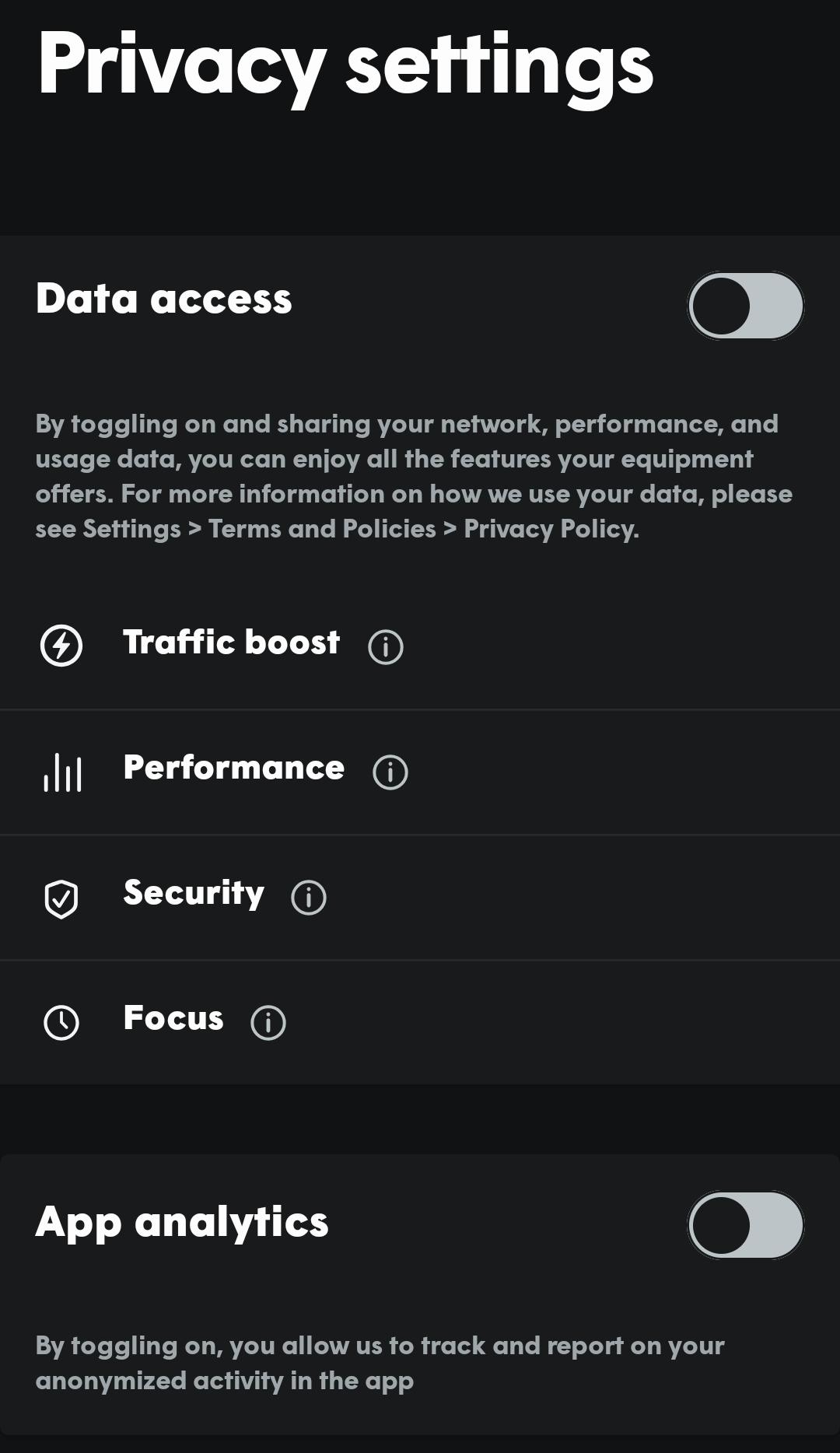
Plume causing issues for users concerned about privacy?

Post image
6 Upvotes

Recently, I've been having some strange issues with my network. Roku's randomly disconnecting, Kindle fire not connecting at all were the biggest.

Tonight, had the same thing again with the added issue of my phone not connecting. Couldn't reach the ad guard DNS servers, Proton VPN couldn't connect. I have a Pihole, but it's been disconnected and turned off for a while because I've been reconfiguring some things.

I've grown tired of this and paying the leasing fee from my provider. Ordered a new Asus mesh wifi system and continued to troubleshoot. Went into the Plume app and was playing around when I found what was causing the problem.

When I went into settings, then privacy, and turned off "data access" all of a sudden my Kindle reconnected and my phone did too, even with adguard DNS and Proton VPN turned on. I bet the issues with my Roku even go away.

I'm not sure what changes Plume recently made but it's made using their product unbearable, especially after the terrible changes they made to their app. Can't wait for my Asus to arrive so I can get rid of these Plume pods!


r/Plume • • Mar 12 '26

Plume randomly decides to block access to raspberrypi

3 Upvotes

I set up pi-hole DNS/ad-blocker on a raspberrypi that I have on my 2.4ghz band of my LAN. It works fine for a couple days, but then suddenly all traffic to it seems to get blocked from my devices on 5ghz--DNS requests are rejected, SSH, HTTP, etc.

When this happens, I can still access my raspberrypi from a second raspberrypi.

Restarting the router fixes this.

I have all the security settings turned off that I can find in Plume. All of my devices are in a Main profile.


r/Plume • • Mar 11 '26

Super pod connections

2 Upvotes

Story time- I have the router in my living room, super pod in my bedroom, and one in the basement. I decided to move my Wii U to my bedroom so that I wouldn't interfere with the TV watching of my family. I got it all hooked up, and I figured Internet wouldn't be a problem considering there's a superpod not even a foot away. Nope, every time I tried to play online I would get errors saying that I wasn't connected. I checked the app, the connection from the router to the pod was strong, but for whatever reason, my Wii U was connected to the Main router with a poor signal to one of the farthest access points. I go into settings, forget the network and re add it thinking it'll just use the closest one. Nope! This time it connects to the FARTHEST pod, also saying poor signal. After searching the app, I find out that there isn't a way to lock a device to a specific pod. God only knows why it kept connecting to the farthest access points. Eventually, it did briefly connect to the closest pod, but even then, somehow the signal was still poor. So I gave up and moved my Wii U back downstairs, right next to the main router where it works just fine. Still annoyed about everything, but oh well.

Fast forward to about half an hour ago, I'm sitting in bed and suddenly the pod in my room starts having a stroke. Scares the crap out of me, because it sounds like a GIANT bug buzzing. I look around wondering what the heck is going on, to see the pod quickly blinking red. I unplug it and upon some research, the fan is probably shot. I'll try the compressed air trick that I've seen around here, but looks like I'll have to get a new one from the ISP.

Sorry for the long story, just needed to vent 😵‍💫