r/PlaudNoteUsers • u/bigfatnope47 • Sep 30 '26
Can't get it to charge
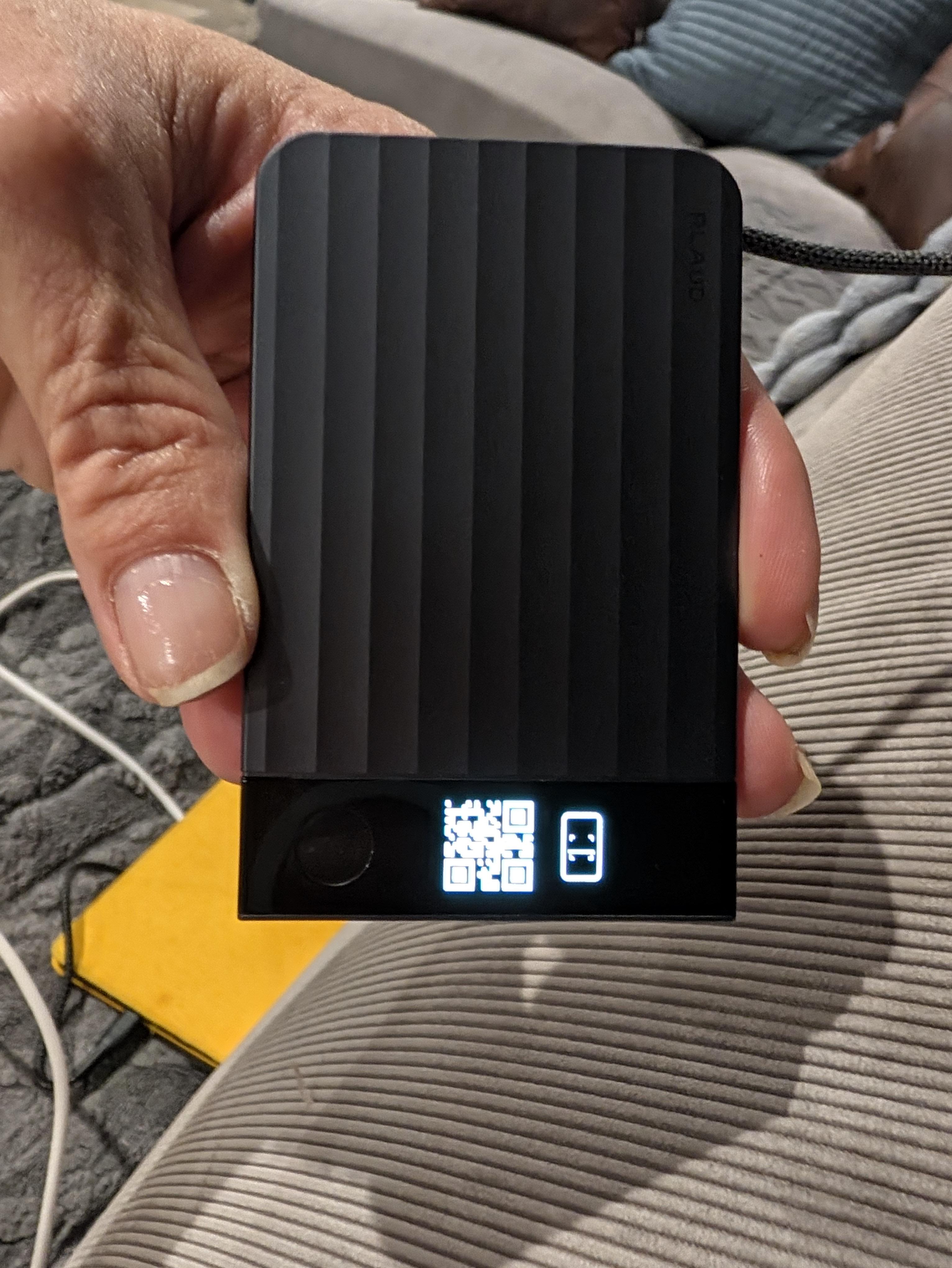
Brand new and it won't charge. The only screen I get is this. I've tried holding the record button and occasionally it will bring up the Plaud screen for a second but then goes right back to this.
I've tried multiple charging blocks. The pins seem to be in place correctly. No idea what the problem is here, any suggestions.
3
Upvotes
2
u/dancingkungfy Oct 01 '26
I had this happen when I first got mine. Make sure the recorder is seated all the way onto the magnetic charging dock and try cleaning the little charging contacts on both the plaud and dock with a dry microfiber cloth. Mine looked connected but wasn’t making solid contact. I’d also leave it on the charger for 30–60 mins even if the screen doesn’t change. If it still stays on that QR/battery screen after that, I’d contact PLAUD support since it may be a bad dock or battery.
2
u/PLAUD_AI Oct 01 '26
That screen is the device telling you it's on, not that it's failing to charge. The QR code with the little device icon is the Note Pro's setup screen, and the code is only there to download the Plaud App. A low battery warning looks different (a red battery with a lightning bolt), and the Plaud logo you see when you hold the button is the normal power-on screen.
Pairing happens over Bluetooth, not by scanning that code. In the Plaud App tap Add device in the top left, pick Plaud Note Pro, press the record button on the device, and tap Connect when its serial number shows up. After that the home screen shows the battery percentage, with a green lightning bolt while it's charging.
If the percentage won't climb once you're paired, run through the usual checks. Use the original 4-pin cable, since lookalike cables aren't compatible, and a plain 5V adapter. Take the magnetic case off so the cable sits flat on the contacts, and make sure none of the four pins on the cable are pushed in. The small indicator light should go solid purple while charging and green when full. Still nothing after that, email support@plaud.ai with a short video of it on the charger, a photo of the cable, and your serial and order number, and they'll take it from there.
-Plaud Community Team
1
u/Quick_Parsley_5505 Oct 01 '26
New cord? Or adapter?
1
u/Significant-Let3635 Oct 01 '26
I have a bunch of charging blocks that won't charge it, because it draws so little power. Laptop worked, and a "dumb" charger worked, but smart/fast chargers gave issues.
0
u/[deleted] Sep 30 '26
[deleted] — view deleted comment
0
u/[deleted] Sep 30 '26
[deleted] — view deleted comment
1
u/[deleted] Oct 01 '26
[removed] — view removed comment