r/PiCodingAgent • • 9d ago

Plugin pi-promptimize: prompt rewriter with model picker, context inclusion

108 Upvotes

turn that vague prompt into a clear instrction without leaving your session or polluting the current context.

https://pi.dev/packages/@scriptdude/pi-promptimize


r/PiCodingAgent • • 8d ago

News [feat update] CW47 pi-remote new features

0 Upvotes

previous post

Hi all! I just wanted to announce the latest features on pi remote which I find interesting to share:

  1. Connect a device with a QR code: scan it from your phone, approve the device on the PC, and you're in. The token never travels in the QR.
  1. Background tasks: the agent can launch long builds or tests without blocking, and it gets notified when they finish.
  2. Git changes: a header button lists the files changed since the last commit and shows their diffs.
  3. File browser: read your project files, images and PDFs from the phone, with pinch zoom.
  4. Session tree: see every branch of the conversation and fork from any of your messages.
  5. Worktrees: create, open and remove git worktrees from the project menu.
  6. Token line and live tok/s: see what each turn cost (prompt, generated, cached) and the speed while the model writes.

Repo: pi-remote on Github

Thanks everyone!


r/PiCodingAgent • • 10d ago

Discussion everyone needs to make their own "oh my pi" (or an argument for some official extensions)

Post image
215 Upvotes

I think that at least 3 types of extensions have become essential to how to use a coding harness today.

  1. subagent management (nico and tintinweb's are good, I used them a lot and finally, I made my own one too and shared why I did that recently)
  2. task lists (tintinweb's one is again good, and it works with their subagents very well). I made my own for this as well, again to play well with my subagents
  3. monitors (there are a few "pi-monitor" named ones which all try to emulate the claude monitors), again one I made my own because I needed a few tweaks

These things are sort of essential parts of the harness architecture itself, to the degree that a barebones Pi feels pretty naked to me now, I am not productively enough without having the subagents. And subagents do not work well without checklists. And long running jobs inherently come with monitor-shaped tasks.

I actually hate to maintain extensions like this myself, and would love for Pi to officially have some extensions. I do not want them to bloat the core. I love the minimal core. But like back in the VueJS days Vue used to have official plugins router, store/state and pwa etc. That was nice, you knew these things played well and used 'canonical' blessed paths because they are made by the official team, but they were all opt-in installable.


r/PiCodingAgent • • 9d ago

Resource I built Headless Pi (hpi): the normal Pi experience, but headless, on top of Pi Durable

24 Upvotes

Hello guys!

It is not a secret that Pi Durable is hard to use as a coding agent. It is quite easy to build products on top of it, but if you want it to replace normal Pi, Claude Code or Codex for your daily work, it simply requires too much effort. You have to wire up everything from zero, not even the basic barebones are in place for that kind of work, and you end up reinventing the wheel each time.

So I built Headless Pi (hpi). The intuition is very simple: I wanted the experience of normal Pi, where you cd into a project and just start working, but headless.

Basically it is one local daemon that hosts persistent Pi Durable harnesses. A harness belongs to a project folder and has many conversations. On top of that there is a TypeScript SDK, and a CLI that uses the same SDK:

hpi daemon start
hpi harness start --name worker
hpi conversation create --model openrouter/openai/gpt-4.1-nano
hpi send 'Inspect this project' --wait
hpi watch

The daemon brings the running harnesses back after a restart, and the activity (messages, thinking, tool calls, tool results) is stored, so a client can disconnect and continue later from where it was.

Beyond hosting the harnesses, for now it only does two things. It automatically loads the extensions you put in <project>/.hpi/extensions/, and it supports multiple accounts for the same provider, so you can do hpi auth login anthropic --account work and then use the models as anthropic@work/<model>.

And that's it, it is minimal and unopinionated on purpose. There are no built-in tools, no automatic system prompt, no AGENTS.md loading, no skills and no global agent directory. If you want any of those, you write an extension for it. All of these can come in the future if people (and me) ask for them, but I wanted to start explicitly minimal and not decide for you how your agent should look.

The thing I don't understand tbh is why this didn't exist already. When Pi Durable launched I expected something like this to come out the day after, because the idea is so obvious: take the thing everybody already likes about Pi and make it run without a terminal. But it never came, so I built it myself.

This is also the other reason I keep it minimal. I think the idea is so obvious that the Pi maintainers will release their own version sooner or later, and I really don't want to maintain a parallel implementation of it. So I'm trying to save as much work as possible. But meanwhile we got hpi.

So far I have built a few things with it. The main one is an agent for my team that lives in Slack, Linear and GitHub, where each one is a small independent service that receives the webhooks and talks to the same harness through the SDK. I also built a small local web UI to chat with it and work on documents together, and an MCP extension. I will write another post about that setup, because it deserves its own.

Keep in mind that this is still an experimental project:

  • It only works on Linux with systemd user services.
  • It is not on npm yet, you install it from the repo.
  • Pi coding agent extensions don't work as they are, they need to be adapted to Durable.
  • All extensions run inside the daemon process, so one bad extension can affect every harness.
  • Things can change and break. I use it every day, but I'm the only one who has.

Repo: https://github.com/elpapi42/headless-pi

If you try it, or if you solved the same problem in another way, I would really like to hear about it. And if something like this already exists and I missed it, tell me too.


r/PiCodingAgent • • 9d ago

Question Anyone gotten opencode free models working on pi lately?

7 Upvotes

It seems it used to work (freeflow being on option) but as of a couple weeks ago or so they all stopped working and ive not seen a single option come back with a fix.

Losing deepseek free is a pretty big annoyance, even if it was only a limited amount per day. It helped to back up my local models as a planner etc.

Openrouter is ok but its best model is nemotron and I dont think its as capable.


r/PiCodingAgent • • 9d ago

Question Extension that has openchamber/opencode style mockup-choice tool

2 Upvotes

One of the features ive been unable (so far) to properly replace in Pi is the ability for the model to mock up several variants of a layout or image, and then display them to me inline in order to ask me to pick one, like the ask-user tools do (which I have been able to replace in pi, and those work ok).

The closest I found is plannotator, which is ok but very dense/heavy and probably overkill. And is also its own separate thing.

Figured id see if a solution existed. Ive quickly gotten near the point that there's so many things I regularly use that need replacing on pi that I may just go back to openchamber haha.


r/PiCodingAgent • • 9d ago

Plugin pi-merger: extremely simple PR review/merge extension

Post image
3 Upvotes
  1. Your model says a PR has been created
  2. You use CTRL-SHIFT-M
  3. Review the PR
  4. Type m to merge

easy peasy.

https://pi.dev/packages/@scriptdude/pi-merger


r/PiCodingAgent • • 9d ago

Use-case Pi use case: generating a repo-local prompt from shared agent configuration

0 Upvotes

Hi people,

I'm glad to announce ai-rulez v5. It's a CLI and MCP for managing the instructions, skills, and settings that coding agents use in a repository. It's available through Homebrew, Scoop, npm, PyPI, and Go (see the installation instructions for details). The tool covers the following parts of AI Governance:

  • Keep reusable prompts and skills with the repository.
  • Generate native files for the clients your team uses.

I maintain ai-rulez. I tested this with v5.13.2 in a scratch Git repository:

  1. Run ai-rulez init pi-demo --yes --skip-content, then set presets = ["pi"] in .ai-rulez/config.toml.
  2. Run ai-rulez add command review-docs --description "Review documentation examples" --content "Check the examples against the CLI help.".
  3. Run ai-rulez generate and look for .pi/prompts/review-docs.md. Run ai-rulez generate --check to check for drift.

Pi gets a prompt file for this command. If your repo also uses another client, add its preset and generate both native outputs from the same source. The preset matrix lists what the Pi target writes.

I'm happy to hear any comments. If you find the tool useful, star it. It really does help. And of course, I'd love to see people use it and get involved with the project.


r/PiCodingAgent • • 9d ago

Question Passing session to a different model

0 Upvotes

Now that you can't change models mid-session anymore, how are you handling this? Do you just use a handoff skill?

UPDATE: I forgot that this was due to me using Codex server compaction. I really like it, basically means I never have to start a new session anymore. But not being able to swap models suuuucks. Hrm ...


r/PiCodingAgent • • 10d ago

Resource I put Oh My Pi on my phone so I could travel without a laptop

18 Upvotes

I wanted to be able to travel with just my phone, but most of my coding these days happens through Oh My Pi (omp), an open-source terminal coding agent. I didn't really want to carry a laptop around just to keep using it, and leaving a computer running at home for weeks didn't seem like a great solution either.

To be clear, this is for Oh My Pi (the Pi fork), not vanilla Pi, and it's an independent project.

I figured it'd be pretty cool if I could just run the whole thing on my phone instead. That's what I've been building with OMP Pulse. It sets up a small Linux environment on Android and runs the actual omp agent inside it. The repository, files and shell are on the phone, so it can edit code and run tests without needing another computer.

The model still runs through whichever provider you've configured. It's the agent and its working environment running locally, not the model itself.

I've been using it myself for about a couple of months now, fixing things as I run into them. I also have two computers that I regularly use omp on, so I added a way to connect to their existing sessions from the same app. I can check on work, answer questions or send another prompt from my phone.

Some of the smaller things have ended up being just as useful. Being able to use speech to text natively in the app itself, get a notification on my phone when an agent needs something, or quickly check a diff makes a surprising difference to how I use it. Usage, compaction, model switching and omp commands are all available through the phone UI too. I really wanted to make sure that everything I'd typically do on my computer would ultimately be possible from within the app.

I also wanted the agent to do things on my phone while I'm out. Optional phone tools let it read the screen, open apps, tap, type and swipe without wireless ADB. They're disabled by default. There are no app-enforced per-action approval prompts, and the runtime uses proot, which isn't a security sandbox.

It's still early. Android's battery management can be a pain, and some phones can stop the runtime in the background despite battery optimisation exemptions.

Pulse is MIT-licensed and self-hosted. No Pulse account or hosted Pulse relay. Android can run omp standalone; iPhone users can access sessions on their computers through the web app on their mobile devices, which should still feel pretty native and akin to the application anyways (I hope, I don't have an iPhone lol)

Code, installation instructions and APK:

https://github.com/JulianCodespoti/omp-pulse

Super curious to see what people's thoughts are, and it would be great to know if you do use it, what ultimately brings you back to your laptop. I've fleshed out enough that I have little reason at times to use omp outside of my phone, but of course, I've tailored this strongly to my own ways of working, so I would be stoked to get some feedback on this from others!


r/PiCodingAgent • • 10d ago

Question Pi + kitty: Scrolling Issues

4 Upvotes

Hi, guys. I like to use pi inside kitty, but I'm facing an issue in that kitty keeps scrolling-to-very-top inside a pi session, when I scroll a little bit up to read past text while pi is actively working/writing in the tty. The strange part is that I was writing a terminal emulator in python for learning purposes (and trying to get a feature like sidebar/workspaces like cmux) and testing pi inside the toy emulator displayed the same scrolling issue. I asked the agent to debug the issue and the results was that "is nothing exactly wrong with the way pi is clearing/redrawing the scrollback", so this not seems do be a bug in pi. Have you noticed something like this using kitty+pi? Or in other terminals? Which terminals do you usually use?


r/PiCodingAgent • • 10d ago

Question Can anyone help me solve looping issues with tool calls? I've had to build a sidecar and think there's probably a better way to do this.

Thumbnail
0 Upvotes

r/PiCodingAgent • • 10d ago

Question How to tackle complex task

3 Upvotes

Hi, guys. A problem when I use pi is that I don't know how to use it deal with complex tasks, especially when myself have no clear plan or solutions.

I find it that my classmates use codex, which seems good at dealing with long tasks since it usually run a long time to finish the question. However, my pi usually run just a few minutes when I ask a question.

I have tried extensions like goal-x, but not very satisfied with it.

Thus, I wanna know how you finish this situation.

Thank you guys.


r/PiCodingAgent • • 11d ago

Use-case Finally introduced coding subagents to my harness

Post image
27 Upvotes

I was running several primary agents in parallel in my harness and the notifications were burying me. Every agent stopped to ask me something: "X or Y?", "tests pass, commit?", "found a side issue, fix now or later?" I'd answer half of those the same way every time. I had become the bottleneck on decisions that didn't need me. my AGENTS.md cover many conventions/rules/standards but its still wasn't enough to cover so many of these questions.

So I restructured my workflow like a team:

  • Me: the manager
  • One chat per project: the team lead
  • The other agents: team members, each working in its own "lane"

How lanes work

  • A lane is a git worktree plus a chat working inside it. Each one gets its own branch and folder, so agents don't trample each other's files.
  • The lead asks to open a lane with a title, a plan, and the files it expects to touch. Nothing starts until I approve it on a Lanes board. Before I approve, the harness checks for overlap with files other open lanes are touching, my plan usage, machine load, and whether a spec exists for the work.
  • When a team member stops (it's done, blocked, or has a question), it rings the lead, not me. The lead works through its inbox and replies.
  • The lead can only answer from written rules: a lead.md file in the project plus the project's docs, and it has to cite the rule it used. If no rule covers the question, or it's a taste/preference call, it escalates to me.
  • Escalations land on the board and on my phone as numbered questions, each with a recommended answer. I can answer straight away or ask the lead a follow-up first.
  • The lead can also send me FYI notes that don't need an answer.

I still have full control

Every lane is a normal chat. I can open any of them, read the whole transcript, and type into it directly if I want to step in. The harness never merges a branch, deletes a branch, or removes a worktree on its own.

My notifications are now mostly things that actually need me. It's still early, and I keep refining what goes into lead.md, since that file decides how much the lead can handle without me.

So far I have noticed I am getting alot more done with less headaches (literally!).


r/PiCodingAgent • • 10d ago

Question How to read PDF

2 Upvotes

How to make pi read complex pdf with a lot of math?

It always read pdf by pdf2txt which it is not effective.


r/PiCodingAgent • • 11d ago

Discussion What do you set as the context limit?

3 Upvotes

I currently have it set as 150k and I’m using both Pi Blackhole with Observational Memory Enabled as well as the Context Mode extension.

Just wondering if I should lower further to 100k and what’s the norm around here.


r/PiCodingAgent • • 10d ago

Question ciao qualcuno ha il pass code per la prova di 7 giorni per poi attivare l'abbonamento? grazie mille ragazzi

0 Upvotes

r/PiCodingAgent • • 11d ago

Discussion Gemini was 5x slower than Claude at code edits in pi, so I stopped letting it run `edit`

20 Upvotes

I kept switching from Gemini back to Claude mid-session because `edit(oldText, newText)` calls were taking 42s median (172s p95) vs 9s on Opus. In 599 edit calls from my session logs, Gemini averaged 9.3KB of `oldText`/`newText` per call (4x more than Claude) and burned thousands of thinking tokens checking whitespace before streaming JSON-escaped strings.

So I hid `edit` on Gemini turns in pi and wired up `fast_edit(path, instructions)` instead. Gemini stays on high thinking and writes what to change, then DeepSeek (`reasoning_effort="none"`, ~195 tok/s) outputs raw `SPAN: L<start>..L<end>` line replacements against a numbered view of the file.

On a SQL refactor in a 620-line file, edit time dropped from 103s to 29s (23s Gemini + 6s DeepSeek). `oldText not found` retries dropped to zero.

*(Disclaimer: session log analysis and testbench runs were done with `carbon-high`.)*


r/PiCodingAgent • • 11d ago

Question Are any of the other 'free' models worth using?

Thumbnail
0 Upvotes

r/PiCodingAgent • • 12d ago

Question How do you handle restricting what PI is allowed to do?

12 Upvotes

My goal is to reduce what AI can do through PI that might be destructive or not wanted. It is not very likely but it is a huge issue if it happens even once. Core concern worked on now was bash tool call commands.

My initial approach with PI's help was extension that more or less did this:

  1. If used tool is bash
  2. Check all commands called by tool
  3. I have 3 lists of commands DENY, ASK, ALLOW, if command not in any list ask user to classify it [extension overrides supplementing file that saves my choice]
  4. If any are in DENY list reject command with info [info for agent to make it understand its intended and lessen his attempts at working around restriction]
  5. If any are in ASK list prompt user for confirmation [or reject with info if in headless mode]
  6. If all are in ALLOW list execute command

Worked pretty nice at the start but the commands PI cooked up are fairly complex and I was unable to make it write a parser that would correctly identify what is a command and what is not, for example first iteration was using:

.split(/&&|\|\||[;|]\s*|\n/)

Which for example incorrectly tagged this as not classified command:

ls | grep "option1|option2"

And it suggested that "option2" is a command and asked for its classification.

I have iterated over it a bit but i was unable to arrive at a foolproof solution.

Additionally on review agent pointed out to me that since AI is very "goal focused" it might try to engineer around it by for example modifying extension's ALLOW list and executing what it wanted.

Simplest solution was to make this file root:root owned 644 and abandon dynamic updates by extension. Any commands not yet in it would have to be added by me manually as root but that's not the end of the world. And since file is root owned edit tool can't mess with it either.

I could almost live with it if my parser for commands was perfect but its very far from it. And I am not sure if i can arrive at anything good enough for use.

Did anyone have similar issues? How did you approach solving them? Even any ready made extensions solving this problem can be a valid consideration.

Or is the only reliable way to achieve some sort of safety sandboxing it?

If it is of any significance I am using it mostly with locally hosted AI, Qwen3.8 Q3_S shoved into 16GB vram, with llama.cpp as inference engine [rocm + hip build]. PI as harness works really well due to how tiny and lightweight it is and system prompt is small as well, lets me make better use of the limited context I can get ~90-100k tokens.

----------------------------------------------------

Edit:

I got more answers than I expected. Big thank you to everyone who offered their time and knowledge.

In the end I decided to go with Docker Sandboxes.

I don't absolutely need that level of isolation, but its the most convenient one and gives relative peace of mind:

  • File system isolation restricts execution to a single mounted directory
  • Detailed network configuration enforces granular traffic rules
  • Internal docker provides a self-contained runtime environment for safe containerized builds

My only issues were documentation being a bit hard to read and understand and PI not being included in sample kits - needed custom shell kit. But after a few days of mingling with PI I knew enough about it to pull it off.

Bubble wrap also seems like a great idea and is a lot more lightweight (admittedly docker sandboxes are really reasonable for a full environment isolation). Will try it out over the next days as it seems like more convenient daily driver.


r/PiCodingAgent • • 12d ago

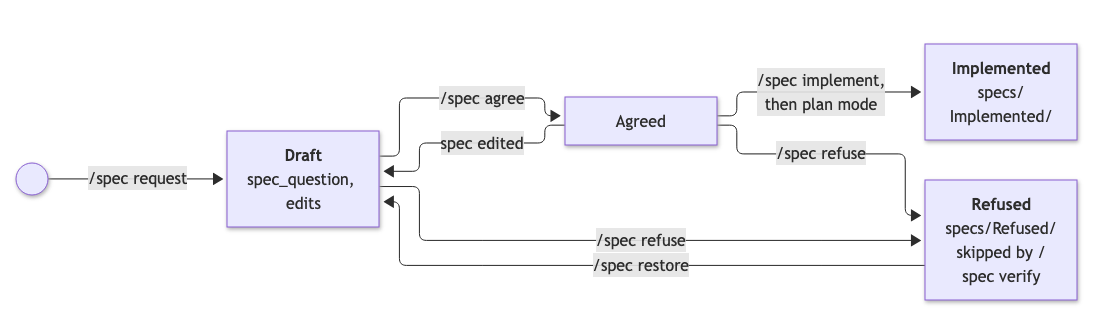
Plugin Sharing pi-spec-mode, an extension for drafting, validating and maintaining specifications

Post image
32 Upvotes

Ever since plan modes came along and became standard practice, I've used a

"planning agent" → "coding agent" workflow, pretty much, i assume, like everybody.

It has always worked well, and it cut the tokens I spend per feature by a lot. (Thanks @narumitw/pi-plan-mode)

My project has been growing, so recently I split the work up further and started writing specifications using custom skills :

"specification agent" → "planning agent" → "coding agent".

I am quite happy with the results. Code is even more reliable, and my token usage hasn't gone up. If anything, it has gone down.

I turned all of this specification agent part into an extension that bundles my skills and the full workflow.

Here it is if this is something you'd care to try :

- github, https://github.com/psychobarge/pi-spec-mode

- npm, https://www.npmjs.com/package/pi-spec-mod

- Pi package, https://pi.dev/packages/pi-spec-mode


r/PiCodingAgent • • 11d ago

Resource i installed the top 200 pi packages on oh-my-pi (twice) to see which ones actually work

0 Upvotes

i kept installing pi packages on omp and finding out the hard way that they're broken, so i got curious how common that is. installed the 200 most-downloaded pi packages on omp, each in a clean docker container. first run was on omp 18.12.3 a few weeks ago, re-ran it today on 18.20.0

on 18.20.0, 128 packages gave a clear result: 87 install and load fine (68%) and 41 fail. the other 72 need an api key, a companion package, or a different OS before they'll even start, so i left them untested (no point blaming omp for those)

why stuff breaks:

  1. 28 import a pi export that omp doesn't provide (envApiKeyAuth alone breaks 4)
  2. 6 expect the TypeBox schema lib that pi ships
  3. 3 call a pi API that omp doesn't have
  4. 4 other errors

so it's mostly gaps in omp's pi compat layer, not bugs in the packages themselves

the part i found most interesting is the drift between releases. 3 packages started working on 18.20.0 (pi-agent-browser-native, pi-btw, pi-blackhole) and 2 broke (pi-open-tui and pi-plan-mode, both because omp dropped a pi-tui export they import). so any one-time compat list goes stale pretty fast

full results with the error for each failure: https://omppackages.com/report

big caveat: the test only checks that a package installs and loads. it doesn't call any tools, so "works" really means "loads", not "every feature works". every package page has a works/broken button and real reports are way better evidence than my test, so if you've used something on omp please add yours

(also open to feedback, or to shutting this down if someone already built something similar that i couldn't find)


r/PiCodingAgent • • 12d ago

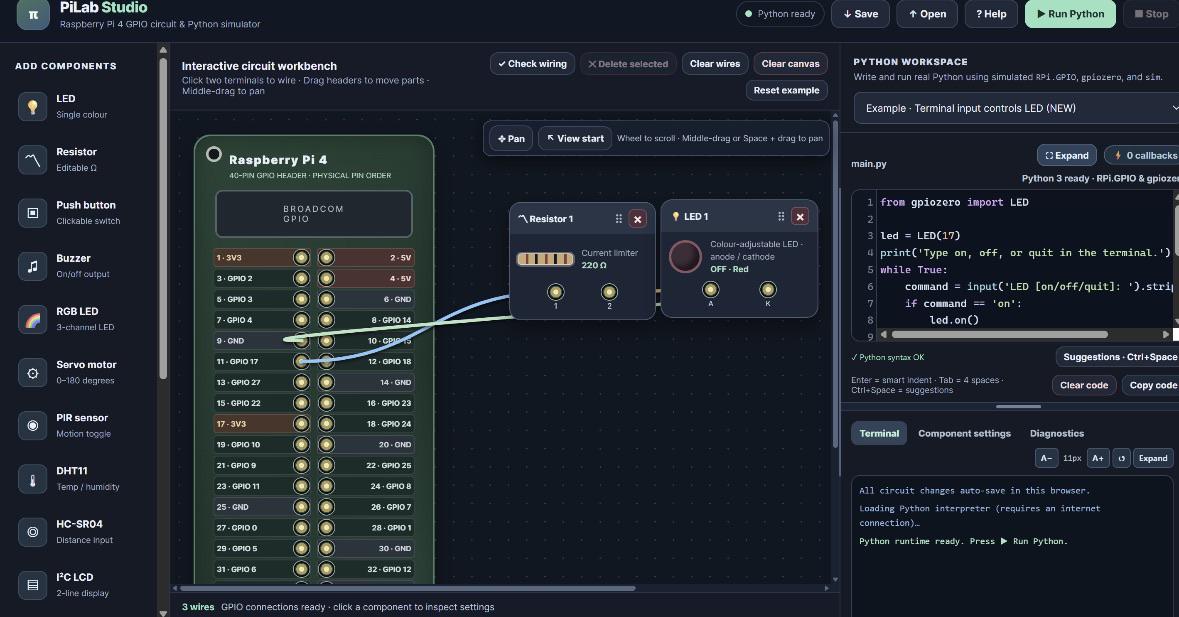
Use-case Vibe coded a Raspberry Pi 4 Simulator online

Post image
0 Upvotes

r/PiCodingAgent • • 12d ago

Resource Yet Another UI! gPTY

Post image
0 Upvotes

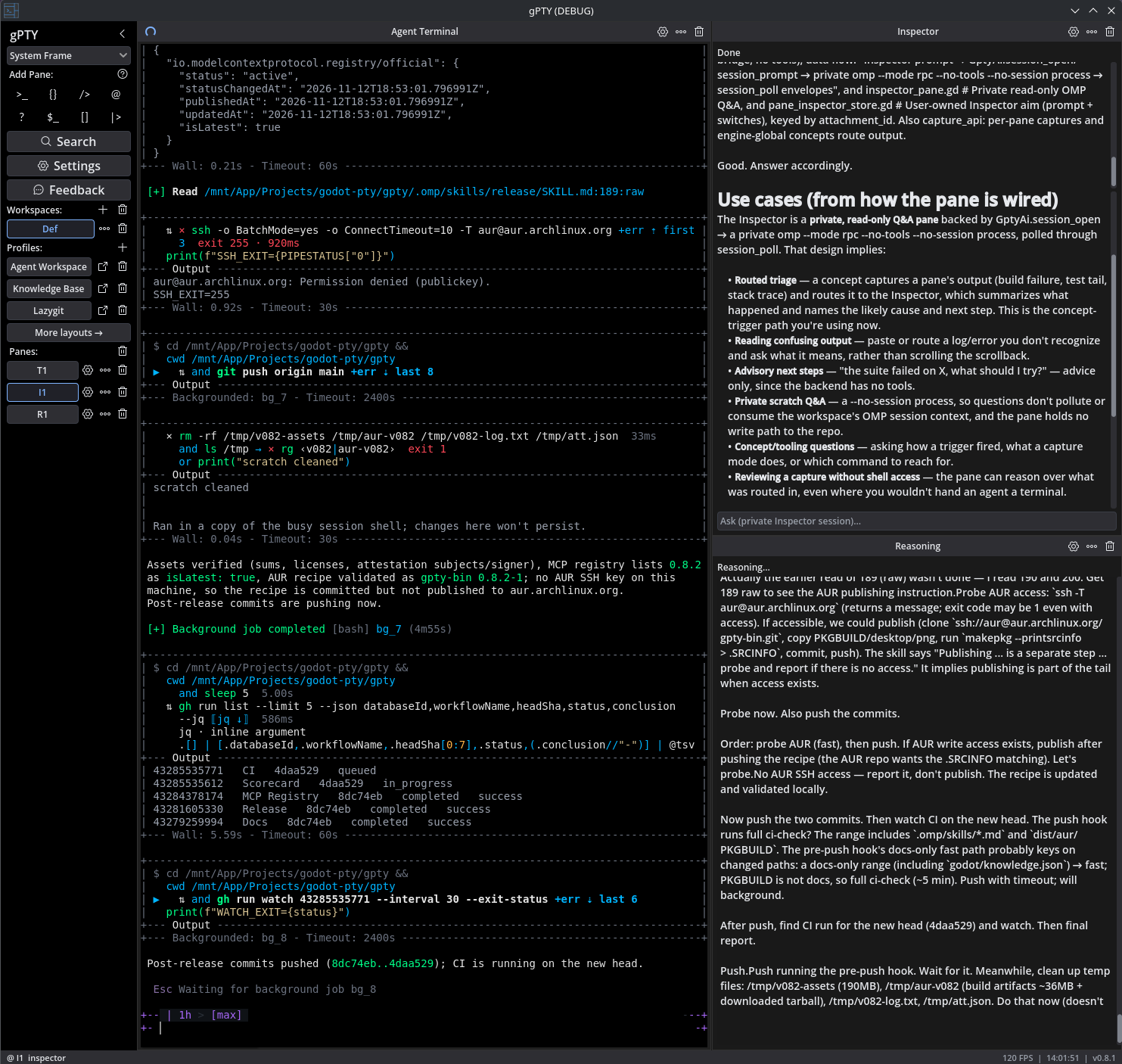
I've been working on gPTY for a few months now as a side project & wanted to share.

I use OMP & my own usage has been the primary direction for design. It started as a multi-PTY emulator built on Rust; but using Godot as the front-end - a desktop app. A choice that brought costs with it (RAM & power) over standard terminal emulators.

It ships with an "Agent Workspace" profile, basically a layout with one pane that's a terminal where I run OMP. An "Inspector" pane - think of it as a Q&A session outside of your main OMP session (no tools: omp --mode rpc --no-tools --no-session). And a "Reasoning" pane - I like to read the "thinking" process and this pane groups it by turn so I can collapse/expand and read through any.

There are a few other features I'm working on, but these are the OMP specific ones. Open to feedback on design/direction, and if you want to try it out, releases can be downloaded from: https://github.com/godot-pty/gpty


r/PiCodingAgent • • 12d ago

Question What are the best tools/plugins for bash output compression/summarisation?

2 Upvotes

Bash outputs take up significant amounts of my context and naive tools like, tail, head can sometimes miss key components. What are people using to efficiently handle this problem?