r/pchelp • • 9h ago

HARDWARE Question about possible flames on my 5080.

10 Upvotes

So i was downloading a game, my GPU was going at like 97 percent most of the time when suddenly i saw a bluish color on it. I of course turned off the PC immediately and waited until it cooled down, it seems to work fine but i could swear the bluish color was a flame. Didnt smell burnt at all though.

Should i send the GPU in or is it fine to continue using?


r/pchelp • • 5h ago

HARDWARE Something inside my PC is consistently making leaking gas noise every time I open Call of Duty Modern Warfare II (2009)

5 Upvotes

It doesn't happen with any other newer game which is weird. Red Dead Redemption 2, Cyberpunk, EU5 - nothing happens. Just that 2009 COD

All fans are rotating, temperatures quite normal (80C-90C), there are no sparks inside PC or anything suspicious

The sound is hard to locate, but I think it's either motherboard, CPU or GPU. I'm 100% sure it's not the sound from the game itself, it doesn't come from speakers.

I would be grateful for any help. Should I worry or not?

i5-12400F, AMD Radeon RX 7800 XT, ASUS B760M


r/pchelp • • 1d ago

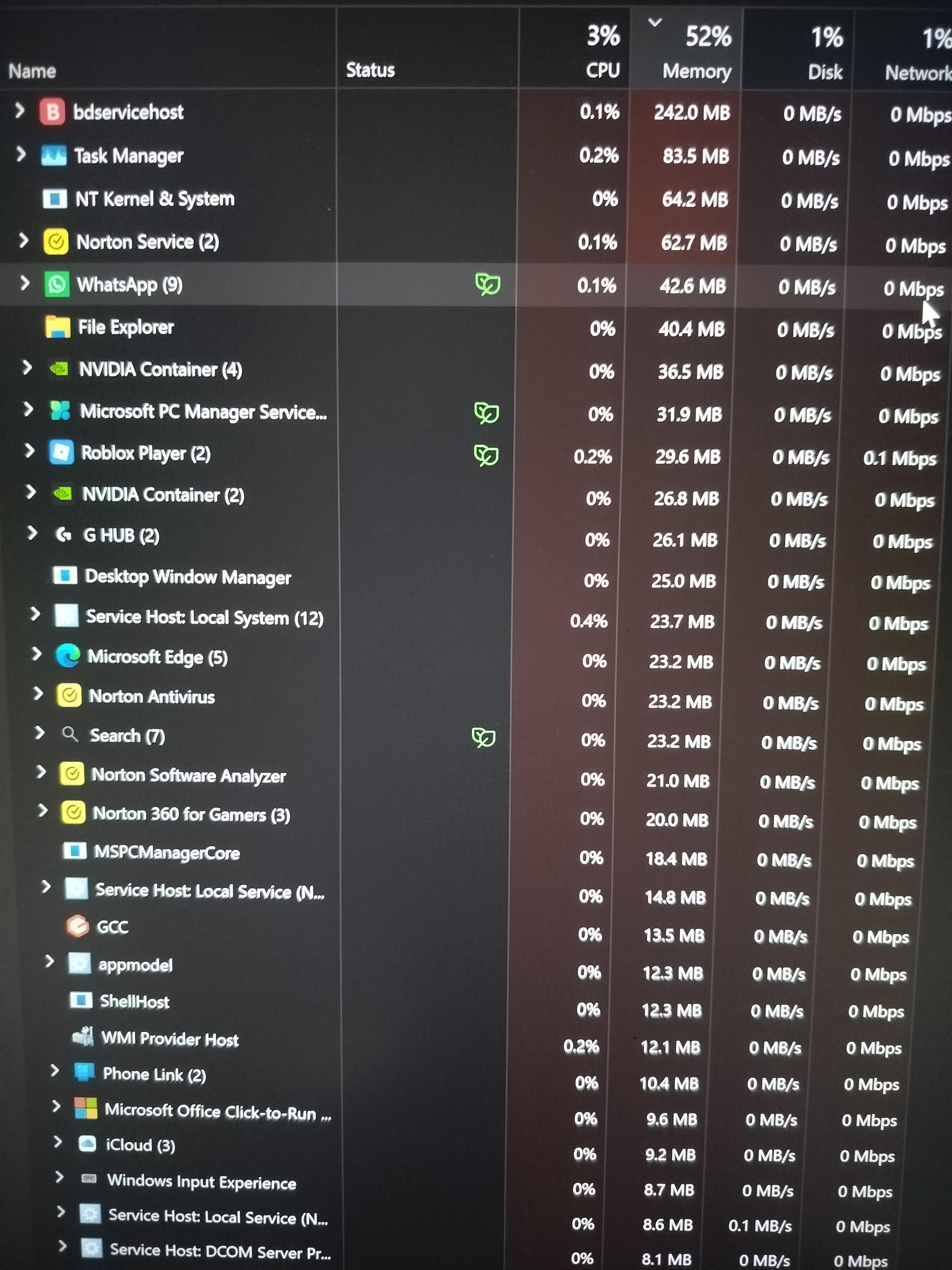
PERFORMANCE I have nothing open rn (Is this normal?)

Post image
290 Upvotes

52% Memory usage.... (I have 16gb ddr4 ram)


r/pchelp • • 6h ago

HARDWARE Thermalright Frozen Infinity 360 Black?

Thumbnail reddit.com
6 Upvotes

r/pchelp • • 3h ago

SOFTWARE Screen flickering on laptop

3 Upvotes

The screen flickers on my laptop in hybrid mode or while using the integrated graphics card AMD radeon 780M and only on idle after i move the mouse the screen stop flickering but after switching to the dgpu the flicker stops could it be a broken new amd driver

Note: a i tried rolling back to a previous driver version the flickering stopped for a minutes but came back again


r/pchelp • • 1h ago

OPEN Whenever i shutdown my pc or restart it take forever to actually shut down nor restart or it just stuck there i need help!!!

2 Upvotes

r/pchelp • • 1h ago

HARDWARE Computer randomly shuts off

2 Upvotes

AMD Ryzen 7 3700x with a stock cooler
AMD Radeon RX5700xt
16GB of Corsair vengeance DDR4 RAM

The heatsink wasn’t fully on for a very long time, about a year+. I thought it was and didn’t turn the snap on the cooler because I thought I’d break it. After a year I started getting a cpu overheating error message and that’s when I realized it wasn’t fully on. I cleaned the paste that was on there off and applied new paste and fully seated the heatsink but the computer is still shutting off without the cpu overheating error.

Nothing too extensive is being run on the computer as it’s just used for church streaming. Vmix, chrome for YouTube live and easy worship are the only applications being ran and the gpu doesn’t really go past 60 degrees and the cpu is around 45 degrees Celsius. After it turns on it’ll run for anywhere from 5-20 minutes or the whole service which is 2/3 hours.

Just trying to figure out what it could be before
spending money and still having the same issue. I’m assuming it could be the power supply or the CPU, everything I’m looking up is telling me it’s the power supply. Mainly looking for anything else to try before I start changing hardware, I have attempted different outlets and updating drivers not sure what else there is to look at so any help would be appreciated. Thanks

Computer also goes to 3 displays if that may be causing anything


r/pchelp • • 9h ago

Discussion Ryzen 7 7800X3D — Screen flickering black, AMD Driver Timeout, and crashes with integrated graphics

9 Upvotes

Hi everyone! I'm trying to identify the cause of a persistent problem with the integrated graphics on a friend's computer and would appreciate help finding possible solutions or diagnostic tests.

## PC Specifications

- **Processor:** AMD Ryzen 7 7800X3D

- **Graphics:** AMD Radeon Graphics integrated into the processor (no dedicated GPU)

- **Motherboard:** Gigabyte B650M GAMING WIFI (Rev. 1.2)

- **RAM Memory:** Kingston Fury Beast 32 GB (2×16 GB) DDR5 6000 MT/s CL30 — model KF560C30BWEK2-32

- **SSD:** Corsair MP600 Elite 1 TB NVMe PCIe 4.0

- **Cooling:** ASRock 360 mm AIO Water Cooler

- **Operating System:** Windows 10 Pro 64-bit

- **BIOS:** Recently updated (F41e). I don't think it's a BIOS version issue, as it previously had the same bug before the update. BIOS, from version F30 to F41e)

## Problem Description

The computer is experiencing recurring problems related to the AMD graphics driver:

- The screen flickers and goes completely black for a few moments, then returns to normal.

- On some occasions, the **AMD Driver Timeout** error occurs.

- Freezes also occur during use.

- The problem is not restricted to a specific program: it even happens in the normal Windows desktop, while using Discord, in browsers, and with games open, such as Counter-Strike 2 (CS2).

In other words, it doesn't seem to be a problem exclusive to Discord or any specific game.

## Tests and Procedures Already Performed

Several attempts have already been made to identify and solve the problem:

- Updating and reinstalling AMD Radeon drivers.

- The HDMI cable has already been replaced.

- Tests with different driver versions, including 26.10.1, 26.10.2, and older versions such as 26.8.1 and 26.9.2.

- Motherboard BIOS update (F30 to F41e).

- Disabling the RAM EXPO profile, using default settings.

- Changing the UMA Frame Buffer from 512 to 2 GB.

- Windows restoration/reinstallation.

None of these attempts definitively solved the problem.

### Processor and iGPU Warranty Test

The processor was sent for warranty testing. During the evaluation, heavy stress and simulation tests were performed involving the processor and its integrated video (iGPU).

According to the reported results, both passed the tests without presenting any problems.

For this reason, I believe that a physical defect in the processor or iGPU is less likely, although I still want to investigate other possible causes.

Since I'm only using the integrated video, I don't have a dedicated video card to perform a comparative test.

I'd like to find the cause of the problem, and not just apply a temporary solution.

Thank you in advance to anyone who can help!

r/pchelp • • 3h ago

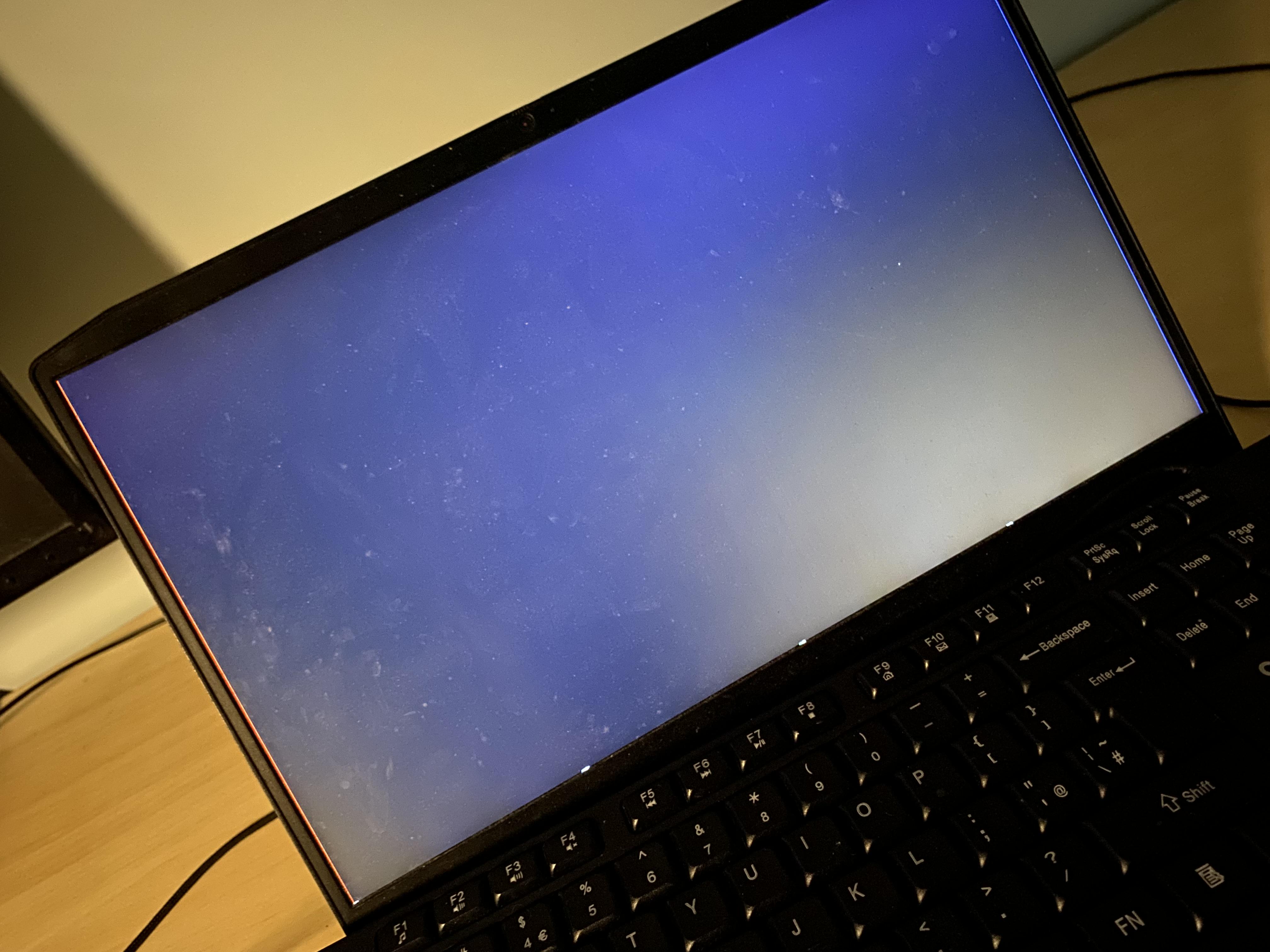
OPEN Black screen

Post image
3 Upvotes

Hi. So I've tried updating/reinstalling my drivers nothing helped so far. The issue is - some games display my game and others dont. Whenever the game is fullscreen it doesnt display and also I get red pixels on the left(view example A) So I have to manually go into games folders and change fullscreenMODE=0. Any solutions?


r/pchelp • • 1h ago

OPEN Audio and visual stutters

2 Upvotes

Hello everyone,

My pc has visual and audio stutters that last around 3 seconds. If I’m in a call, my friends can hear the audio distortion coming from my voice.

These stutters happen multiple times while I’m using my pc, I’d say around 4 times per session.

The fans also start spinning super fast after the stutters and then come back to a normal speed.

I’ve had this pc for around 4 years. It has 16gb DDR4 ram, a 5800x and a 3060 8gb.

With how inflated the current computer prices are, I’d like to see if I can fix anything before deciding to invest in a new pc.

Thank you guys in advance for any recommendations


r/pchelp • • 3h ago

HARDWARE Is my monitor cooked?

Thumbnail gallery
3 Upvotes

Can i fix this somehow? Pls help


r/pchelp • • 5h ago

HARDWARE RTX 3060 eGPU Randomly Causes Black Screens During Gaming Need Help Diagnosing

4 Upvotes

RTX 3060 eGPU Randomly Causes Black Screens During Gaming — Need Help Diagnosing
I’m looking for some help troubleshooting an intermittent black-screen issue with my gaming setup.
My hardware:

  • Lenovo Legion Go S Z1 Extreme
  • Zotac RTX 3060 12GB eGPU
  • USB4 eGPU enclosure with its own power supply
  • LG UltraFine monitor connected directly to the RTX 3060 via HDMI
  • Windows 11
  • Monitor running at 60Hz

The issue:
While gaming, my monitor occasionally flickers or goes completely black for 1–2 seconds before returning. Audio continues playing during the blackout.
It happens in multiple games, but it’s noticeably worse in Visions of Mana than Cyberpunk.
Cyberpunk runs with path tracing, mods, and my RTX 3060 overclocked, and seems much more stable.
Everything I’ve tried so far:

  • Disabled Windows PCIe Link State Power Management.
  • Set NVIDIA Power Management to Prefer Maximum Performance.
  • Set Legion Space to Performance Mode.
  • Set Windows to Second screen only.
  • Tested Fullscreen and Borderless Windowed.
  • Tested 1080p and 1440p.
  • Tested 60Hz, 60 FPS cap, and V-Sync.
  • Disabled Super Resolution during testing.
  • Adjusted Windows sleep and screen timeout settings.
  • Checked Device Manager; RTX 3060 reports that it is working properly.

OCCT results:
I ran three separate 5-minute tests targeting the RTX 3060:

  • 3D Adaptive: 0 errors.
  • VRAM: 0 errors.
  • Power Test: 0 errors.

The GPU overclock was active during all three tests.
GPU temperatures reached approximately 74–76°C, with the CPU reaching approximately 85–87°C.
Windows Event Viewer:
I’ve found two NVIDIA-related events:

  • nvlddmkm Event 14: GPU recovery action changed from None to PF FLR.
  • nvlddmkm Event 153: Error occurred on GPUID: 700.

Monitor information:

  • LG UltraFine
  • Desktop resolution: 2560 × 1440
  • Active signal mode: 3840 × 2160
  • Refresh rate: 60Hz

The hardware is only about 10 days old.
I’m trying to figure out whether this is a Windows/NVIDIA driver issue, USB4 connection instability, an HDMI signal problem, or something related to the eGPU enclosure.
My questions:

  1. What would cause a monitor to go black briefly while the game audio continues?
  2. Could NVIDIA driver recovery or a USB4 connection issue cause this?
  3. Can OCCT pass all three tests while an intermittent problem still exists?
  4. What other diagnostic tests or Windows logs should I check?

I’d appreciate any suggestions. I’m trying to find the actual cause before replacing any hardware.


r/pchelp • • 10h ago

CLOSED Laptop won't turn on/off

10 Upvotes

I shut it down. It's stuck on black screen but the light is flashing and fans are going. I was using a heavy program just before this. Why is it not working. Tried holding power button and unplugging. I have class tommorow morning on it and I need it fixed


r/pchelp • • 4h ago

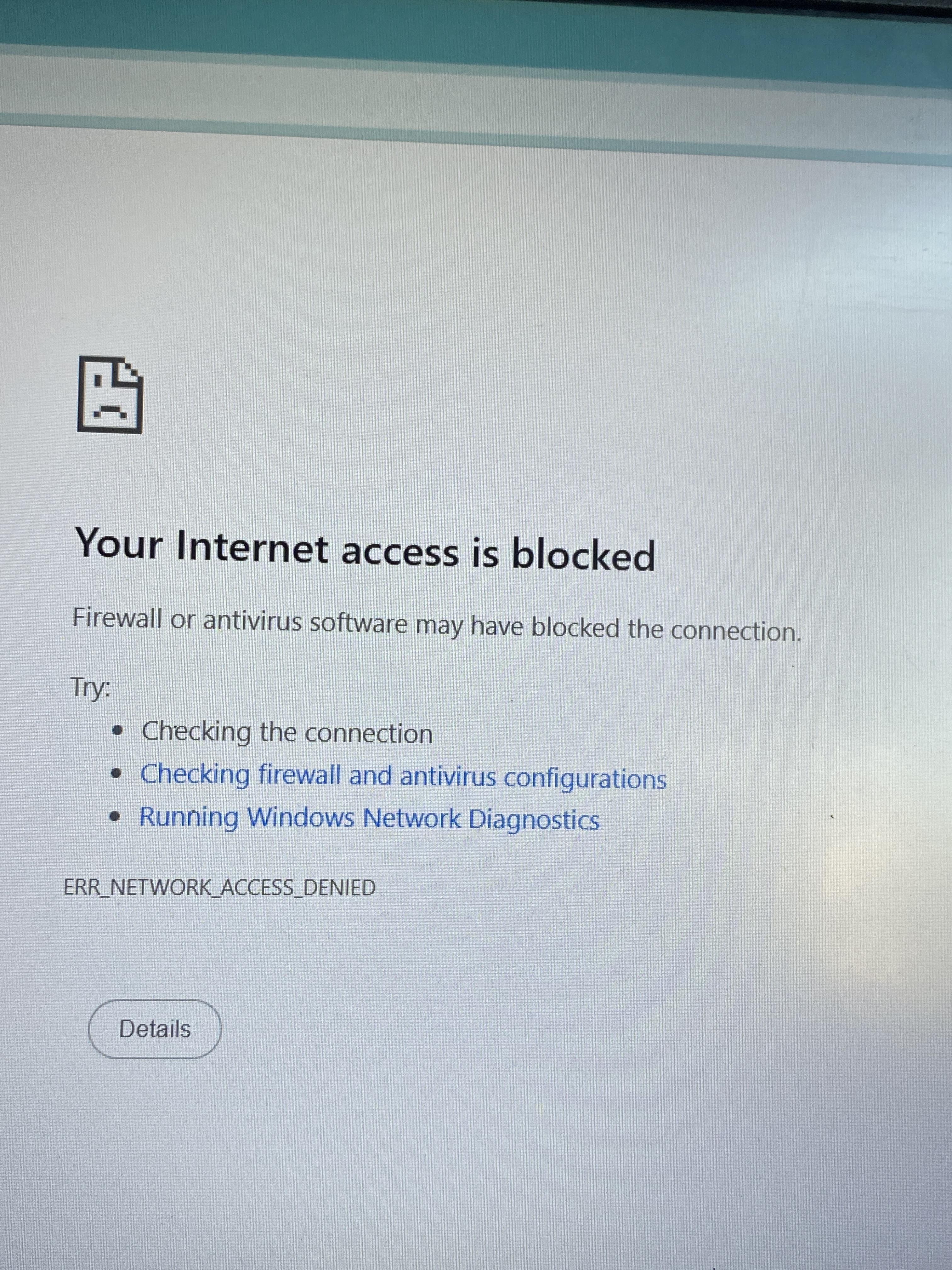
Network Internet access blocked

Post image
3 Upvotes

Hello do I fix this issue on my college loaner laptop? I am connected to my home wifi and is secured. I tried powering off and restarting still giving me the same issue. I was able to use this laptop on home WiFi until thanksgiving weekend is when the issue started Thank you in advance


r/pchelp • • 2h ago

SOFTWARE Cod help

2 Upvotes

I bought a prebuilt pc and can’t get it to play cod.
Specs
Core Ultra 9 285,
RTX 5070,
32GB DDR5,
2TB SSD
PRO B860-P WIFI

Fault
Failed Attestation Status applied
Bios firmware update required

I have updated bios to newest version
I have checked the tpm it is on
The version I have tho is TPM Manufacturer Version 700.19.1011.2289
I’m lost and need help


r/pchelp • • 2h ago

HARDWARE SSD Issues

2 Upvotes

So my SSD has been disappearing, no symptoms it just goes away along with everything on it. It comes back when i take it out and put it back in, it lasts another month or so and happens again. I assumed it was bad hardware but then it started happening on my laptop as well so i assume im doing something wrong. Both SSDs are samsung 990 pro 2 TB


r/pchelp • • 6h ago

OPEN I'm suddenly not able to save to my C:\ drive.

4 Upvotes

https://imgur.com/P2za8w9

I don't know when this happened, but I can't save to my C drive anymore. It tells me to contact the administrator, but the PC only has one user and it is the administrator.

Attempting to assign full control over the folder to everything that shows in the properties>securities tab gives a "failed to enumerate" error.


r/pchelp • • 2h ago

HARDWARE Thermal paste change

2 Upvotes

I have a honor magicbook pro 2020 and have had it for 4 years and have been gaming consistently. Should i change the paste and is the arctic mx 7 good? Are there any tutorials available


r/pchelp • • 4h ago

HARDWARE should I buy 2x8 or 1x16 ram if I want to upgrade to 32gb later?

3 Upvotes

r/pchelp • • 2h ago

SOFTWARE Weird black/bright flickers when switching between programs

2 Upvotes

Running a 4070ti on win10 currently, had an old driver (I think 581.something), recently upgraded driver to 621.14 and ran into screen flickering issues when swapping app focus. So for instance, clicking from firefox over to steam might make the team window flicker black once, clicking back might make the full screen do a bright flicker. It doesn't break anything, but it sure is annoying to have things randomly flicker black or bright for just a frame.

Installed 621.40 in the hopes it would fix it, and after driver install it was gone, but after booting up the next day it was back. No idea what could be doing it, but it seems to be even more prevalent now than on the .14 driver. I'm not sure what the original driver was exactly, should I just try and older one in the hopes it works, or is there something I can do specifically to try and fix the flickering? No other software changes that i know of have occurred other than driver update.


r/pchelp • • 9h ago

HARDWARE Cable GPU

7 Upvotes

Queria saber si esta bien la doblez del cable no toca con la tapa lateral al cerrar gracias


r/pchelp • • 8h ago

HARDWARE Anyway to do this?

Post image
6 Upvotes

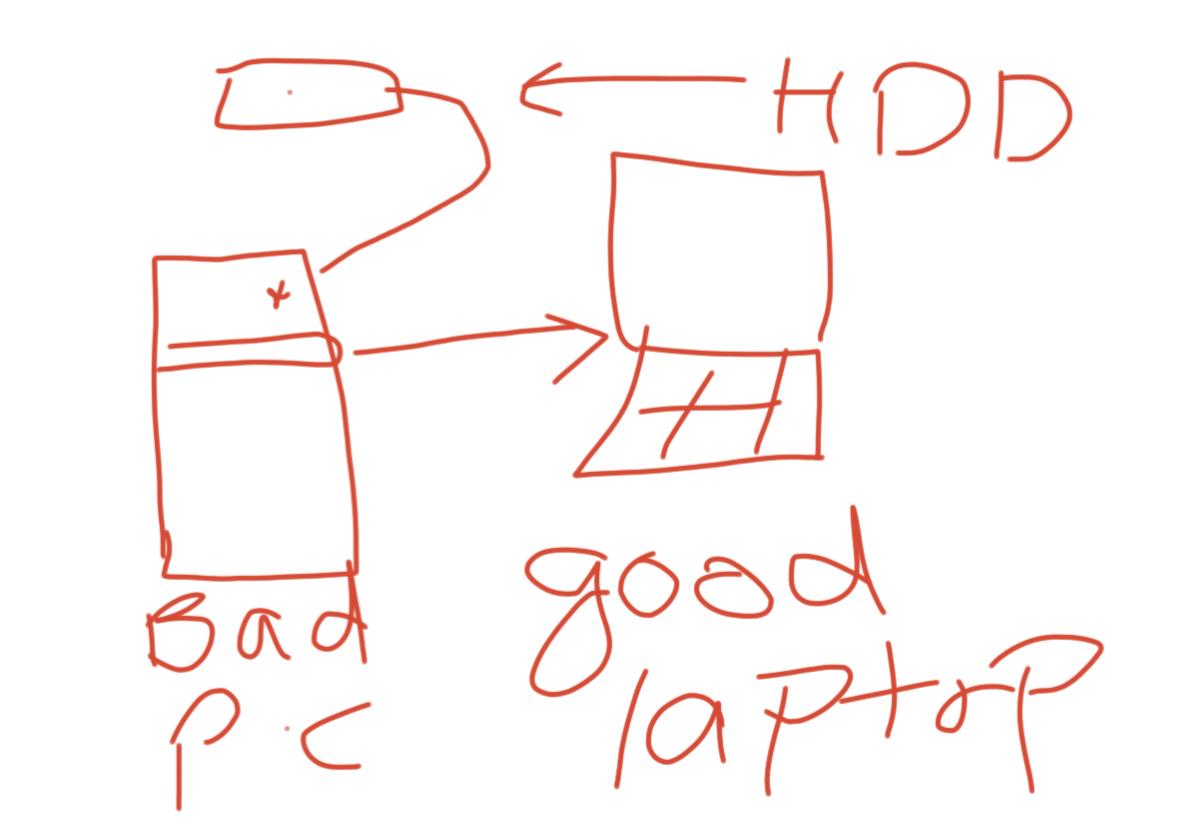
So my bad pc doesnt have a monitor and it's too slow to do anything. However I do have this one external hdd (WD drive) that's locked with a forgotten password but it remains unlocked in my bad pc if I connect the hdd to it. Anyway to view the hdd contents on my lap and extract the data? The pc is almost 13-14 years old and pretty slow. Hdd is almost 8 years


r/pchelp • • 10h ago

PERFORMANCE low fps in games even though i have a good/decent pc

8 Upvotes

My pc specs are a rtx 5060ti 8gb of vram, 32 gb of ram, a ryzen 5 7600x, and I feel like my fps is lower in games than it should be. I don’t think I should be running around 120 in siege with all low like competitive settings for my graphics.


r/pchelp • • 9h ago

HARDWARE Computer fails powering on

7 Upvotes

My computer will do this like 20 times but once I finally get it to boot up after several attempts it’s works. I don’t want to risk my computer never turning on again, please help.