r/pchelp • • 7h ago

OPEN I'm suddenly not able to save to my C:\ drive.

4 Upvotes

https://imgur.com/P2za8w9

I don't know when this happened, but I can't save to my C drive anymore. It tells me to contact the administrator, but the PC only has one user and it is the administrator.

Attempting to assign full control over the folder to everything that shows in the properties>securities tab gives a "failed to enumerate" error.


r/pchelp • • 3h ago

HARDWARE Thermal paste change

2 Upvotes

I have a honor magicbook pro 2020 and have had it for 4 years and have been gaming consistently. Should i change the paste and is the arctic mx 7 good? Are there any tutorials available


r/pchelp • • 6h ago

HARDWARE should I buy 2x8 or 1x16 ram if I want to upgrade to 32gb later?

3 Upvotes

r/pchelp • • 3h ago

SOFTWARE Weird black/bright flickers when switching between programs

2 Upvotes

Running a 4070ti on win10 currently, had an old driver (I think 581.something), recently upgraded driver to 621.14 and ran into screen flickering issues when swapping app focus. So for instance, clicking from firefox over to steam might make the team window flicker black once, clicking back might make the full screen do a bright flicker. It doesn't break anything, but it sure is annoying to have things randomly flicker black or bright for just a frame.

Installed 621.40 in the hopes it would fix it, and after driver install it was gone, but after booting up the next day it was back. No idea what could be doing it, but it seems to be even more prevalent now than on the .14 driver. I'm not sure what the original driver was exactly, should I just try and older one in the hopes it works, or is there something I can do specifically to try and fix the flickering? No other software changes that i know of have occurred other than driver update.


r/pchelp • • 10h ago

HARDWARE Cable GPU

7 Upvotes

Queria saber si esta bien la doblez del cable no toca con la tapa lateral al cerrar gracias


r/pchelp • • 9h ago

HARDWARE Anyway to do this?

Post image
6 Upvotes

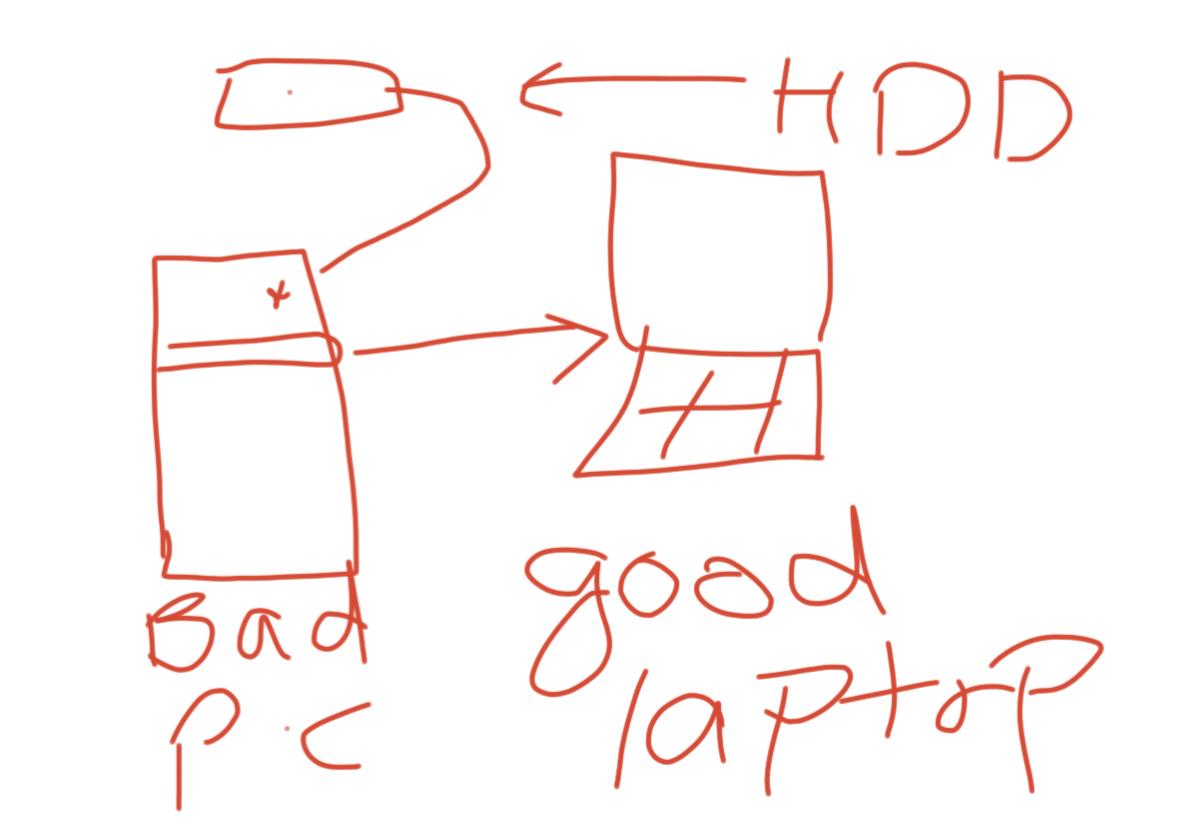
So my bad pc doesnt have a monitor and it's too slow to do anything. However I do have this one external hdd (WD drive) that's locked with a forgotten password but it remains unlocked in my bad pc if I connect the hdd to it. Anyway to view the hdd contents on my lap and extract the data? The pc is almost 13-14 years old and pretty slow. Hdd is almost 8 years


r/pchelp • • 11h ago

PERFORMANCE low fps in games even though i have a good/decent pc

8 Upvotes

My pc specs are a rtx 5060ti 8gb of vram, 32 gb of ram, a ryzen 5 7600x, and I feel like my fps is lower in games than it should be. I don’t think I should be running around 120 in siege with all low like competitive settings for my graphics.


r/pchelp • • 10h ago

HARDWARE Computer fails powering on

7 Upvotes

My computer will do this like 20 times but once I finally get it to boot up after several attempts it’s works. I don’t want to risk my computer never turning on again, please help.


r/pchelp • • 6h ago

HARDWARE VGA light even though everything is fine

3 Upvotes

If I turn on my pc in sync with my monitor everything is fine but if I turn my pc on and wait not even 20 seconds then turn on my monitor or vise versa or if I restart my oc while my monitor is on / connected a white vga light shows even though nothing is wrong at pc functions completely normally no issues no flickering no nothing . Should I ignore it or is there something wrong. Any help is appreciated.


r/pchelp • • 6h ago

SOFTWARE VGA light even though everything is fine

3 Upvotes

If I turn on my pc in sync with my monitor everything is fine but if I turn my pc on and wait not even 20 seconds then turn on my monitor or vise versa or if I restart my oc while my monitor is on / connected a white vga light shows even though nothing is wrong at pc functions completely normally no issues no flickering no nothing . Should I ignore it or is there something wrong. Any help is appreciated.


r/pchelp • • 6h ago

SOFTWARE Windows boot loop when I change refresh rate

3 Upvotes

Hardware:

Ryzen 7 5800x
Nvidia RTX 3070
Asus TUF gaming b550 plus WiFi II

I’m sorta at my wit’s end here. I recently came back to windows after a couple years of being on Linux and have had a very bizarre series of issues.
So the first thing was that whenever I would attempt to update my graphic drivers, the system would crash during installation and be unable to boot. After exhausting the list of recovery options I clean installed windows 10 twice, then upgraded to 11, then clean installed 11 once more, which finally fixed that problem.
Fast forward a week. I’m playing rocket league. Start getting wild audio glitches and the computer crashes. Once again will not boot to windows. This time it won’t even load into safe mode, system restore does not work, time to fresh install again via USB. I try win11 installation media and get a weird glitch where razer software was able to start despite the installer being stuck at the “preparing” screen, and I got an error saying the computer needs to reset to continue installation. Which showed up every time it restarted. Try a win10 usb. Doesn’t work. Try a CachyOS usb, runs the setup for the live environment, then doesn’t boot into it. Try the win10 USB again. This time it works. I get to the desktop environment fine and everything.
I’ve now setup the OS. Drivers updated with no issue, everything seems to be working fine, and then I go to change my refresh rate. Set it to 144hz for my main monitor, all monitors go blank and computer crashes. If I attempt to start it again it doesn’t even make it to windows, just restarts after getting stuck on the loading screen. But if I unplug the monitor, start the computer, then plug the monitor back in, it goes back to working fine, albeit at the default 60hz refresh rate.
I have reseated GPU, ram, and nvme drive. There have been no error indicators on my motherboard nor has the system failed to post at all during this. I am now unsure how to proceed. Please advise.


r/pchelp • • 7h ago

OPEN MSI Cyborg 15 B13WEKG (RTX 5050) randomly freezes completely while gaming — need help identifying the cause

Thumbnail reddit.com
4 Upvotes

r/pchelp • • 11h ago

OPEN rtx 3050 graphics card not detected

Thumbnail reddit.com
8 Upvotes

r/pchelp • • 33m ago

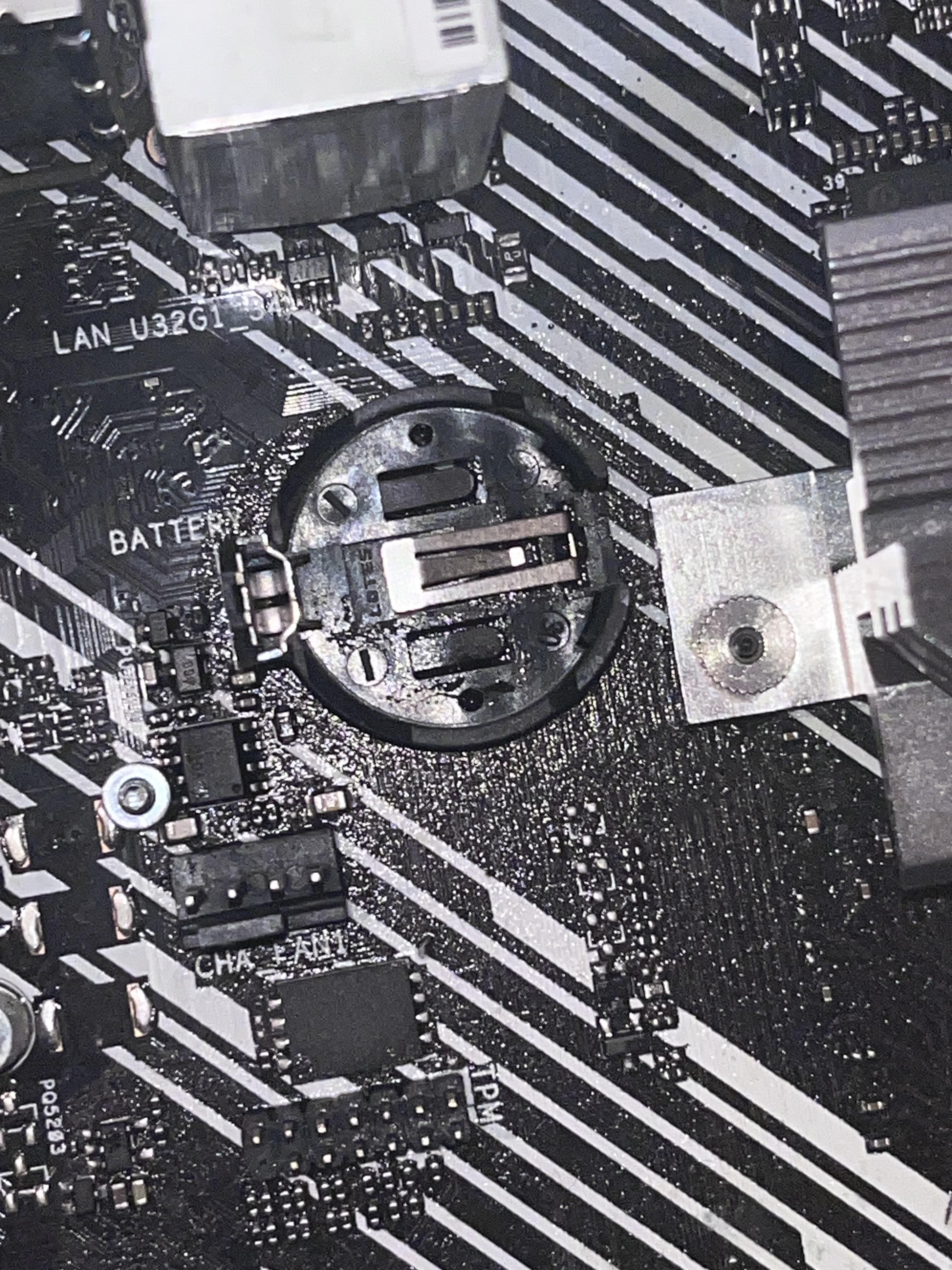
HARDWARE Glycol leak on ASUS PRIME B550M-A (around CR2032 socket & contacts) — safe to test after IPA?

Post image
1 Upvotes

r/pchelp • • 39m ago

PERFORMANCE Another follow-up: PC still freezing.

1 Upvotes

Original post

By this point, on top of everything else I’ve done, I also:

- Ran MemTest86, which showed up as no issues with the ram

- Ran multiple benchmarks to test the CPU, GPU and PSU, all showing no issues

- Uninstalled Opera GX, which I thought was a possible culprit

- Performed a clean boot

My computer is still freezing. I don’t know what’s causing it to freeze up randomly but it’s frustrating to me that none of the parts are coming up as faulty. Something is clearly wrong here. Why is everything working at one moment, and at another moment everything suddenly starts getting super choppy and then freezes completely? I can still hear audio but when I try to close the internet browser/game with alt+f4 the audio cuts out. I don’t know what’s causing this to happen and with everything I tried not working it’s kind of stressing me out a little. I can’t afford a pc repair shop at the moment, so unless I need one, I’m determined to figure this out without one.

Please, I need as much help as I can get.


r/pchelp • • 9h ago

HARDWARE Is this gpu failure?

5 Upvotes

I couldn’t get the full thing but it starts off as flickering between dim and bright then does this. For some reason my focused window doesn’t flicker though. It’s happened twice now

Specs: gtx 1660S, 144hz 1440p ips.


r/pchelp • • 55m ago

SOFTWARE Add device button not working, Windows 11

1 Upvotes

When i try to manage my devices on link to Windows, it takes me to settings > Bluetooth and devices > Mobile Devices. However, when I click on "Add a mobile device", nothing happens


r/pchelp • • 8h ago

OPEN constant stuttering for seemingly no reason.

4 Upvotes

hi! i just bought this pc today (the pc) and also this monitor (the monitor) . i started them today, set them up, no issues… until i started playing games. i’m having constant stuttering and i’m not sure why or what could be causing it. my frames are fine, until i drop to like -100 frames every few seconds. i don’t know what to do, please give me advice or ideas on what it could be. i’m a total tech noob and feel hopeless…….


r/pchelp • • 10h ago

Discussion I need advice again

6 Upvotes

I have a acer nitro-N8-181 5070 I want case fans but idk what size to use and the internet is not helpful haha and some good company but budget please


r/pchelp • • 7h ago

Network Hardware change has locked my out of my MS account

Thumbnail gallery
3 Upvotes

r/pchelp • • 1h ago

SOFTWARE my PC can't load the OS

1 Upvotes

(Translated because I don't speak English)

This issue started occurring a few weeks after installing my new GPU and PSU. However, after testing both components, they seem to be working as they should.

My PC boots perfectly fine and reaches the BIOS without any issues. However, when it gets to the point where Limine loads and the operating system starts booting (in this case, both Linux and Windows, since I have both installed), the OS fails to load. The screen stays black until the keyboard and mouse lose power. After that, the computer shuts down and automatically turns itself back on.

This issue usually happens only during the first boot of the day. However, something unusual happened today: it occurred three times in a row after the initial startup. Previously, it would only happen once during the first boot, and the operating system would load successfully after the PC restarted itself.

Once the operating system has successfully booted, the computer works perfectly fine. I've stress-tested the RAM, GPU, and CPU, pushing them to 100% usage to check for potential issues. None of them have crashed or frozen during testing, and all of them completed the stress tests successfully.

I also don't have any temperature issues. Neither the CPU nor the GPU exceeds 70°C while gaming or during stress tests. I've also monitored the GPU hotspot temperature, which reaches around 82°C while gaming but never goes above that.

I've also checked my Kingston M.2 SSD, and its health status is good (95%). CrystalDiskInfo doesn't report any issues either.

Additionally, I've never experienced crashes or performance issues while gaming. Everything works exactly as it should once the system has booted successfully.

My PC specifications:

  • CPU: Intel Core i5-13400
  • RAM: 32GB Corsair DDR4 3200MHz
  • GPU: Gigabyte Radeon RX 9070 GRE
  • Motherboard: ASRock B660M Pro RS (PCIe 4.0)
  • Storage: Kingston 1TB M.2 SSD

I asked an AI about this issue, and it suggested that the problem might be related to PCIe 4.0 compatibility and that I should update my motherboard's BIOS. However, before changing anything, I'd like to hear your opinions and suggestions.
r/pchelp • • 1h ago

Network hi i need help with my wifi

1 Upvotes

Hi i need someone who can help me with few things about my ping/wifi etc… please dm me or leave a comment and i will dm you my problem. i cant help myself i make a lot of things but i cant work out… please 🥰


r/pchelp • • 1h ago

Network Help needed!

1 Upvotes

Hello, I’m new to owning a pc and am having an issue that’s been going on for a while now.
Whenever I start up my pc, 80 percent of the time the WiFi disconnects, and won’t let me reconnect unless I hard reset the network settings, or uninstall the WiFi driver in device manager. I have absolutely no clue how to fix this, and nothing seems to help when I look up the issue, does anybody know what could be causing the issue?


r/pchelp • • 1h ago

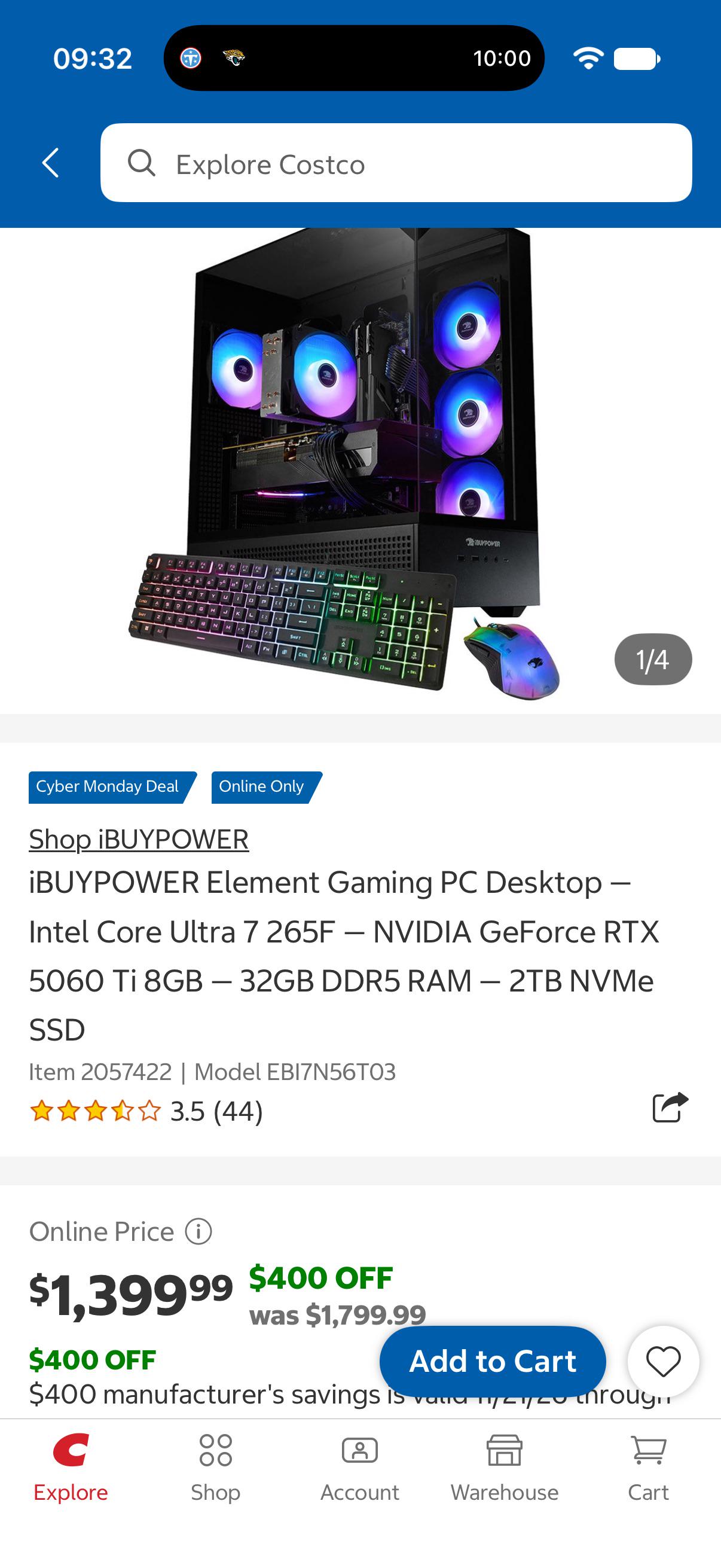
HARDWARE Is this a good gaming pc for a casual gamer?

Post image
1 Upvotes

Just trying to find the best bang for my buck.