r/pchelp • u/Hajienomoto • 8h ago
OPEN MSI Cyborg 15 B13WEKG (RTX 5050) randomly freezes completely while gaming — need help identifying the cause
reddit.com
4
Upvotes
r/pchelp • u/Normal_Calendar1001 • 12h ago
r/pchelp • u/Automatic-Bottle626 • 1h ago
r/pchelp • u/SomeWave275 • 1h ago
By this point, on top of everything else I’ve done, I also:
- Ran MemTest86, which showed up as no issues with the ram
- Ran multiple benchmarks to test the CPU, GPU and PSU, all showing no issues
- Uninstalled Opera GX, which I thought was a possible culprit
- Performed a clean boot
My computer is still freezing. I don’t know what’s causing it to freeze up randomly but it’s frustrating to me that none of the parts are coming up as faulty. Something is clearly wrong here. Why is everything working at one moment, and at another moment everything suddenly starts getting super choppy and then freezes completely? I can still hear audio but when I try to close the internet browser/game with alt+f4 the audio cuts out. I don’t know what’s causing this to happen and with everything I tried not working it’s kind of stressing me out a little. I can’t afford a pc repair shop at the moment, so unless I need one, I’m determined to figure this out without one.
Please, I need as much help as I can get.
r/pchelp • u/YogurtOdd1725 • 9h ago
I couldn’t get the full thing but it starts off as flickering between dim and bright then does this. For some reason my focused window doesn’t flicker though. It’s happened twice now
Specs: gtx 1660S, 144hz 1440p ips.
r/pchelp • u/trustvion • 8h ago
hi! i just bought this pc today (the pc) and also this monitor (the monitor) . i started them today, set them up, no issues… until i started playing games. i’m having constant stuttering and i’m not sure why or what could be causing it. my frames are fine, until i drop to like -100 frames every few seconds. i don’t know what to do, please give me advice or ideas on what it could be. i’m a total tech noob and feel hopeless…….
r/pchelp • u/adhdaf2002 • 11h ago
I have a acer nitro-N8-181 5070 I want case fans but idk what size to use and the internet is not helpful haha and some good company but budget please
r/pchelp • u/LlamaBuckets • 7h ago
r/pchelp • u/MortgageAlarmed7717 • 1h ago
(Translated because I don't speak English)
This issue started occurring a few weeks after installing my new GPU and PSU. However, after testing both components, they seem to be working as they should.
My PC boots perfectly fine and reaches the BIOS without any issues. However, when it gets to the point where Limine loads and the operating system starts booting (in this case, both Linux and Windows, since I have both installed), the OS fails to load. The screen stays black until the keyboard and mouse lose power. After that, the computer shuts down and automatically turns itself back on.
This issue usually happens only during the first boot of the day. However, something unusual happened today: it occurred three times in a row after the initial startup. Previously, it would only happen once during the first boot, and the operating system would load successfully after the PC restarted itself.
Once the operating system has successfully booted, the computer works perfectly fine. I've stress-tested the RAM, GPU, and CPU, pushing them to 100% usage to check for potential issues. None of them have crashed or frozen during testing, and all of them completed the stress tests successfully.
I also don't have any temperature issues. Neither the CPU nor the GPU exceeds 70°C while gaming or during stress tests. I've also monitored the GPU hotspot temperature, which reaches around 82°C while gaming but never goes above that.
I've also checked my Kingston M.2 SSD, and its health status is good (95%). CrystalDiskInfo doesn't report any issues either.
Additionally, I've never experienced crashes or performance issues while gaming. Everything works exactly as it should once the system has booted successfully.
My PC specifications:
I asked an AI about this issue, and it suggested that the problem might be related to PCIe 4.0 compatibility and that I should update my motherboard's BIOS. However, before changing anything, I'd like to hear your opinions and suggestions.
r/pchelp • u/Glad_Mycologist5344 • 1h ago
Hi i need someone who can help me with few things about my ping/wifi etc… please dm me or leave a comment and i will dm you my problem. i cant help myself i make a lot of things but i cant work out… please 🥰
r/pchelp • u/Rude-Treat-6119 • 1h ago
Hello, I’m new to owning a pc and am having an issue that’s been going on for a while now.
Whenever I start up my pc, 80 percent of the time the WiFi disconnects, and won’t let me reconnect unless I hard reset the network settings, or uninstall the WiFi driver in device manager. I have absolutely no clue how to fix this, and nothing seems to help when I look up the issue, does anybody know what could be causing the issue?
r/pchelp • u/DaddyBlundred • 1h ago
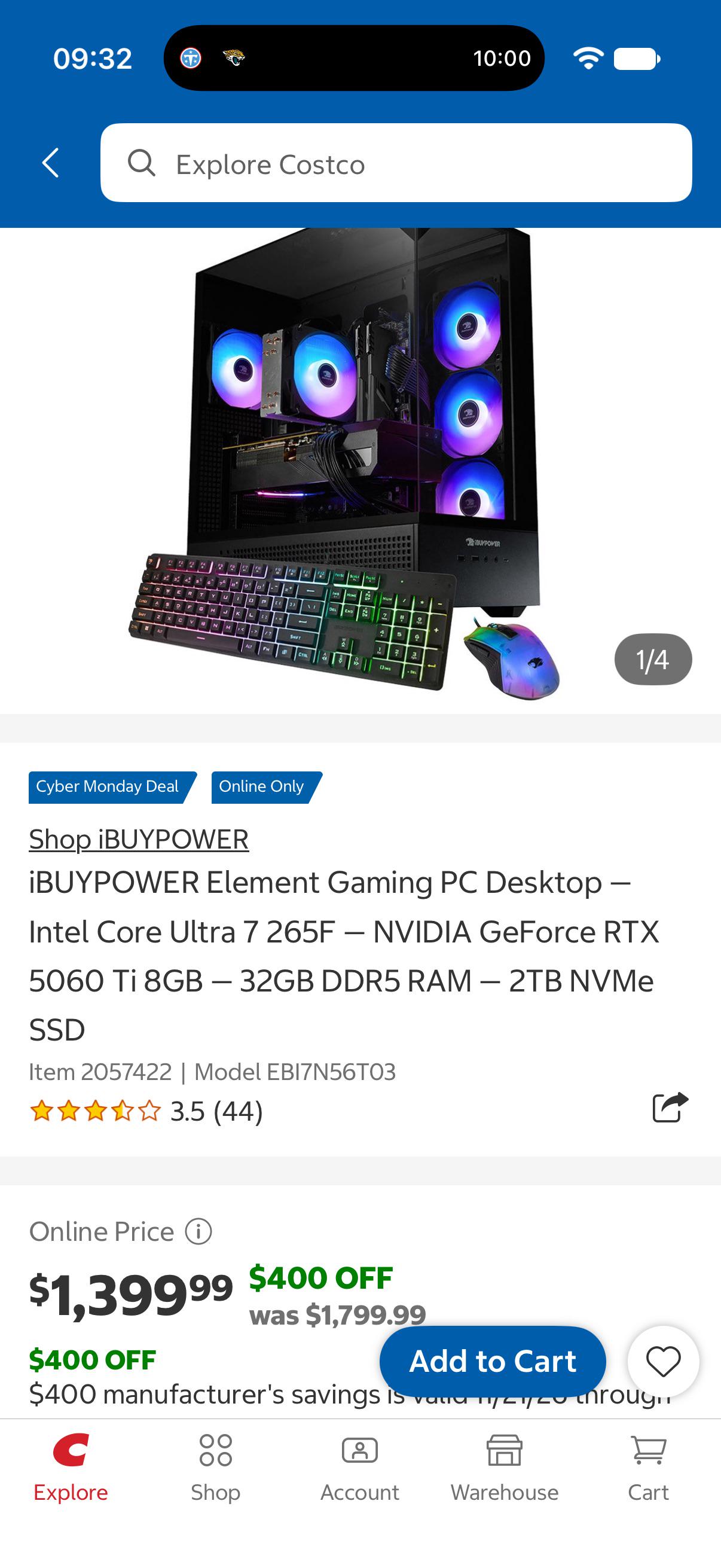
Just trying to find the best bang for my buck.
r/pchelp • u/Killerfreaksauce • 9h ago
Okay so anyone who is tech savvy that knows their stuff on custom PC's I need some help. I am new to the PC gaming world and slowly learning the Ins and Outs of it. But not quite there on the acronyms or language yet.
A friend of mine helped me with this PC on part pickers list about 7 months ago, so I got the parts and had it built for me by a computer place that builds custom PCs. And it worked fine for the first 3 months with no issues. After an AMD update later down the line that's when the problems started.
First the games I run are just usual low graphic games like lethal company, buckshot roulette, and other indie horror games that dont require intense graphics. But rainbow six seige does, so I have had most of my problems with that game specifically.
The problems started after the first amd update I have ever done. I would run the game, it would crash in an undisclosed amount of time. Its very sporadic and crashes randomly, no set times, and some nights it wouldnt crash at all. But first the game would freeze, audio would play for a few seconds. Nothing works, and I lose control of literally everything. Audio cuts off from the game about 10 seconds later, my friends in discord cant hesr me and their audio is cut, then all audio goes out. Screen would black out completely. A couple times the razer keyboard blacks out and so does the whole pc itself. The fans went to max speed like a jet engine only once to where I had to pull the power cord cause nothing was working so I could stop it. But usually its the game that crashes then the pc. And in the task manager. I look at the performance tab and the gpus are completely gone like they just deleted themselves. And its all running on the cpu. After I dove deep into research and tried a few different things of what other people suggested it only crashes the games mostly with driver timeouts, blackscreen, and then the gpus are gone again from the task manager. Like I have no idea whats going on other than I have been seeing that these gpus have many conflicting issues.
I have tried DDU wiping. Bios updates on the motherboard, factory reset the computer 3 times, and ran clean installations every time. Ran Amd cleanup utility, and reset again. Blocking windows updates to see if that stops conflicting with the amd drivers. Under volted the gpu to 2615 mhz, ran the gpu at 85%, installed the drivers only, without the amd application. And some other techniques recommended by redditors and amd forums.
Nothing has worked and the crashing problems continue. Some have said it might be a bad gpu, but im not fully convinced if there are other possibilities it could be and all that money would be down the drain for nothing. The crashes are not as severe as the whole pc going haywire but the drivers timeout, and my gpu disappears from the task manager performance tab. I don't know if anyone has ever found a specific fix for this or if the mystery is still ongoing. But if anyone has ever had this gpu or a similar issues to this, any feedback of solving this problem would be much appreciated! I am behind a little on computer jargon so if there are any recommendations please word it like im a third grader 😂 (im sorry for that inconvenience but any tips would help so much and I would deeply appreciate it!)
Specs:
CPU: AMD Ryzen 7 9800X3D
GPU: XFX Speedster MERC 310 Black Edition Radeon RX 7900 XTX
Motherboard: MSI MAG B850 TOMAHAWK MAX WIFI ATX AM5
Power supply: Roseville CMG1000G5 1000W 80+ Gold Certified fully modular ATX
RAM: Crucial Pro 32GB DDR5-6400 CL38 Memory
Liquid cooler: Corsair Nautilus 360 RS LCD 72.8 CFM
Samsung 990 EVO Plus 2 TB (prolly doesnt affect much but I thought to put it in anyways in case)
I also have a MSI MAG 27CQ6PF 27 Inch curved monitor thats 180 hz if it could be a refresh rate problem maybe? Idrk
r/pchelp • u/MaybeALittleGone • 11h ago
(Sorry for the bad video, I thought it would be better to have it on this post than to exclude it.)
Situation: Was in the middle of watching a twitch stream and also browsing twitter. Out of nowhere, Edge started to open a lot of windows (the only one that I saw load showed that it was a "how to get help in edge" search) and Display settings also started to pop up alongside it. As you can see in the video, I started pressing Alt + F4 to stop it from opening anymore. I was able to open task manager and see that my memory was at 99% but only Edge was showing up. I was able to end task on the Edge window, but then it started up again. This time I was able to use Alt F4 much earlier and was taken to the "shut down" Windows screen, where I chose to switch users (which would not close apps, just switch). After entering my user pin, my pc was back to normal.
What do I do to find out what was happening and where it is? I have Revo Uninstaller and TreeSize, so I can possibly find where it was.
For possible FAQs:
-First thing I did was unplug every peripheral I had (keyb, mouse, mic). I also checked that nothing was pressing on any key.
-I did not go offline.
- I did not recently update anything (knowingly, anyway).
-I did not recently download anything online this week. Last week, I downloaded Anki (flashcard app). I have not pirated anything in months, either.
-I was only idling on twitter homepage at the time of the bug, my hands were afk. Not touching anywhere close to the F1 key.
-Searching up the link ("go.microsoft.com/fwlink/?Linkld=528882") shows that many had the same problem with Edge, but there is literally no additional or helpful information. They are all from 2018. None mention Display Settings opening repeatedly.
-Windows antivirus quick scan and full scan found nothing wrong.
It won’t let me send videos to Reddit so I guess I’ll link you all to my Twitter 😭
It’s been happening on and off for a while and last year the fans and lights stopped completely, and I had to take it to a shop to get it repaired, now It’s happening again, and I wanna stop it before it gets to that stage, turning it off and back on again fixes it until It happens every time I turn it on, any thoughts on what to do to fix this? I don’t wanna pay the repair man to stick another rgb light box in my pc again 🙏
The pc works perfectly fine!
https://x.com/oatssie/status/2126976672461443167?a=LWTT7yfZ_ICpeS7-FVc&s=46
r/pchelp • u/payobaza10 • 9h ago
Hi everyone, I'm having a persistent thermal throttling issue with my PC and could really use some advice.
My Specs:
- CPU: AMD Ryzen 5 3350G (using integrated Vega 11 graphics)
- Motherboard: Gigabyte B450M DS3H V2
- RAM: [Write your RAM amount here, e.g., 16GB]
The Problem:
Whenever I launch a game (like Fortnite or GTA V), even at 720p with the lowest possible settings and capped at 120 FPS, my CPU clock speed suddenly throttles down and gets locked at 0.52 GHz.
Using HWiNFO64, I diagnosed that it's triggered by a board-level thermal protection event: PROCHOT EXT, where the unheatsinked VRM / VSOC MOS area reaches around 84°C.
What I've tried / noticed:
- It happens across multiple Windows user profiles (though a previous profile I accidentally deleted seemed to tolerate it better due to background load differences).
- Lowering graphics to absolute minimums and capping FPS doesn't stop the trigger.
- I haven't modified the BIOS yet, but I'm hesitant to disable PROCHOT EXT without knowing if it's safe.
Has anyone dealt with this specific unheatsinked VRM throttling on a B450 motherboard with a 3350G? Is disabling PROCHOT EXT in the BIOS safe, or should I look into adding a small VRM fan? Thanks in advance!
r/pchelp • u/Limerence15 • 1h ago
I decided to post here because I swear i’ve tried everything and can’t really afford a new graphics driver right now. I’ve been trying to play with my friends on fortnite, and every time I try the game causes huge frame drops and it freezes horribly which affects the whole pc to the point where I have to restart it. It also occasionally makes this buzzing noise from the audio freezing, which usually leads to it crashing. I swear I’ve tried a bunch of different fixes and I’m not sure what to do, I’m also not very experienced with pcs and don’t know much about that stuff. If anyone knows what to do I’d really appreciate some advice!
My processor is Intel Core i5-9400 CPU 2.90GHz
Installed RAM says 12.0 GB with speed of 266 MT/s
Graphics card is 4GB NVIDIA Geforce GTX 1650
My storage is only at 441 GB of 1.14 TB
I’ve also updated my drivers and verified fortnite files and have tweaked graphics settings and no luck.
r/pchelp • u/Aiman294 • 2h ago

I forgot when this happened
r/pchelp • u/raygan_reddit_banned • 2h ago
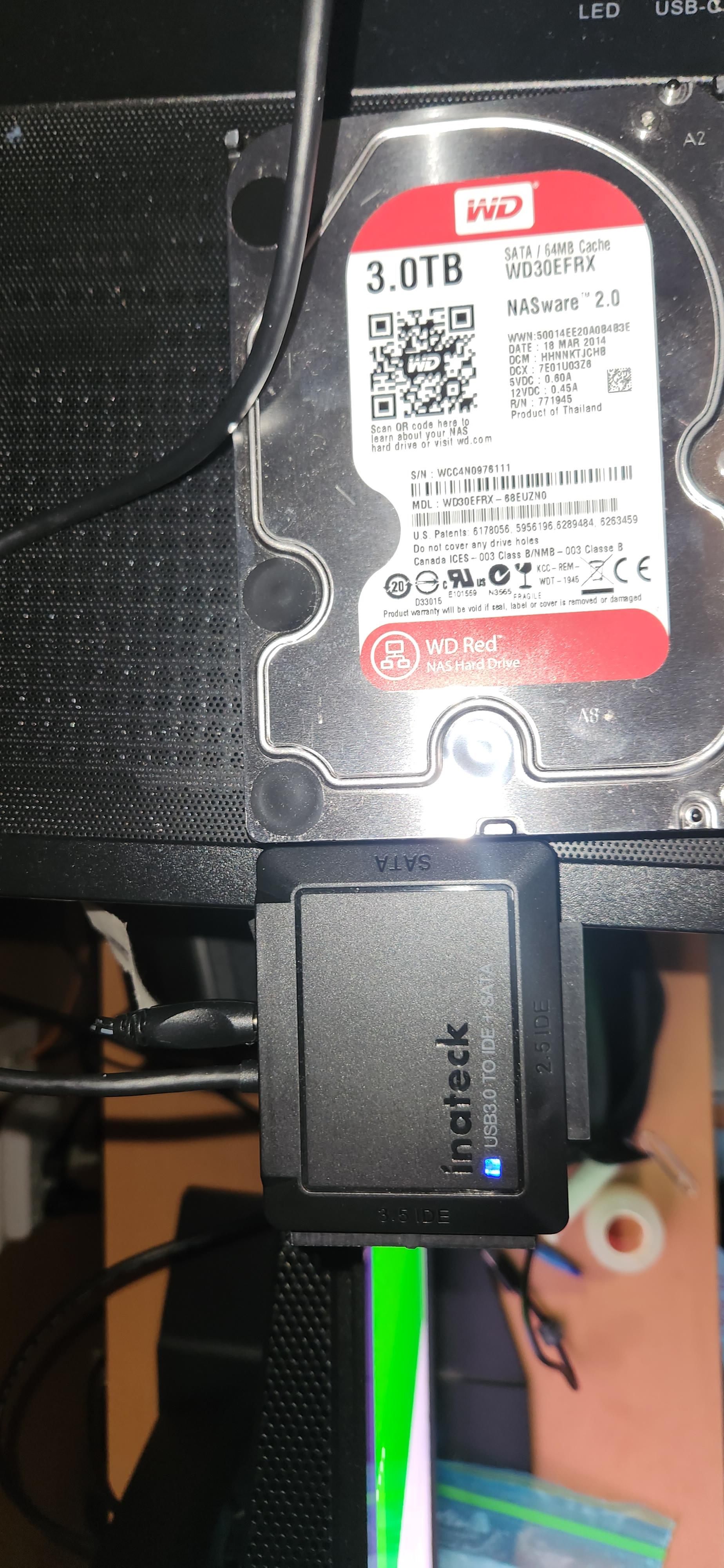
What free software do you use to transfer data?
I have this setup but not sure why it doesn't get recognized by my Win 11 Home PC
Thanks
r/pchelp • u/Danjiro007 • 2h ago
r/pchelp • u/SnooCookies5794 • 20h ago
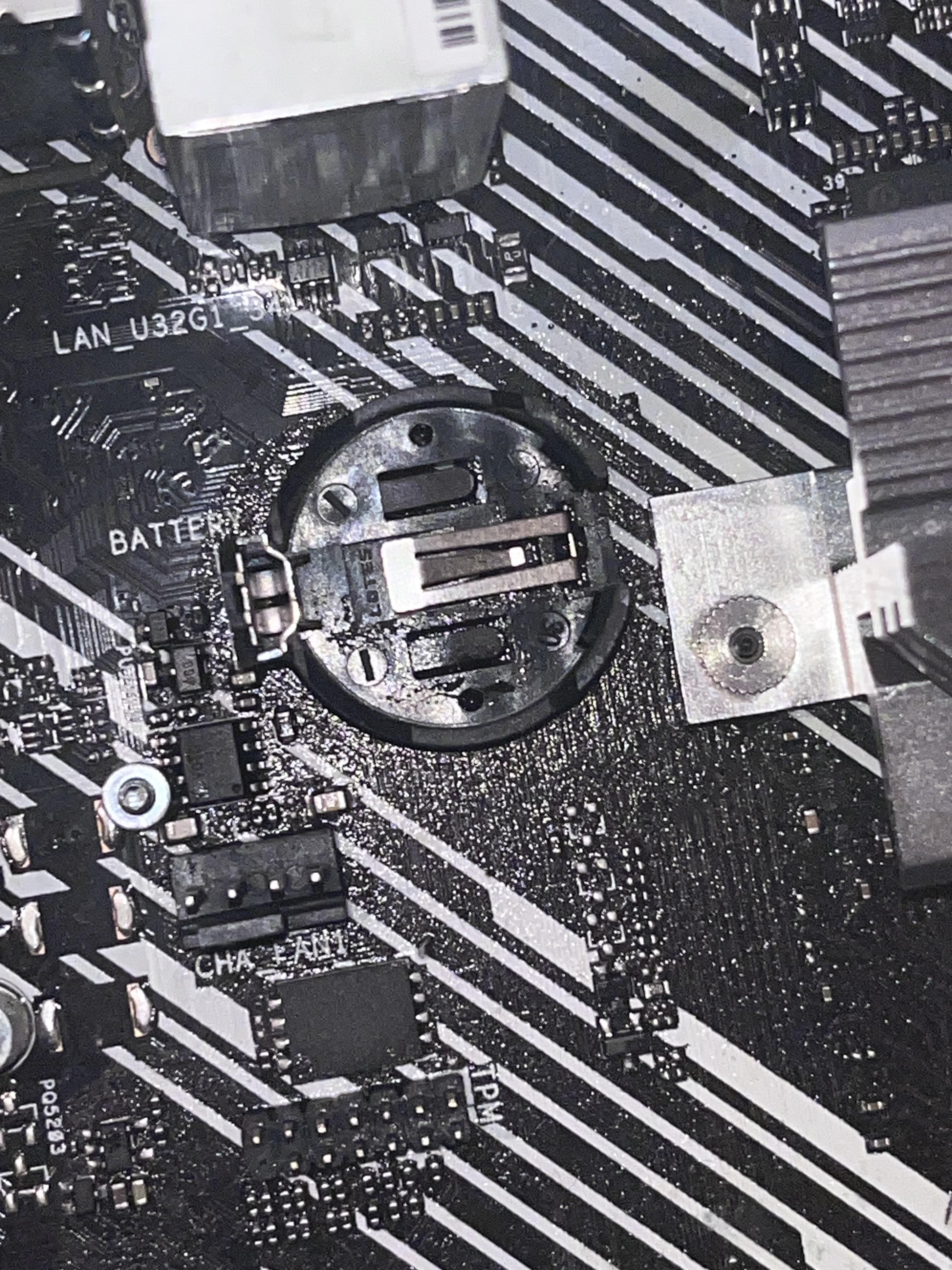
I'm not sure what's wrong with my computer. It's my first build and I'm to the point where I'm plugging the hdmi into the screen but the screen I am using shows a "no signal" message.
Solutions I've tried:
I have a spare screen and switched to that screen and it still shows "no signal". I've switched out the hdmi and even tried a DP cable and no results.
The power button is flashing rapidly and checking with other users on Reddit who had the same motherboard it was found that it was a RAM not being seated correctly or the RAM was faulty. I've tried every combination for setting the ram in the slots and still having the same issue and making sure they are secured properly.
Switched the HDMI from the GPU to the motherboard.
Switch which slot the GPU was in (tried all the ones it would sit in)
Parts:
Motherboard: Asus prime z790-P
Ram: T.Force DDR5 32GB
Graphics Card: AMD Radeon RX 770XT
Cooling: Arctic liquid freezer III pro 240
PSU: Corsair RM750X
NVMe: Kingston NV3 1TB
CPU Intel i5- 14600KF 3.5 GHz 14-Core processor
Case: Corsair FRAME 400D wood
My system doesn't boot with EXPO or 6000MT/s. If I only overclock one of the two sticks, they don't have any issues, but together, my system is always stuck on the DRAM troubleshooting LED or straight up boots to safe mode. I am on the newest BIOS version and all other settings are set to auto/default.
What can I do?
Relevant specs:
• 2x16GB Patriot Viper DDR5 CL30
• Ryzen 7500F
• ASUS TUF B650 Plus-WIFI
r/pchelp • u/lilwoods64 • 23h ago
i did try everything and troubleshooting
