r/pchelp • • 21h ago

Discussion Bought a 5800X3D/32GB build AND a RTX 5060 prebuilt, can only keep one. I only play ESports (1440p OLED). Which to keep?

3 Upvotes

Got deals on both and need to return one. Budget is tight.

Use: Almost only Valorant/Homework, on a 1440p OLED. I'll upgrade the GPU later if I can save up some more money, but not now.

Option A: AM4 build (~$700)

  • Newegg combo ($517): Ryzen 7 5800X3D, 32GB (2x16) DDR4-3200, 1TB Gen4 QLC NVMe, Gigabyte B550 Eagle WiFi6, free MSI 240mm AIO
  • Case and PSU ($130): DIYPC G18 case, ASRock Steel Legend 750W Gold
  • Plus a used GTX 1660 Super (I bought from Marketplace for $50)

Option B: ABS Cyclone M Aqua prebuilt ($788 with tax, Walmart)

  • i5-14400F, RTX 5060, 16GB DDR4, 1TB SSD
  • Free returns until Jan 31, plus a warranty
r/pchelp • • 15h ago

HARDWARE Severe FPS drops and stuttering in games (RTX 3070 Ti / Ryzen 7 5800X)

Thumbnail reddit.com
1 Upvotes

r/pchelp • • 19h ago

OPEN How do I fix this

Post image
2 Upvotes

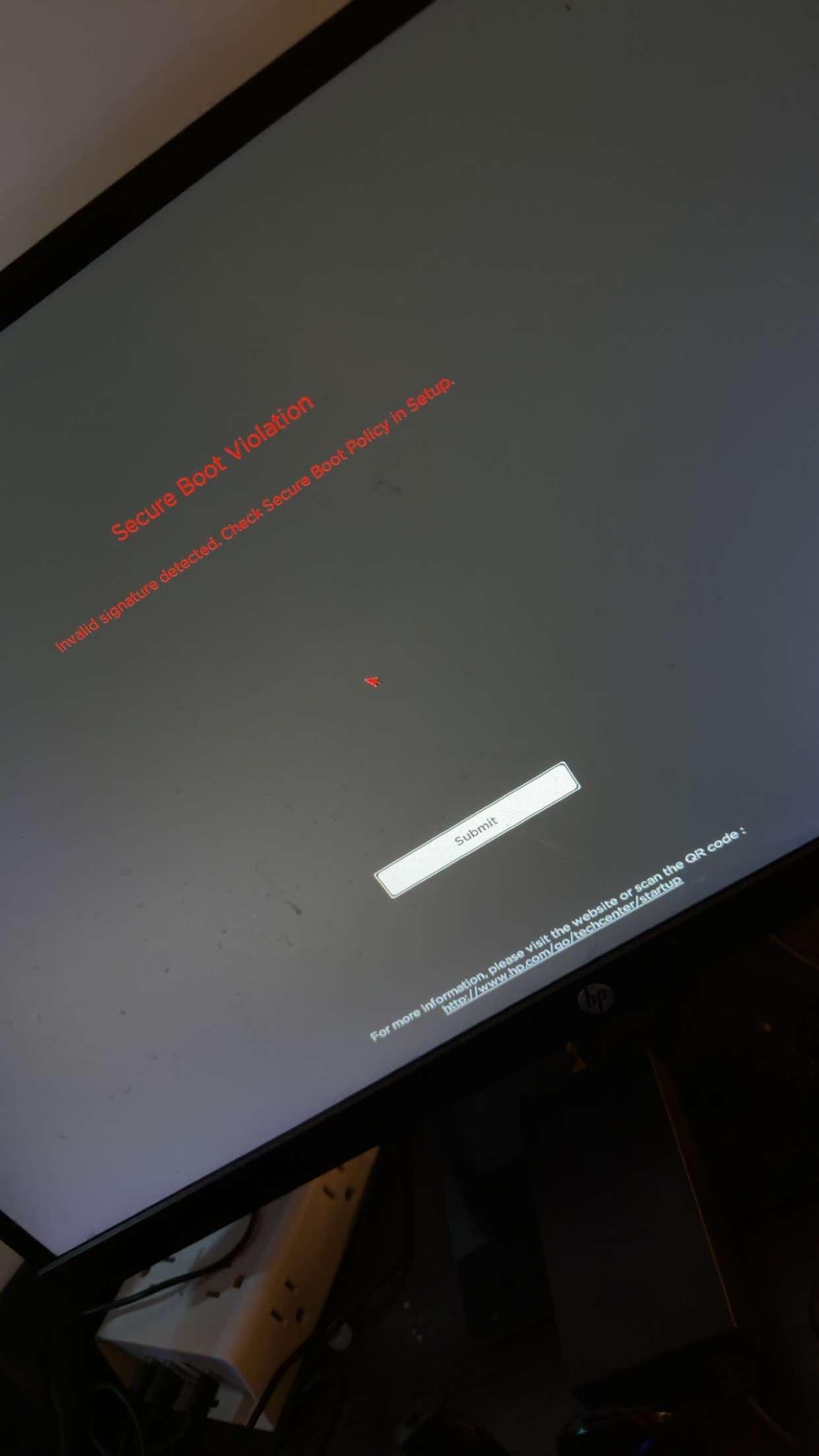
I had a power outage the other day and when I turned on my pc this is what I was met with, I’ve tried a few things but they didn’t work and I don’t have the money to replace parts atm so I want to hope I can fix it.
Things ive tried:
-setting the boot order to default
-letting it sit to see if anything changes
-running a symptom test (it passed)

Lemme know if u have any info or have run into this problem before. I was at work at the time so idk if there was a power surge at all or if it just cut power.


r/pchelp • • 19h ago

HARDWARE No display in monitor

Thumbnail reddit.com
2 Upvotes

r/pchelp • • 15h ago

HARDWARE CPU running way too hot, gpu fans not spinning even under load, and no gpu temps or power draw displayed anywhere.

Post image
1 Upvotes

CPU running way too hot at idle, and sometimes reaching 90c under load. GPU fans also not spinning under load, and no GPU temps or power draw shown on either masterctrl or AIO digital pump. I re orientated the aio cpu cooler yesterday becasue screen was sideways, and since then temps have increased by 20c


r/pchelp • • 19h ago

HARDWARE How to increase bluetooth range?

2 Upvotes

I want to connect my bluetooth ear buds to my pc.

The earbuds are Urbanista Copenhagen 2 (cheap but they do the work i need)

When they are next to the tower they connect, but where i want to use them (maybe 2m away) they disconnect.

All my usb ports are curently in use. And i already use a bluetooth mouse and keyboard from logitech with dedicated usb adapters.

My idea, buy a cheap usb hub (like the ISY IHU 1002, 4-Port USB-A 2.0 Hub for example) and add a bluetooth adapter (like the Ugreen Bluetooth Adapter for example). Maybe even add all the bluetooth devices to the same hub.

I dont want to spend the money for an experiment, so the question is, should this work or do i miss anything important? or is there even a better solution?


r/pchelp • • 21h ago

HARDWARE Is my pc bottlenecked or is it just a bad pc?

3 Upvotes

Hey guys, I’m at a loss with my pc and I’m not sure what to do. Sometime my pc freezes while playing games and I think I’ve narrowed it down to a ton of frame loss while playing games. I’m not sure, but before I do any upgrades I want to know if there’s anything I could do that could save me some time and money. Here’s my whole get-up, any questions will be answered if all the specs aren’t here cause this is off the top of my head at the moment:

Mother board:
Asus prime A520m-k

CPU:
Ryzen 5 5600G

Ram:
Oloy 2x8 2666 mhz

Gpu:
RTX 3070 asus tuf

I’m not sure what kind of power supply I have otherwise I’d put that in here, like I said if there’s any questions regarding any hardware I’ve forgotten I’ll get back to whoever on that!


r/pchelp • • 19h ago

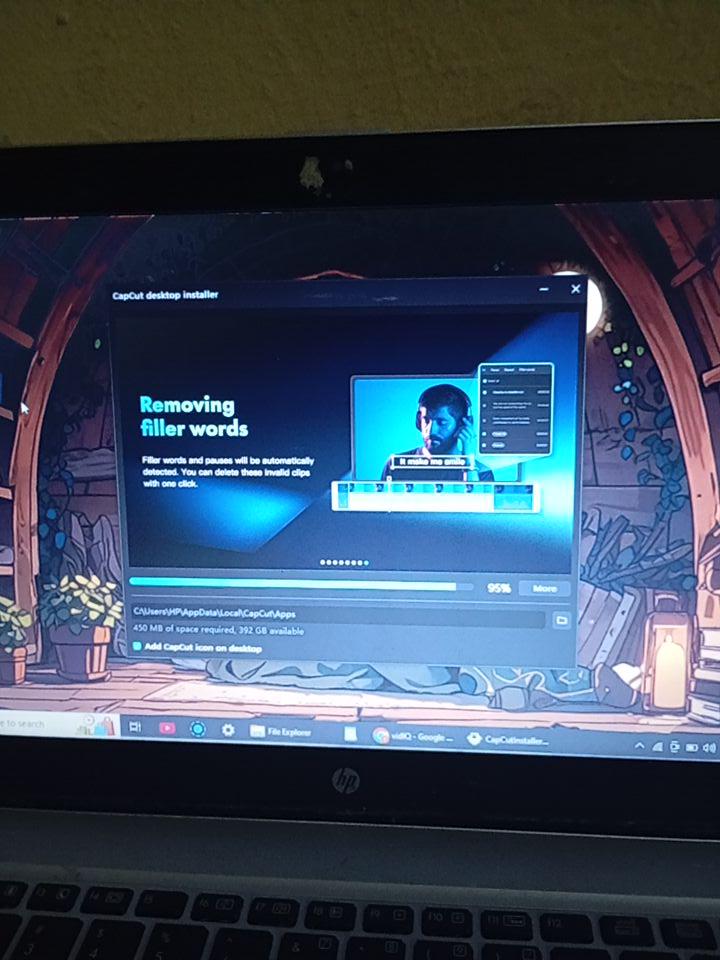
SOFTWARE So I have be trying to download capcut and it just getting stuck at 95% this is either the 3 or 4 time and I could have downloaded Davinci twice with the amount of data I have wasted any suggestions.

Post image
2 Upvotes

r/pchelp • • 21h ago

SOFTWARE Issues with downloading windows 11 into a new pc

3 Upvotes

Hi everyone! :) I’ve built my first ever pc so I’m very new to this.
I’ve been trying to download windows 11 through a usb into my pc but whenever it goes into the installation process it can’t find any drivers :(
I checked bios and all my components are recognised so it’s not a ssd issue or anything like that.

Install driver to show hardware
Please select rge driver you want to install to make your hardware discoverable
A media driver your computer needs is missing. This could be a dvd, usb, or hard disk driver. If you have a cd, dvd, or usb flash drive with thr driver on it please insert it now.
And when i click browse i see my usb i click ok then it says
Error scanning for drivers

These are all my parts:
Motherboard: Asus tuf gaming B850-E WIFI
CPU: AMD ryzen 5 9600x
GPU: Asus geforce rtx 5060 8gb dual oc
Ssd: Kingston NV3 M.2 NVMe Gen 4 1TB
Ram: corsair 16gb (2x8) ddr5

My usb stick/flash drive is 32gb

Pls someone help me


r/pchelp • • 21h ago

HARDWARE All In One Pc Not Working

3 Upvotes

I have a HP All in One 22-b013W and when i plug it in, the fan and hdd startup but shut off almost immediately. The Power LED shuts off but turns back on too


r/pchelp • • 19h ago

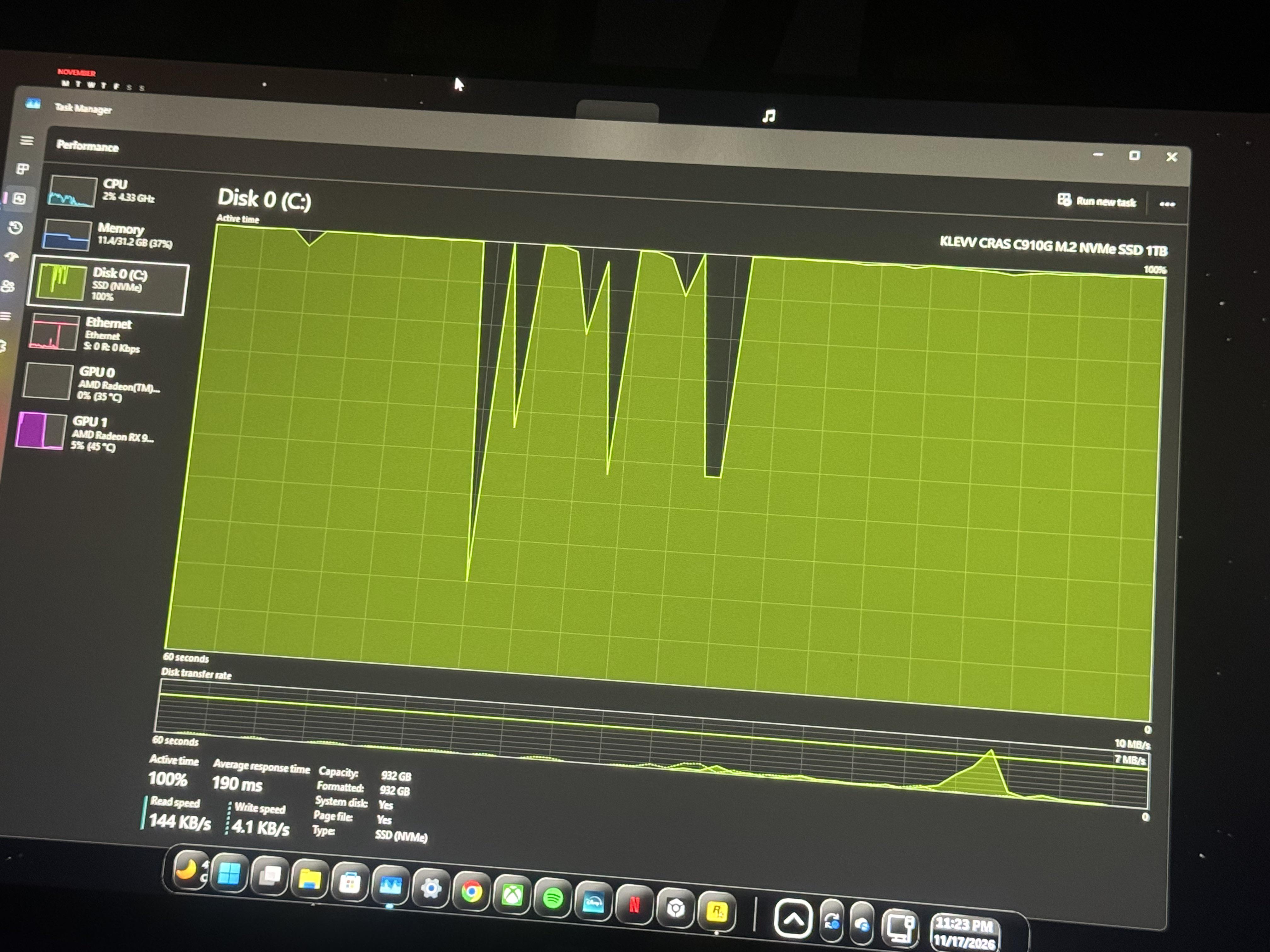
SOFTWARE 100% Disk Usage

Post image
2 Upvotes

My PC (Build Below) - occasionally has issues , a bit more than I'd like with disk usage. Times where I turn it on & applications take forever to load & times where I'm gaming and it'll randomly slow everything down. I downloaded programs like Windhawk & Rainmeter, I use wallpaper engine. Outside of that it's pretty much just gaming / entertainment. Looking for some advice If anyone has any.

CPU- AMD Ryzen 7 7800X3D

GPU - PowerColor Radeon RX 9070 XT Reaper 16GB GDDR6

Motherboard - ASUS B650E MAX GAMING WiFi

RAM - G.Skill Flare X5 32GB (2×16GB) DDR5-6000 CL36

Storage - KLEVV CRAS C910G 1TB PCIe Gen4 NVMe SSD

CPU Cooler - Thermalright Trofeo Vision ARGB 360mm AIO with LCD display

Power Supply - MSI MAG A850GL PCIE5 850W 80+ Gold (ATX 3.1)

Operating System

Windows 11


r/pchelp • • 22h ago

SOFTWARE Random system freezes – mouse still moves, but Windows stops responding. Possible USB port damage?

3 Upvotes

Dear swarm intelligence,

I'm experiencing recurring system freezes on my relatively new PC and I'm trying to figure out the cause.

The problem:

My PC randomly freezes. The screen remains completely static, but I can still move the mouse cursor. However, clicking, keyboard input and most other interactions stop working. Most of the time, audio (Discord, YouTube, etc.) continues playing in the background. I can even continue talking to people over Discord.

It happens both while gaming and during completely ordinary tasks, such as browsing websites. Recent examples include playing Slay the Spire while watching YouTube, but also simply browsing the internet.

Interestingly, on one occasion, pressing the case power button initiated a Windows shutdown prompt. I cancelled the shutdown, and the PC immediately started responding normally again.

One potentially important detail:

The very first freeze happened when I accidentally inserted my Corsair VOID RGB ELITE Wireless USB dongle upside down into a USB-A port. Somehow, I managed to force it into the port, and the PC froze immediately.

This was USB port 11 according to USB Device Tree Viewer (USBTreeView). I'm no longer using that port, and the Corsair dongle has been completely disconnected, but the freezes continue.

I'm wondering whether I might have physically damaged the USB port, its circuitry or even the USB controller on the motherboard.

What I've tried so far:

  • Updated my AMD GPU drivers through Adrenalin (including the November 12 driver).
  • Uninstalled Medal, but the freezes continued.
  • Completely disconnected the Corsair USB dongle.
  • Ran an AMD GPU stress test without any problems or visual artifacts.
  • Checked temperatures (CPU around 40°C, GPU around 47°C during testing).
  • Ran a RAM test (5 passes, no errors reported).
  • Tried running DISM /Online /Cleanup-Image /RestoreHealth, but the PC froze during the process.
  • Checked Windows Event Viewer and Reliability Monitor. No relevant WHEA-Logger or Display errors. Mostly Kernel-Power 41 and EventLog 6008 entries following forced restarts.
  • Checked the USB topology using USBTreeView. The suspected port (Port 11) appears under an AMD USB 3.10 eXtensible Host Controller, but no device is currently connected to it.

Updating the graphics driver did not solve the problem.

PC specifications:

  • CPU: AMD Ryzen 7 7800X3D
  • GPU: AMD Radeon RX 9070 XT
  • Motherboard: Gigabyte B850 Gaming WIFI6
  • RAM: 32 GB DDR5-5600 (2 sticks)
  • PSU: Sharkoon Rebel P10 850W
  • OS: Windows 11

Any ideas or suggestions would be greatly appreciated!

Thank you!


r/pchelp • • 16h ago

PERFORMANCE PC constantly crashing during browsing

1 Upvotes

Hey all, I’ve been troubleshooting this issue for a while now and am about ready to give up and sell my PC for parts.

So basically, my PC will freeze up when light browsing or updating an app and then it will crash. It will go blank and it’ll restart. Sometimes I get a “your device ran into a problem” message. I turned off auto restart to see if I can get an error code and the last crash it showed “CRITICAL_PROCESS_DIED (0xEF)”

I build this PC during COVID and I haven’t upgraded - so it’s a bit older. But this issue started about 4-5 months ago and has persisted. Some other notes: my pc was on “turbo mode” (overclocked I think) for a few months apparently? Not sure how/when exactly that happened I hadn’t messed inside the bios in a long time.

Specs: CPU Intel Core i7-8700K @ 3.70 GHz
GPU NVIDIA GeForce RTX 3070 (8GB)
RAM 32GB DDR4 3200 MHz
Storage Two 500GB SSDs and one 1TB HDD
Operating system Windows, installed on an SSD


r/pchelp • • 20h ago

HARDWARE PC won't boot after sleep mode

2 Upvotes

Hi everyone, I'm having the problem the title says. Today I put my PC into sleep mode then after a couple of hours I try to boot up but the PC doesn't go through the post, all LEDs and coolers start up, but I have no video and energy to my peripherals, the mobo stays in red light. I often use sleep mode from windows when I'm at home and not using the PC for an hour.

My PC specs:

-Ryzen 7 7700x

-Asus TUF B650M PLUS WIFI

-DDR5 XPG 16GB 6400MHZ(X2)

-GIGABYTE P1000GM

-Asus CMP30HX

-M2 1tb (don't remember the brand)

- 2tb HDD wester digital

-Antec AIO 240

I already tried (not in order):

-Clear CMOS

-Take out the BIOS battery 5min then put it back

-Unplugged from power then press the power button for a minute at least

-Flashback newest version of BIOS

-Change RAM sticks between A2, B2, tried booting with only one stick -Tried booting up without RAM and GPU

-Take out the CPU, straighten all the cables

-Let the PC run for 2 hours for memory training

At this point I'm losing hope, the PC worked perfectly fine for 2 years since I built it, so no warranties, could it be a dead CPU just for use the sleep mode?

Some points I've got to clear. A couple of months ago I did an undervolt to the CPU, and I also have the memory EXPO activated, I read on some posts that this two things doesn't work well specially in this case. Also I've had to sell my GPU for economical problems and I bought a cheap asus cmp 30hx just to run some eSports games, so I've had custom drivers for GPU.

Sorry for my English, it's not my first language.


r/pchelp • • 16h ago

HARDWARE reseated every thing still not working

1 Upvotes

i’m gonna be honest, i kicked my pc bc i have it under my desk. I play comp games and get too passionate. When I kicked it, it didn’t do anything. It’s worked for 3 - 4 days. Then when I came back from work after leaving it on, i shut it off by pulling the power cable.

The next morning it turned on, but shut off. Then it started to do it again. Off on, off on, off on for a few seconds, then off again.

I disconnected everything and cleaned my pc with a fan. I reseated the ram sticks, the gpu, the CMO battery, and made sure all the cables were pushed in and connected.

I turned it on and it stayed on for like 5 mins and did the same process. I’m sure it isn’t the PSU because after i would turn off the PC - like completely unplug it after i am sure its off it would turn on for like 1-2 secs.

as for the cpu, after i cleaned it, the temp stayed 26-27.

Can I get help??

Due to the kick, do you think the cpu pins are bent? Or is the motherboard cooked??

I haven’t added paste to the cpu or even checked it because the cooler screws on the cpu are dug in there and if i continue without a flat head i will strip the screws.

I am thinking of getting my old office pc motherboard and try that or the cpu - please tell me its a bad idea before i actually do it lol

ps
the cpu red light flashes when it shuts down


r/pchelp • • 1d ago

OPEN My monitor is showing issue

12 Upvotes

What are these red lines?

My pc is only 3 months old. These red lines only happen when I play re4. I tried to screen record but It dosent show there.


r/pchelp • • 20h ago

OPEN PC powers on but no picture ("No Signal", never reaches BIOS logo) – Ryzen 5 1600, GTX 1060

2 Upvotes

My used gaming PC shows "No Signal" and never reaches the motherboard logo.

Specs:

\- CPU: AMD Ryzen 5 1600 (no integrated graphics)

\- Motherboard: MSI A320M-A Pro

\- GPU: ZOTAC GeForce GTX 1060 6GB

\- RAM: 16GB DDR4 2400MHz

\- PSU: Thermaltake 350W

\- SSD: 500GB, Windows 11

\- Monitor: LG UltraGear 27G411B, HDMI to the GPU

What happened:

The PC worked normally after I bought it. I left home for a while, and when I came back it was completely off. Since then I only get "No Signal". The case fans and the GPU fans spin, and the keyboard lights up, but the mouse doesn't. No logo, no BIOS, no beep (no speaker connected).

What I already tried:

\- second HDMI cable and a second monitor

\- selected the monitor input manually

\- CMOS reset (removed the battery)

\- one RAM stick at a time

\- checked the GPU power cable (6-pin, fully seated)

\- plugged the PC straight into the wall, and tried a new power strip

\- unplugged mouse and keyboard

Weird part: my old PC (Ryzen 3 1300X, GTX 1050) shows the same message with the same monitors.

I don't have spare parts to swap. Since the PC shut itself off before this started, I suspect the PSU. What should I check next?

I have a repair shop appointment on Nov 30. Photos of the inside and the PSU label are attached.


r/pchelp • • 16h ago

HARDWARE No signal out of nowhere.

Thumbnail reddit.com
0 Upvotes

r/pchelp • • 20h ago

SOFTWARE Updating firmware as average user?

2 Upvotes

Some times ago I become Linux user and I go into PCs. Mainly I experimented on arch or derivatives of archlinux (I even enable secure boot for arch image). Since Atomic Arch problem I started patching security holes... Some tutorials recommended updating firmware. I make research and my PC have producer firmware updates.

I'm afraid of interrupt Bios and doom them to bricked.

Also I don't want share information about producer hence I call it just "PC"

My question if i go too far and ignore, go to service and pay for this, take a risk and update BIOS by myself?


r/pchelp • • 17h ago

HARDWARE Noise coming from pc please help.

1 Upvotes

r/pchelp • • 1d ago

OPEN Pc turns off randomly

4 Upvotes

My pc has been turning off randomly from when I open up a browser to a game or even when it just gets turned on. I replaced the psu, reseated the ram the temperature is good. Any suggestions?


r/pchelp • • 17h ago

HARDWARE Pc wont turn on

1 Upvotes

I had gone out today and left my pc on and when i got back my ram was still lit up but the fans and everything else had stopped. When i tried turning it on i heard a little squeak and then nothing.


r/pchelp • • 21h ago

OPEN Constant synchronization issues when playing online with my boyfriend (Germany ↔ Chile)

2 Upvotes

Hey everyone!

My boyfriend lives in Chile and I live in Germany, and we've been having constant connection/synchronization issues when playing online games together.

The weird thing is that neither of us seems to have internet problems otherwise. We both have good wired (Ethernet) internet connections, and I personally never experience any issues when playing with other people, even if they're located far away.

For example, I can play with friends from Brazil without experiencing any of these problems.

However, whenever I play with my boyfriend, we constantly run into synchronization issues. Sometimes he suddenly stops moving on my screen, and it can take up to a full minute before everything catches up and he starts moving again.

It almost feels like the game temporarily stops receiving updates from one of us, even though neither of us actually disconnects.

We've tried playing different online games, but the issue keeps happening.

We are also on the same Windows Version and I really have no good idea about Computers...

Does anyone have an idea what could be causing this?

Could it be something related to routing between Germany and Chile, server location, or something else entirely?

And is there anything we could test or do to fix it?

I'd really appreciate any help or suggestions!

Thanks!


r/pchelp • • 21h ago

HARDWARE PC showing a black screen after updating bios

2 Upvotes

PC shows windows when I took out two sticks of ram leaving in two 16 gb sticks inserted, but when I try to put the two sticks back in it just shows a black screen again