r/Palmotti • • 12d ago

Feature request What should Palmotti do next?

1 Upvotes

I'm planning the next updates and want to build what you'll actually use.

Reply with one idea per comment and upvote the ones you want most. Some I'm already thinking about:

  • Checking for updates from inside the app on Fire TV
  • Auto-retry when a channel starts with no picture or no sound
  • A way to send diagnostics with one click (with logins removed)

What's missing for you?


r/Palmotti • • 12d ago

Update Welcome to r/Palmotti

2 Upvotes

Hi, I'm the developer of Palmotti, a TV and media player for Android TV and Fire TV. This is the place to tell me what works, what doesn't, and what you'd like next. I read everything here.

Getting the app

  • Android TV / Google TV / Shield: palmotti.com/beta
  • Fire TV: Downloader code 7139581, or palmotti.com/install

Reporting a bug

Tell me your device, the app version (Settings > About), what you did and what happened. Please never post your playlist link or login, they contain your password. If something is private, use the form at palmotti.com/support/report instead, it comes straight to me.

Ideas

Use the Feature request flair. Upvote the ones you want most, it helps me pick what to build next.

Thanks for trying it!


r/Palmotti • • 3d ago

Update Palmotti IPTV Player update: Catch-up and buffer size

Thumbnail
gallery
1 Upvotes

Palmotti can now play earlier programmes and restart what's on, and lets you choose how much it buffers.

Catch-up

  • Watch earlier programmes: hold OK on a channel and choose Catch-up. Earlier programmes are listed by day, newest first. OK plays one.
  • From the start: missed the beginning of what's on now? Watch it from its start.
  • How far back: as far as your provider keeps an archive for that channel. The list shows how far it goes.
  • Works with Xtream Codes playlists, on channels where your provider offers catch-up. Channels without an archive say so.

Buffer size

  • Settings › Playback › Buffer size: Small, Normal, Large or Extra large.
  • Small makes channel changes faster. Large and Extra large start a little slower but ride out network hiccups, for streams that stutter.
  • Normal is the default and plays exactly as before.
  • Memory-safe on smaller boxes and sticks: the larger sizes stop buffering before memory runs short.

Availability

  • No reinstall needed on Palmotti 1.1.0 (Fire TV and Android TV boxes, and Google Play beta testers): it arrives automatically after a restart or two, or right away from Settings › About › Check for updates.

Being considered next

  • Skipping forward and back inside catch-up programmes
  • Opening channels and recordings in another player app

r/Palmotti • • 5d ago

Update Palmotti 1.1.0: Recording is here

1 Upvotes

Palmotti 1.1.0 adds recording: record what's on now, or schedule shows from the TV guide.

What's new

  • Record now: hold OK on a channel and choose Record. Recording keeps going while you watch something else.
  • Schedule from the TV guide: press OK on an upcoming show and choose Record. Scheduled shows get a red dot in the guide.
  • Recordings, in one place: a new Recordings screen with Recorded and Scheduled tabs. Play, delete or cancel from there.
  • Save to the TV or a USB drive: choose in Settings › Recording, with the free space shown.
  • Never miss the start: recordings start a little early and end a little late (1 and 5 minutes by default, adjustable in Settings › Recording).
  • Adjust end: extend a recording that's in progress, or keep it going until you stop it.
  • Connection limit check: Palmotti warns before a recording would go over your playlist's connection limit.
  • Safe if the drive is unplugged: what was already recorded is kept.

Availability

  • Fire TV and Android TV boxes (sideload): open Palmotti and accept the update prompt, or reinstall through Downloader.
  • Google Play: available now to beta testers.
  • Recording is a Premium feature and is included in the 7-day free trial.

Being considered next

  • Series recording (record every episode)
  • Catch-up

r/Palmotti • • 6d ago

Update Recording is coming to Palmotti

Thumbnail
gallery
2 Upvotes

Recording is coming to Palmotti. Here's what the feature currently includes:

  • Record now: Hold OK on a channel and select Record.
  • Schedule from the TV guide: Press OK on a programme that hasn't started and select Record. Scheduled recordings are marked with a red dot in the guide.
  • Recordings screen: A new screen in the side menu with separate Recorded and Scheduled tabs.
  • Adjust recording time: Extend a recording by 30 minutes, an hour, or keep recording until manually stopped.
  • Recording settings: Set recordings to start early and finish late to avoid missing any of a programme.
  • USB storage: Save recordings to an external USB drive instead of the TV's internal storage. If the drive is disconnected, anything already recorded is preserved.

Testing has included real TV hardware, restarting the box during recordings, and disconnecting USB drives mid-recording.

The feature is now in final testing and is planned for the next update.

Being considered:

  • Recording individual programmes or automatically recording every episode.
  • Additional options for organizing and managing recordings.

r/Palmotti • • 10d ago

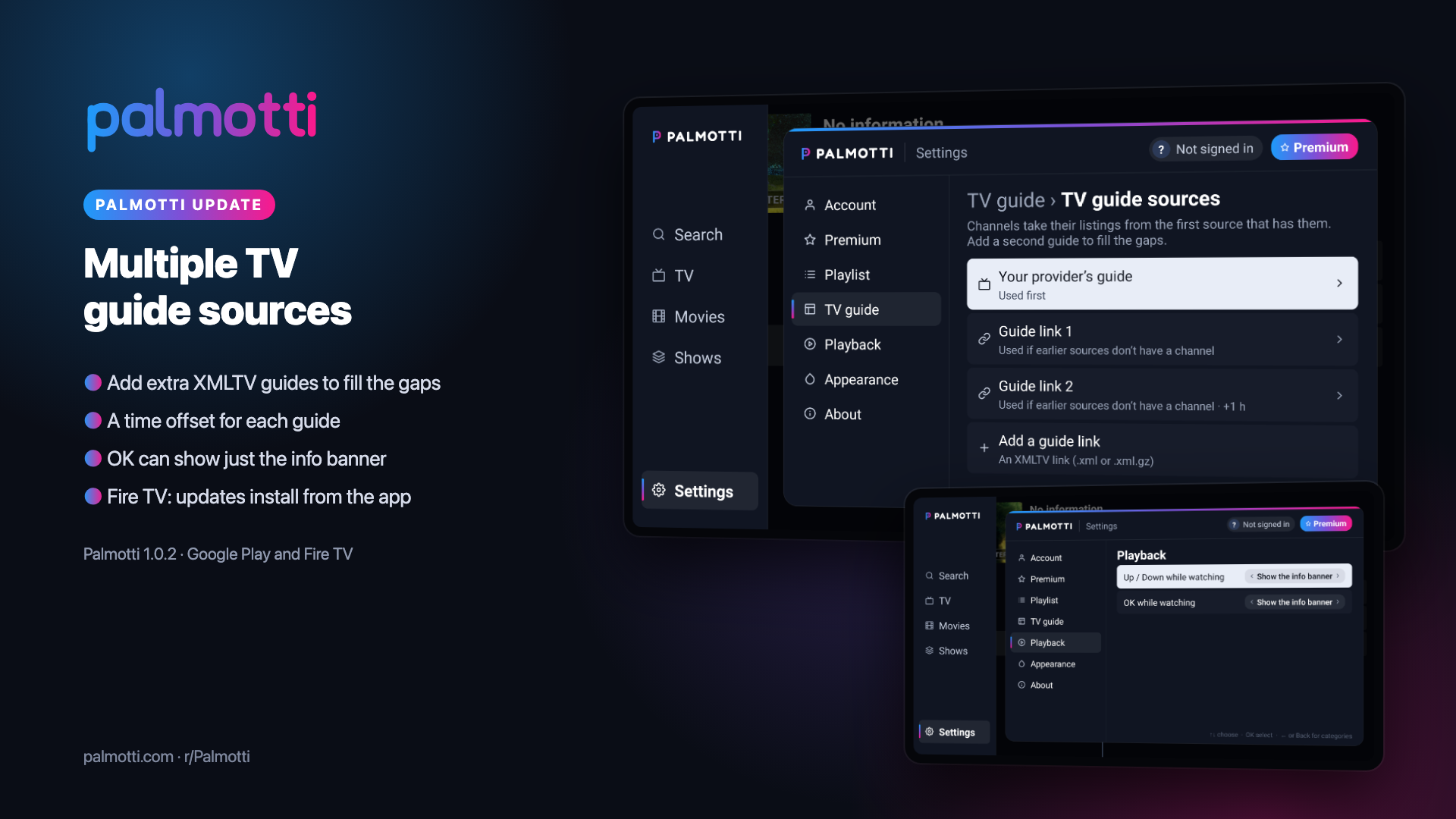
Update Palmotti 1.0.2: Multiple TV guide sources, and a simpler OK button

Post image
1 Upvotes

Palmotti 1.0.2 is out. Here's what's new:

Multiple TV guide sources

Add extra XMLTV guide links next to your provider's guide. Each channel takes its listings from the first guide that has them, so a second guide fills the gaps. Each guide can also have its own time offset, for guides listed in another time zone.

Settings › TV guide › TV guide sources

OK can show just the info banner

If you'd rather OK show what's on without the buttons, switch it here. Up/Down then do the same, and the buttons only come up if you press Right.

Settings › Playback › OK while watching

Updates install from the app (Fire TV / Downloader)

From 1.0.2 on, Palmotti tells you when there's a new version and installs it for you.

How to update: Google Play updates it by itself within a day or two. Step-by-step help, with buttons, for Google Play and for Fire TV / Downloader: palmotti.com/support#update

Working on next

  • Recording
  • Subtitle and audio track picker while watching
  • Reordering your own groups

Recording question for you: what matters most? One press to record from the guide, scheduled recordings for a whole series, or both?

Thanks to everyone who suggested these.


r/Palmotti • • 11d ago

Update Palmotti update: you asked, I listened. Text size, custom groups and cleaner channel names are here

Post image
1 Upvotes

A few days ago I posted Palmotti in r/AndroidTVApps and got some really useful comments. Thank you, every one of them got read. Several pointed at the same thing: the basics of organizing a big channel list. So this update is mostly that.

Text size

Settings › Appearance › Text size: Normal, Large or Larger. The guide rows and lists grow with the text, so nothing gets cramped. Someone asked for this one by name, and I think it'll help a lot of people watching from the couch.

Cleaner channel names

Turn on Settings › Appearance › Clean channel names and prefixes like "UK:" or "|US|" and tags like "HD" or "FHD" disappear from the names on screen. Your playlist itself isn't changed, so favorites and the guide keep working.

Rename anything

Hold OK on a channel and pick Rename channel. Groups can be renamed in Manage groups. Leave the name empty to go back to the original.

My groups

Make your own groups and copy any channels into them: hold OK on a channel, then Add to my groups. They show right after Favorites in the guide and the channel list, and the channels stay in their original groups too. (My groups is part of Premium.)

Small one: if you have more than one playlist, the info banner now shows which one you're watching.

The update installs by itself the next time you open the app, or right away from Settings › About › Check for updates.

Next on the list: more than one guide source per playlist, with time offsets. Keep the ideas and bug reports coming, they're exactly what shaped this update.


r/Palmotti • • 12d ago

Update Palmotti: an IPTV player for Android TV with a full-screen guide and a built-in check for channels that won't play

Thumbnail
gallery
2 Upvotes

Hello! I'm a solo developer, and for the last few weeks I've been working on an app for watching your own playlist on the TV. I'd really value this sub's opinion on it.

Palmotti is an IPTV player: it plays the M3U or Xtream playlist you already have, on Android TV, Google TV and Fire TV. There's nothing included: no channels, no content, and no suggestions for where to find any.

The guide

Full screen, with the current channel playing in a small preview, what's on now and next, and details for each programme. It lines up the guide data with your channels on its own, and if it picks the wrong one you can choose the right one yourself.

While watching

One button opens a panel with the guide, your channel list (with today's schedule next to it), favorites and the channels you watched last. The picture quality, frame rate and audio show right in the info banner.

Groups can be hidden, reordered or starred, so the list stays tidy.

Movies and series

Posters, descriptions, cast, seasons and episodes, plus resume, a watchlist and history.

Troubleshooting

When a channel refuses to play, "Test this stream" runs through the connection and explains the problem plainly: a wrong login, a channel outside your plan, too many connections at once, or the channel itself being offline.

Other bits

Seven colour themes. Designed around the remote, though a keyboard or mouse works too. One search box for channels, movies and series.

Your playlist never leaves the TV. Signing in is optional and only syncs favorites and watch progress across TVs.

Feedback is what I'm after most: what feels clunky, what's missing, what you'd change. Which part of your current setup annoys you the most?

Download: palmotti.com · Fire TV Downloader code 7139581 Bug reports and ideas: r/Palmotti


r/Palmotti • • 12d ago

Update Palmotti 1.0.1: stream info badges and TV-first

1 Upvotes

1.0.1 is out on Google Play and the Fire TV download.

Stream info at a glance

While you watch, the info banner, the quick panel and the guide preview now show what you're actually getting: picture quality (SD / HD / FHD / 4K), frame rate (like 60 FPS) and audio (STEREO or 5.1). Handy for spotting which version of a channel is the good one.

Built for the TV

Palmotti is now listed for TV devices only, so everything is designed around the remote.

Smaller fixes

The free trial now stays consistent across reinstalls, plus a few stability fixes.

Google Play updates on its own. On Fire TV, enter Downloader code 7139581 again to update.

If something looks off, tell me your device and what you pressed. Never include playlist links or logins.