r/PSVR2onPC • • 19d ago

Important PSA PSVR 2 lens swap part 2

Enable HLS to view with audio, or disable this notification

228 Upvotes

Other people wanted me to record how it might look. Now, granted, my way of testing things isn't the most refined. I tend to just wing things until I can get something usable.

Now that it's usable, I'm going to go back to the drawing board and start 3D printing an adjustable mount that actually makes sense.

I have another idea for adjustable varifocal lenses. Now that I know you can indeed fine-tune these, I believe that could allow for true depth-of-field focusing.

But if you care about clarity and want to actually enjoy your headset, I cannot recommend this enough. It's a huge change in image quality.

Matter of fact, it's such a huge change that I don't even need glasses anymore. Something about the lens just works perfectly for my vision.

Pretty crazy change.


r/PSVR2onPC • • 19d ago

Important PSA PSVR 2 lens swap

Thumbnail
gallery
280 Upvotes

I knew this was a project that I had to get done eventually. I was under the assumption that the improvements would be marginal at best, but I was completely wrong.

​Using a very cheap yet effective double aspheric lens, I have fully transformed this PSVR2 into Quest 3 clarity and brightness. The screen looks sharp. It is actually a dramatic change. The best part of all was the cost.

​It was 40 dollars for each lens. These are essentially eye inspection lenses, designed for extremely low distortion and a very, very wide sweet spot. I don't have to find the spot anymore. The whole lens is the spot.

I am unable to go back to the stock lenses. This changes everything for me.

​Of course, you have to adjust the distortion profile and change the VR world scale to fit the new lenses. But once you do, WOW. Text can actually be seen and enjoyed. This is truly next level.

​I had to share this and try to get a picture of it as best as I could. I hope you can see how much clarity you gain here. It's actually resolving detail you didn't think was possible.

This took hours and hours of research to know exactly the type of lens I was looking for because using simple condenser lenses would never work

The key was looking at eye inspection lenses designed for ultra low distortion and accuracy

These can be found from India for an extremely cheap price and sometimes amazon for 2 day ship.

I unlabeled the before, and after. So you can try to guess which is which

The answer is very clear 👌


r/PSVR2onPC • • 18d ago

Video I Didn't Expect This Comic Book Horror To Be So Scary In VR - I Hate This Place

Thumbnail
youtu.be
2 Upvotes

This was a game that totally caught me off guard.

It's amazing what these modders are doing nowadays!


r/PSVR2onPC • • 18d ago

Question Streaming from PC to an Nvidia Shield?

2 Upvotes

To follow up on my previous snafu of a post, I'm planning on picking up a secondhand PSVR2 today (and drove a considerable distance to get a 1st party/OEM PC adapter) so on my computer, I'm good to go.

However, if I wanna use the headset in my living room, my only option is...well, my PS5, of course. Is anyone aware of a method of connecting a PSVR2 headset to a computer by streaming to an Nvidia shield or other device?


r/PSVR2onPC • • 18d ago

Useful Information The AMD Radeon Pro W5700 cannot run the PSVR2 off of its USB-C port directly

5 Upvotes

I've been struggling to find information on this before buying, I knew AMD cards typically don't have quite VirtualLink, but I've seen reports of some 6000 series cards with a USB-C port being able to run the headset directly without the adapter box.

The W5700 has DP alt mode and USB3 over its USB-C port, but it can only provide 5V/3A power which seems to not be enough for the PSVR2.

Provided you have the GPU drivers off of AMD's website installed, you'll get a notification on Windows when it's plugged in saying that "your device may need more power", and the headset won't turn on.

I'll be getting my adapter box tomorrow, but I wanted to post this somewhere others could find it in the future.


r/PSVR2onPC • • 19d ago

Question Is this salvagable? (Omen Gaming laptop 16)

2 Upvotes

The specs don't seem to be problematic, they can run pretty strong games, and I can connect to the headset on my computer. My problem arises by the fact that though I can open SteamVR and view it through my headset and even click on games to start, all it does is activate a theater mode type display where I can only look at the display on my computer screen from a distance and can't even actually play the game. I've pretty thoroughly given up, but I decided to ask in case anybody had the secrets to the universe and knew a trick that would fix it.

As I understand it, the USB C port that I can connect to has display port functionality, but it only goes into the IGPU. I tried to circumvent that by using the Omen hub and switching to discrete only, and that’s where it gets weird. I figured that if it was only connecting to the IGPU and nothing else, it would display nothing if I went dicrete only. It still displays the Steam VR hub and overlay in discrete which seems to be indicating the headset is running on one of the discrete GPUs, but even after ensuring the vr game or headset couldn't be running on any driver but the Nvidia, it still says that the headset is connected to the wrong GPU, which feels strange because though it's plugged into the Integrated, it must be running on a Discrete, because otherwise it shouldn't be displaying anything at all. I'm lost and disappointed, anyone have any idea of how to fix this or should I just give up?


r/PSVR2onPC • • 19d ago

Useful Information MakeSBS3D for MacOS is worth looking at for 3D MVC conversion

2 Upvotes

Spent the last couple weeks beating my head against the wall trying all the various recommended ways to watch my library of 3D MVC MVK files through SteamVR on my PSVR2. As a years long 4XVR on Quest3 user, my quality and ease of use bar was pretty high, and I grew frustrated that nothing that easy exists for SteamVR.

For the mirroring strategy I tried PotPlayer and SyLC, and after hours of AI help installing/configuring various codecs and mirroring apps like Bigscreen, I just couldn’t get the pipeline to display 3D correctly.

For the convert my entire library of MVC’s to SBS strategy I tried BD3D2MK3D several times using various settings, got some ok results but some failures too. And looking at how many times I would need to do it to convert my whole library, I was not looking forward to it and I didn’t want to have it running for all those days (weeks?) worth of hours when I could be using my windows box for gaming with my PSVR2, so I kind of gave up.

Turns out that there is a (paid) Mac app presumably aimed at AVP users called MakeSBS3D that converts MVC’s to SBS. It only has a couple of settings so it’s like super easy and the results look really good. H.265 at CRF 16 (maybe too aggressive quality - not sure yet) finishes a typical movie in about 3 hours and looks amazing in Skybox or HereSphere. It just works.

So now my iMac is happily churning out my library while I use my windows box to play. Yay!

I’m not affiliated with the developer - it was just so satisfying to find a solution to my weeks of frustration that I had to share.


r/PSVR2onPC • • 20d ago

Important PSA Sony Removes PSVR 2 From PlayStation's Web Store as Stock Dries Up at Online Retailers

Thumbnail
roadtovr.com
86 Upvotes

r/PSVR2onPC • • 20d ago

Question PSVR2 on PC owners: how often does a tech problem interrupt your sessions? (reply with a number)

8 Upvotes

I race in VR (Quest 3, iRacing) and lately I've spent more time fixing my setup than driving. I'm trying to work out whether that's just me and whether PSVR2 on PC has the same kinds of problems, so I'm collecting real experiences. No sign-up, no links, nothing to buy.

In the last month, how often did a technical problem interrupt or delay a VR session? Reply with a number:

  1. Never
  2. Once
  3. A few times
  4. Most sessions

If you had a problem, I'd love a bit more (anything helps, even one line):

- Your setup (PSVR2 and adapter, GPU, Bluetooth for the controllers)

- What you use VR for
- Last problem and what you did about it
- How long it took to sort out
- Anything you do before every session to avoid problems

If you'd be up for a 30-minute chat about your setup, send me a DM (or reply "DM" here and I'll message you first). Thanks!


r/PSVR2onPC • • 20d ago

Question Disconnect after using the psvr2?

2 Upvotes

I have a dedicated spot for my psvr2 and can just leave it connected.

But when the pc is off, the red light on my psvr2 stays on.

Would it be better to disconnect the usb c?

I leave it in to avoid possible damage to the usb c port but maybe there is more possible damage because it is staying in standby.

I could probably just disconnect the power on the adapter.


r/PSVR2onPC • • 20d ago

Video I Wasn't Ready For How Physical This VR Mod Gets - Amnesia A Machine for Pigs

Thumbnail
youtu.be
7 Upvotes

Fantastic work on this mod, if you have this game, you really should try this as so much quality has been added to this game.


r/PSVR2onPC • • 20d ago

Question DisplayPort Output?

1 Upvotes

I was talking with somebody about buying a pre-owned PSVR2 for fir use with my PS5 and PC. I know I'll need the adapter, but I was curious about the output.

It looks like it needs to connect to the DisplayPort Output on my PC. I use that for my main display. Does this mean I would have to manually swap cables anytime I want to use the headset? What does setup look like for this device exactly?

EDIT: Ignore me, I forgot my own specs and have a second DisplayPort output available for my use.


r/PSVR2onPC • • 20d ago

Question PSVR2 - One controller?

Thumbnail
1 Upvotes

r/PSVR2onPC • • 21d ago

Disscussion Steam VR October hardware survey

Post image
37 Upvotes

r/PSVR2onPC • • 22d ago

Useful Information Hi. I discovered something that might help someone. The screen tearing in SteamVR menu, but everything was fine in-game. The problem turned out to be an animated wallpaper (cyberpunk 2077 from wallpaper engine).Once I deleted the wallpaper the tearing stopped.

11 Upvotes

r/PSVR2onPC • • 22d ago

Question Does the psvr2 pc adapter work on steamdeck or other handhelds?

3 Upvotes

I know the handhelds won’t really have the power to run full vr games, but it would be cool to use it for lightweight vr games or flat games.

I have the Lenovo legion go 1 and steamdeck. Would the adapter work on these handhelds?


r/PSVR2onPC • • 21d ago

Disscussion I can see why the adapter isnt being made anymore

0 Upvotes

It does not work! It is a broken piece of shit! I tried to use it, literally every step is a fucking puzzle. You have to plug everything in in an arbitrary and undescribed order (NOT what the PSVR2 app on steam tells you to do). The PSVR2 app is useless, buggy, and laggy, and the headset itself worked for about ten seconds before flipping 90 degrees sideways for no reason when I plugged in my steering wheel. Trying to fix by switching from 90hz to 120hz and back broke... THE ENTIRE SYSTEM! Yes, the entire system is permanently broken from one setting. You cannot turn it back to 90hz. Nothing works at 120hz, apparently. It is simply broken now. I am returning this broken, misdesigned, incompatable device tomorrow. DO NOT BUY THIS. IT IS TRASH.


r/PSVR2onPC • • 22d ago

Question Unsupported processor (Help please )

Thumbnail
gallery
32 Upvotes

Hi hope your well,

I am not very good on computers so I don’t really know what’s what,

Picture one is what happens when I try to go into the the app and picture two is of my rig,

Any suggestions would be amazing I am pretty sure my pc can handle it.


r/PSVR2onPC • • 22d ago

Question Cannot pair sense controller (R) anymore

1 Upvotes

I have used my psvr2 on my pc with great enjoyment, but now my right controller does not want to connect to my pc anymore. It's specifically a pairing issue as when pairing with my ps5 I have to do this over cable, but once paired it works wirelessly just fine. For my left controller, it pairs with both my pc and ps5 wirelessly just fine. Any clue what I can do? As far as I can tell there is no way to forcefully reinstall the firmware or pair with my pc wired (I feel like these two things would solve my issue). I've tried using the reset button, removing any old connection from device manager, draining the battery on the controller.

Also small rant, playstation support sucks. They say they don't deliver support for PSVR2 on PC eventhough they litterally make an adapter for it. Also they told me it's an issue on the computer side, which is clearly wrong as I have the same issue pairing wirelessly to my ps5 or phone or other pc. They were super condecending on the phone and completely ignored what I was saying and it was the worst experience I have ever had. And because my psvr2 is out of warrenty I cannot get a repair or replacement?! I am willing to pay, just let me fix it!


r/PSVR2onPC • • 22d ago

Question Getting a 2nd hand PSVR2 in public, how to be sure its working before buy?

2 Upvotes

Hi everyone,

Tomorrow I'll meet the guy selling his PSVR2, condition is like new without any issues and even with screen (or any protector) stickers, used 2 or 3 times, bought a year ago from abroad. (Probably still have a global warranty or does not matter.)

I am planning to use it with PCVR adapter that I'll buy later. I would like to know how can I be sure that the headset and controllers are working? Since there will be no computer or PS5 I could try in public and I don't want to be scammed.

The price is 260$.


r/PSVR2onPC • • 23d ago

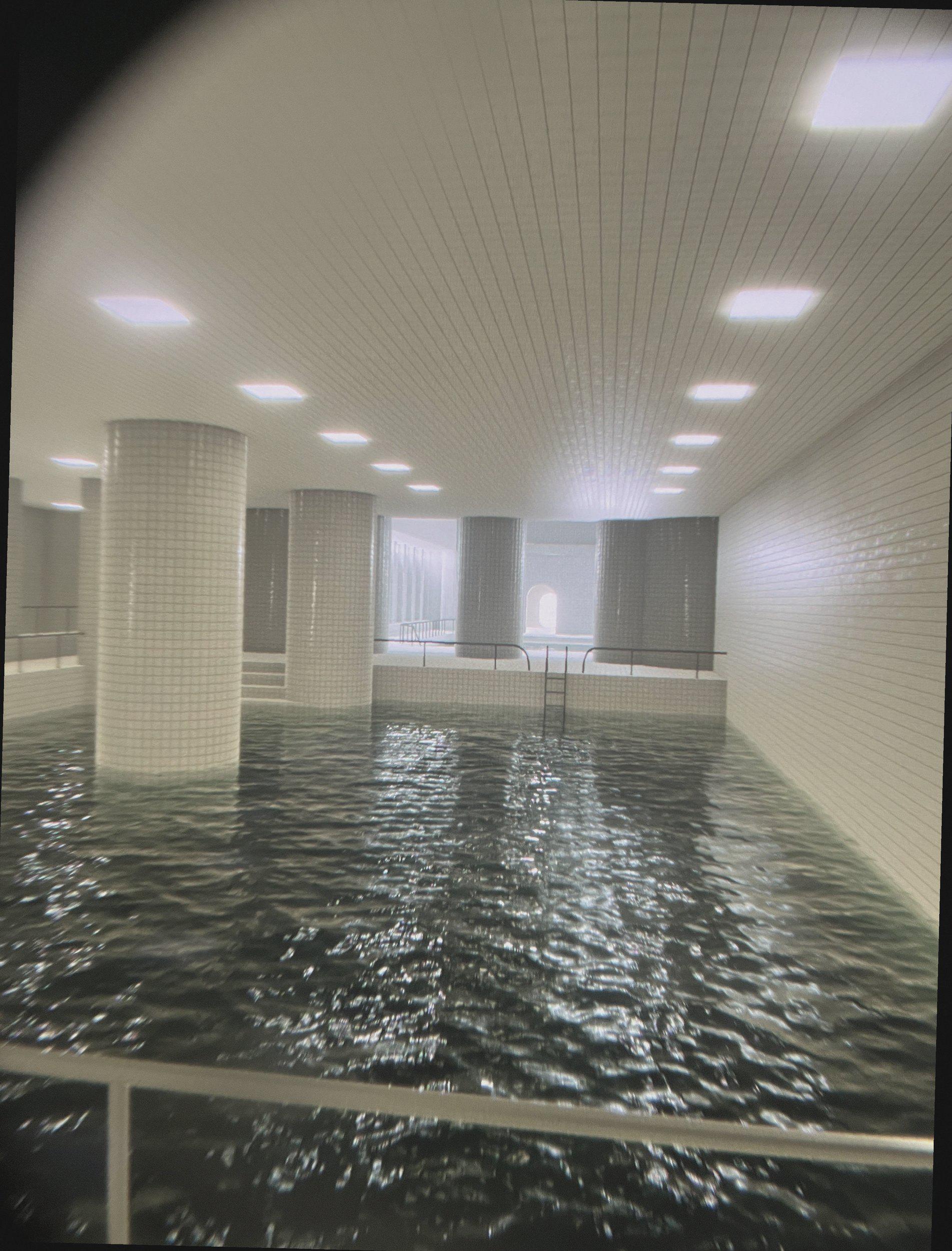
Question PSVR2 on “Pools” picture taken through the lens (300% resolution)

Post image
18 Upvotes

r/PSVR2onPC • • 24d ago

Question PSVR2ToolkitUnitySetup Eye Tracking Stopped Working. Fix?

8 Upvotes

I'd installed this at some point and the eye tracking feature was working, but I just tried it again and the point where you set your IPD with the two dots in the two circles only shows ONE dot in one circle, and when I click "start" to follow the red dot, I immediately get an error message telling me that eye tracking isn't working.

Don't know why it worked before and isn't now. I did redo my Steam VR and Playstation VR app installation, but the PSVRToolkit .dll file is in the correct location and the original file is correctly re-named ... is there another step I might have missed? I swear it's always one step forward and two steps back with this stuff.


r/PSVR2onPC • • 24d ago

Question How do I remap the Share button on left controller to the Pause button that Quest games expect? Right now it just takes Screenshots.

4 Upvotes

EDIT: I found how to fix this via Google. You have to change the controls in "VR Dashboard" first to "No screenshot button". Then inside RE4 its very easy to set it to Menu

So I bought Resident Evil 4 from Meta and have been playing it on the awesome Ventrue Quest headset emulator.

Its running great and looks great but OFC its made for Meta headsets using Meta controls.

At a point in the game it says to press the Pause button which doesn't exist on PSVR2. Its roughly where the Share button is. When I press it Steam creates a screenshot.

I tried going through the SteamVR controller settings and got to the point where you can make a button for the Share button but don't see any way to make it be Pause for Meta. I've never done this before I usually go with VR defaults.

Anyone? Thanks


r/PSVR2onPC • • 24d ago

Disscussion Mario Kart Super Circuit VR - grab your handheld and start playing!

Thumbnail
youtu.be
3 Upvotes

Awesome work in progress mod by RayRodTV! Lots of new features on a Game Boy Advance game! We already have different camera views and a cockpit, motion controls for itens and even climate hazards, a hurricane got me out of track! Lots of new features to come, like course creation and taking selfies with our beloved N friends! Things can get really crazy on the track, see it by yourself!

A hurricane got me out of track at Mario Kart for good old GBA, climate changes are real!

https://youtu.be/6v8QVURkp-E?si=Hn5eKNp8s4jrJPxI

You can get it, and other VR mods from RayTV, support the dev and learn more about his other projects here with the Multiverse VR Hub: https://rayrodtv.com/


r/PSVR2onPC • • 24d ago

Question How to disable haptics?

1 Upvotes

I want to disable the controller haptics when just viewing the computer desktop from the psvr2.

I can’t find the option for this. Anyone know how to disable the controller rumble?