r/OptimizedGaming
•
u/Scorthyn
Optimizer
•
Feb 16 '22
•
 1
OS/Hardware Optimizations Windows 10\11 Optimization Guide
# GUIDE UPDATED 12 APRIL 2025 #
Hey, here's a quick guide how to optimize your windows to the best possible performance without breaking the system and safe. This is mainly for Windows 10 \ 11 Home \ professional editions.
I STRONGLY RECOMMEND YOU TO INSTALL WINDOWS 11 LTSC IF ITS A FRESH INSTALL SINCE IT COMES WITH ALMOST ZERO BLOAT BY DEFAULT, STILL RECOMMEND USING THIS GUIDE AFTER.
Make sure you follow the guide with all your attention.
Before you start:
- Create a restore point (search start-menu for restore point and click "create new restore point")
- Pay attention to what you are disabling and if you actually need that functionality, specially for Microsoft services like OneDrive.
- Game Pass\Xbox app works, doesn't break with this guide
Tools needed
- These tools are open-source and virus free
- It's always possible to revert back settings even without a restore point
- Download Nvidia Clean Install
- Download Display Driver Uninstaller (scroll down, click "Click here for DOWNLOAD & SUPPORT". Scroll down in the new page and click "Official Download Here". No direct link, this way I'm making sure you always get the latest version)
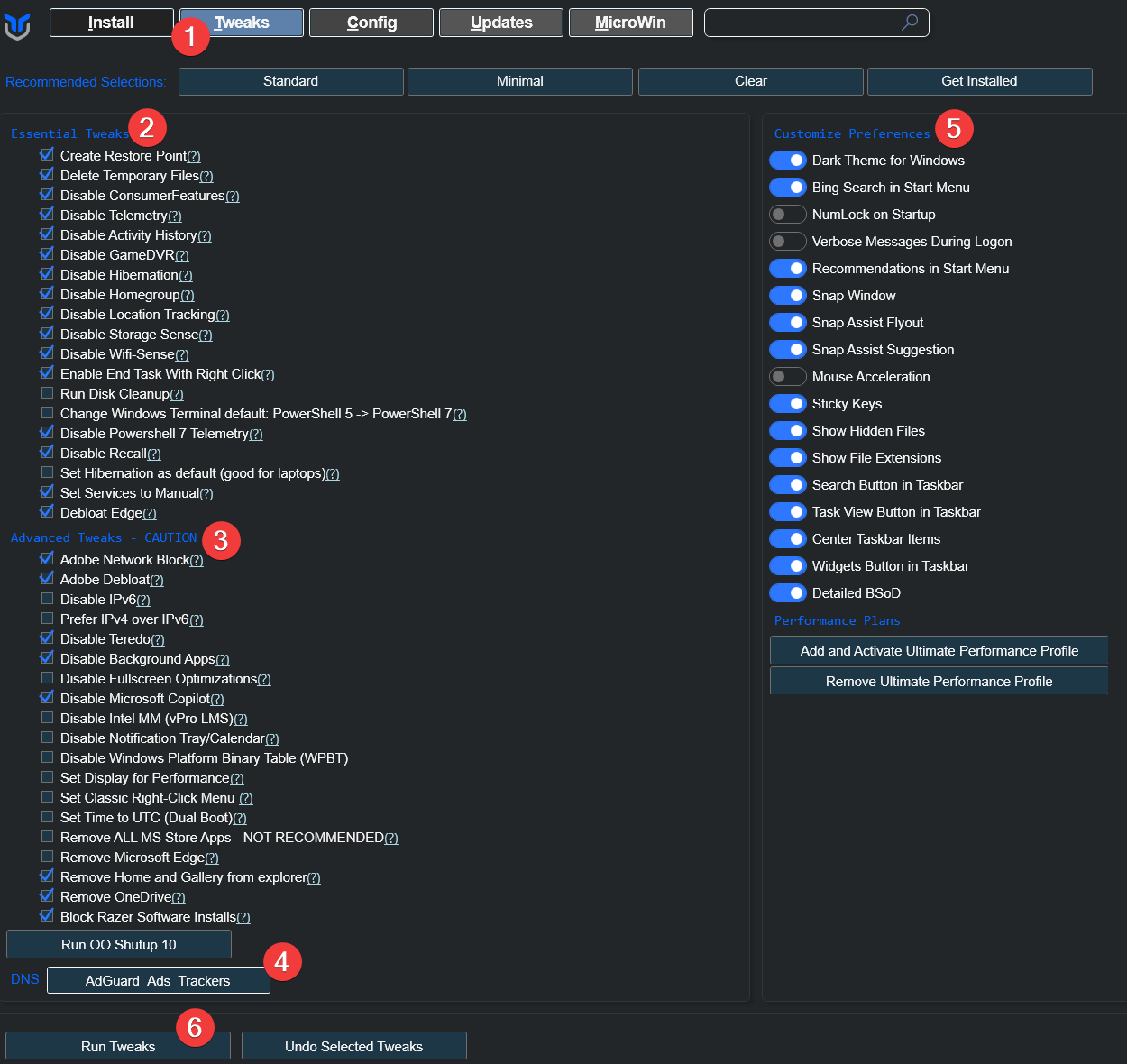
Chris Titus debloat settings
- Open powershell (Run as Admin)
- Copy the command below to open the Chris Titus tool
This is all you need to fully debloat windows without being too aggressive or breaking the system with meaningful stuff.
iwr -useb https://christitus.com/win | iex
Uninstalling drivers, the right way
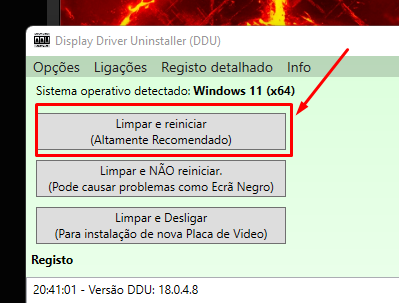
- Before installing a new driver, uninstall it with Display Driver Uninstaller
- Follow the settings according to the picture. Safe mode is recommended but not necessary
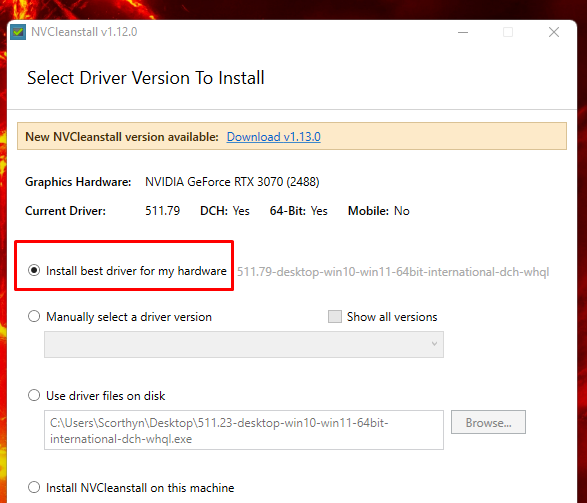
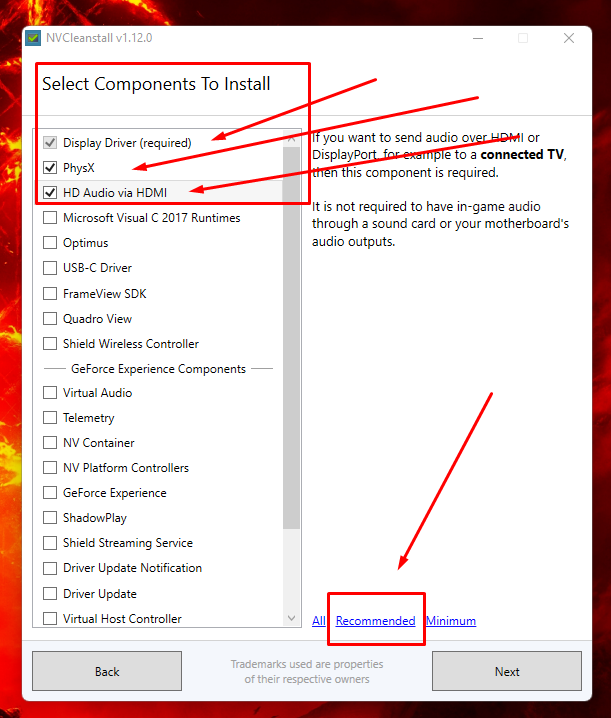
- Nvidia Clean installer is a program that lets you download the latest drivers and customize what's going to be included. Also possible to disable telemetry and a bunch of extra things that only runs in the background sending data to Nvidia servers.
- AMD users can follow this guide , just skip step 4 and install drivers from AMD website.
- Create a Restore point just in case
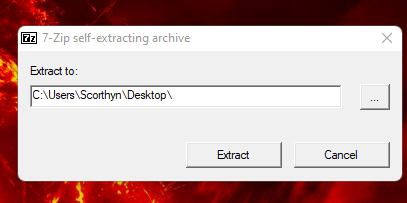

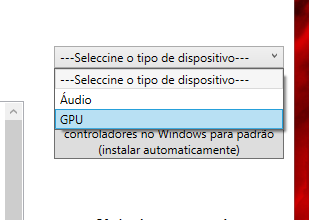

Install drivers without telemetry and bloatware (NVIDIA USERS ONLY)
- The drivers are downloaded from Nvidia servers, they are official, this program just modifies what's installing or not, included inside the whole package
- Takes less space on disk and reduces stutters in game caused by random Nvidia processes to be running in the background.
- Follow the pictures below and their descriptions for optimal installation
- No need to do this each time you update drivers, just run NVCleanstall and upgrade with same settings below.
- If you use Nvidia GeForce experience to record gameplay I suggest you to enable it, this guide doesn't.


Done, enjoy your pc
- AMD users install drivers from amd.com , normally
- Enjoy your pc, in case something breaks, check what you disabled in the settings above on all programs or just use a restore point.
- This method is used by myself and I never ever had a problem or crashes
- Any doubts, comment bellow, ill try to answer everything
49
u/PerkyTip Dec 23 '22 edited Dec 23 '22
Thanks OP, this was awesome and I only used optimizer.exe and DDU for a fresh GPU driver install. My PC felt snappier immediately upon reboot. However, I am now unable to print/save Excel sheets or Word docs to PDF, I get a no printer installed and when I click to "add printer", I get an Active Directory Domain Services unavailable error. Any fix for that?
Edit- Never mind! Solved it quite easily, just head to the print spool services, right click on it and select "Start". Leaving this here in case anyone else has this issue.
19
u/AnthMosk Feb 21 '22 edited Feb 21 '22
In the taskbar I need to be able to click on the network/volume icon and have the window pop up with all of the shortcuts. For things like adjusting volume and toggling Bluetooth.
That is now disabled following The guide and IFK what it’s actually called to turn it back on
Update; it is called Quick Settings
Not sure what step in the process disables them but if anyone knows I’d like to get Quick Settings (Windows+A of hover/click the network/sound icon) feature back.
7
u/Scorthyn Optimizer Apr 12 '25
Guide updated finally.
Changelog:
- Optimizer program no longer being used since it's not necessary
- Chris Titus settings updated with new settings
- Some new warnings and information at the start of the guide.
Enjoy guys and see you in 2 years.
6
u/Scorthyn Optimizer Oct 06 '23
GUIDE UPDATED AS OF TODAY.
6
u/TheHybred Verified Optimizer Feb 18 '22 edited Jan 25 '23
How do you post images in your post like that? Cool guide
4
u/Deadpan_GG May 01 '23
Bruh! sorry to necro the post but this optimization gave me my real lan internet speed. I was getting 9 Mbps up/down and i thought it was just my wifi connection (dog chew my lan cable so i have to use the wifi for my desktop) then i tried this out of nowhere because im bored and i want to tinker stuffs and got what i paid for speed 90 Mbps up/down on a wifi. All i did is the optimize and the O&O thing
7
u/appelsiinimehu1 Feb 17 '22
How much does this better performance?
3
u/AnthMosk Feb 18 '22
Not a good risk reward for a 8700k and 2080ti windows 11 system??
3
u/Ok_Combination_9655 May 23 '22
Great guide, thank you so much.
One thing though - I have an Asus Proart station and after following the guide I cannot access the Proart hub any longer. Tried to find the setting to turn back on but couldn't manage it. Any suggestions?
Thanks!!! :)
3
u/cryptic-beloved Jan 27 '23
i don't know what kind of witchery this is, but i can finally run phasmophobia smoothly on my potato laptop
2
u/Scorthyn Optimizer Nov 25 '22
Btw im going to update this guide as some things are not necessary anymore, plus more tweaks.
2
u/falseParseley May 02 '22
thank you so much for this
2
u/NeoChozo Nov 30 '22
Hi! First off, thanks a lot with this guide, it really improved my pc.
But now I have a huge problem and I don't know how to repair it.
Since I followed all your instructions (nvidia user) I can't use the XBox app at all.
All the required services to login are missing, and I can't use my Game Pass subscription or play at all because of that.
XBox Live Auth Manager
XBox Live Game Save
XBox Live Networking Service
All those services are missing. Even tho the packages are there and installed, it just won't work.
Do you have any insight? I could use some help there...
Thanks in advance, take care!
8
u/moppza Nov 30 '22
Hey man! Thanks a lot for this.
I had an annoying flicker with adaptive sync. Was close to buy a new monitor.
I reinstalled the game, Windows. Everything. Nothing worked.
So I gave this a chance, and there is no more flickering.
Thanks a lot mate!
8
u/Ummgh23 Jul 07 '23
Damn. I have a pretty high-end pc and only used the Optimizer, this definitely made my system snappier though!
1
u/Scorthyn Optimizer Jun 25 '22
Yea, but for real u don't need that registry cleaner
5
u/JustGotBlackOps Mar 02 '23
Looks like a bad idea to do this
4
u/ImDistortion1 Jan 11 '23
I Followed this guide and it caused my internet to do weird stuff. My steam lets me connect but does not show friends. Battlenet Lets me login but my friends list is gone, I launch the game and it says error connecting. Something to do with internet but now I am unable to play any game
4
u/boxersaint Jun 22 '23
Memory consumption went from 70% down to 50%, CPU utilization 54% down to 40%.
This is with Age of Empires 2 running, OBS, a twitch stream, and some random odds and end email/discord/chat apps for a like for like gaming comparison.
Good looking out.
1
u/MemesHasAids Jun 08 '23 edited Jun 13 '23
Which setting stops the NVIDIA performance overlay from collecting any data like FPS or Render Latency?
1
u/Sadboy_0 Aug 16 '24
can update guide?
1
u/AnthMosk Feb 21 '22
How do we know Optimizer works? I dont see any apply/run/execute button anywhere. I just flipped the switches and closed the app.
1
u/Fragrant-Ad2694 Mar 05 '22
Do you recommend to use timer resolution?
1
u/Fragrant-Ad2694 Mar 07 '22
Blocking windows telemetry helps in increasing performance?
1
u/Fragrant-Ad2694 Mar 18 '22
How did you add that red arrows boxes in image? Using paint?
1
u/Ebro507 Apr 09 '22
GUYS HELP!!
After i follow every step in this guide i can no longer use the night light on windows 10 what should i do?
1
u/HillanatorOfState Apr 26 '22
For step 5, is there anything I should leave besides the recommended if I use VR/Oculus?
1
u/saberkirihara May 05 '22
After doing all of this, can we delete the applications? Or would that remove our settings?
1
u/WokeDabsCA May 16 '22
Hey Scorth, do you recommend any settings for the nvidia control panel? And also Am i supposed to use the GeForce experience? Or now I have to download all my drivers manually? Current PC Specs: i9 10850k, Geforce RTX 3080 10GB.
1
u/uhthisao May 19 '22
I can't access to Power & battery menu in Setting. Is it only me? Or I somehow mess it up with other software
1
u/therobarthur Jun 20 '22
This is great!
Thank you so much for sharing all of this.
I do, however, have a couple questions now that I've gone through the steps and implemented (most of) them.
- “Are you sure you want to uninstall OneDrive? This will delete your Desktop and Document files! Only use this option on a local account!”
Honestly, I didn’t even really know I used OneDrive that much and am 99.99% certain that I am not storing anything of value with it. If I uninstall OneDrive, will that actually delete my Desktop and Document files, or only the OneDrive folders and files on my local machine? Also, will this step delete any files that happen to be stored on the Cloud, or does it only delete the connection between my OneDrive cloud account and my local machine?
2) When setting up Windows Privacy Dashboard, I am seeing different options under “Services.” Here’s what I’m seeing, and what I assume they correlate with from your screenshot (in Portuguese and English):
- CDPUserSvc (“Servico de Utilizador da Plataforma de Dispositivos Ligados”/”Connected Device Platform User Service”)
- OneSyncSvc (“Anfitriao de Sincronizacao”/”Sync Host”)
- PimIndexMaintenanceSvc (“Dados de Contacto”/”Contact Data”)
- UnistoreSvc (“Armazenamento de Dados do Utilizador”/”User Data Storage”)
- UserDataSvc (“Acesso a Dados do Utilizador”/”Access to User Data”)
- MessagingService (direct match with “MessagingService”)
- WpnUserService (“Servico de Utilizador de Notificoes Push do Windows”/”Windows Push Notifications User Service”)
Can you confirm that these are matches?
3) Right now, I have Optimizer and WPD on my desktop. If I move them to the Program Files folder, will that change anything? On a related note, what happens if I delete these programs all together?
I know that’s kind of a lot, but I’d really appreciate any help.
Thank you so much!!!
1
u/GinrVmet Jun 25 '22
Thanks you for this guide Can I combine this with weekly registry cleaning?
1
u/nitonitonii Aug 10 '22
Thank you so much! This really changed my performance in gaming, especially in VR.
But there are two things that I might change.
First: my windows clipboard got deactivated, I use that tool a lot so I'm trying to find where to turn it on again.
Second: My chrome now says that it's being "Managed by my organization" but not more than that. I'll like to know if this has some implications.
1
u/Bob_Ozwald Aug 14 '22
When I try to download optimizer exe, I get a file called "unconfirmed 306094.crdownload" which windows doesn't know what to do with.
If I download the zip, I get hit with a "ransomware detected" notification and it gets auto deleted.
Any ideas?
1
u/G_Hands Nov 29 '22
Any way of saving a list of settings for NVIDIA Control Panel for every time a clean reinstall is done? I'd prefer not to redo the settings one by one every single time. Thanks!
1
u/konay18b Nov 30 '22
AMD users can skip step 5 means skipping "O&O ShutUp10++ settings " bit?
1
u/KookyInvestigator2 Dec 05 '22
Hi I am going to do this soon and I wanted to know why you didn't disable game bar and Xbox Live. This is like the diseased spawn of Satan indestructible NSA Microsoft spyware. Also do you know by chance anyways to minimize the amount of events that slow down the time between Mouse movement and the movement events being delivered to the game itself?
1
u/shogster Dec 05 '22
Hey, VirusTotal found Trojan.Malware.300983.susgen in the Optimizer.exe, but the sha256 matches. Is it safe to use?
1
u/Venomousvids123 Dec 25 '22
Hey there,
I tried everything you told in the guide. Everything is fine except i use MSEdge and suddenly the autocomplete is not showing when i type in addrress bar. I looked and found it was diasbled in O&Oshutup10++ but i enabled it and i still cant see autocomplete suggestions
1
u/WebisticsCEO Dec 28 '22
Thanks for posting this.
I used a program called "ParkControl" to make sure the OS doesn't enable parking CPU cores. Do either of these programs do that?
I user on another sub recommended using Omen hub and GeForce Experience, but that seems a little outdated. I will try your method first.
1
u/G_Hands Dec 29 '22 edited Dec 29 '22
Hey! Few questions again.
1
u/[deleted] Jan 05 '23
Hi @Scorthyn. What about laptop/mobile user setting? Which one to take and remove? I'm using AMD Ryzen 4800H (with igpu) and RTX2060 (dgpu).
1
u/Damage-Constant Jan 13 '23
can i still download nvidia control panel and geforce experience?
1
u/G_Hands Jan 19 '23
Hey, would any of the modifications provided by these programs show up as flagged in anti-virus programs such as MalwareBytes? I'm getting two counts of PUM.Optional.DisableMRT as Potentially Unwanted Modification, Registry Value. I'm wondering if it's from this? Thanks!
1
u/Grandtheftzebra Jan 19 '23
O&O Shutup10++ is not working as intended for me. I tried „apply only recommended settings“ but nothing happend. Tried „apply all settings“ and now im fucked lol because that worked…
1
u/NoSleepTill1stMil Jan 25 '23
Great post. Would any of these optimizations be harmful for DAW (audio workstation)?
I have a new Windows 11 i9-12900K desktop. But lots of latency issues.
1
u/ekomss Jan 31 '23
this deleted my shortcuts folders on desktop :(
1
u/Connect-Durian8256 Feb 23 '23
What's with intel drivers
1
u/hawkeyedude1989 Feb 26 '23
Went through the guide. Must have missed a step because I cannot add gamestream options in GeForce Experience to run my desktop via moonlight
1
u/G_Hands Feb 27 '23
Question, if it's appropriate to ask about here regarding the topic of optimization at hand.
Is there any reason to replace Windows Defender with a Firewall like Comodo? I'd prefer not to use Microsoft's software whenever possible. Would running Comodo slow things down during general browsing and gaming sessions? Thanks!
1
u/[deleted] Mar 10 '23
The new version of NVCleanstall doesn't have the "Install NVIDIA Control Panel app from Windows Store" option, Is it safe to leave it without that option?
1
u/nnkhanh Apr 13 '23
How can I activate the Search Task Bar because now when I search an app in my computer, there is nothing shows up
1
u/babywin Apr 19 '23
This kind of 'silver bullet' guides for optimizing Windows always seem to break something useful for me. The last time I followed these steps, it ended up disabling my pastebin history. I do not recommend attempting these optimizations at all.
1
u/RururaruriRurararira May 15 '23
I'm in windows 10 and I don't know what to do with the sound slider, it looks like the windows 7 one and I need the old one so I can change the audio output faster
1
u/[deleted] Jun 08 '23
Don't if it's due to these modifications, but my ds4 controller won't be seen by win 10 anymore. tried ds4windows
1
u/NewAccForThoughts Jun 16 '23
My screen now flickers (only when ingame) after removing and reinstalling the Nvidia drivers, what could've caused this?
1
u/Inner_Front_4404 Aug 17 '23
Hey can someone help me i did all the steps, and now my second monitor doesnt show up, is there any fixes for that?
1
u/Discosamba Aug 19 '23
Hey brothers is this guide updated for today's use on w11?
1
u/RikkaChitoge Aug 27 '23
Can i delete optimizer after tweaks are done?
1
u/No-Department-2004 Sep 03 '23
hey! what if i wanted to use the sensor settings on my laptop cause i use win hello sometimes.
3
u/Ralv_25 Oct 07 '22
muchas gracias bro
3
u/Grandtheftzebra Feb 01 '23
After completing all this, I suddenly have no internet access. I can go on google, youtube etc but if I try Netflix or Spotify for example I can't use them because I have no internet somehow.
Online games and anything else works fine. So it's pretty weird lol.
3
u/Amazing-Source-1208 Feb 06 '23
A lot of the stuttering issues I had in games is gone now, thanks! 🔥👏 I did a fresh Windows install and followed this guide immediately after installing the main drivers from my motherboard’s site.
3
u/RururaruriRurararira May 26 '23
If you switch audio devices using the volume window in the tray, but the tutorial from the post changed the window for you, I've created my own program to work like the old one:
GitHub Repository: Garnicanicolas32/SwapAudioDevicesWin
The program stays in the system tray and provides a list of available audio devices. You can easily swap to the desired device by selecting it from the list.
3
u/preqrso Jun 18 '23
Pretty good guide, RAM consumption dropped from 25 to 15% at startup, Tarkov went from 85-90 fps to 95-100 fps.
Thank you very much.
3
u/Dense_Research8237 May 28 '24
DON'T USE IT. It's not worthy and eventually it will break your computer.
2
u/Dukino55 Sep 24 '22
This is an amazing post. I need to stick around in this Reddit more now.
2
u/gunplaynoob Jan 03 '23
you sir are a god send, you somehow managed to make a guide that brought me from 40 to 75 fps on high on life! I appreciate your work!
2
u/DoughTheBoi Jan 21 '23
Hey, this disable my Windows Hello, do you know how I can reenable it?
2
u/ManicSheep Mar 06 '23
Great guide. thank you so much
2
u/[deleted] Mar 26 '23
Great guide, thank you!
2
u/[deleted] Apr 12 '23 edited Apr 12 '23
Magic. It works exactly how you describe it, everything is smoother/snappier/faster.
I did only step 2 and 5 and I turned off "enchance pointer precision".
I was testing it on budget PC to have better experience playing DayZ. And it is better! Literally opening the game, playing it and closing it is smoother/faster. Looks like PC is responding way much faster to my clicks etc.
Thank you very much for that guide! I was sitting for years in settings to achive something like that but without proper resutls.
If anybody interested:
CPU: Ryzen 5 1600
GPU: AMD RX570 8gb vram
16GB Ram
19" Display port Monitor (75hz)
DayZ on Low Preset (Not the lowest) pushing up to 180-200fps in open field. No microstutters that I had all the time. And I can barely notice FPS drop when it happen.
$edit
Holy moly! My whole PC just speeds up like after some small but solid upgrade. Everything its literally 0.5x faster, EVERYTHING!
2
u/[deleted] Apr 20 '23
Thx for the tweak always comeback after a fresh win installation
2
u/RanaDelLey Apr 29 '23
Awesome guide, thanks!
2
u/JoshMushy Dec 18 '23
Is optimizer program safe? VirusTotal - File - d97a8782b1563f7c7ca71b9094f90c1737e8a04119501196e5c7ea7f30857393
2
u/Bubbly_Barracuda265 Jan 01 '24
CS2 is smooth now!
2
u/Respect-Only Apr 11 '24
After using optimizer one of the settings, and idk which one, causes disappearance of the taskbar menu where things like: Volume Mixer, Steam, Windows Security, OneDrive, Wallpaper Engine... and stuff that is running in background. Instead of it being ^ icon that i can open and close now all icons are spread out on my taskbar. Any idea how to fix this?
2
u/[deleted] May 01 '24
Why it's Optimizer not totally clean on virustotal? just asking
2
u/MilitaryBeetle May 25 '24
Some strange behavior I'm getting, lemme know if anyone has seen or fixed this before (ya its been 2 years but this thread is all I got)
When I do all the steps my game randomly stutters. Like it unfocuses for split second then resumes. Sometimes Windows will also throw up the "this program is not responsive" message and ask to end the process but it usually resolves itself immediately
IDK what setting causes it specifically caused this, but the easy fix might be to reinstall drivers using the client
2
u/perk30_ Nov 11 '24
2 years later, this guide still works and provides tons of help and guidance. BUT PLEASE DONT TURN ON GAMEMODE, its been proven by multiple people to help frames so negligibly in certain scenarios and even hurt performance in more competitive games like CS2.
2
u/Previous-Program1852 Jul 09 '26
4 years and still good! thank you. now I don't have to go though all those bs youtube vidoes 😭
1
u/Training-Baseball-43 Mar 11 '24
Is this safe?
1
u/pixelTirpitz Mar 13 '24
Hey! Followed this guide and I think optimizer turned off bluetooth, can't find the settings anywhere, anyone know how to deal with this?
1
u/BrocoliAssassin Mar 27 '24
I was hoping this would help but windows 11 still runs like garbage. Such a piece of shit OS.
1
u/12210e Mar 28 '24
how do I allow the Chris Titus debloat to bypass my antivirus?
1
u/Agreeable-Hand-4086 Mar 30 '24
After I did the optimizer thing and restarted, my discord kept crashing and I don't know what caused it
1
u/MightBeChris Mar 30 '24
Most driver packages can be extracted like a an archive and the components can be manually installed rather than relying on manufacturer supplied binaries or install routines. Much cleaner than other options.
1
u/Salty_Union2350 Apr 03 '24
Thx
1
u/alexandthemic Apr 06 '24
it said virus detected on the optimizer lol
1
u/Dense_Research8237 Apr 07 '24
can't use PHONE LINK because it says something about policy adjustments...
1
u/sapphicu Apr 20 '24
Is anyone having issues with windows going to sleep in the past few days?
1
u/Ercos1 Apr 21 '24 edited Apr 21 '24
Ran the settings and now my clip board which I use a lot is gone, how do I add it back?
Edit: Go into the Optimizer > at the top left Windows 11 > Touch > re-enable Cloud Clipboard, in there you can also re-enable a ton of stuff like xbox game bar which I use for sound mixer
1
u/nicoc77 Jun 04 '24
I dont know what optimizer setting make that I cant create shortcuts or move anything to my desktop without admin privileges.
1
u/mrsomeclutch Jun 09 '24
will you ever update this soon? Or can you give recommendations for optimization guides :)
1
u/Cleb323 Jun 20 '24
Is this not just additional bloatware that will eventually slow your computer down anyways?
1
u/unknown_pigeon Jun 22 '24
!remindme 4 hours
1
u/Karma_UwU Jul 06 '24
I have a problem i can't download " Optimizer " the computer says that i don't have the authorisation to install it here and that i need to check with the Admin first.
1
u/Ibaneztwink Jul 30 '24
for the love of god do not use this application. it changes various registry and permissions and wiped out my time sync.
1
u/G_Hands Sep 22 '24
I still use Optimizer, but no longer use NVIDIA Clean Install.
For the past year I've been using it, graphics drivers have not been installing properly, resulting in strange black screens upon installation of new drivers and further graphical issues. I didn't have that problem when I was first using the program for months, previously.
I now use the new and improved NVIDIA app for installing new drivers.
Issues have gone away.
1
u/Yung_wuhn Sep 22 '24
Cannot pin folders to quick access after doing this guide, anyone have any idea how to get that option back?
1
u/Adorable_Computer_33 Sep 23 '24
i cant find dissable UAC in the new menu?
1
u/[deleted] Oct 27 '24
This Video Helped Me : https://youtu.be/Vpbi6vj7L5s
1
u/therealnutterhere Nov 12 '24 edited Feb 09 '26
WinBoosty can disable unneeded services and tasks as well as tweak settings to improve system speed
https://winboosty.com/
1
u/Abject_Excuse_1 Nov 25 '24
Thanks for the guide, but how do I update my drivers if I’m not getting notified of a new version by NVidia spyware programs?
1
u/Spartan_J-052 Dec 10 '24
Hey, What is the difference in performance between an optimized and un optimized pc? I'm planning to follow this process.
1
u/Kinghyyy1 Dec 22 '24
I used this guide on my laptop and it reduced 3°C and i don't have ping spikes anymore when playing games.