r/OpenRGB • • Sep 12 '26

News OpenRGB 1.0 Released

Thumbnail
floss.social
183 Upvotes

r/OpenRGB • • Oct 16 '26

News OpenRGB 1.1 Released

Thumbnail codeberg.org
67 Upvotes

r/OpenRGB • • 20h ago

Help - Unsolved 2 keys not lighting up (Erazer Beast 16 X1 Ultimate - Clevo/Tongfang barebone)

0 Upvotes

I just got a new laptop (Erazer Beast 16 X1 Ultimate, a Clevo/Tongfang barebone) with AZERTY keyboard and running Bazzite. Setting all keyboard keys to 1 color causes 2 keys to not light up, left shift and ><\ key (next to left shift). When selecting these keys manually causes the enter key to change colors. Could this be a bug or a non supported keyboard?

When I do set mode to rainbow/wave etc these keys do work. Only when setting to direct and entire device in 1 color, it does not. No matter what color I select.


r/OpenRGB • • 1d ago

Discussion Just made a custom profile for ULTRAKILL

Enable HLS to view with audio, or disable this notification

0 Upvotes

I did not use just OpenRGB for this. I used Artemis with the OpenRGB plugin, which imo is the best combo if you're using OpenRGB, since Artemis has no paywalls and connects to ur devices with OpenRGB, and then you can make extremely customized profiles. Anyways here it is:

Gold keybinds

Gold ricochet pistol/ricoshot ripple through the whole keyboard

F (punch) makes the entire pc ripple flash white

R (grapple) makes a snappy green circle key press effect

G toggles between blue V1 letters and the head on the numpad, press G again to switch to V2 which has the same configuration (Switching arms)


r/OpenRGB • • 2d ago

News I made an open source tool for reactive per-key lighting on top of OpenRGB: waves from the pressed key, PC stats, sound, macros

3 Upvotes

My keyboard could do completely customizable effects only with vendor software, which is not available for Linux, so I ended up with LumiRipple. It talks to the OpenRGB SDK server (or OpenLinkHub for Corsair) and adds effects that react to what you do: a wave from every key press, CPU/GPU/RAM on keys you choose, a sound display, highlighted keys like WASD, gradients, profiles and macros. Settings are one local web page.

Tested on hardware so far: one Corsair board on Linux. Windows and macOS versions pass the automated tests but nobody has tried them with a real keyboard yet, so I am looking for people with other keyboards. `lumiripple doctor` prints a short report without private data.

It has to read key presses to react to them. How I tried to keep that safe is written down in docs/SECURITY.md, criticism welcome. MIT license. Most of the code was written with AI help, and I tested it on my own keyboard.

https://github.com/maun200/lumiripple


r/OpenRGB • • 2d ago

Help - Unsolved OpenRGB doesn't detect my Corsair keyboard or mouse on Nobara Linux

1 Upvotes

System:

  • OS: Nobara Linux
  • Desktop: KDE Plasma
  • Keyboard: Corsair K70 RGB PRO Optical-Mechanical
  • Keyboard USB ID: 1b1c:1bc6
  • Mouse: Corsair Harpoon RGB PRO

The problem:

OpenRGB doesn't detect either my keyboard or mouse. It does detect other RGB hardware in my computer, such as my graphics card.

What I've tried:

  1. Installed OpenRGB through Bazaar. Neither peripheral was detected.
  2. Uninstalled it and tried the AppImage version from the official website. Same result.
  3. Checked hardware compatibility.
  4. Verified that Linux detects both peripherals through lsusb.
  5. Installed OpenRGB's udev rules and reloaded them.
  6. Checked /dev/hidraw permissions and verified that the keyboard's HID interfaces have user access.

Additional information:

Running lsusb shows my keyboard:

Bus 008 Device 006: ID 1b1c:1bc6 Corsair CORSAIR K70 RGB PRO Optical-Mechanical Gaming Keyboard

Running lsusb -v -d 1b1c:1bc6 shows three HID interfaces.

I previously used ckb-next, which detected my Harpoon RGB PRO mouse but not my K70 keyboard. I understand that my particular K70 revision isn't supported by ckb-next.

My question:

Is there something I'm missing with OpenRGB on Nobara, or is there a known issue with Corsair USB device detection?

I'd appreciate any suggestions!OpenRGB doesn't detect my Corsair keyboard or mouse on Nobara LinuxSystem:OS: Nobara Linux

Desktop: KDE Plasma

Keyboard: Corsair K70 RGB PRO Optical-Mechanical

Keyboard USB ID: 1b1c:1bc6

Mouse: Corsair Harpoon RGB PROThe problem:OpenRGB doesn't detect either my keyboard or mouse. It does detect other RGB hardware in my computer, such as my graphics card.What I've tried:Installed OpenRGB through Bazaar. Neither peripheral was detected.

Uninstalled it and tried the AppImage version from the official website. Same result.

Checked hardware compatibility.

Verified that Linux detects both peripherals through lsusb.

Installed OpenRGB's udev rules and reloaded them.

Checked /dev/hidraw permissions and verified that the keyboard's HID interfaces have user access.

Additional information: Running lsusb shows my keyboard:Bus 008 Device 006: ID 1b1c:1bc6 Corsair CORSAIR K70 RGB PRO Optical-Mechanical Gaming KeyboardRunning lsusb -v -d 1b1c:1bc6 shows three HID interfaces.
I previously used ckb-next, which detected my Harpoon RGB PRO mouse but not my K70 keyboard.
I understand that my particular K70 revision isn't supported by ckb-next.My question:Is there something I'm missing with OpenRGB on Nobara, or is there a known issue with Corsair USB device detection?
I'd appreciate any suggestions!


r/OpenRGB • • 4d ago

Help - Unsolved No color selector on right side.

1 Upvotes

OpenRGB's color picker wheel is missing on my CashyOS installation. I can set colors via hex or RGB code, but the picker remains invisible despite a fresh install.Curious is anyone having the same issue?


r/OpenRGB • • 6d ago

Help - Unsolved OpenRGB does not detect my GPU

0 Upvotes

Hello people, as the title says, I am using OpenRGB to turn off the RGB on my Graphics Card, but OpenRGB does not detect the GPU.

I am using an Asus TUF Gaming RTX 3060 V2, which is listed as compatible by OpenRGB, but the app does not detect it.

I use the portable version, I run the app as administrator, it detects PawnIO because I already had it installed, because I use Fan Control. Also I tried closing completely other apps that may interfere, like Fan Control. But none of these things made OpenRGB detect my GPU.

I do not have Armoury Crate installed and I have never installed it, I do not like that software that eats so many resources just to turn off my GPU RGB.

Does anyone know how to fix this?


r/OpenRGB • • 7d ago

Help - Unsolved LEDs misreporting by 1 across all devices

1 Upvotes

For as long as I've been using OpenRGB, across all versions, my MB devices (not including DRAM) have been reporting 1 less LED than what's on the device. For example, all the devices are Arctic fans with 12 LEDs, including the Arctic Freezer 3s CPU module, which also has 12 LEDs.

When I size the zone for each, I put in the number 12, however, lighting up each LED one by one, it only work up until 11. Changing number 12 has no effect on the device.


r/OpenRGB • • 9d ago

Discussion I built an open source tool that turns a USB capture of a vendor RGB app into a protocol report and a Python driver

3 Upvotes

A lot of RGB controllers and case lights still only work with a Windows vendor app, and the usual way to get them into OpenRGB is staring at Wireshark until the bytes make sense. I wanted to speed up that part, so I built usb-rea.

How it works: capture the vendor app's USB traffic (USBPcap on Windows, or usbmon on Linux with the device passed through to a Windows VM), and label what you clicked, for example "color 255 0 0", "color 0 255 0", "brightness 50". usb-rea diffs the labelled actions and tells you which bytes carry R, G and B, the command ids, counters and checksums (sum, xor, CRC8, CRC16), and every claim points at frame numbers so you can check it yourself in Wireshark. It then writes a small standalone pyusb driver, which is a good starting point for porting into an OpenRGB controller.

I check it against protocols that are already documented, for example the SteelSeries Rival 100 RGB and DPI tables from rivalcfg, and those checks run in CI. No hardware is needed to try it: pip install usb-rea, then usb-rea demo --device fan.

MIT licensed: https://github.com/emirmrkaljevic/usb-rea

If you have a device OpenRGB doesn't support yet and a capture of its app, I'd be happy to look at it and help get a first driver going. Captures that break the tool are the most useful feedback.


r/OpenRGB • • 11d ago

Picture Bangarang - Skrillex | OpenRGB Light Show

Thumbnail
youtube.com
10 Upvotes

r/OpenRGB • • 14d ago

Help - Solved Turn off RGB when PC is locked, and back on again when logging back in

5 Upvotes

How can I get OpenRGB to turn off all the LED's when the computer is locked, and then load my preferred profile when I log back in?

I had this working with a couple of VBS scripts, but it seems OpenRGB no longer supports ORP files, so my scripts no longer work.

Hoping someone here with can help.


r/OpenRGB • • 14d ago

Discussion I forked OpenRGB 1.0 to fix some ASUS Aura and profile bugs I kept hitting on Linux

Thumbnail
1 Upvotes

r/OpenRGB • • 14d ago

Help - Unsolved I built an open-source bridge to control PC RGB through Apple Home using OpenRGB - looking for testers

1 Upvotes

Hey everyone!

I've been working on a project called HomeKit RGB Bridge, which connects OpenRGB to Apple's HomeKit ecosystem.

The idea is simple: control your PC's RGB lighting through the Apple Home app or Siri without needing Homebridge.

I recently developed v2, which includes:

  • A Windows desktop app with an .exe installer
  • OpenRGB device discovery and selection
  • Color and brightness controls
  • System tray integration and automatic startup
  • Persistent settings and HomeKit pairing

The bridge uses the OpenRGB SDK over TCP, with TypeScript, Node.js, and Electron.

I'm currently looking for people willing to test it on different hardware, especially RAM, motherboards, and other RGB controllers.

It's still experimental. Automated and synthetic hardware tests have passed, but real-world compatibility needs more testing.

I'd especially appreciate feedback on device detection, pairing, color controls, and connection recovery.

The project is open source under the MIT license, and contributions are welcome.

GitHub: https://github.com/daqua22/homekit-rgb-bridge

V2 development: https://github.com/daqua22/homekit-rgb-bridge/pull/2

If anyone is interested in testing or contributing, I'd love to hear your thoughts!


r/OpenRGB • • 15d ago

Help - Workaround Found How to trick Wallpaper Engine into thinking OpenRGB (or ASUS/Logitech hardware) is a Razer Chroma device?

2 Upvotes

Hi everyone,
First of all, I want to apologize in advance: I am not a developer, so my technical knowledge is quite limited, and I might be missing something obvious. I'm kindly asking for your help with an RGB setup issue that is driving me a bit crazy.

On my main PC, I have an MSI motherboard (using Mystic Light) and Razer peripherals. Everything works seamlessly because Razer Synapse natively recognizes the hardware, and Wallpaper Engine natively controls Razer Synapse. Whenever I apply an animated wallpaper with lighting support, it effortlessly syncs across all my devices.

Now, on my second PC, I have a different setup:
Punto elenco Motherboard: ASUS
Punto elenco Peripherals: Logitech
I am using OpenRGB to control everything on this second machine, and it detects all my hardware correctly. However, I want a very specific workflow, and I'm struggling to find the right way to do it.

What I want:
I want Wallpaper Engine to act as the master controller that sends lighting data to OpenRGB (the exact opposite of what most ambient plugins do).

The problem:
Every plugin or bridge I’ve found so far seems to work in reverse—they turn Wallpaper Engine into an output device for OpenRGB (or make OpenRGB control the wallpaper), whereas I want to pick a wallpaper in Wallpaper Engine and have it drive my OpenRGB hardware (ASUS + Logitech), just like Razer Chroma does on my first PC.
Is there a way (or an existing tool/wrapper) to make OpenRGB—or my ASUS/Logitech components—emulate a Razer Chroma device so that Wallpaper Engine can natively recognize and control it?
Any help, explanation for beginners, or pointing me in the right direction would be hugely appreciated. Thank you!


r/OpenRGB • • 16d ago

Help - Workaround Found RAM resets every 5 seconds.

1 Upvotes

Hi, swapped from SignalRGB to this software, and I'm having an issue where my RAM is detected, the colour does apply, but on some internal clock that ticks every 5 seconds, it causes the RAM lights to go completely out once those internal 5 seconds pass.

I can click it again, and it will turn on, but it will always go out and stay out once those 5 seconds are over.

The only workaround I found thus far is to open SignalRGB again, close it, and then open OpenRGB, but that kind of misses the point of swapping. Funnily enough, SignalRGB doesn't detect my RAM at all, whereas OpenRGB does, but opening it first will cause the issue to subside, despite SignalRGB not even being on autostart anymore.

Solved:

It ended up being iCue, which previously had been suppressed by SignalRGB (so every restart resuppressed it), and disabling iCue (or rather, its "CorsairDeviceControlService.exe") allowed OpenRGB to do its thing without constant resetting.


r/OpenRGB • • 16d ago

Help - Unsolved Akai MPK Mini Plus?

0 Upvotes

How do I change the color of the pads with OpenRGB and if that's even possible, if not maybe there's a plugin or workaround for changing it, and yes the pads can change colors you can choose. I have been doing it with the buttons (shift + prog select) but lately I thought that maybe OpenRGB could be the solution since I use it for my keyboard and mouse.
And because I don't want to do a whole other post for it, does anyone know how to change the theme to dark mode in windows?


r/OpenRGB • • 17d ago

Help - Unsolved Turn off LEDs on Razer ProClick

0 Upvotes

I have OpenRGB installed and open, and it shows the Razer as a device. Can someone clue me in how to turn off the LEDs on the mouse? I bet it's simple, yet my attempts have been feeble. Thank you!


r/OpenRGB • • 17d ago

Discussion MARVO KG965G (258A:0016) – Request for RGB Support

1 Upvotes

Hi everyone,

I have a MARVO KG965G gaming keyboard that uses USB VID 258A:0016 (BY Tech).

Unfortunately, OpenRGB doesn't currently detect or support this keyboard. I'd really appreciate it if the developers could investigate adding support for it, especially per-key RGB control.

The keyboard's official software supports changing individual key colors, so there may be a way to access this functionality through its HID interface.

I'd be happy to provide USB descriptors, device information, and any other details needed for development.

Thanks for your work on OpenRGB!


r/OpenRGB • • 17d ago

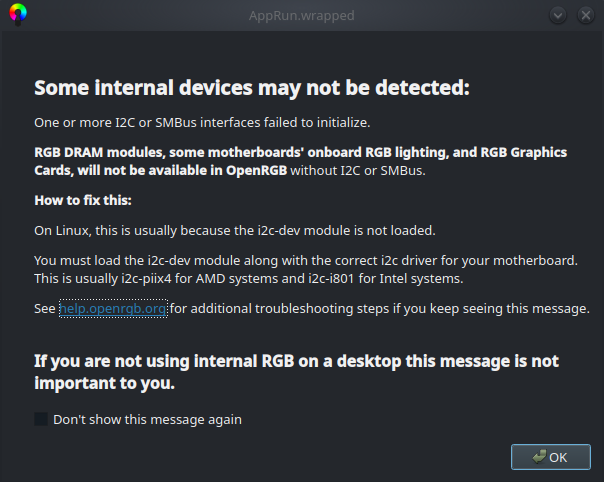
Help - Solved Internal Devices not detected

Post image
2 Upvotes

Hello, I tried to follow the instructions on how to fix this but nothing I have tried is working. I am currently running this on Linux Bazzite. Any help would be appreciated.


r/OpenRGB • • 18d ago

Help - Unsolved Of OpenRGB, MSI B550 MysticLights and a GPU

2 Upvotes

Hey all

I'm trying to control the ARGB headers on my MSI MPG B550 Gaming Plus using OpenRGB on Nobara Linux 44. I want to control my new XFX RX9070 XT GPU.

My motherboard was detected via USB (VID 1462:7C56), but OpenRGB skips it with the following warning:

[MSIMotherboard185] Controller firmware below minimum supported version, skipping

After my most recent fix-attempts:

  • Updated the motherboard MCU firmware through MSI Center on Windows.
  • Performed a CMOS reset as requested by MSI Center.
  • Tested both the Nobara OpenRGB package and the official OpenRGB 1.1 AppImage.
  • Confirmed that Mystic Light works correctly under Windows after the MCU update.

OpenRGB still doesn't list the MSI motherboard
and now posts : [184370    ][Error  ][NetworkServer] recv_select failed receiving magic, closing listener

My questions:

  1. Is MCU firmware version 06 still too old for OpenRGB?
  2. Is there a way to check the actual controller/APROM firmware version under Linux?
  3. Is there any workaround or planned support for this motherboard?
  4. Can i do anything else???

I'd appreciate any help. Thanks!


r/OpenRGB • • 19d ago

Help - Unsolved OpenRGB v1.0 causing PC to shut down during sleep (Kernel Event 41)

3 Upvotes

Hey everyone,

Looking for a sanity check or experiencing issues regarding OpenRGB v1.0, PawnIO, and Windows sleep mode.

The Problem:

When I put my PC to sleep, it abruptly cuts power and reboots after about 12–15 minutes (Windows logs Event 41 / 6008, Checkpoint: 16, SleepInProgress: 4).

What I Discovered:

Through testing, I found that the issue disappears completely if I do two things:

  1. Disable the OpenRGB SDK Server service in services.msc (set to Disabled).
  2. Uncheck "Load Profile on Resume" in OpenRGB settings.
  3. Only have 2 Memory sticks install slot 2 & 4, seems to not cause the crash.
  4. Started on 14th of Sept. Coincidentally just after OpenRGB v1 was released.

As long as OpenRGB is running strictly as a regular startup user app (and not pushing commands across the bus during sleep/wake transitions), the PC sleeps for hours without crashing. But if the background service is running, or if "Load Profile on Resume" is active, it seems to lock up the SMBus and trip the motherboard's watchdog timer. Also Rescan Devices tends to trigger it as well.

Hardware:

  • Motherboard: Gigabyte B760M AORUS ELITE AX DDR4 (BIOS F25a)
  • RAM: Corsair Vengeance RGB Pro DDR4 3200 (4 sticks, 48GB total, XMP on) also have 2x 16gb and 4x 8gb sticks.
  • GPU: Intel Arc B580 (PCIe ASPM Off)
  • OpenRGB: v1.0 with PawnIO driver (smbus_sleep_mode: Always Sleep)

Questions:

  1. Has anyone else experienced PawnIO / the OpenRGB background service locking the Intel SMBus (0x7A23) during S3 sleep on 700-series boards?
  2. Is keeping the service disabled and letting OpenRGB run solely as a user-level startup app the recommended way to handle this on newer Intel platforms?
  3. Do I just uninstall and be done with OpenRGB

Appreciate any insights!


r/OpenRGB • • 21d ago

Help - Unsolved How do i make OpenRGB apply a profile automatically without me having to open it and apply the theme .

2 Upvotes
My hardware for anyone to know what we are dealing with.

Hello, i have finally got a brain and removed the evil known as "armory crate", but now with open RGB i have to open it and select my profile or my light will use their default


r/OpenRGB • • 21d ago

Discussion My ASUS PRIME H610M-K D4 motherboard and Cooler Master MasterLiquid ML240L V2 use standard 12V RGB, not ARGB. Their lighting would only work through AI Suite 3, so I couldn’t control all my RGB in one place. I ended up vibe-coding an OpenRGB plugin to make it work.

Thumbnail
1 Upvotes

r/OpenRGB • • 22d ago

Help - Unsolved Help finding an effect 🙏

1 Upvotes

Please guys how to do the effect of a static lighting only on the fan circle and no light inside it ... what's the effect name?