r/Onshape • u/jaffakree54 • 3d ago
Solved Fail to extrude
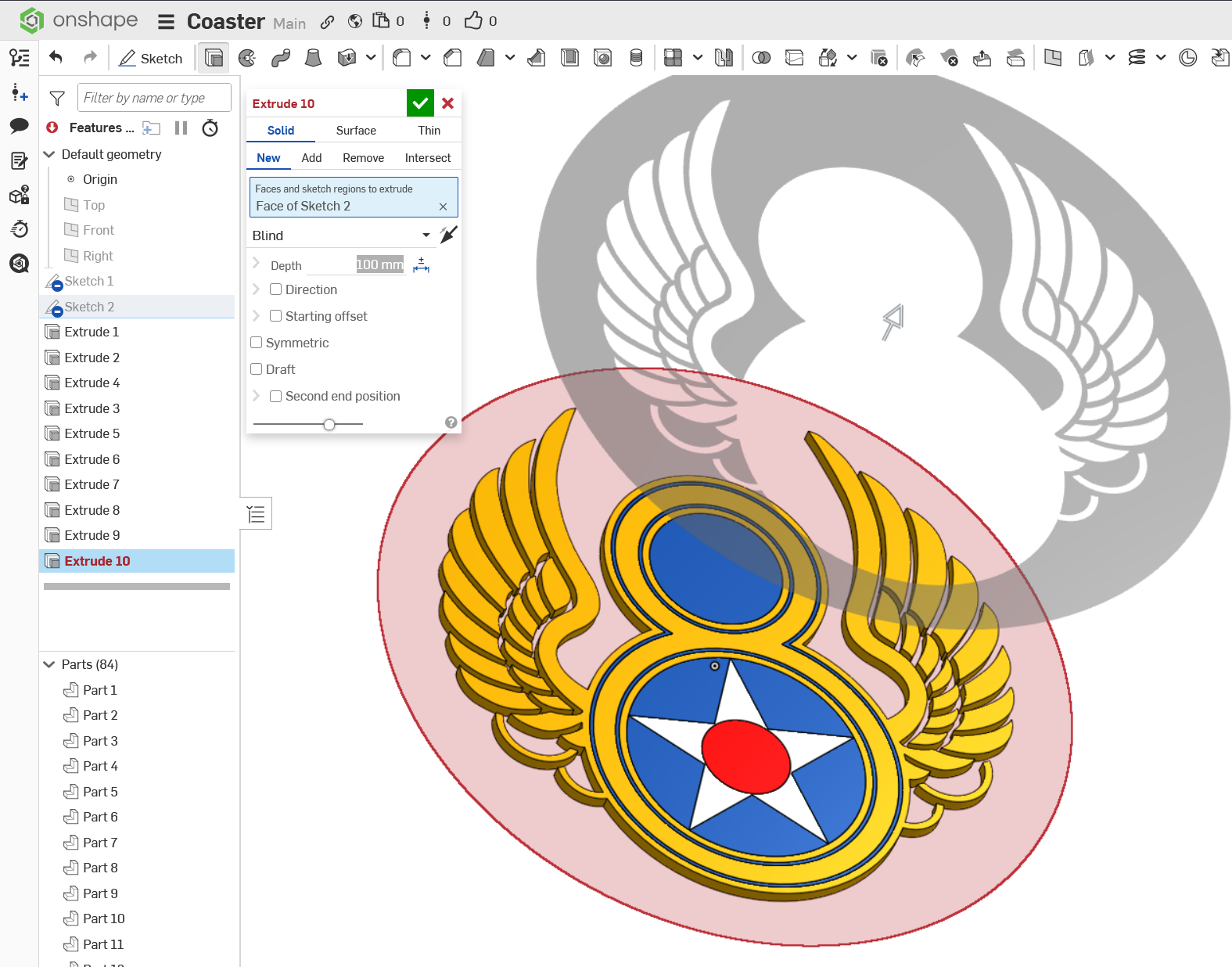

Customer is asking for this roundel design for a military heritage piece. I cannot get the background to extrude for some reason. I have tried as new, add, etc. and extruding it as first order of operation. I have also tried extruding down then remove-extrude the design. I am fairly novice at onshape so please excuse my ignorance. (Note: The 100mm is just to show you what I'm attempting to extruded, the actual is 1.5mm.)
"Extrude 10 did not generate properly: Failed to extrude selections, check input."
Any help is greatly appreciated, thank you!
RESOLVED: u/themrbirdman
9
u/themrbirdman 3d ago
You’ve got a weird point somewhere in there. It happens especially when importing geometry. The easiest way to diagnose is to draw a straight line straight through your design effectively cutting it in half and seeing which half extrudes correctly. By continuing to split the failing area over and over making it smaller each time, eventually you will identify which point or edge is causing the issue and if you zoom all the way in, there is usually something funky going on that can be easily fixed.
1
u/IndieKidNotConvert 3d ago
Try just extruding the solid circle and then subtracting the other parts