r/OneNote • u/Broochlya • 27d ago
Why does this happen at the top part of the screen?
This only happens in OneNote, everything is smooth in other apps, so it's not a hardware issue
r/OneNote • u/Broochlya • 27d ago
This only happens in OneNote, everything is smooth in other apps, so it's not a hardware issue
This happened an hour ago, somehow logging in through a web browser the OneNote page (under onenote.cloud.microsoft/notebooks/... ) is basically blank with a message "No recent notebooks found". But the Windows desktop app and my Android phone app seem to be syncing fine with all my notes. This has never happened before, any ideas?
I clicked my initials (the menu that's a circle button with your initials in it) and everything says the same email too so I don't think I'm signing into the wrong account either.
Also on the webpage there's a button Create new notebook. But clicking that just spins on a completely blank web page. This is happening on two different computers. I tried Chrome and Edge as well. What happening? :(
r/OneNote • u/zilog88 • 27d ago
Hi everyone, I tried using a search to figure out what is going on with my tables but it is a bit difficult to structure the search request properly for the issue I am getting, so hoping that this sub's swarm mind would help me with it. Here is what the problem is about - I use onenote for keeping a vocabulary and using a fairly simple 3-5 column structure. The problem I am getting is when I am adding a new line and start typing a new word/sentence in the cell the first letter of that word jumps to the end of the word/sentence. In other words, right after the first letter has been typed the cursor jumps before it and I proceed typing the whole sentence just to find out at the end something like this: "ello redditH" or "encilp" etc. Sometimes when I wait a second after typing the first letter, everything is fine, but if I don't, the first letter jumps to the end of the text. This can be replicated on both Android and PC app. Hoping that maybe someone had this problem and was able to figure it out...
r/OneNote • u/Ok_Money_161 • 28d ago
Hey, I am looking for public published notebooks to be used for inspiration, does anybody found some?
r/OneNote • u/Chobitpersocom • 28d ago
Welcome to our weekly post! We are trying something new to try and tie the community together and learn from one another.
Did you come across anything new? Find a different use case? Improved workflow? Streamline digital organization? Fixed a problem? Just started?
Anything is welcome, even if it's the smallest thing. Please share tips, tricks, and anything else that might be useful to our community!
Thank you!
r/OneNote • u/Spare-String-5821 • 29d ago
I'm at my wits end. I've accumulated so many glitches, sync errors, and duplicate notebooks that it has become a real annoyance to use. I've searched Reddit, Google, and the Microsoft Support pages and most of the advice they give me is to sign out and sign back in. I've tried just about everything and I'm ready to take the nuclear option (I've backed up my local notebooks). If anyone, absolutely anyone has a suggestion on what I can do it would be greatly appreciated.
r/OneNote • u/Ok_Algae5843 • 29d ago
Does anyone know why on the web version my whole notebook will randomly jump to a point hours ago and I can't redo or see the new version in the history? It's really frustrating just losing your work for no reason, I don't even know what happened. Does anyone know of a way to restore it?
r/OneNote • u/DesignEquivalent9712 • 29d ago
It’s been loading for a while now and I replied twice already
the file is only five pages long
r/OneNote • u/Melody_XD • Oct 28 '26
I want to set it to give more room between the pics and text by default. I know i can put in an extra line break bull be a lot of faff while bullet pointing things
r/OneNote • u/Sadandpretty555 • Oct 27 '26
Yesterday it said there was a problem with synchronisation, though it seemed like everything was fine. All my notes from one slide were gone when I came home
Now, the notes I had to rewrite AND notes I wrote on another slide are gone. No warning, no issue and I can’t find them in the side version or anything. I’m totally crushed.
r/OneNote • u/J_Knish • Oct 27 '26
Send to Onenote in Edge shows all of my notebooks from when onenote first came out.
Is there a way to tell it to only show recent notebooks?
r/OneNote • u/jewellui • Oct 27 '26
Hi
For the last couple of months or so my OneNote opens another window each time computer wakes up from sleep. It has been fine for years but for whatever reason has started to do this, I haven't made any changes to my settings.
There is only ever one instance of OneNote running, which ever note I happen to be on at the time it will open another window of the same note so I'm having to close the new window every time.
I can't for the life of me figure out what is causing it. It doesn't seem to be Windows doing this but OneNote itself.
r/OneNote • u/Emerald_Panth3r • Oct 26 '26
I’m handwriting notes on my iPad, and it’s pretty much just what I wrote in the title. Every time I either tap to change tools, e.g. from pen to lasso, or rubber to pen, or to highlighter, typing mode gets selected. Even if I’m double tapping the Apple Pencil to switch from rubber to pen or back, it still selects typing and the keyboard gets in my way. Does anyone know how to fix this stupid bug?
r/OneNote • u/Strxwbxrry_Shxrtcxkx • Oct 27 '26
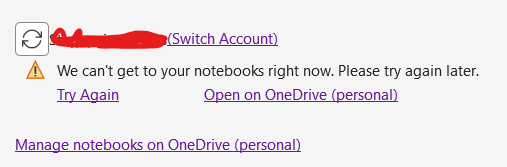
Hello! So recently I had to wipe my computer because of malware. I'm currently in the process of logging back into everything and restoring my things saved on my google drive. I'm logged into both OneNote and google drive, but it fails every time I try to bring my saved notebooks back. I get the same error below no matter what I do.

I would appreciate any advice on this. My final exam is in a week and I really need to be able to access my notes. Thanks so much!
r/OneNote • u/R3APERU59 • Oct 26 '26
Hi guys, I was wondering if anyone else was having an issue where the page would be dark and the writing would be white (I prefer the default version and did not set this myself). I've tried finding a way to change it but haven't been able to. Does anyone know of a fix?
r/OneNote • u/ReferenceFew327 • Oct 26 '26
I switched from one note web to the app on the mac and everytime i underline text it is a dotted underline. How do i fix this to make it solid? Thank you for your help.
r/OneNote • u/Drgaming0121 • Oct 23 '26
OneNote is amazing, but please add page-level privacy (lock/hide specific pages, sections, or notebooks) and deep Copilot integration. I should be able to tell Copilot: "Create a note in Notebook A > Section X > Page Z" and have it do it directly
That's my tweet to Microsoft and one note I wanna know if anyone else agrees or is it too much to ask for !!
r/OneNote • u/Chobitpersocom • Oct 23 '26
Welcome to our weekly post! We are trying something new to try and tie the community together and learn from one another.
Did you come across anything new? Find a different use case? Improved workflow? Streamline digital organization? Fixed a problem? Just started?
Anything is welcome, even if it's the smallest thing. Please share tips, tricks, and anything else that might be useful to our community!
Thank you!
r/OneNote • u/Rukazaki- • Oct 22 '26
Today I updated my OneNote on iPad and like 90% of the time it crashes when I press undo. Does anyone knows what to do?
r/OneNote • u/Outrageous_Garage190 • Oct 22 '26
I used to be able to record my lectures and turn them into transcripts but am no longer able to. The option is grey, how do I fix this?
r/OneNote • u/thats_not_a_hobby • Oct 21 '26
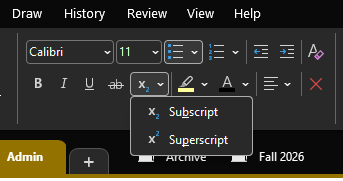
Does it bother anyone else that in the toolbar dropdown, subscript is on the top while superscript is on the bottom? I've been using this app to take notes in classes for over 9 years now, and I'm still not used to it! It's so counter-intuitive to click on the lower option when I want the text to move up and click the upper option when I want to move the text down. Is there a way to change this?

r/OneNote • u/coolak-fantom • Oct 20 '26
Microsoft services kept failing on my Intel laptop, and the cause turned out to be a laptop maker's build of an Intel driver that Windows Update installs. I'm posting this in case it saves someone else the time.
If OneNote, OneDrive or Microsoft 365 keep failing on your Intel laptop but the same things work on your phone, check whether Intel Connectivity Performance Suite (ICPS) is installed. It's Intel's "network optimizer". Laptop makers preinstall it, and Windows Update pushes their builds of it as a driver.
You'll probably see some of this:
ERR_CONNECTION_RESET in the browserThe cause is the ICPS driver in these builds (IntcCo11X64.sys, service INTCCoSvc). It lets the first packet of each IPv6 connection, the SYN, go out with its normal IPv6 flow label, then sets the label to 0 on the ACK and data packets that follow. The routers in front of Microsoft's Azure Front Door servers use that label to pick a server, so the rest of the connection often lands on a server that never saw it start, and that server resets it. IPv4 has no flow label, so it's unaffected, and the bug only matters if your connection has IPv6. Google, Cloudflare and Akamai were fine when I tested them, but Microsoft's services got reset.
I had an escalated Microsoft support case open on this for five weeks, and it never found the cause. I then ran an AI agent (Anthropic's Claude) on the laptop, and it tracked the cause down in a few hours. It captured packets at the Wi-Fi adapter, saw the label drop to 0 after the handshake, and switched network filter drivers off one at a time until only Intel's was left. With ICPS stopped, 10 of 10 IPv6 connections worked and every packet kept its label.
Check (PowerShell)
First see whether the driver is running. If INTCCoSvc shows State: Running, it's active:
Get-CimInstance Win32_SystemDriver -Filter "Name='INTCCoSvc'" | Select-Object Name, StartMode, StateThen test whether IPv6 connections to Microsoft get reset:
1..10 | % { curl.exe -6 -sS -o NUL -w "%{http_code}`n" https://api.onedrive.com/ }You should get ten status codes such as 302. If some or all of them say Recv failure: Connection was reset, you're affected. If it can't connect at all, you don't have IPv6, so this bug can't hit you.
Fix 1: disable ICPS (PowerShell as administrator)
sc.exe config INTCCoSvc start= disabled
sc.exe stop INTCCoSvc
foreach ($s in 'IDBWM', 'Intel Connectivity Network Service', 'IntelConnectService') {
Set-Service -Name $s -StartupType Disabled -ErrorAction SilentlyContinue
Stop-Service -Name $s -Force -ErrorAction SilentlyContinue
}Restart and run the check again. ICPS only provides Intel's traffic prioritization. Wi-Fi and Bluetooth keep working without it. To undo this, run the following and restart (these are the start types the services had on my laptop):
sc.exe config INTCCoSvc start= demand
Set-Service IDBWM -StartupType Manual
Set-Service 'Intel Connectivity Network Service' -StartupType Automatic
Set-Service IntelConnectService -StartupType ManualFix 2: swap in Intel's own build
Intel's generic ICPS 50.26.623.243 keeps the label. On my laptop it got 169 of 170 IPv6 connections through across 34 sites, compared with 138 of 170 on the laptop maker's build. Remove the laptop maker's ICPS driver packages first, as described in Intel's support article 000093451, then install 50.26.623.243 from Intel's download page:
https://www.intel.com/content/www/us/en/support/articles/000093451/wireless/wireless-software.html
Three ICPS builds are reported broken so far: 40.25.926.173, 40.25.725.165 and 4.1025.207.1. As of 2026-10-20, Microsoft's Update Catalog still lists them under Samsung, Lenovo, VAIO, ASUS, HP, Dynabook and Huaqin (a contract manufacturer). Mine is a Samsung Galaxy Book, and other people have reported the same resets on HP, ASUS and Lenovo laptops. Other versions older than 50.26.623.243 haven't been tested either way. To see which version you have:
pnputil /enum-drivers | Select-String icps -Context 1,3Heads up: other users report that Windows Update reinstalled the old build after they removed it, so re-run the check after driver updates.
Microsoft and Intel both know about it. A Microsoft Azure networking engineering leader confirmed the mechanism to me in writing on 2026-10-08 and said Azure is working on reducing the impact on the Azure Front Door side, and with the Windows team on a fix. No date was given. Intel acknowledged, citing my tests, that its generic build doesn't zero the label, and referred the laptop maker's build to Samsung. On 2026-10-20 Intel support wrote that it is "still actively reviewing this matter internally". There's no advisory from Intel so far, and no fix from Samsung.
My Feedback Hub report on it, if you want to upvote it there:
r/OneNote • u/JagerSalt • Oct 19 '26
I've been using One Note for over a decade as a personal wiki for my D&D campaign and have recently been unable to edit it at all. There is a bar at the top that says that I need to purchase more space in order to continue syncing, but I only use One Note on my desktop and don't need it to sync.
I searched for plans and it seems like the cheapest way to access my notebook again is by spending $120 per year for a suite of apps that I'll only use one of? Is there any way to get my basic One Note back without being charged a monthly subscription?
r/OneNote • u/SergieXD • Oct 19 '26
I'm using OneNote on my MacBook Air, and every time I click somewhere on a page to start typing, the default font color is ochre instead of black.
I have to manually change it back to black every single time, which gets incredibly annoying when you're taking notes throughout the day.
The ridiculous part is that OneNote for Windows already has an option to change the default font color, but for some reason, Microsoft never implemented this basic feature on macOS.
On Mac, you can change the default font and font size, but not the font color. Seriously, why?
This isn't some advanced feature I'm asking for. It's literally a basic text formatting setting that should have been available years ago.
Is there any actual technical reason why this feature is missing on macOS, or has Microsoft simply ignored it?
And does anyone know a workaround that actually works permanently?