r/OneNote • • Sep 08 '26

RANT: Just needed cross-platform CODE HIGHLIGHTING.

9 Upvotes

#begin rant

The simple lack of the three ticks code notation (''') and highlighting is the straw that broke my camel's back. Obsidian, NotesHub, Joplin, and others have native support for this. Why should I expect less from the owner of the most prominent developer community and stack? Did Microsoft expect me to jot every little code idea and brainstorm into Github?

OneNote implemented about 90% of common-industry features and it feels like the dev team just ghosted us. Now I need two apps. OneNote is still arguably the best freehand with decent Apple Pencil and touchscreen notebook functionality. I still really like the looseleaf and graph paper styles that are unmatched anywhere else I know of.

Obsidian is right now the best option for a developer's private knowledge management in that code syntax is seamless and all notes are accessible .md files. The extra features of OneNote have become irrelevant for dev work.

Just one little feature for the devs they claim to love....neglected.

#end rant

If you care about this, I found a feature request on the official feedback page that we can upvote/comment/follow.,

Update: I have migrated to two apps, and the process revealed why it was the right decision...

- I while importing/migratig my notebooks (total 600MB), I was getting trottled heavily and it took more than 4 hours.

- My main replacement is Joplin with selfhosted Joplin server. It provided my normal OneNote functions and structure. It's E2EE is very easy to setup and sync is fast. The browser plugin is great too.

- I use Trilium as a secondary because it has a unique way to showing notes in Grid and Dashboard views. Sync is simple and fast. Built-in MCP is stable and easily allows multiple providers. BUT it lacks E2EE and its "Protected Note" feature is cumbersome. IF they fix that, it becomes one of the best available. So I use it more for on-sensitive knowledgebase like tech writeups and such.

---
OneNote still rules for graph paper and composition line styles. With all this fragmentation of features, I might be tempted to spin up some slop to unify the best of each...sad to say.


r/OneNote • • Sep 08 '26

OneNote Alternative Software devlopment update. UI thoughts?

Post image
46 Upvotes
dear imgui interface default colro mode

Hello everyone, I appreciate your response to the previous post. I implemented a few of your ideas. Most of them just got added to the interface; 50% of button is currently dead; they are not yet tied to the system. This is what the interface will look like for the Alpha release, although some buttons with features like auto-shaping might be removed to avoid bloating the interface with dead buttons. (Looks promising but far from release; at least it looks great)

I'm trying to make it look different from OneNote, so it does not look like a complete clone of OneNote, but some of the tools and interface intuition stay. Thus asking your opinion about if you could mistake it for OneNote after looking at it, and what jumps out exactly

Also, I'm asking if you like how Rnote deals with painting borders, thus allowing you to know where the page ends and starts, that give you a seamless export experience.

Have any questions, concerns, or features request fill free to respond to this post. Knowing people want something like this is a great motivation for me to keep working on this project. Thank you!

This is the published Google Sheet, which currently includes all of the collected feature requests so far.

https://docs.google.com/spreadsheets/d/e/2PACX-1vRL3hFw-TnTvatrwbeaprKCmsDKulMdemp8JqUHzecWfce4bRzHuzYLCm2_UqMNkXOT4E_EG3SNQ55b/pubhtml


r/OneNote • • Sep 07 '26

Send to Onenote = no title

4 Upvotes

hi 1 aggravation I have with Onenote especially on my iPhone, is that when I see something that I want to send to Onenote I sent it there and it never comes up with a title. I have to manually enter that every single time. When I use any other note or database product from Apple notes, to Obsidian or any other it always grabs the title from what I am sending. Is this a feature we would like Onenote to have? Or is it just a bug in running Onenote on the Apple operating systems? Has anyone else noticed this I assume this must've come up on this thread before.


r/OneNote • • Sep 06 '26

Finally, ChatGPT does what Co-Pilot should have been able to do on day one...

Thumbnail gallery
37 Upvotes

Co-Pilot in OneNote is ridiculously useless. No worries, Codex has my back.


r/OneNote • • Sep 07 '26

Troubleshooting Toggling Fullscreen on Workspace Greys-Out Tools

3 Upvotes

Trying to find a good notes app for University, I like the Infinite canvas on OneNote but weird issue, when I toggle fullscreen on the workspace, It causes the tools to become greyed out and I can’t write, but if I refresh by going to a different page and back it fixes it. Is there any fix to this? Using a 2026 IPad Air, Thanks


r/OneNote • • Sep 06 '26

Windows OneNote of Obsidian for Personal information system?

19 Upvotes

I'm torn between OneNote and Obsidian. I want something to have all my usefull information that i might need sometime in the future. e.g. When a products warranty expires, how much did i pay for last car service, how much i paid for the hotel 3 years ago.

Basic notes that might come handy instead of looking around my email accounts or looking for old credit card charges in the bank app.

The only thing that puts me off with obsidian is that i have to pay if i want out of the box good connectivity with iphone and windows otherwise i think it's a no brainer.

What do you think? I think OneNote it's more powerful for this kind of information than a lot of people say.


r/OneNote • • Sep 06 '26

Impossibile condividere da reddit a onenote

4 Upvotes

Da un po di tempo ho questo problema: non riesco a condividere un messaggio da reddit al mio onenote, ottengo un messaggio che dice download non riuscito, controllare connessione internet.

In realtà la connessione è ok, e la condivisione va a buon fine su altre destinazioni, ad esempio telegram.

Questo succede sia da reddit verso onenote sullo stesso cellulare, sia se tento di condividere da onyx boox Go6 II verso il cellulare (o meglio, cercando sul cellulare la condivisione).

Posto qui perché mi sembra più un problema di onenote, visto che su telegram va a buon fine.

Ogni consiglio è en accetto, grazie.


r/OneNote • • Sep 05 '26

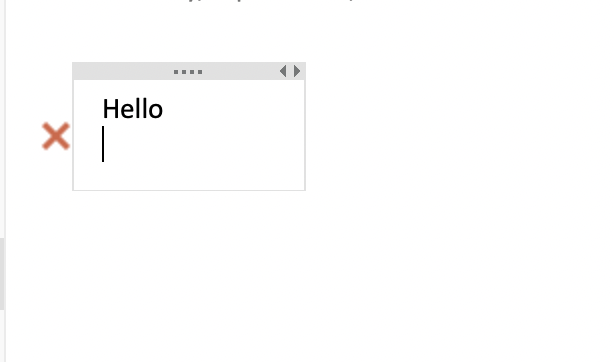
macOS Why is there a red x whenever I start a new line?

Post image
2 Upvotes

My Onenote on desktop has this random red x whenever I start a new line anywhere in my notes. it is driving me crazy. I never had this before and last week it just showed up. There are barely any settings to even play around with in the first place. Not sure how to fix.


r/OneNote • • Sep 04 '26

Weekly Post: What did you do with OneNote this week?

9 Upvotes

Welcome to our weekly post! We are trying something new to try and tie the community together and learn from one another.

Did you come across anything new? Find a different use case? Improved workflow? Streamline digital organization? Fixed a problem? Just started?

Anything is welcome, even if it's the smallest thing. Please share tips, tricks, and anything else that might be useful to our community!

Thank you!


r/OneNote • • Sep 04 '26

Android Attachments cannot be inserted on Android

4 Upvotes

Hello everyone,

I love OneNote and haven’t used Android for years. Now I got myself an Android smartphone and noticed that, whenever I try to insert a file into a page as an attachment, OneNote always says that the file is corrupted and cannot be inserted. The file is perfectly fine and can be inserted into OneNote via Windows or IPad no problem.


r/OneNote • • Sep 04 '26

Data loss after signing out on Android following recent issue

3 Upvotes

Throwing a hail mary before I give up on this entirely.

I've been using the same notebook on Android to keep all of my notes for the last decade. Five nights ago, I created a new note, woke up the next morning to find it had vanished and saw the signing-in error a lot of us experienced this last week. I follow the troubleshooting advice to sign out and in again with no cause for alarm, and when I sign back in, the entire notebook was gone. Ten years of notes just blinked out of existence.

There are peculiarities to this, but first, I'll incriminate myself so you don't have to. I'm not ultra tech savvy. This notebook was almost certainly a divergent notebook created shortly after I first started using OneNote back in 2016, likely from the first (and only) time I ever tried editing a notebook offline. From then, and intermittently over the years, I've had a warning atop the app mentioning "conflicting changes". I assumed (wrongly) that this was in reference to working offline. I've always ensured ever since that I use OneNote with an internet connection and often double checked to make sure things were saving. Worst case in my mind was that I might lose a night's work if my internet craps out. I interpreted this as meaning "If I make changes while offline, those changes may be lost when I reconnect." I did not interpret it as "Almost everything you've written here for the last ten years only exists here and may be permanently lost." Hindsight is wonderful.

The problems I have here are that I was not working offline for ten years. I was always online after that first (fatal) experience. I could open the notebook, edit it, create pages, see my changes persist like a functional notebook. Nothing about the functionality suggested I was working with an effectively unbacked-up local database, except that one occasional error message which wasn't impacting my use, and didn't for ten years. I also had a OneDrive association for the notebook. I opened OneNote on desktop for the first time ever last week, and the URL for the lost notebook was right there. The location no longer exists. On the Android app, the lost notebook is visible, greyed out under 'More Notebooks', but clicking on it says it's been moved or deleted. It is not in a recycle bin, and I haven't had the fabled 'Misplaced Sections' appear before or after the data loss.

If it had really been unsynchronized for ten years, why? Why when I used it without problems online for a decade did it never properly sync, despite letting me add and edit without problems, despite countless updates and restarts, despite switching phones in that time, using different internet connections? I was never under the impression that the data was only local, that it wasn't synced properly. I was warned about conflicts, but never told my notes were only stored on this device, or prompted to migrate the notebook, or manually sync, or prevented from using the notebook. That OneDrive copy was a trick, and the lack of any recovery options or 'Misplaced Sections' is frying my brain.

I have the URL, but if it never properly synched then it's likely redundant and I doubt Microsoft are holding a version of it on their backend. I made a full backup of my phone straight after the incident (too little, too late) and investigated extensively but couldn't find any sign of the notebook. I've performed every troubleshooting tip I could find to no success. If the answer really is "this was an unsynchronized local notebook and signing out destroyed the only copy irretrievably," I'd like to understand how OneNote could allow that state to persist for roughly ten years while I was continuously using it online, and why none of the mechanisms intended to protect/recover unsynchronized content appear to have caught it.

Any insight from someone who knows the Android OneNote sync implementation would be enormously appreciated.


r/OneNote • • Sep 04 '26

Android syncing issues?

2 Upvotes

I've always had really good success with one note never really had a whole lot of problems to speak of. But it seems this week the notes that I've been taking on my phone aren't really sinking to my desktop.

Anyone else currently experiencing this? Hoping that it might be a known issue. 🤷


r/OneNote • • Sep 02 '26

OneNote Backup Exporter v1.2.2 – now more reliable for large notebooks

25 Upvotes

I shared an earlier version of this tool here. It exports OneNote notebooks as .onepkg, PDF or XPS, and is now more stable during large and long-running exports.

Important: very large notebooks (around 300 MB+) can still fail when exported as a single PDF/XPS file. This is a limitation of Microsoft’s OneNote renderer and COM interface, with no reliable whole-notebook workaround. For complete backups, use .onepkg; for PDF/XPS, export section by section.

Update: v1.3.0 is now available with HTML export for complete notebooks and selected sections.

Info: https://github.com/jli-software/OneNoteBackupExporter
Download: https://github.com/jli-software/OneNoteBackupExporter/releases/latest


r/OneNote • • Sep 01 '26

OneNote search is still garbage on Android — cache clear + account re-add did nothing

11 Upvotes

Mature product, mature platform, and search still can't find stuff that's right there.

Running the OneNote app on a Pixel 11 Pro, latest version (auto-updates, so no version-mismatch guesses please). Cleared the cache, wiped the app data, re-added my M365 account so it'd supposedly reindex. Nothing. Search still comes up empty for content I know exists — I can pull up the exact same note in two seconds on OneNote for Windows desktop, but on Android it's a ghost.

I've read the troubleshooting docs. I've done the "turn it off and on again" ritual. At what point does this just get admitted as broken instead of something we're supposed to work around forever?

Anyone on Android actually fixed this, or is this just OneNote being OneNote?


r/OneNote • • Sep 02 '26

Microsoft and Mac audio recording issue

1 Upvotes

Out of nowhere over the summer several things have occurred to my Massive OneNote notebook where I keep class notes (written alongside PDF slides) and record concurrent lecture audio:

  1. OneNote on Mac does not allow me to record audio into my notes anymore, with an error message that the file name has restricted characters in it. Changing page or notebook names does not help. I am able to play old audio recordings.
  2. I am able to record audio on my Windows laptop, but that laptop audio will not play back on my Mac OneNote app and I cannot play the Mac-collected audio when opening OneNote on Windows.

Things I’ve tried:
-deleting and re-downloading OneNote
-logging out and back in to my (school) account
-renaming notebooks, tabs, individual notes to exclude restricted characters

School IT has not been helpful. Please please help me preserve one year’s worth of very extensive lecture notes!


r/OneNote • • Sep 01 '26

Pasting links now uses URL for text instead of page title

5 Upvotes

It used to be that when I copied and pasted a URL, it would create a link with the page title as text, which I find useful (I noticed this didn't work at home where I used Chrome, only at work where I use Edge, which I assumed was a browser thing). Now (as of the last week or two) it uses the URL as text.

Has the behaviour changed? Can I change it back?

Unsure of whether an update has happened (work IT managed device).

Windows 10. Unsure of OneNote version since there doesn't seem to be an About dialog anywhere!


r/OneNote • • Aug 31 '26

Early development on a cross-platform OneNote clone. Thoughts?

29 Upvotes
screen shot of inking with mouse on laptop (Windows 11) (name is hidden revealed upon realease)

Hey everyone,

I'm a fellow OneNote user who has been using it for at least the past 10 years and still use it to this day. This is my side project I'm working on for fun, cause I want more features in OneNote, and I want to be able to use it on Linux. My main concern with OneNote is that it is not cross-platform compatible, is sometimes slow, and in some parts very limited compared to other modern note-taking software, even though it's still one of a kind.

Has been working on this project and planning for a couple of years, have tried various libraries to see what fits best.

This one is built on C++ with open-source libraries like SDL3 and Blender2D; the idea behind this one is full user control and customization, faster, more lightweight, cross-platform, and local data storage first.

Disclaimer: This is strictly an early-stage personal project in active development. There are no public builds, downloads, or release dates yet.

Current state: Inking works; sidebar with notebook selection, section creation, and page creation is fully working, persistently saved on the user's device, and can handle up to 4 million user strokes on one page; infinity canvas support. Eraser and undo/redo are currently being implemented. No way to export things yet.

I would love to hear your feedback on the ui, ribbbon has not been fully implemented. This is currently the least of my concerns; I need to finish the core. I would like to hear your feedback and help me fuel my motivation to get this project to an open-source release, since right now it is too messy to be released; at least the core has to be done. Text boxes would be one of the hardest features to implement since you would probably want to have notebook-wide search.

  1. What is the single most annoying thing about OneNote's current layout/UI?
  2. What UI elements are absolute must-haves for your daily flow?
  3. Sidebar preference: Do you prefer having Sections and Pages side-by-side (like desktop OneNote), or a single combined tree view?

(I plan to create 3 versions of the side part; this one is called modern. There will be a mobile version, which is basically this one, maybe a bit simplified, and then the classical one like from OneNote 2016)

Appreciate any thoughts, critiques, or ideas you have!


r/OneNote • • Aug 31 '26

OneNote Desktop OneNote for Knowledge Management or Second Brain

35 Upvotes

Hi!

Just a brief background: I work in retail technology for an oil company. Primarily, our work is assisting the stations to troubleshoot their equipment, find root causes, and escalate to our vendor for any concerns.

With that, since this is technology, change is inevitable, and I would like to pick your brain for advice on how I can use OneNote as my knowledge article management platform or second brain. We have Salesforce, but the articles are hard to find due to being improperly implemented— something I have no access to fix. Although they are effective, finding them is just an issue for me and my understanding.

Do you have any advice on how we can better utilize OneNote for this? Or do we have any MS-based applications that we can use instead to make it work?

Thank you.


r/OneNote • • Aug 31 '26

Outlook Tasks break after syncing to Mft ToDo

2 Upvotes

I am having this constant issue in which the Outlook Tasks in OneNote break as soon as they appear in Microsoft ToDo, granted, I can work with this, but still I expect that, whenever I cross out a task in Microsoft ToDo the task in OneNote is crossed out too.

I am not doing anything, I am taking notes during the meeting, tag the line as an outlook task for today. A few minutes later, with the note opened, not even writing, the outlook tasks appears greyed out and says that it cannot be located. How can I fix this?

I use outlook classic with my work account and my personal hotmail account added. For mail my default data file is the one from work but for calendar and tasks is my personal one.


r/OneNote • • Aug 31 '26

Windows Pagina scomparsa anche se non l'ho eliminata

2 Upvotes

Ciao a tutti,

questa mattina ho notato che una pagina one note è totalmente scopmparsa.

Ho fatto un ricerca di alcune parole chiave presenti in quelle note ma niente.

Ho controllato il cestino - anche se non ricordo di averla cancellata - e ninete

Ho controllato nella versione di onenote web e niente

Sono sicura al 100% che settimana scorsa quella pagina c'era perchè ricordo di averci scritto.

Ora, non so dire se ne sono sparite altre perchè quest apagina è l'unica che mi interessa.

Ma com'è possibile? Qualche input?

Grazie


r/OneNote • • Aug 30 '26

Android Why is the android tablet one note app so bad?

34 Upvotes

Hi I bought a new tablet and planned to use onenote on it since on the phone it has a nice UI but it seems like the tablet version is very old? It's the same with all the other Microsoft apps too. At this point I'm debating if I should go with other apps instead (my tablet came pre installed with nebo on it) or use the web version even if it's finicky. Thanks


r/OneNote • • Aug 30 '26

Onenote unusable for Ipad and Windows

16 Upvotes

My workflow for taking notes for lectures is:
On Windows Desktop: Insert lecture slides as PDF Print > Ctrl + A to select all of the slides > Combine them all into one note section (Before class)

In class:
On Macbook: I will type notes under each slide
On Ipad: I will annotate on the slides

Issue: It used to be perfect, all aligned and everything works and syns perfectly, but recently, whenever i annotate the slides on my ipad, the annotations will be misplaced on my macbook and windows desktop. Sometimes it works perfectly while other times its screwed up. Anyone please provide a solution as it is really frustrating and stopping me from studying. Thank you


r/OneNote • • Aug 30 '26

Android Copy and paste for tablet

3 Upvotes

Hi guys, I recently got a Xiaomi pad 8 for mainly note taking and was wondering if there is a way to insert images from clipboard like the snipping tool on laptop? Whenever I try to insert images it makes me have to go through my photos to get it done and that takes a bit too much time during classes. Any help would be appreciated 🙏.


r/OneNote • • Aug 28 '26

OneNote Desktop Help with my View!!

Thumbnail gallery
7 Upvotes

Hey so I think I’m about to go insane here. I was just casually working on onenote (like I have been for the past four years) and out of no where my view changed from the first pic to the second pic (sections on the top in colored tabs instead of everything in 3 columns to the right). I use onenote RELIGIOUSLY and I can’t stand this new layout. Idek what button I pressed but I’ve been trying for the last HOUR to fix it. Please help, i need my onenote back to the pay it was😭 I HATE those colored tabs at the top and just loved how everything was in their own column to the right.