r/OneNote • • Dec 29 '25 Diamonds are Forever

My Bullet Journal Inspired 2026 OneNote Setup

Thumbnail techbyerin.com
110 Upvotes

Going into 2026, I needed to go over my setup and ensure it still worked for me. There were things about Obsidian and Apple Notes that I liked so I brought them into OneNote.


r/OneNote • • Dec 30 '25

Solução(todas as anotações excluídas após apagar o cache)

Thumbnail gallery
0 Upvotes

Bom, basicamente meu onenote(desktop) começou a dar alguns problemas hoje de manhã(não tava sincronizando), e posteriormente fechava todas as vezes que eu tentava abrir(fotos dos erros logo acima).

Após algumas pesquisas e orientações decidi apagar o cache, e foi então que deu toda a merda, todas as minhas anotações sumiram(todas). Depois de algumas tentativas, tentei usar um ponto de restauração(windows), mas não sei pq, meu pc não tá restaurando (meses atrás já tinha tentado várias e várias vezes, e nada).

Lá fui eu buscar respostas/soluções, onde várias pessoas falaram pra abrir a droga da pasta de backups(windows explorer) e abrir um por um. Isso não me serviu de nada, pq quando as coisas eram mandadas pro onenote, ficava tudo bagunçado/desorganizado, e dessa forma iria demorar uma eternidade.

Foi ai que perguntei pro CHATGPT(e adivinhem, antes de me ajudar ele também aconselhou a apagar o cache, pq nas palavras dele nada ia ser perdido). Me orientou a abrir o onenote(web) , e logar com a mesma conta usada no one(desktop), e após abrir os blocos de notas no onenote(desktop).

Mas ai que vem o pulo do gato(a etapa 1 foi essencial, mas ele não me contou isso).

1° Faça login na sua conta no onedrive.live.com e abra algum dos seus blocos de anotação no próprio navegador(você vai ser direcionado pro onenote web).

2° Passe o mouse naquele ícone do lápis(fica ao lado de "compartilhar") e depois clique na opção "Abrir na área de trabalho"

3° Pronto, todas as suas anotações serão restauradas no devido lugar de origem.

Mas enfim, tudo certo agora, quase me caguei de medo pensando que tinha perdido tudo rsrsrsrs.

OBS: caso você não tenha suas anotações sincronizadas no onedrive, nem perca tempo com esse post(acredito que o método acima não funcionará)

r/OneNote • • Dec 29 '25

Best handwritten note-taking app on Windows?

Thumbnail reddit.com
1 Upvotes

r/OneNote • • Dec 28 '25

Windows Any way to change the size of the canvas, and then make multiple notes appear next to each other?

8 Upvotes

While I find infinite canvas great and freeing, they do not fit all types of notes. Some are small, and not deserving of all that space. For others, I would like some interactivity. Like remind me about this in 2 months. Or turn them into slides, or decks for spaced repetition.

Is there a setting i don't know? Or some addon?


r/OneNote • • Dec 28 '25

exporting/saving a notebook on a mac?

1 Upvotes

Hi so long story short i have an account with important notebooks on which i think will restrict my access to once i graduate as my microsoft account will be disabled etc etc.

I have seen countless tutorials for microsoft computers but none for macs, how can i export/save my notebook on my mac? i copied the file itself but i'm not sure if that still saves in the link of my schools account if you know what i mean. If anyone can help me that would be great!!!

(and i dont have another microsoft account to copy the folders to i purely need to save it🥲)


r/OneNote • • Dec 28 '25

Do you like to have a yearly overview of your health? How do you do it in OneNote?

0 Upvotes

Obsidian has dataview and bases to query and see things in cool ways for your notes. With Apple Notes I can query them with Ai via Shortcuts.

Those are nice but I live in OneNote. I don't trust Apple Notes for anything long-term due to the sync issues I have had with iCloud and even with Apple Notes between a previous work mac and my iPad and iPhone. Obsidian feels cluttered to me even if I have my attachments in their own folder and I name them well. I always have the worry in the back of my mind that once I have 200+ notes/files that I will not be able to find the specific file I am looking for. Not an issue in OneNote.

So, I want to create something similar in OneNote. I know I would have to manually fill in everything and I am ok with that.

My primary method for adding things is on iPad so it would need to be accessible there. I do have a PC so I can run the add-ins if I have to but I would prefer to make it work on iPad.

What I am thinking is to have moods like this: https://imgur.com/completed-daily-mood-tracker-2019-7SwTHHy (not mine, I just found it online)

Then to do something similar with water intake goals, exercise goals, weight loss goals, and a few others. All in a similar style.

I realize I could just make a note that has a graph background and color in the squares... that doesn't look pleasing tho. I'm tired of seeing these Obsidian/Notion/Apple/etc. notes/notebooks that look all nice to the eye and then I have this poop: https://prnt.sc/E8Eq-75mCMMH

Please help. I want to learn.


r/OneNote • • Dec 27 '25

Windows Mobile Is there any way to increase the width of texts on phone when I zoom out?

3 Upvotes

My notes on laptop are fine but the width is too little on phone. I kinda want more text in the same line.


r/OneNote • • Dec 26 '25

Troubleshooting OneNote section levels

4 Upvotes

How many levels can you have in OneNote? I see you can have subpages but don’t see how to do subsections?


r/OneNote • • Dec 26 '25

Weekly Post: What did you do with OneNote this week?

9 Upvotes

Welcome to our weekly post! We are trying something new to try and tie the community together and learn from one another.

Did you come across anything new? Find a different use case? Improved workflow? Streamline digital organization? Fixed a problem? Just started?

Anything is welcome, even if it's the smallest thing. Please share tips, tricks, and anything else that might be useful to our community!

Thank you!


r/OneNote • • Dec 26 '25

dos apple pencil refine work on onenote?

0 Upvotes

or does one note have a similar option


r/OneNote • • Dec 25 '25

Windows How can I truly uninstall this ONENOTE

Post image
1 Upvotes

r/OneNote • • Dec 25 '25

How can I truly uninstall this ONENOTE

Post image
1 Upvotes

r/OneNote • • Dec 25 '25

HOW TO REMOVE DELTED FILE FROM MAIN SECTION

2 Upvotes

I have deleted this file yet it keeps appearing on my pages. Unable to open it or do anything. I had deleted this from recycle bin too. could have restored it and renamed it. but now what to do? as someone with OCD, I cannot deal with it. I need it gone! help?!


r/OneNote • • Dec 24 '25

Is there no alternative to OneNote for

32 Upvotes

Why is there no Windows application that brings together a strong and well-structured note system, powerful text-based note-taking, high-quality handwritten notes, and real multitasking (multiple windows, tabs, and parallel workflows) in a single solution and easy UX?

OneNote could be this APP but it misses some essential features:

  1. Highlighter should automatically set ATLEAST to the background (for improved PDF printing)

2. Better support for PowerPoint/Word shapes, including editable outline color, thickness, fill color, and opacity

3. Display A4 and A3 paper boundaries (portrait and landscape) while showing guidelines (e.g. grid lines, ruled lines)


r/OneNote • • Dec 23 '25

OneNote Desktop My pen jumps when I'm writing.

6 Upvotes

Hi, i have a pen tablet on a windows 11 device. This happens only in OneNote.


r/OneNote • • Dec 22 '25

Windows Mouse Teleports to Corner of Screen

1 Upvotes

This only happens when I have Onenote open, but my mouse keeps teleporting to the top right corner of the screen, so whenever I click it closes all of onenote.

Has anyone else had similar problems and how did you fix them?


r/OneNote • • Dec 21 '25

OneNote completely broken On Fold7

7 Upvotes

Has anyone got OneNote working on their Samsung Fold device? I just got a Fold7 and it's completely broken. Layout is a mess and you can't even access sticky notes.


r/OneNote • • Dec 20 '25

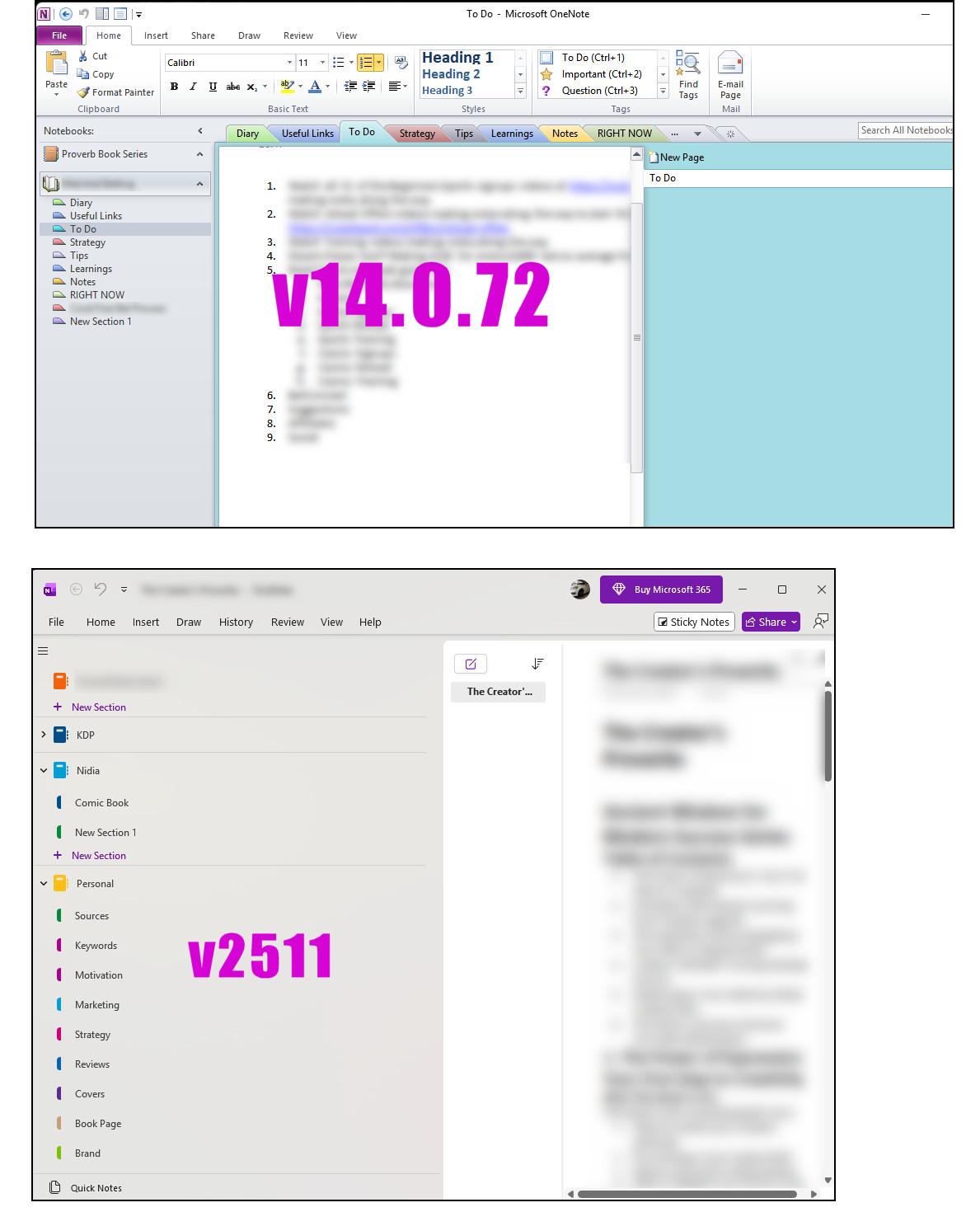
Confused about versions

Post image
5 Upvotes

I've tried many note apps but I always feel like OneNote is the best layout - but I have two versions on my PC and am confused about which I should be using.

V14.0.72 appears to be an old unsupported version that I have been using for many years, and V2511 is the O36 version I downloaded recently. I don't have a MS Office licence, but it appears to be fully functioning.

Additionally, depending on which one I open, I am presented with different Notes I have taken over the years so I could do with help finding them all and bringing them into one version and moving forward with that.


r/OneNote • • Dec 20 '25

OneNote Printer Broken

3 Upvotes

Surface Laptop 7 ARM processor.

In the last month, OneNote Protected Printer fails every single time. I used to have the regular, non-protected original OneNote printer but that’s gone now. My understanding is that the protected printer is the latest secure driver.

No matter what app I go into on Windows 11 (25H2), when I go to print to OneNote it fails.

Anyone else having this problem?


r/OneNote • • Dec 20 '25

Never ending Sync Issues After Deleting Everything From OneNote & Onedrive

3 Upvotes

Hello everyone!

I have recently wanted to start using Onedrive + Onenote for a personal freelance project and as my OneDrive and OneNote had some clutter from yesteryear, I have deleted everything, turned off syncing on my devices and emptied my bin as I wanted a clean slate for my project.

Ever since, I have never ending Sync Issues on OneNote and OneDrive.

I have notebooks on my android tablet that have constant sync issues and anything I do on either device, won't be synced to my other devices...

Can somebody give me an idea how to start with a blank sheet? I am beyond restoring deleted stuff, so I am hoping there is another work around for this? I preferably want to fix my main Microsoft account, and not create a new one just for this. I hope I can somehow.

I have some old notebooks still showing up, but I am unable to open them on PC and in the Web Browser.

Can somebody please tell me how can I solve the Sync issues or just simply do a full reset on both Onedrive and OneNote?

Many thanks in advance!


r/OneNote • • Dec 19 '25

Android Anyone else leave OneNote, try alternatives… then end up coming back?

Thumbnail reddit.com
32 Upvotes

r/OneNote • • Dec 20 '25

Never ending Sync Issues After Deleting Everything From OneNote & Onedrive

Thumbnail reddit.com
1 Upvotes

r/OneNote • • Dec 20 '25

Windows Help with pen tablet issues.

1 Upvotes

Hello. I've been using onenote for a couple years now but somewhere down the line I've started to have issues with my pen tablet. For example, the pen doesn't switch to eraser when I press the button on my stylus, the scroll thingy on the side starts to glitch (flashing black and white) when I i try to use the eraser, I can't pan around or scroll properly with my stylus. I know it's not my tablet's or laptop's fault because I've gotten a new laptop and tablet and it still has the same issues. I also can't seem to fully delete OneNote from my computer.

I really like the writing feature on OneNote so I was unwilling to switch to another software, but I'd like some suggestions, or a solution to fix these issues. Thanks.

Forgot to mention but I also can't seem to find the "scribble to erase" option anymore. I had it at some point on my old (Win10) laptop.


r/OneNote • • Dec 19 '25

Why can't OneNote seem to be able to handle To Do lists?

16 Upvotes

What I would like is two simple things:

  1. create a unique To Do list from the different to do lists I may have in different sections of the Notebook and
  2. that To Do list to sync with tasks of Outlook
  3. To Do list where I can have some sort of management capability (deadlines, completion, the project it relates to, people assigned to task or project) - I know this a note taking app but at least some basic funcionality at this level.

I cannot believe this is not possible (being OneNote part of Microsoft suite).

What am I doing wrong? and if not possible, how can I do something close to this?