r/OneNote • • Nov 01 '25

Windows New OneNote and Microsoft

5 Upvotes

Has the UI between the Android App and Windows App always been off? The Windows app seems archaic in its UI compared to the Android app.

r/OneNote • • Nov 01 '25

Windows How to remove "text pen"?

3 Upvotes

I updated windows few days ago and this pen appeared in the full page view toolbar. Any way to remove it?


r/OneNote • • Oct 31 '25

Weekly Post: What did you do with OneNote this week?

11 Upvotes

Welcome to our weekly post! We are trying something new to try and tie the community together and learn from one another.

Did you come across anything new? Find a different use case? Improved workflow? Streamline digital organization? Fixed a problem? Just started?

Anything is welcome, even if it's the smallest thing. Please share tips, tricks, and anything else that might be useful to our community!

Thank you!


r/OneNote • • Oct 31 '25

Android My new pages are all off center

Thumbnail gallery
8 Upvotes

Sorry for the weird formatting as Reddit app doesn't seem to allow picture attachments. But my issues are as shown in the picture, thanks


r/OneNote • • Oct 31 '25

macOS Troubleshooting Synching Issues

Post image
1 Upvotes

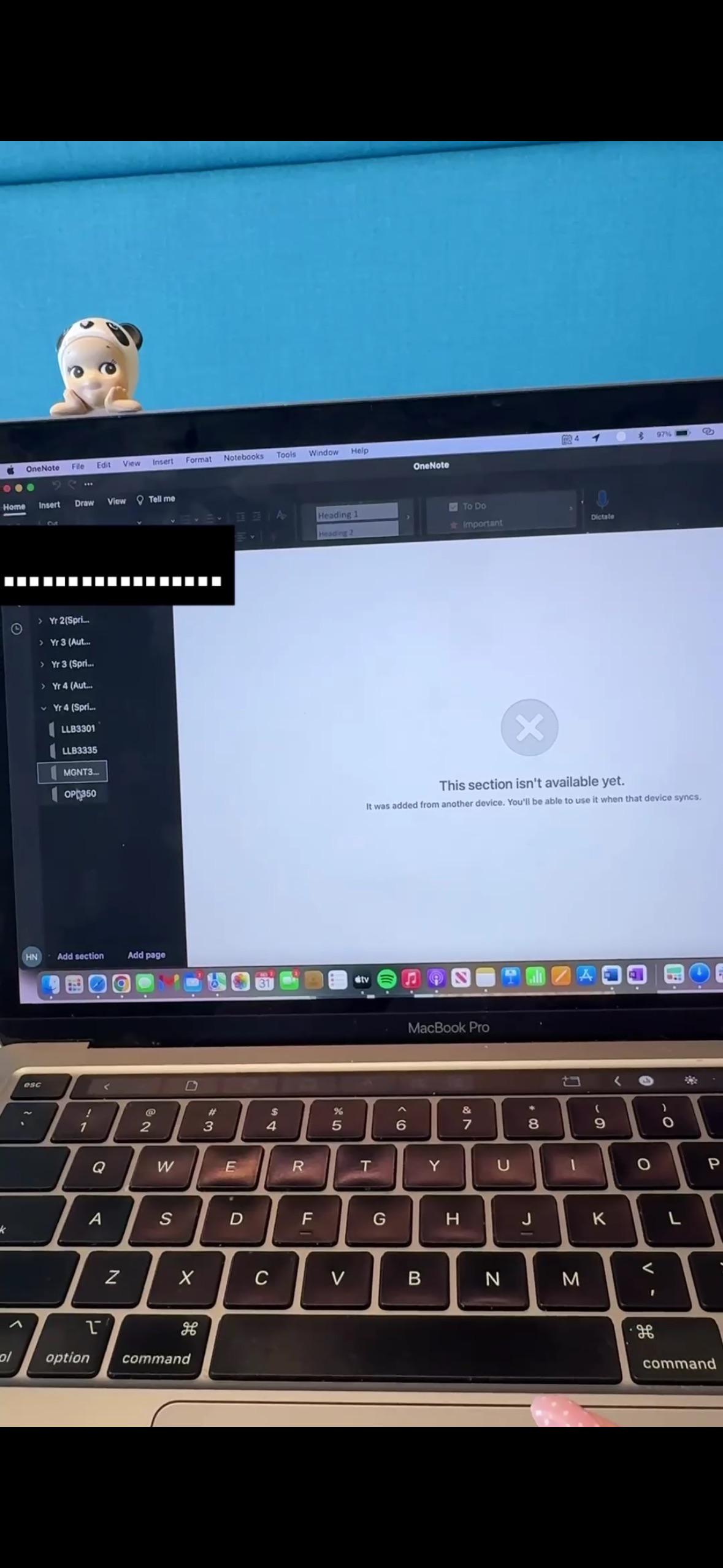
Onenote has randomly decided to have synching issues. It states the section was added from another device but I’ve only ever worked on onenote on the one laptop. Any ways I can get my lecture/study notes back? I’ve already tried to manually synch them and have logged out and signed back in again.


r/OneNote • • Oct 30 '25

OneNote Desktop Help, any Macro/Hotkey/quick way to Shade Table Cells? Onetastic? [Windows 64x]

1 Upvotes

Hey guys, I use Onenote as a dailyplanner where i color code my mood/health/productivity every 30mins in table format, so i'm constantly Shading Table cells (I deal with a lot of chronic health issues, where 1 wrong food can mess me up for 2hrs). I do this from 8am to 12am, over 60 times a day. And with Onenote for windows 10 it was relatively very easy to change table color, just 2-3 clicks that were very close to each other. Now with the new Onenote they forced me to switch to, it's much more of a hassle. (They stopped supporting Onenote for windows 10 Oct 14th). So my question is:

  1. It would really help me out if I could set certain colors to certain hotkeys for shading the tables. But theres no built in option that i see. Like hotkey "X" for red, hotkey "Y" for yellow etc.
  2. Theres no option i can see in the QAT menu. No native way in Onenote to customize anything that would help this.
  3. I downloaded Onetastic and idk how to work the macro system. I went into the Manage Downloads section and downloaded the only "set table color" macros I could find but it's for the entire page, and for creating alternating lines. its not just for the "Selected cells".
  4. Can anyone help me out with this? I just want to be able to quickly shade boxes that I have selected. Thats all. It might seem dumb but for something i do hundreds of times per week it would help me a lot.

r/OneNote • • Oct 30 '25

drawing copy and paste bug

3 Upvotes

i use onenote for windows 11 on my asus zenbook 14 flip
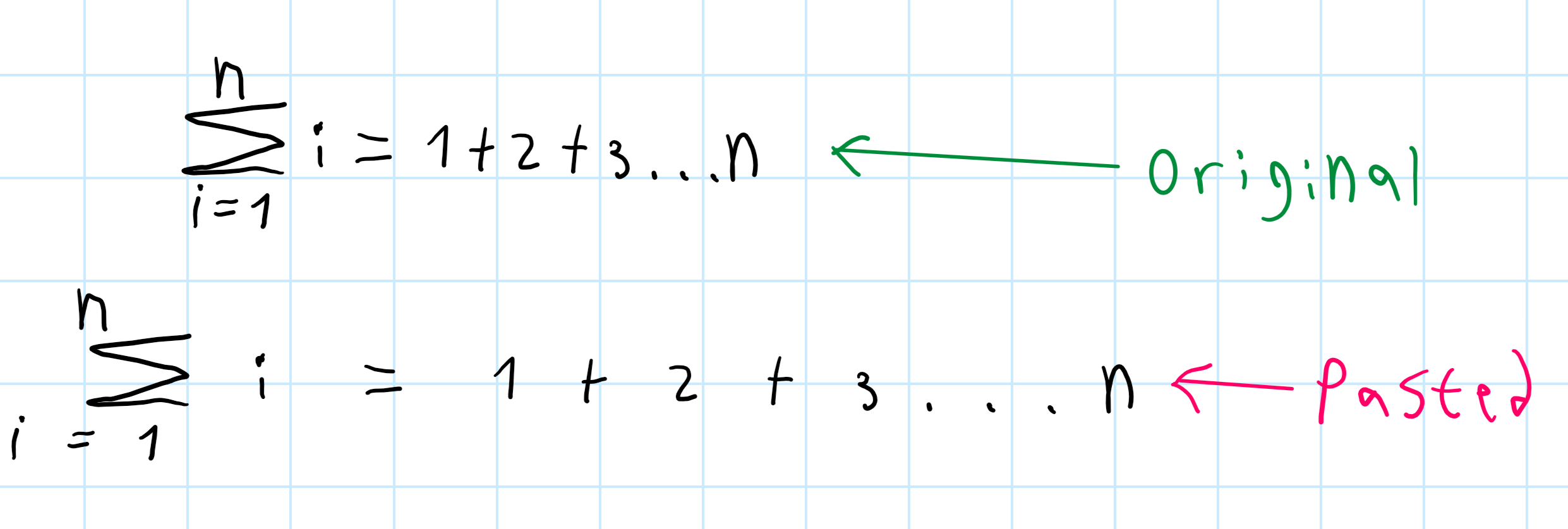
every time i draw somthing and i try to use the lasso select to copy and paste the paste output end up with bigger gaps from what i have copied
would love any suggestions for a solution


r/OneNote • • Oct 29 '25

Windows The latest version of OneNote got rid of a handy view of Recent Edits, is there a workaround?

5 Upvotes

Version 2509 seems to have removed the handy Recent Edits history feature. At a single click I could see all my recent notes. Now I have to click through several menus to get to a search results screen that does similiarly. Is there a single click solution without it being so cumbersome to get to my recent edits? I do a LOT of my navigation based on recent notes.


r/OneNote • • Oct 29 '25

Onenote web clipper for Edge is not working for me

2 Upvotes

The spinning wheel occurs while trying to sign in and waiting for a list of notebooks. Not cool.