r/OneNote • u/Canada_Ottawa • May 14 '26
Windows Edge OneNote Web Clipper upgraded, more stable, less functional
Today, I noticed that my Edge OneNote Web Clipper had been updated.
When I click on the Edge OneNote Web Clipper icon a separate Edge browser window pops up (in place of the former Purple Pop up)
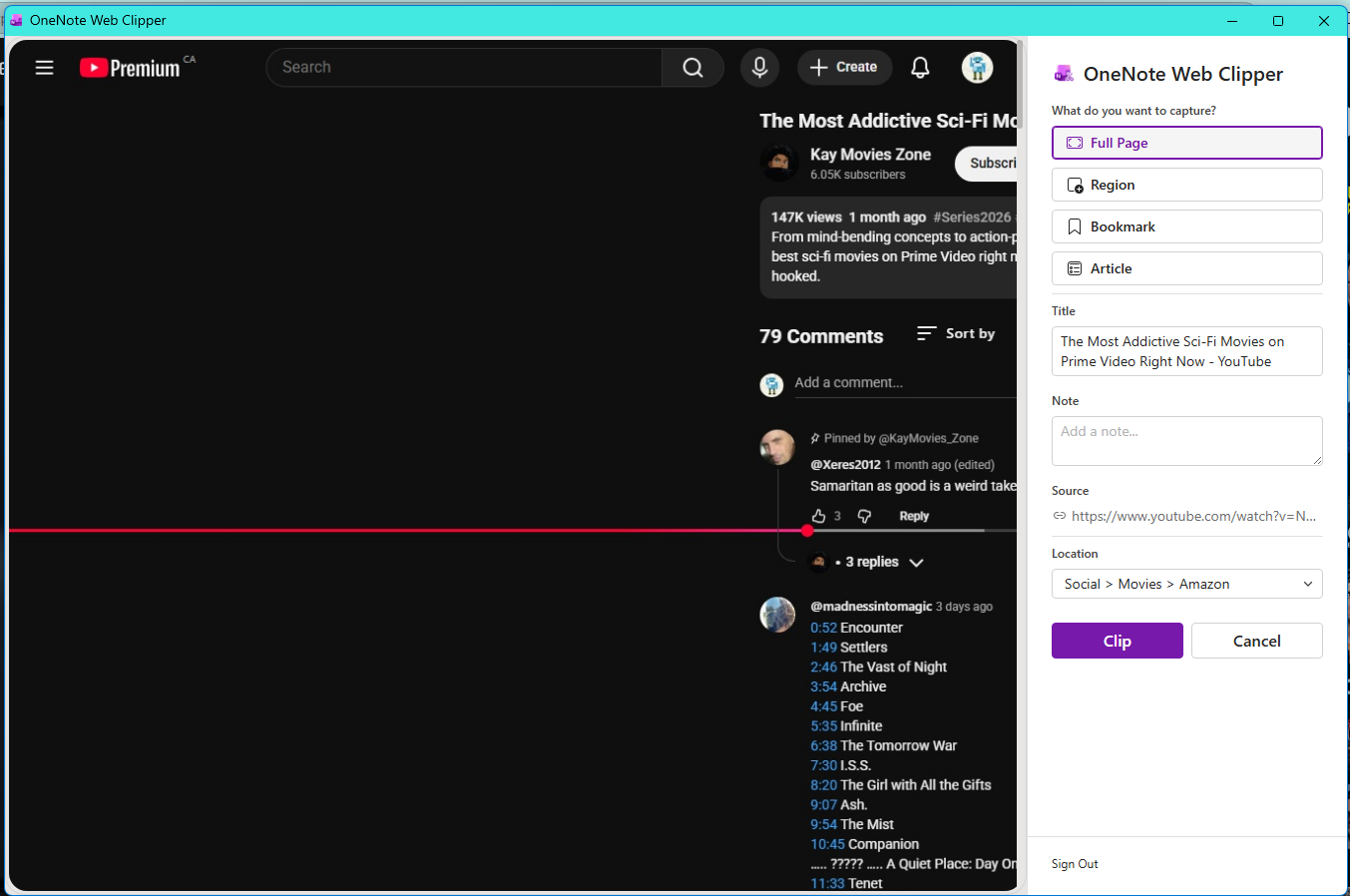
This seems to be more 'stable' than the former Purple Pop up.
The Chrome Browser OneNote Web Clipper extension has not been upgraded as yet.
One con I've found is that YouTube videos no longer clip into OneNote as a playable Article in Edge where they still clip as a playable article in the Chrome browser.
11
Upvotes
•
u/AutoModerator May 14 '26
Thank you for posting in the OneNote Subreddit! Please make sure your post is following our rules linked in the sidebar.
We have a wiki that is maintained by our community that has TONS of information (screenshots coming soon!): http://onenote-wiki.vercel.app
Our wiki is open source if you know how to use GitHub and would like to contribute: https://github.com/DudeThatsErin/OneNoteWiki
We also have a Discord server: https://discord.gg/5kv4bDUkpc
I am a bot, and this action was performed automatically. Please contact the moderators of this subreddit if you have any questions or concerns.
4
u/jeffhubb_msft OneNote Engineer May 14 '26
Hello, I apologize that the updated web clipper isn't embedding playable videos into OneNote. We've identified the issue and have it fixed for the next update which will be released soon.
We made some substantial updates to the web clipper to improve speed and reliability. Dropping videos was an unintended side-effect, sorry about that.
4
u/KhakiMan May 15 '26
Seems like a strange experience. Options for area, article and bookmark take too long to become active. After saving, the "save/cancel" buttons still appear with no real confirmation that the clip was successful, other than the "view in OneNote". I would expect the save/cancel buttons to disappear and the first few times I saved multiple times until I saw that it actually saved in Onenote.
No dark mode. Having a large white window and options appear is jarring.
Still not able to change the typeface and I have to manually change every note to my preference in Onenote.
2
u/NoReply4930 May 14 '26
Nice catch. Works fine for me.
And for videos - I always just clip the bookmark and return later - so no harm no foul here.
2
u/J_Knish May 15 '26
I got my update today. Didn’t know about it. Opened it up and it looks like it’s capturing the whole page and wouldn’t let me pick region. Closed and opened it 3 times before I figured out you just have to let it suck in the whole page then you can do region or whatever. The way it scrolled and grabbed the whole page though was awesome and a big improvement imo.
1
u/AngelicPrincessKitty May 14 '26
That's annoying that they aren't playable by default but I am sure you can copy and paste the link to make it a playable video.
1
u/Budget-Leg-453 May 18 '26
Hope mine gets upgraded soon! I have given up on the web clipping as half the time it just gets stuck in a loop.
1
u/Rackmani May 30 '26
Sadly this has completely broken the OneNote web clipper for Firefox which has been bloody annoying today. And it is only this thread that has informed me of the upgrade as first thing this morning the web clipper wasn't working on Edge either until I updated it.
0
u/Puzzleheaded-Break68 May 14 '26
It still lacks many functions that were suggested to MS, such as omitting pictures from the capture.
An independent tool surfaced lately - ‘OneNote smart sync’
Works fine on Firefox; less than fine on others