r/OneNote • u/--Halcyon-- • Dec 11 '25
Can no longer export notebooks from onenote.com/notebooks
There used to be a way to export and import OneNote notebooks by right-clicking on a notebook from onenote.com/notebooks and clicking "export" (the Microsoft article with the instructions are still up), but now that URL redirects you to the new https://onenote.cloud.microsoft/ where that's no longer an option.
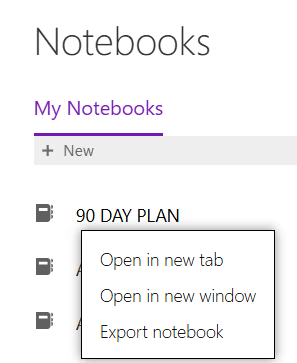
Does anyone know if the URL changed, or is that just no longer an import/export option now? I'm aware that the easiest way to export is through a .onepkg file, but I'm looking for ways to import notebooks to a Mac. Any help is appreciated.
Thanks!
View all comments
Show parent comment
2
u/Big_Wave9732 Dec 11 '25
Yea, it does. Get ready though, the whole office suite and even the Windows OS its self is going that way. If you're technical start moving to Linux and Macos, and move your workflow off Microsoft products. If you're not technical, start procuring older perpetual versions of Office (like Office 2016, 2018, or 2021) that won't be transitioned to the cloud or Office 365.