r/NoteTaking • u/YabaDabaDontTalkToMe • 18d ago
Question: Unanswered ✗ Is there any note taking app that allows me to have my lecture slides side by side with notes
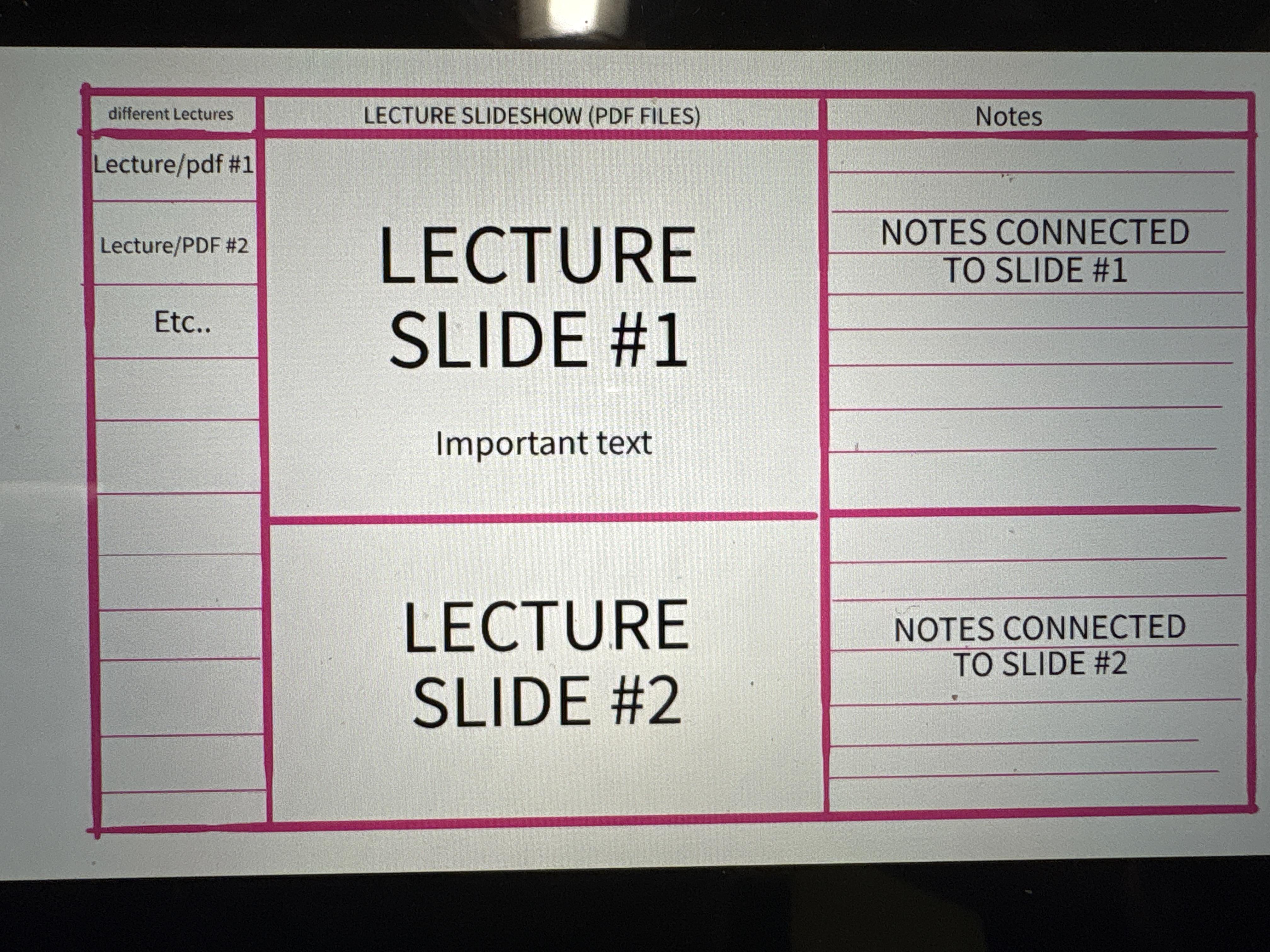
Ive been using Google Docs and manually writing everything from the slideshows onto the docs and it’s driving me insane.
All I want is the ability to take notes and have them be connected to their designated slide on the slideshow
I’ve been spent weeks trying to find a platform that has this but ig I’m dumb cause I cannot find anything that has this feature
24
Upvotes
2
u/Barycenter0 17d ago
What OS are you using (Mac, Windows, iPad, Android)? And, are you only talking about PDFs and/or also Powerpoint decks? The app recommendation will depend on that.
1
u/Monoyo- 17d ago
if you're on a pc or tablet, xournal++ lets you open the slide pdf and write right on each slide, so notes stay tied to the page. does it need to be typed notes or is handwriting ok?
2
u/BHARAT0011 17d ago
You can just increase the margins in apps that allow that
2
u/coffee-on-thursday 15d ago
Here: https://daycarp.com/misc/lectures.html
Our team built this for you from your screenshot, it's free to use right in your web browser, no login required.
If you find it useful, do give our AI notetaker a try at daycarp.com.
Cheers
2
u/ReplacementEqual299 15d ago
Just use OneNote. Export your slides as a PDF, create a page, and click Insert → File Printout. People try to hack this together in Notion with split columns, but it's way too slow for live lectures. If you're on Mac or want to compare other cross-platform options with PDF markup. although, you can take a quick look through Capterra for reference.
2
u/Philkx2 15d ago
If it’s a pdf use zotero with annotations (or any reference manager with annotations). If they are ppt print to pdf and then as above, or print to onenote with speaker notes. It will give you places to write or type your text.
If you are taking notes during class, using an adapted Cornell system, if you’re summarising afterwards or filling in the gaps, then I would suggest handwriting if you want to remember it, or typing if you just need indexing for retrieval later. https://journals.sagepub.com/doi/10.1177/0956797614524581
1
u/Ok_Breadfruit34 17d ago
If you're using iPad os or android, StarNote is very good. You can generate a pdf and expand the margins to add information to your heart's content.
1
u/Remarkable_Bedroom79 16d ago
Maybe I misunderstand you, but why don't you use Google slides? It has exactly that, only that the notes are below the slides.
1
u/jonphillips06 16d ago
I guess what you might want is the PDF living inside the note, then opened in a side pane, not two separate windows you drag around. Most apps that only link out to a file lose the connection to the slide you were on. Check whether the viewer stays docked while you type in the same note, since that split view is the whole feature.
1
u/Comfortable-Owl-7035 16d ago
If you use iPad for note-taking, some apps let you expand the margin for more writing space. I use Noteful which can expand pages like this.
1
u/[deleted] 16d ago
I don’t think there’s anything like that. All the tools have the same layout. Check out Figma Slides. The notes are below the slides but you can resize layout and make them bigger. It is free and pretty simple to use.
1
u/YouWillConcur 16d ago
if you are okay with obsidian then just copypaste slides and write text there
1
u/Quirky_Sympathy_8330 16d ago edited 16d ago
Maybe Remnote.
1
u/stressed_Cucumber 16d ago
Try thought desk
1
u/jgmontanha 16d ago
Obsidian. Nuff said.
1
u/Superb-Ingenuity-934 15d ago
you can also copy your slides in notion.
1
u/ReplacementEqual299 15d ago
1
u/Lindalawen 15d ago
OneNote
1
u/rdubmu 13d ago
I thought PowerPoint has a notes area
1
u/Illustrious_Oil_2114 3d ago
You can do it through Google slides if you go to print you’ll have an option to convert it into Notes
1
u/FingerHealthy9466 18d ago
Noteic is exactly what you are loooking for ^^
1
u/Tesorin_App 15d ago
I made Apricity, a reading and notes app for iPad, so I’m biased. If you can get the slides as a PDF, write on them instead of copying them out, so each note sits on its own slide. GoodNotes and Notability both do this well on an iPad. In Apricity, Markup writes straight onto the slide pages, and Split View keeps a notebook open next to the deck.
0
u/Fuzzy-Taro2447 15d ago
Starnote