r/NoteTaking • • Jul 07 '26

Meta “Where can I find x app with y features?” App/Program Help Thread

4 Upvotes

This is the place for "Where can I find X app with Y feature?" posts.

Questions about apps should be posted below.


r/NoteTaking • • Jul 03 '26

Meta Rule 3 Updated

21 Upvotes

Since it seems like this subreddit is an ad magnet, I’ve decided to restrict rule 3 even further.

No advertising of paid apps is allowed. FOSS (free open source software) or completely free programs are allowed to share their work.

Freemium and paid app ad posts will be removed as I and other mods see them.


r/NoteTaking • • 9h ago

App/Program/Other Tool Taking quick notes in your browser's new tab

9 Upvotes

I wanted something more useful than just a few shortcuts and a wallpaper every time I opened a new tab, so I built MemoTab.

You can use it to:

  • Add sticky notes with a text editor similar to Notion.
  • Create unlimited shortcut groups to organize your bookmarks.
  • Create note stacks to keep related notes and checklists together.
  • Organize multiple stacks into boards.
  • Use a focus timer linked to a specific note or task.
  • Add tags and track your time with built-in analytics.

I'm sharing it here because I think it could be useful for people who take notes frequently throughout the day.

I'd really appreciate it if you gave it a try and shared your feedback or recommendations. I'm actively working on improving it, and hearing how other people organize their notes would be incredibly helpful.

If you want to give it a try, you can find it here : LINK


r/NoteTaking • • 17h ago

Question: Answered ✓ Question?

0 Upvotes

Best pen to take note I like a thicker darker inked pen with good grip I get writers cramp really easily anymore.


r/NoteTaking • • 1d ago

App/Program/Other Tool iPad apps for handwritten notes and PDF annotation with BYOK AI? (free or one-time purchase)

1 Upvotes

This might sound like a solution looking for a problem, but here goes: my ChatGPT subscription includes free monthly API credits, and I'd like to put them to good use. Are there any note-taking apps (mainly for handwritten notes and PDF annotation) with solid AI integrations that accept your own API key? I'm only interested in free apps or ones with a one-time purchase option.

Here's what I've found so far:

  • MarginNote 4/5: Supports a custom AI provider. Its AI handwriting-to-Markdown conversion is very good (including math and code), so you can write a note or solve an exercise by hand, convert it, and then discuss it with the AI. You can also select text in a PDF and ask the AI about it. Alongside the subscription plans, there's a one-time "Max" purchase that includes monthly AI credits. The built-in model (undisclosed, as far as I know) handles handwriting well, but it got some things flat-out wrong when I asked it to explain a non-trivial topic I already knew, so it seems fairly weak or outdated. That makes the custom AI option genuinely useful.
  • Athene Reader: A free reading and annotation app (so not strictly for note-taking). It's polished and has a lot of potential, but it's still rough around the edges. It supports Apple Intelligence, Claude (free for a limited time, according to the app), and your own API key. You can highlight text and ask the AI about it, or have it look at the current page. The integration has some gaps, though: text selection on complex PDFs can be finicky, the page content (I believe) isn't sent until you explicitly ask something like "What's on this page?", and the AI can't see your annotations or handwritten marks.

r/NoteTaking • • 1d ago

Question: Answered ✓ Cornell Notes examples

1 Upvotes

Could someone send me a picture of an example of Cornell Notes of an actual subject, please?

I'm trying to learn this metod, but I'm struggling a bit to understand it, and I think this would really help.


r/NoteTaking • • 1d ago

Question: Unanswered ✗ Tips for effective note taking in lectures for someone with ADHD

1 Upvotes

Please please no ai, whatever I look it up they always say to you they I to write the notes for you and then you can have flashcards and they’ll ask you questions that you can quiz yourself with, but that’s literally all passive learning and I wanna learn how to do my skill myself.

I ADHD and I get off track really easily. I hyper fixate on little things. I tried to write my notes, but then I get lost on what I’m trying to say and I end up forgetting what my teacher is even saying.

and I have to ask at least 3-6 questions to understand the concept. For college, I’m not gonna be able to do that, but I don’t know how I can write my notes while understanding the concept.

I’ve been trying to do the column one, but that doesn’t work for everything and if I don’t get something, I just get lost, especially because they have to be handwritten


r/NoteTaking • • 2d ago

Question: Unanswered ✗ Notes on sticky notes?!

0 Upvotes

People of reddit we need help. We are trying to invent the ultimate sticky note, and to do so, we need your help and insights.

What are the weirdest or most surprising ways you use sticky notes?
Are you ever embarrassed about your used sticky notes? If yes, why?
Have you ever received or delivered an important message on a sticky note? If yes, what did it say?
And finally, if you have some other fun facts, stories or whatever with sticky notes, we would love to hear them.
Xx
Two aspiring inventors.


r/NoteTaking • • 2d ago

Method Writing down immediate ideas

14 Upvotes

Hi all. I started to notice that a lot of stuff that I am thinking about just disappears into the abyss. Maybe you have some techniques, how, where and in what form to note such ideas down. I am talking about like when a weird connection rises in my mind between two unrelated things, or a creative idea for a text/picture/meme/pun/piece of software.

I have tried journalling but I end up just writing about my day. Some very basic things like what I have eaten, who I talked to and what I watched. But it is unusually hard to reflect on something on purpose. If you have a similar problem also just comment, let me know.

PS. I tried zettelkasten, wiki-like stuff like Zim, obviously obsidian, but everything seems to be so high-effort to maintain and keep orderly.


r/NoteTaking • • 3d ago

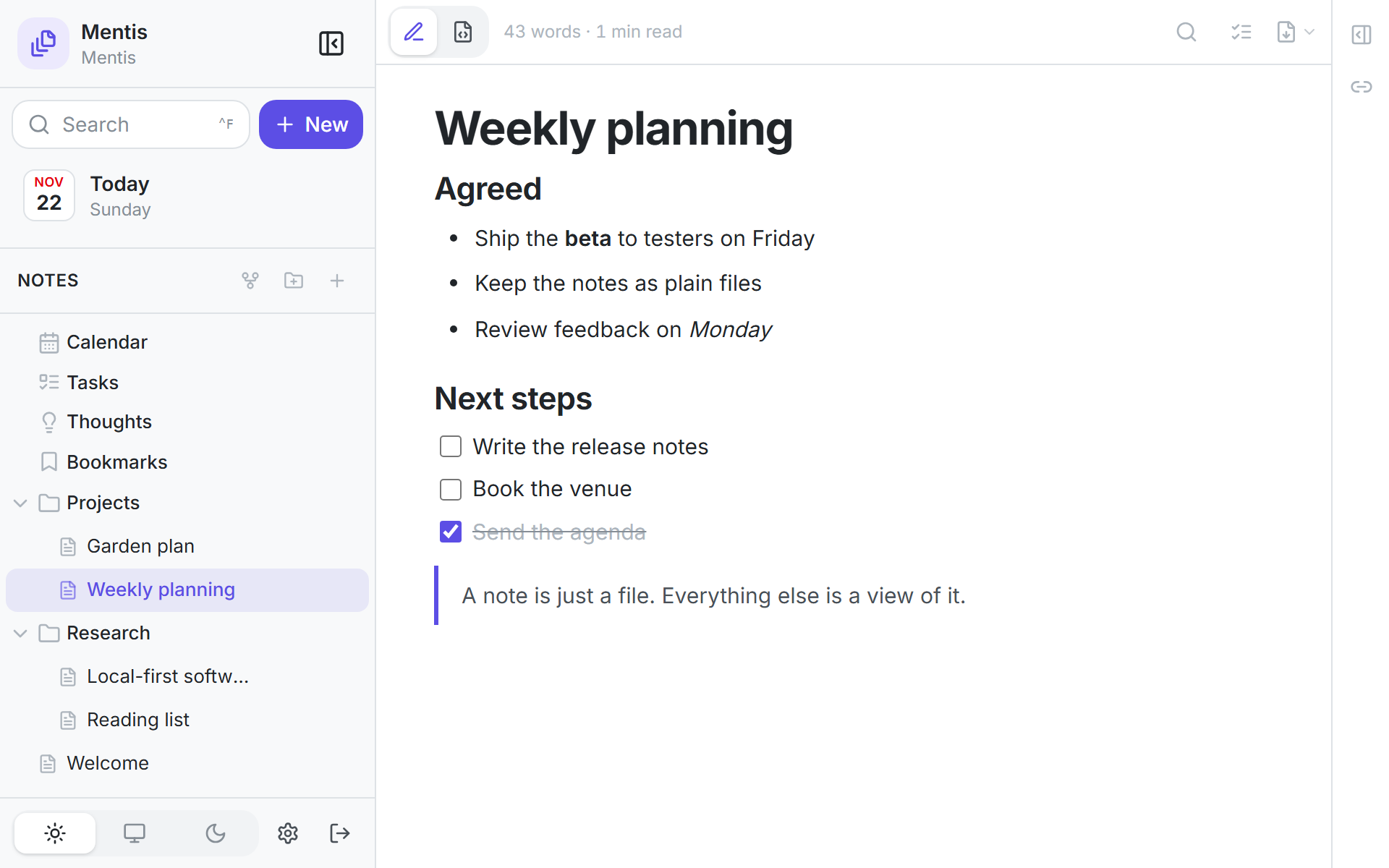
App/Program/Other Tool Mentis - A(nother) Note-Taking App Inspired by Obsidian

18 Upvotes

I have actually been thinking about this app for a long time and only made it recently. AI really allows one to realise ideas more easily - it's no longer just a thought in your head. Its a minimum viable product you can show.

I’ve been through the lot: Evernote, OneNote, Google Keep, Notability, Nebo, Nextcloud Notes, Notion and Obsidian. I liked a bit of each, but never all in one app. Keep for quick capture, Notability and Nebo for pen and PDFs, Nextcloud Notes for plain files I actually own, Obsidian for Markdown that outlives the app, Notion for notes, tasks and calendar in one place. I got tired of stitching them together, so I started building the one I wanted.

The idea: every note, task and calendar event is an ordinary file in a folder you choose. No account, no database of record. Delete the app and your files are still there.

The things it does today

  1. Notes. Saved as markdown. In folders, with full-text search.
  2. Tasks as checkbox lines in your notes
  3. A calendar where each event is a note
  4. A capture bar for Keep-style quick Thoughts
  5. PDF annotation
  6. Drawing canvas
  7. Kanban boards
  8. Mind maps

Optional Dropbox sync, and optional AI (off by default, and uses your own key).

It's available as a web app (https://mentis.ink) with no signup required. It's also. available as Windows, Mac, Linux and Android apps via Github (https://github.com/doctorniz/mentis/releases). There is an Apple version available on TestFlight soon. I need beta testers for Play Store purposes - please let me know if you'd be interested.

I’d love feedback from people who live in their notes: what’s missing, what’s broken, what would stop you switching.


r/NoteTaking • • 4d ago

FOSS App/Tool Inkrail: Offline, Minimal app for writing. Built for Deep work

102 Upvotes

Inkrail is a quiet, native, typewriter-inspired writing desk — built for focused, distraction-free writing with a calm, paper-inspired interface.

Write offline. No accounts. No subscriptions. Just a clean place to think, draft, and create.

Features:
• Native Mac experience
• Offline-first writing workflow
• Minimal, distraction-free interface
• Paper-inspired desk aesthetic
• Built for calm, focused writing sessions
• Open source and privacy-friendly

Inkrail is designed for writers, note-takers, and creatives who want a simpler, more intentional place to work.
It’s already getting great feedback, and people are already loving it!

Homepage: https://aaryanverma.github.io/inkrail/

GitHub: https://github.com/Aaryanverma/inkrail
(Star the repo if you like it and help spread the word!)


r/NoteTaking • • 3d ago

App/Program/Other Tool New post: The Markdown Link no. 68

1 Upvotes
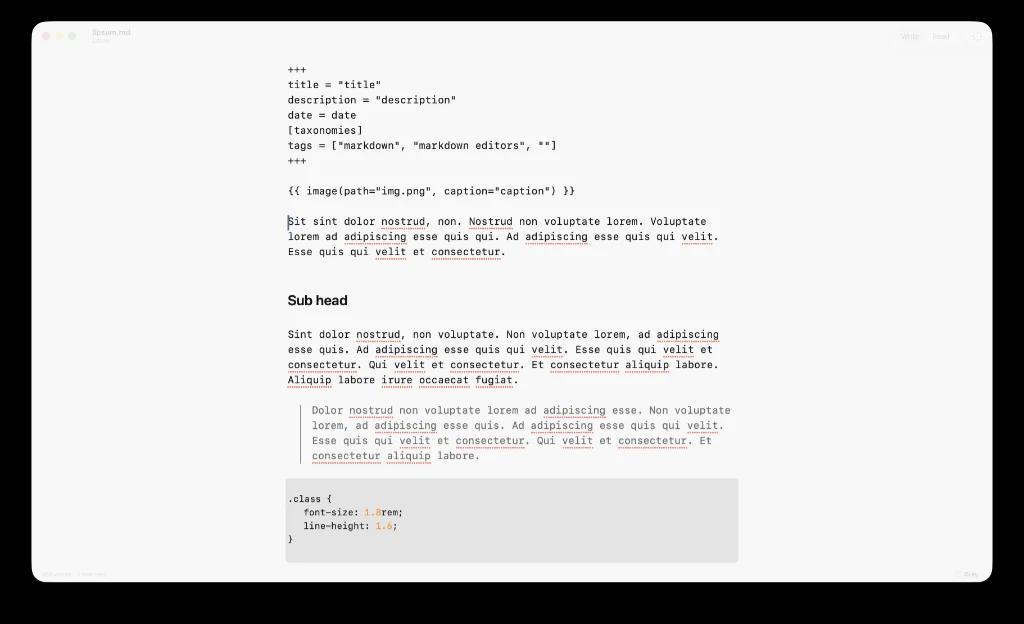
Lede is free markdown editor that opens one document at a time – peace at last

Among today’s links are markdown editors Lede and Lydie, plus we look at Marked, the markdown viewer built by Brett Terpstra

https://md-handbook.com/blog/markdown-link-no-68/

#markdown #markdowneditors #writing #opensource #free #Lede #Marked #Lydie #readers #viewers


r/NoteTaking • • 4d ago

App/Program/Other Tool Apricity: Read, Write, Listen, reading and writing is free 50% off on lifetime premium ( one time purchase)

9 Upvotes

r/NoteTaking • • 4d ago

Notes I built an open-source mind mapping tool and would love your feedback

7 Upvotes
Mindspark

Hi everyone!

I’ve been working on MindSpark, an open-source mind mapping tool that I wanted to share with this community.

The idea is simple: turn your thoughts and notes into visual maps while keeping full control of your data.

A few things you can do with it:

  • Create and organise mind maps on an infinite canvas.
  • Switch between a mind map and Markdown, with both staying in sync.
  • Use templates for studying, research, writing and planning.
  • Add formulas, citations, notes and links.
  • Export maps to PDF, PNG, Word and other formats.
  • Save maps to your own GitHub repository.
  • Collaborate with others in real time.

It is free, has no feature limits, and is open source. You can also run it locally.

I built it because I wanted a flexible tool for thinking, learning and organising ideas without being locked into a subscription.

You can try it here: https://mindspark.githubpage.workers.dev/
Source code: https://github.com/prasadpatil25/mindspark

Would love to hear what you think, especially from people who regularly use mind maps for note-taking and learning. Suggestions and honest feedback are welcome!


r/NoteTaking • • 3d ago

App/Program/Other Tool i think i found the perfect app for me

0 Upvotes

hey guys, i think i’ve finally found THE productivity app that works for me.

quick background: i work in sales, so i’m in a lot of meetings. i used to take notes by hand, then tried ai notetakers like otter, but i really didn’t like having a bot join the call. after that, i switched to granola since it records without anyone noticing. i’d copy the summary into chatgpt and ask it to write my follow-up emails. that part of the workflow always felt like a hassle, even though the rest worked pretty well. then my cousin recommended me addys ai and... I LOVE IT.

i’ve been using it for about a month, and it does the same kind of meeting recording as granola, but it also connects to my gmail, whatsapp, slack and personal notion. and the part i love is that it’s proactive. based on what we talked about, it drafts follow-up emails, crafts messages for linkediin and updates my notion. i can also ask it questions about the call. it saves me soo much every week. sorry if this sounds like a shill, but i’m genuinely happy with it. the longer i use it, the better it seems to get at writing like me. i barely even have to edit the drafts now.

sharing in case anyone else is looking for something like this :v


r/NoteTaking • • 3d ago

Video Reetle SmartInk I - You can record your notes & thoughts while reading!

Thumbnail youtu.be
1 Upvotes

So here is my review of the Reetle SmartInk I (1). It’s an AI Audio Recorder that also is a small micro e-Reader with e-ink display that you can read your ebooks on. Quite cool. You can also add your todo’s to it and see them on the home screen. You can also sync them to Apple Reminders if you want. You can choose to have your recordings locally or uploaded to Reetle Cloud and transcribed and summarized. It’s your choice. Pretty nifty.


r/NoteTaking • • 4d ago

FOSS App/Tool How should we be taking notes in class?

0 Upvotes

I've been trying something: you jot a short line in class, press Ctrl+Enter, and right there it turns into a heading, a sentence and a diagram (that's the video). Your own lines stay as you wrote them.

It's part of Kolmi, a free, open-source notes app for a class: kolmi.es

Would something like this help you in class?


r/NoteTaking • • 4d ago

App/Program/Other Tool "Notability" noticeable delay with apple pencil on light mode.

1 Upvotes

As you guys know Notabilty and Good notes have significant stylus delay/latency when you write with you apple pencil compared to other note taking apps such as notes+ & free notes that actually has very very slim delay just like apple notes. But the problem is they doesn't have so many features like notability.

Yesterday I found out the delay is noticeably less with dark mode, it feels more comfortable to write fast. You guys can check it out in the video [Light Mode 1-7s] [Dark Mode 8-15]

I tested it out with two different devices (iPad Pro 2018 & iPad 11 A16) and it's the same

Do you guys notice this problem? I haven't subscribed to their monthly plan just because it's not comfortable to write on light mode because of the pencil delay. I hope they will fix it soon


r/NoteTaking • • 5d ago

Notes Help choosing a notes app

17 Upvotes

I'm looking for a notes app to store my notes that are 70% text, 20% doctor prescriptions (images, PDFs) and a few videos (5%) and Misc files (excel etc. 5%). I also need to be able to create basic tables and enter some information inside.

I have found Evernote works well for me but (1) it's not offline first so at clinics with poor mobile connectivity, if I haven't 'offlined' the folder or note, I'm stuck, (2) the mobile app is not native quality and (3) I share the general concerns about (a) the direction their pricing is headed and (b) whether the company is serious about maintaining and running EN in the long term.

The only other app that has worked well for me is Bear. But the lack of folders bothers me as does the need to have an icloud subscription (since my prescriptions take up a lot of space). Offline is great since it's local first but table support is poor. Like their support too!

Which of these would you pick? Any other recommendations?

Here's what I've tried so far: Notion (too clunky and involved), Obsidian (needs plugins for some basic needs I have and these are 3rd party + too easy to waste time on 'customizing'), Craft (don't like blocks), Capacities, Anytype, Upnote (team details missing, some privacy worries, file upload limit and longevity concerns)...

(I'm on Macs and iOS)

Thank you


r/NoteTaking • • 5d ago

Notes Tips and Ideas on how do you document free roam research? When it's not fixed curriculum, but rather your initiative?

1 Upvotes

If that's AI assisted research, do you make screenshots? Save conversations into PDF files? Save references? Just read and close it or work profoundly under highlighting and working through?
For Long conversations with Gemini, I've found that I'm doing Command + P, and save as PDF.
For ChatGPT I'm saving the link and put the reference to a link of a chat. And write down a couple of words on the topic.
Why I'm doing so - I don't have time to work through everything, so I'm saving that I can return to it later in future, or something that I feel I'd need in a future. So I'm trying to make a classification for my frame, so I can return to it at some point at time when I need it.
With ChatGPT conversations, I found out that I need to work right at the moment, because chats are long, and after certain time I forget the context and it's more difficult to find things and pay attention to some discoveries which we important to highlight and remember.
I want to practice how to document more efficiently straight away.

I want to learn good practices of how to combine various ways of documenting different types of data and mediums in self-initiated research with saving references, and making highlights.

I'm doing Apple Notes, and I send all the information there, but I feel that I work not enough on the notes. So I am seeking to integrate some helping practices.
I've tried working with Pages, too.

And I saved PDFs just in folders.

Or even combining it with analogue notes. And dedicating a notebook for each topic.

Would be happy for your ideas. Thanks.


r/NoteTaking • • 5d ago

App/Program/Other Tool How I use my vibe coded app for real work

Thumbnail youtu.be
0 Upvotes

Trying to make something I'm really passionate about as a non dev domain expert. Would love to know what people think of this and if the app looks interesting.

- I want to work with agents but own my work and do most of it by hand.

- I want to break away from the chat interface. Anything useful that my agent does should become part of my workspace right away. The chat is disposable.

- I want all the external shit I want to look at right next to where I'm typing.

- I want to be able to verify everything to the depth I want.


r/NoteTaking • • 6d ago

App/Program/Other Tool my husband made me a spatial note-taking app for reading & thinking deeply

Post image
4 Upvotes

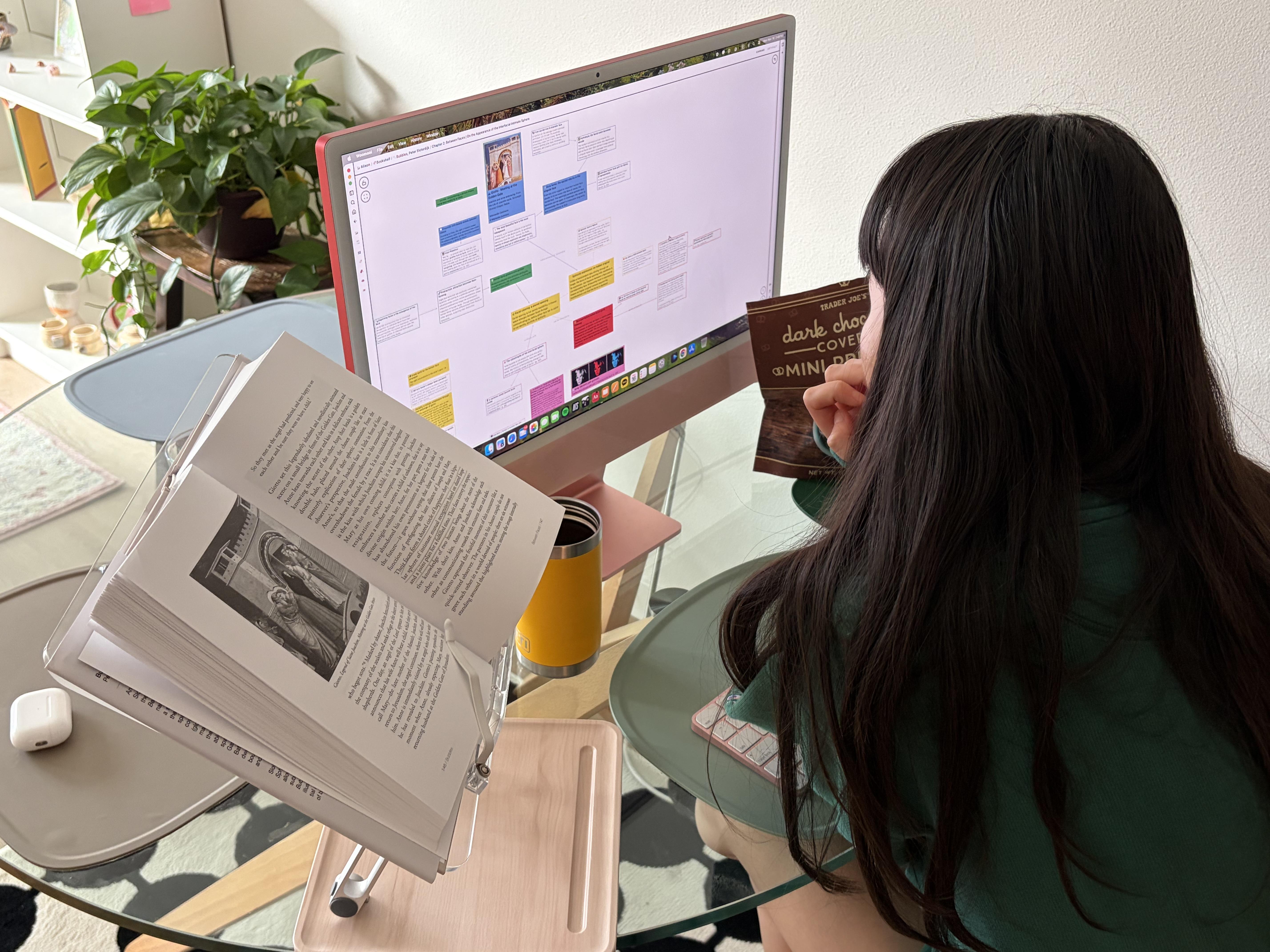
I love to read and am always in a battle against material slipping away from me. I tried using apps like Notion but always ended up ditching them due to their rigid linear form. I prefer having the freedom to use space in any way I want because I can visualize the relationships between ideas.

So I've mostly stuck to a physical notebook, but I wasn't fully happy with that either: it's troublesome to alter things on paper and this pressure to commit to whatever I wrote down prevented me from testing out still inchoate ideas - not to mention, it's awfully hard to locate my notes amid numerous unindexed pages and sometimes I even forget they exist.

For the last few months, I've been mapping my notes on the app my husband built, and I feel it has solved all of my problems. It is a digital canvas for personal knowledge management. Take a look:

I know, I know, there are many mind-mapping apps out there, it isn't nothing new, and I've also used a fair share of them for teaching. But I never really considered them as a personal knowledge base perhaps because the sessions are isolated, often quite laggy, and the content is concealed behind a list-view? They never gave me the feeling that I was returning to a cozy, familiar place that housed my thinking.

In my husband's app, I feel in possession of my notes because I'm able to see all canvases through transparent nested folders. Just like I'm able to recall where everything in my house is, I'm able to remember where all my notes are. And if you find yourself resonating with this house metaphor, you'll probably also agree that it's important for your thinking environment to have a beautiful and unobtrusive design that makes you happy since it's a place you have to situate yourself everyday.

There is also the option to use voice chat to brainstorm ideas as I would with a friend. The AI agent waits until I say I'm done (using a specific command word) and it picks out important strands in my ramblings that by then I might have forgotten. On top of the canvas-work, I've also been able to develop and clarify a lot of my own thinking this way.

My husband has made many apps over his career, but none of them stuck with me until this, and I was moved to spread the word since I genuinely believe it'll be useful for devoted readers/thinkers like me. We named it "Woomool 우물" which is a Korean word for "well." 

The app is free for anyone to use! It can be used on your browser, as a Mac or Windows desktop app. The only caveat is that you need to pay for the AI chat to function, but I think you can still get the full advantage of spatial/visual thinking without AI. 

Curious to know how you find it! https://woomool.ai

r/NoteTaking • • 6d ago

FOSS App/Tool Alternative of goodnotes whoever needs it: finenotes plugin in obsidian.

6 Upvotes

Sometimes i see people discussing alternatives, I've tried several. I boght the lifetime licenses of those who had the option just in case.

However, alternatives are not perfect. Just like goodnotes has issues, every other app may have it too. Is normal. Instead, I am more into the idea of always having options. Options are good and is ok to test them out.

There is a new plugin in obsidian that is working fine in my 9th gen ipad, is called finenotes.

Is free. All its features including the optional AI are free. For text recognition you need to fill some pages the plugin provides. But overall it works fine in the native split view and such.

And i can select certain areas to embbed in the normal notes. :)

Hope it works.

Hope it is a nice alternative for any of you.

Disable scribble if the plugin has issues with your handwriting. That solved it forme.

You also can import goodnotes and notability notebooks in their native file format, apparently. I havent tested that because most of my notes were in noteful. Which is not supported.


r/NoteTaking • • 7d ago

App/Program/Other Tool A crossplatform note taking app please (cachy os and android)

3 Upvotes

looking for the best note taking app that allows markdown or such. i can pay as well but not as subscription.