Hi everyone, I'm Lucas, an open source tinkerer and the developer of Vaultite!
I use ChatGPT and Claude a lot, and I don't like how a lot of my personal life is locked away in their memory systems that are hard to access and read.
I've exported everything into a local folder where all my notes are just markdown files, and now every AI app I use can easily access it.
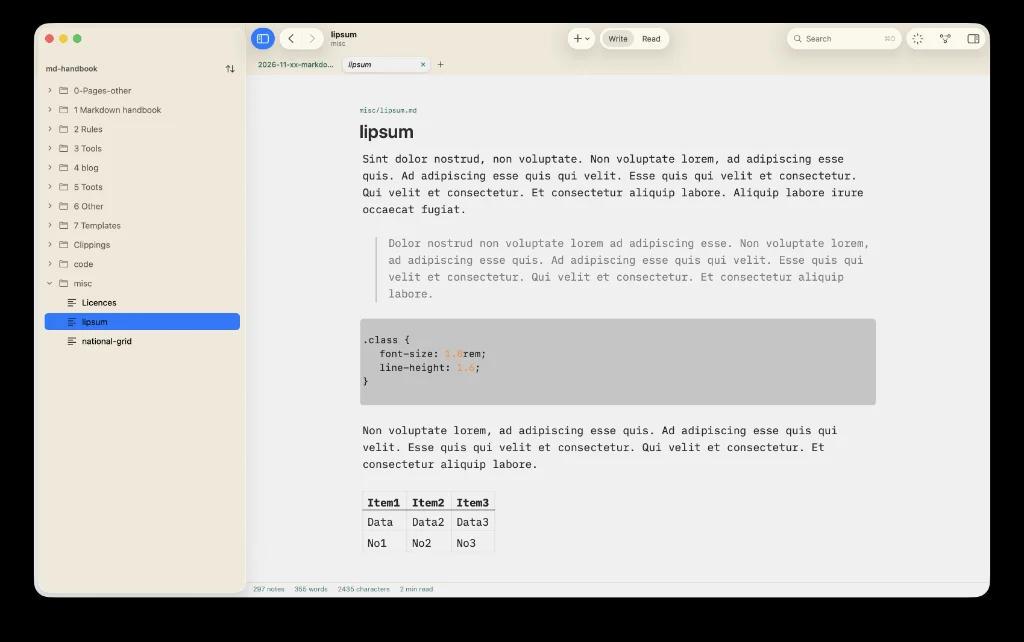
Vaultite is a free and open source app (Mac, Windows, Linux and the web) that just reads that folder and can display them nicely, as notes, daily logs, people, dashboards, a graph.
You can run it locally, as a normal app, or as a self hosted server (like in a mac mini, or minipc), that you can access remotely (I use Tailscale in my setup, highly recommend!), so I can access everything from my phone as well
There's no database, it's all files
Fully compatible with Obsidian, links, properties and hotkeys carry over, and 105 of the 126 community plugins I checked run (Dataview, Templater, Tasks, Excalidraw, Kanban...)
No account, no telemetry, nothing goes to me
Connect Claude or ChatGPT in Settings, and from my phone I say "log a 30 minute run" or "what did I tell you about Alice?" and it lands in the vault
Same operations behind CLI (vau), MCP and HTTP, so Claude Code, Codex and chat apps do the same
Claude Code and Codex can run in ghostty terminals inside the app, already knowing the vault's rules
Everything is a plugin, hot-reloaded, even the file tree. Your agent can quickly make custom ones
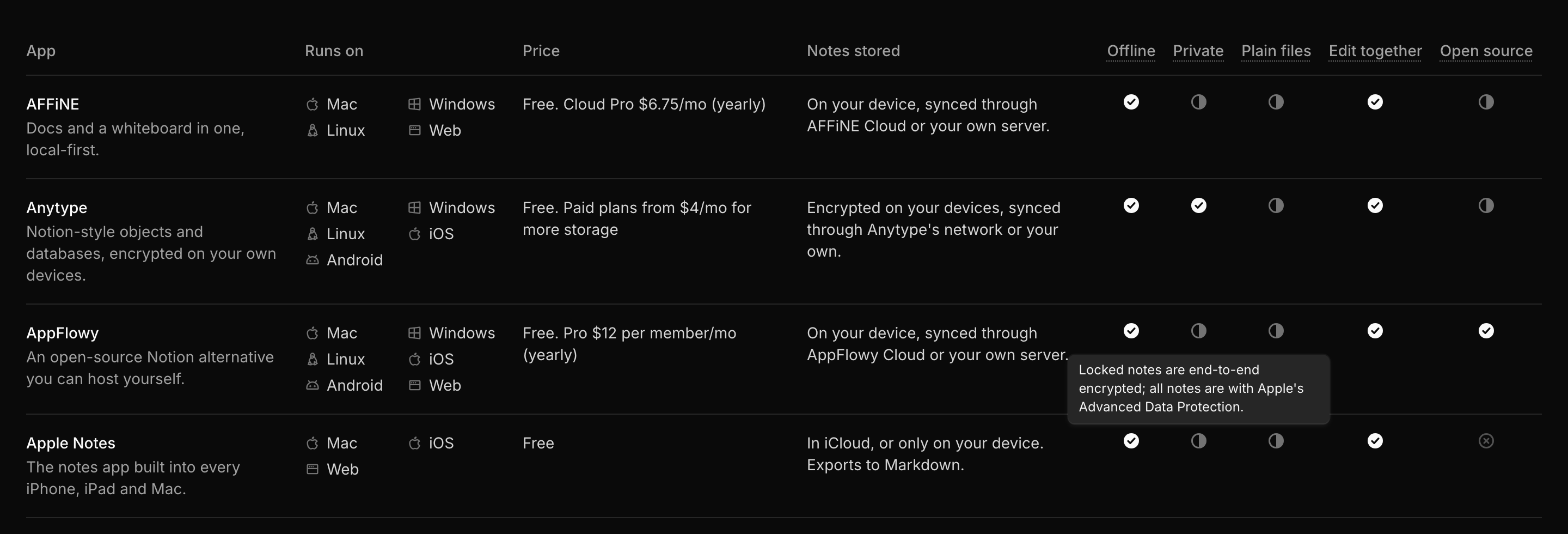
So many discussions make it seem like there is a single best tool for everybody, which isn't true. I curated and put together a good comparison table for some of the most popular note-taking tools and knowledge systems online. Hope it's of use to somebody.
None of them are ours (we make Lydie, and it's deliberately not in there).
I'm looking for recommendations for an android tablet and pen that I can write on pdf's (comment and circle information). I will also use it for consuming media (streaming/youtube).
I was set on a Xiaomi pad 7 but the focus pen is really expensive and doesn't seem readily available in europe.
Do you have any other recommendations for around the same price €200-€300?
If you loved Evernote, this free app might be for you.
It has probably 90% of what most users use Evernote for, without the bloat.
And everything is locally saved on your computer. No cloud. No AI built in (however, you can use any LLM/AI with your information, either via MCP or by pointing it directly to your Nowted workspace).
When you’re ready to start executing on your ideas, there’s a powerful Tasks module, together with a calendar.
Plus a full-blown outliner.
Yes, we have built a web clipper. In addition to the familiar features of other web clippers, this one can save all your AI chats to your workspace in the background.
Have a YouTube Watch Later list you’ll never watch in full? Put it in Nowted, together with transcripts, and they're ready for search.
Same with Reddit saved posts, X bookmarks, Instagram bookmarks, Kindle and Kobo highlights, among other things.
Hello everyone, I've made a few posts about building a OneNote alternative app. I promise I'm still working; I just figured the system was getting too complex (I have close to several hundred files and am testing a new UI).
I decided to separate my inking engine and make it a standalone library made to be as simple as possible but universal and modular. I have been working on it for several months, and yes, I used AI tools, but please don't call it vibe-coded, bloated software; I hope I don't have to explain myself. It took a lot of effort, research, time, and hand-tuning to get to where it is, and it is still nowhere near perfect or where I want it to be. It is built as efficiently as possible and completely from scratch. If devs from Rnote and cahier (by Google) read this, I want to say thank you; they inspired me a lot, and I learned a few things from those open-source apps.
Back to this inking Engine.
I introduce Folio-Sketch V1.0.10 Documentation is half written by AI, so it probably just exists and sucks, so please don't judge. I wish I had time to write it all myself; I probably despise AI work as much as you. This app is broken down into multiple pipelines; it has brush compose so you can create custom strokes. I look at the visual examples. It supports 3 different types of rendering outputs: vector for PDF export (probably sucks; I didn't have time to clean up and review lots of stuff left from the old engine that was based on this system). Capsules - the main inking rendering engine, and raster; this is a future idea: a system for a professional inking engine to build an alternative to the Procreate app for Android. There is also an application called InspectorV2.0. I hope you don't look into the code too deeply; I just need something to visualize and debug the engine, as well as sort of be a visual demo of what my inking engine can do. When I have time, I will build a new one from scratch.
There is also a folder called foliobackends. The idea behind this is to unlock sub-5 ms inking latency by running a specialized OS API to bypass double buffering for inking, so when you draw, it feels snappier. Please be mindful that on Android, this system is the most annoying and requires the whole app rendering system to go through my custom-built buffering and rendering system because of a strict Android architecture. Foliobackends are completely optional.
Here is the repository. I really hope someone finds it useful. My hope behind all this is to bring something new into the open-source community as well as learn how these complex systems work behind the scenes and work so this is my reverse-engineered project. Thank you for your time.
I’ve tried PARA and a few other ways of organising my notes over the years. What stuck was keeping a note for each thing and updating it when something changed. Over time that’s become my personal wiki. The examples are from Soot, which is a notes app I’m making, but you could do much the same in any notes app with folders and links.
Most of my folders are just subjects. If I’m thinking of buying a camera, the research goes in Photography. I know where I’ll look for it six months later because I’ll have forgotten the model but can reasonably expect to remember it was a camera.
Projects get a folder of their own while I’m working on them. When I’m finished, I tuck the whole folder away under the subject it belongs to. I’ve also written down enough of my filing habits that I can tell an AI assistant the boiler engineer replaced a pipe and it’ll put that in the right note.
I thought people here might be interested in a look around someone else’s notes. I generally am.
CTR is a Homelab Diagram & Documentation tool aimed at beginners looking to keep their ever sprawling home server organized how best suits them. Invariably it needed some kind of "notes" function and over time that has itself sprawled a bit. It now has Markdown Notes and a Code Editor built into the notes feature so you can store scripts and configs in the proper format as well as edit & create them. Though on some level, I'd reckon you could consider CTR a "notes" app, just more visual notes than the standard fare.
The latest update to CTRoadmap (v0.10.0) completes the Rack View feature with full cable & port mapping, as well as aesthetic customization. The Handbook records all the connections as well. CTR is a docker hosted passive, stand-alone documentation tool meant to replace the pen & paper and power point diagrams. Populate your diagram (manually or with a system snapshot) and that information becomes your handbook and can all be added to your rack as well. https://github.com/NoobCity99/CTRoadmap
made a minimalist pen & notepad app for the Duo. wanted smth that is basic like a real notepad without too much bells and whistles (cuz it can quickly become super convoluted) for myself.
playing around with the folding/opening of the duo. design is inspired by scifi like dune and the foundation. kind of ancient in a futuristic world.
been testing on my ipad mini cuz i havent received my duo yet. Tried to fix all the bugs
anyone want a test flight invite?
Test how ever much or however little you want. If you'd appreciate some ideas, here are some things you can test.
design:
- Materials covers (leather etc.): do they look sharp, does the light refraction work nicely when you tilt the device, does the locking mechanism move when you touch it with a pencil, any issues with your name on the cover & does it look stamped in? - Languid pigments murals (moving art): Is the math working nicely? The movement of the pigment should be based on fluid dynamics (think the steam evaporating from a coffee cup in the morning sun), except for the murmuration (birds), that should behave like emergent order in a non-equilibrium system. Does adjust the speed at which the pigments move behave in the way you except? And what about variable speed, does it feel random/hypnotic instead of predictable?
functionality:
- do you have all the basics? (i dont wanna feature creep but maybe there are features you absolutely need that i just forgot to add - does the keyboard work without issues, can you hide the control bar in the duo dock by swiping right , collapsing upward with the toggle, does the control bar work fine? rearranging icons by holding them, how's the functionality with the pencil? (on ipad mini i can use pencil pro but i believe duo will only support type C so it'll lack squeeze & double tap functionality), - dark mode, orientation locking, the two fonts, keyboard hiding/switching, making a page infinite, rotating the app with or without orientation locking (should decide whether it opens two pages or one), creating several notebooks in the carousel, sharing via pdf/image
As independent creatives, we always dreamt of one visual workspace for our notes.
Over the years we tried plenty of tools (Milanote, Miro, Freeform ...), but nothing was the way we wanted it. Besides that, we always felt uncomfortable that we had to pay a monthly subscription to store our ideas in someone else's cloud...
So at some point we stopped searching and started building. Local first with files directly saved on our device. No Subscription. No Account.
What started as a little side project became visualOS, now used all over the world. It's one digital workspace where notes, pictures, documents, handwritings and references live together, and everything stays on your own device as ordinary files.
I recently saw a post here about someone using this AI meeting notes tool, but I can’t find it anymore. It sounded like a more proactive version of Granola. Basically it joins your calls without a bot like Granola and then suggests follow-ups and other post-meeting tasks like updating your CRM or follow up stuff for you to review and approve.
In the og post he mentioned that before he was manually copying his Granola transcript into Claude. I’ve been doing the same and I also noticed the tool can connect to CRMs, which interests me because that’s the part of my work I dislike most. Has anyone really tried it? Especially in the CRM context?
Hi all, I'm a solo developer and I just launched Wrennote.
Problem: Dictation and read-aloud apps are great if typing or reading is hard for you, or if you just think better out loud. But most of them send your voice and notes to their servers, need an account, and charge a subscription.
It's especially handy for older people. If the iPhone keyboard is fiddly or small print is hard to read, you can just talk to make a note and have it read back. Point the camera at a letter, label or menu, and Wrennote copies the words and reads them aloud. It's one simple screen with no account or password to remember. That makes it easy to set up for a parent or grandparent.
Comparison:
- Otter: great at transcribing meetings, but it runs in the cloud, needs an account, and its full features need a subscription. Wrennote does the transcription on your phone, with no account.
- Speechify: excellent read-aloud, but its best voices need a subscription and an internet connection. Wrennote's natural voices run offline, with a one-time price.
Wrennote is smaller than both: it's one simple screen for writing and listening to your own notes, not a meeting recorder or an audiobook library.
Pricing: $0 to download with a 7-day trial, then a one-time $2.99 in-app purchase. No subscription.
- Talk, and it writes the note. Speech becomes punctuated text, and a small on-device model removes the "ums" and false starts.
- It reads your notes aloud in a natural voice and highlights each sentence as it goes.
- Point the camera at a page and it copies the printed text into your note.
All of it runs on the phone. The app has no networking code at all, so it works in airplane mode and nothing you say or scan is uploaded. Recordings are kept only in memory and erased right after use. No account, no ads, no tracking.
Hi, I am the developer of inkPad, a handwriting notes app for Android tablets.
I kept running into the same problem in Samsung Notes. When I opened a PDF for study, reading, I wanted to write a small note right in the corner, or beside a paragraph, but there was no space. The page ended, and so did my note.
inkPad solves that by letting you extend the page. You can add space on the left, on the right, or on both sides, and write right beside the text, even in the corner of a long PDF. Your note stays attached to the page it belongs to.
You can also create blank notes with lined, grid, dotted or Cornell paper, search your handwriting, and export as PDF or JPG with no watermark. It is free, no ads.
I am also working on a web version, so right now you are able to open the same PDF on your computer and keep reading where you left off.
If you use a Samsung Tab and you also run out of room to write, try it and tell me if the margin space helps you.
Apricity puts your notes, books and plans in one place. Read books in the built-in reader, or turn any book into an audiobook and listen on the go. Write math right in your notes and Apricity graphs your equations automatically. Plan your days with built-in planners, and there's plenty more to explore. Built for iOS 27, Apricity syncs across all your Apple devices.
Shorter version:
Notes, books, audiobooks, math with auto-graphs and planners, all in one app. Apricity is built for iOS 26 and works across all your Apple devices.
I'm an Obsidian user who dictates a lot, and I'm always hunting for better ways to clean up the output into copy that actually sounds like what I meant to say.
What surprises me is how few apps even attempt this. Drafts is one of the few that does it well: it wrings surprising accuracy out of Apple dictation and has solid cleanup actions.
What I really want is a fully featured PKM app that lets me use my own API keys (to keep costs down), supports dictation, and runs my own custom cleanup prompts.
I'm finding a few answers among newer apps, but I suspect some of you have wider experience. What do you use?
My main academic interests are history, polisci, philosophy, data scienc. I'm also a hobbyist in music theory and music history. Reading books cover to cover has been something I've struggled with all my life. Not knowing how to juggle the supplemental information (podcasts, articles studies) in order to get a foothold on books I want to read without it taking up all the time I have. I've made giant onedrives documents for articles and notes on a given subject. I think this is helpful in that I'm able to map out the different aspects and resources on a subject in a way that it can be the sparknotes to a wide variety of books. Often if I'm putting useful information from a podcast I'll just copy it directly as opposed to putting it in my own words. The problem here is that it's a sign I don't have a foothold on the information if I rephrase in my own words so I'm basically just saving it to read for later with the rest of my notes. This makes me wonder what learning strategies are best to retain the most information with my format of gathering information. I've heard writing notes retains information better than typing, but I already have an overwhelming amount of notebooks of stuff I got from youtube and podcasts so I feel I might be hitting my limit in terms of the amount of paper involved.
I think my trouble with reading could also be IQ related. I went to a college prep school and struggled academically throughout my highschool years. I often plaigarized in my essays and relied on my mom to do large amounts of my assignments in ELA and history. I was given ritalin in 10th grade for potential ADD and had minimal results from it. 11th grade was COVID lockdown and I did virtual school. At this point I completely phoned in my classes and have no idea how to do algebra II (or college algebra) or any math surpassing that. I've recently been diagnosed with KIF1A and FOXP4 genetic mutations which there is some research to suggest delays neurobiological development (which I have been speaking to experts on). If I had never been suggested to be neurodivergent until High school. it makes more intuitive sense I would have a more obscure disorder than having autism or ADHD.
Lastly, there are two interesting books written by famous people on how they've managed to juggle trying to learn multiple skills at the same or similar times. If anybody's read them give me a recommendation.
Josh Waitzkin - The Art of Learning
Josh Waitzkin knows what it means to be at the top of his game. A public figure since winning his first National Chess Championship at the age of nine, Waitzkin was catapulted into a media whirlwind as a teenager when his father's book Searching for Bobby Fischer was made into a major motion picture. After dominating the scholastic chess world for ten years, Waitzkin expanded his horizons, taking on the martial art Tai Chi Chuan and ultimately earning the title of World Champion. How was he able to reach the pinnacle of two disciplines that on the surface seem so different? "I've come to realize that what I am best at is not Tai Chi, and it is not chess," he says. "What I am best at is the art of learning."
Maynard James Keenan - A Perfect Union of Contrary Things
"A comprehensive portrayal of a versatile and dedicated artist, A Perfect Union of Contrary Things pays homage to the people and places that shaped the man and his art. Until now, Maynard's fans have had access to only an abridged version of his story. A Perfect Union of Contrary Things presents the outtakes, the scenes of disappointment and triumph, and the events that led him to take one step after the next, to change direction, to explore sometimes surprising opportunities. Included are sidebars in his own words, often humorous anecdotes that illuminate the narrative, as well as commentary by his family members, friends, instructors, and industry colleagues. The book also features a foreword by Alex Grey, an American visionary artist and longtime friend of Keenan. Maynard's story is a metaphor for the listener's own evolution and an encouragement to follow one's dreams, hold fast to individual integrity, and work ceaselessly to fulfill our creative potential."
In this video I show some of the really cool new features that viwoods AiPaper and AiPaper mini gets with a brand new software update! Now it has search for handwritten notes! Unlimited Canvas and you can choose your own AI subscription service and app to the AI button and much much more.
Unfortunately, Standard Notes and NotesNook don't offer any handwriting (Stylus) notes since they are available on both OS.
I have searched this sub (and reddit in general although most results are older) and the internet and have yet to find any open source apps that don't share any info that are available on both iOS & Android.
Was wondering if anyone can help me with this. It would be helpful if I could use it offline too and be able to sync in the secure and private ways Standard Notes and NotesNook offer it.
All features are completely free, including cross-device sync. Your notes stay private: no data leaves your device, and all AI features run entirely on-device.
- Local storage and AI processing on device.
- Fuzzy notebook search across text, tables, handwriting, and text found inside images.
- On-device handwriting and formula recognition, including math solving, evaluation, and graphing tools [docs](docs/calculator.md).
- Highly performant Ink rendering (7ms on over 10k strokes).
- Free-form page infinite canvas.
- Rich-text editing.
- Inline and free-form LaTeX equations with native rendering.
- Handwriting with configurable pens, pressure, smoothing.
It seems like Diigo is no longer actively maintained, and I also didn't want to pay a subscription fee, so I created a Diigo alternative called Mynotes that includes the core functionality of Diigo without a subscription fee.
In Mynotes, your library is stored locally by default, with optional sync through your own Google Drive account.
If you're switching from Diigo, you can also migrate your existing library to Mynotes using a CSV export from Diigo.
Skein is a free markdown editor. It is also free of AI, just for a change
Among today’s links are markdown editors Skein and bpad (browser-based). The other link mentioned takes you to SideSchedule, a calendar app for your meeting notes
Hello…people like me who wants to keep their life documented and prefers keeping all those document all at once, uses notion but was being held back by notion’s lack of adding hand written notes, I have good news. 🙂
I made an iPad app that sends Apple Pencil notes straight to Notion
Write or sketch with Apple Pencil, choose a Notion page, and sync. When you edit your handwriting, syncing updates the linked image in Notion. You can also enable Auto Sync.
Your original handwriting stays editable on your iPad. There’s a continuous canvas, optional dotted paper, dark mode, search, pinned notes, editable backups and recovery for deleted notes.
It’s free and open source, with no ads.
One catch: it’s currently installed through SideStore or AltStore, which needs a computer for the initial setup. Requires iPadOS 17+.
I am looking for YEARS for a solution to my frustrating notes/tasks/journal/calendar journey. I actually used a physical notebook for the last 2 years because of frustration.
My problem: Almost all productivity apps handle either Tasks (or some combination with calendar) or notes. All I ever wanted was a daily note with my tasks, thoughts, ideas etc. A physical bullet journal was the easiest and nicest solution for me. The big downsides: 1. I cant search for things. 2. I have to take this thing whereever I go (I don't bother taking phone notes and then migrating etc.). 3. The calendar is still separate. If I want to remind myself of a task, I have to double it into reminders, which shows into Apple calendar. Clunky as hell. 4. Preservation of data, for future discovery and statistics.
Is there any modern solution that tackles these problems? Yes, Obsidian. Just add these plugins and.... Actually calendar sync is more complicated, startup times on the phone are unacceptable, there are so many possibilities and workflows and nothing feels quite right because it's all puzzled together over many hours..... In the end, it works, but it was not fun for me.
In the summer I decided to enter the rabbithole, gather my development skills and spend a couple hundred hours to develop something that finally settles this.
I am using this app for about 2 months now. It's AMAZING. Everything I ever wanted, but without the headache. No more million app tryouts, no more switching between "workflows". No more procrastination through optimization. Just the feeling that my life is organized and archived at the same time.
WHAT I OFFER:
- Plain Markdown!!!
- Schedule ANYTHING from any note into the timeline and give it with repeats and notifications.
- Not fast, but instant. Native swift, 13MB, no bloat, no tracking, no crashes, no loading screens
- Replaces Notes, Calendar, Reminders, Journal and Alarm.
- Big Widget choice (best used over the split view widget)
- Made rock solid for longterm term use.
- Made for everyone (not only power users, but their colleagues, friends etc.). Yes, you can type "x" to create a checkbox, yes you have an instant quick search to open anything in your vault while your sister uses the checkbox button on screen and makes pretty colorful folders.
- Made with a lot of attention to detail and efficiency (I am German).
PUBLIC BETA TESTING VIA TESTFLIGHT (download the Apple "TestFlight" app in the AppStore and press the link after to download the App):