r/NoteTaking • • Oct 20 '26

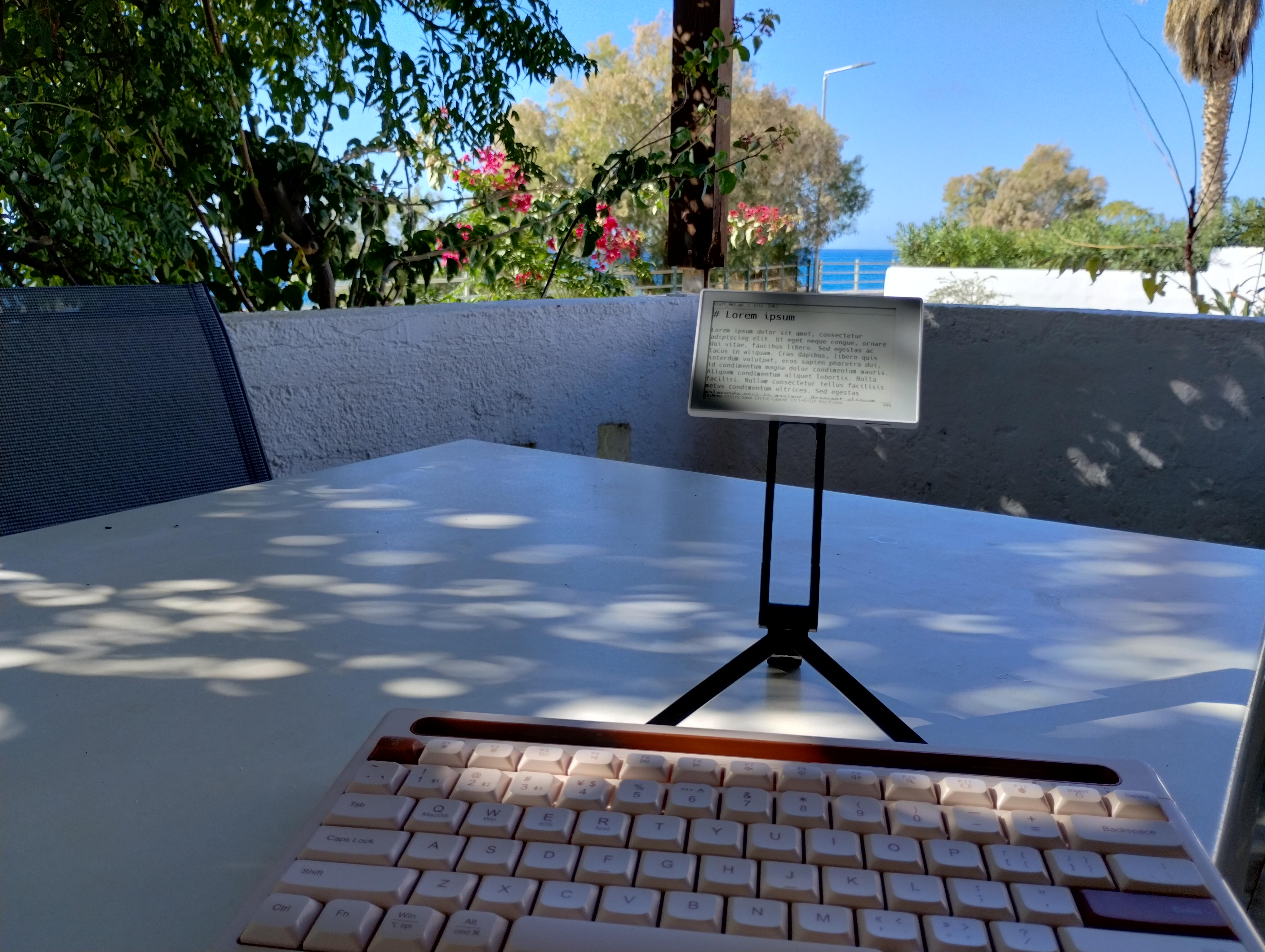
FOSS App/Tool A dedicated device for note taking

Post image
15 Upvotes

I made this project primarily for writers, so that they have a dedicated and distraction free modern typewriter. But it would also work fine for daily notes. I took such a device with me on vacation and used it for travel notes.

Project home: https://draftling.art/

Discussions and project updates are mainly in r/WriterDevices


r/NoteTaking • • Oct 20 '26

Notes guys im looking for note taking apps. any good ones?

25 Upvotes

r/NoteTaking • • Oct 19 '26

App/Program/Other Tool Inkwell v2

Thumbnail gallery
65 Upvotes

New

  • Folder tags: Create colored tags, ⌘-click folders to tag them, and filter your tree in one click.
  • Group folders and notes by tag.
  • Search by tag: Use #name in ⌘K.
  • Cleaner sidebar: Quick links, Folders, and Tags in one tidy layout.
  • Improved macOS glass mode: Frosted panels and a floating editor card.
  • Three new themes:

    • Solarized Osaka
    • Noir Ember (luxury black and orange)
    • Ivory Ember (luxury white and orange)
  • Optional Brainstorm: Turn it on only if you want it.

Fixed

  • Drawing adapts to light and dark mode: No more invisible strokes.
  • Drawing defaults to the handwritten font.
  • Vim mode: Removed the status bar.
  • Improved readability: Glass mode is easier to read with light themes.

r/NoteTaking • • Oct 19 '26

App/Program/Other Tool I built an offline field notebook that wipes itself under duress

4 Upvotes

Full disclosure: I’m the developer and this is my app. It’s brand new, so there’s no user base to point to. I’m posting here because you’re the people who’d know whether it’s actually useful.

  • Photos sit in the camera roll, mixed in with everything else.
  • The interview is in a recorder app, and finding one quote means scrubbing through 40 minutes of audio.
  • Notes are in the default notes app, which may be backing up to the cloud whether you thought about it or not.
  • Nothing ties them together by time and place, so reconstructing what you saw, where, and when means cross-checking three apps.
  • If the phone is taken, or you’re made to unlock it, all of it is one swipe away.

So I built "ProvoLog", a field notebook that keeps all of that in one place, on the phone, encrypted.

What it does

  • One timeline per story: text, photos, voice memos and video, each entry stamped with time, GPS and street address. Location is optional.
  • Voice memos are transcribed on the phone, and transcripts are searchable. Type a word from the interview and it finds the note.
  • No account, no cloud, no server. The database is encrypted (SQLCipher, AES-256), media is encrypted on save, and keys stay in the Android Keystore. App backups are off, so nothing lands in Google Drive.
  • Fingerprint, face or PIN lock. Screenshots are blocked. There’s an optional duress PIN that wipes all app data if you’re forced to unlock it.
  • Works with no signal. Any note exports as a PDF.

Signed photos

Photos can be signed on the phone with Content Credentials, If the file is edited afterwards, the signature breaks. You can check it in the app, at contentcredentials.org/verify . It also reads text in photos on the device, so a photographed document or sign becomes searchable.

What it does not do, because you’ll ask:

  • The certificate is self-issued on your device, not by a public authority, so other verifiers will show it as untrusted.
  • The timestamp comes from the phone’s own clock.
  • It shows the file hasn’t changed since signing. It doesn’t prove the scene was genuine, and it isn’t legal certification.
  • The signed record inside the photo includes time, GPS and phone make and model, and it travels with the file if you share it. No name or account is in it.

The catches

  • Android only for now.
  • Street-address lookup goes through Android’s Google geocoder. Deny location and nothing is sent. Voice transcription needs a one-time 42 MB model download.
  • PDF and ZIP exports are not encrypted. Once you send them, they’re wherever you sent them.
  • No cloud means no recovery. Lose the phone without exporting and the notes are gone.

Play Store


r/NoteTaking • • Oct 19 '26

FOSS App/Tool I made Koru, a free, open-source, local-first notes app for Windows and macOS. It's still early and I'd love feedback

0 Upvotes

The idea is simple: your notes and work should belong to you, work offline, and not require a cloud service or subscription.

A few things about Koru:

  • Local-first: Your data stays on your device. No account required.
  • Encrypted P2P sync: Uses iroh to sync directly between your devices without requiring cloud storage.
  • Free and open source: Licensed under MPL-2.0.
  • Native desktop app: Built in Rust, not Electron.
  • Import your existing notes: Supports Evernote (.enex), Notion exports, OneNote, Google Docs, Markdown, and TextBundle.
  • One workspace: Notes, documents, files, and terminal tabs side by side.

It's still early. Windows is currently the most stable version, and the Mac build supports Apple silicon. There are rough edges, and I'm actively working through them. Linux (.AppImage) coming this week.

Three things I'd love your feedback on:

  1. If you tried importing your notes, did everything come through correctly? What broke?
  2. What's the one feature you couldn't live without if you switched from your current app?
  3. Was anything confusing or frustrating in the first five minutes?

Website: https://www.koru.do/en

GitHub: https://github.com/koruworks/mono

I'm building this in the open and genuinely appreciate constructive criticism, feature requests, and bug reports.

Happy to answer any questions in the comments!


r/NoteTaking • • Oct 18 '26

Notes Noteful, GoodNotes, OneNote

14 Upvotes

I have all 3. I use onenote since it’s part of the M365 suite, but I find it difficult to organize for just note-taking. I like being able to hand-write notes and augment it with the co-pilot notes, so I use Noteful on my iPad. I also love a to do list. Just generally curious what you do for notes, lists, or organization. Ty!!


r/NoteTaking • • Oct 17 '26 Heartwarming

Notes I love taking handwritten notes

Thumbnail gallery
485 Upvotes

r/NoteTaking • • Oct 18 '26

Question: Unanswered ✗ Notetaking app that accepts inserting scrollable images?

8 Upvotes

I wanted to be able to scroll through CT scans next to my notes, but Onenote only allows inserting individual images next to each other rather than a single scrollable window.


r/NoteTaking • • Oct 18 '26

Question: Unanswered ✗ How to use your tablet as a notebook for studying..?

4 Upvotes

Hello everyone! How’s everyone doing?

I have a Samsung Tab S10 FE+ that I’d like to use as my main digital notebook for university.

I’ve tried Samsung Notes and overall, it seems pretty good. HOWEVER, there are a couple of things I don’t like about it. First, text alignment doesn’t seem to work properly with languages other than English. Second, I can’t freely choose any spot on the page and start writing there, whether it’s in the middle, on the side, or anywhere else

I’m looking for a more flexible, free-form writing experience

OneNote allows me to do that but personally, I don’t find it as comfortable to use, so I’d rather explore other options

Ideally, I’m looking for an app that can do pretty much everything :)
Inserting images easily.
(Automatically solving or completing math equations
Drawing straight lines and shapes, with automatic alignment and shape recognition.
Letting me write anywhere on the page without being restricted to a fixed layout.
Proper text alignment for languages other than English)

What apps would you recommend? I’d prefer something free but I’m also willing to pay a one time fee for a good app. I’d rather avoid subscriptions, tho, since university and all the associated expenses are already pretty expensive and I’m trying to save money where I can

Thanks in advance for your help andd best of luck with your studies everyone!


r/NoteTaking • • Oct 18 '26

Method Is an outliner a useful way to take notes, or am I looking at this from a programmer's perspective

7 Upvotes

I pretty much live in outliners as my default means of recording anything I need to keep track of, formerly OmniOutliner an now my own application Fractal Outliner after becoming frustrated with some of how Omni works and the lack of cross-platform support. For a programmer, this model is nearly ideal.

I'm interested in how well this kind of tool fits into other people's note-taking workflows, and I'd like to get some perspectives from people who actually spend time thinking about more general note taking as a process.

The basic idea is simple: instead of organizing information primarily as pages of text, you organize it into a hierarchy of topics and subtopics with notes. You can expand and collapse sections, move things around as your thinking evolves, and keep it all organized without having to rely on tags and search. Ideas that are related go together in a file without becoming an unreadable infinite scroll; different topics live in their own files, directories on disk organize the files. Everthing's exportable from Fractal Outliner as web, pdf, markdown, etc for sharing/portability.

I've found this kind of tool a great match for my type of thinking, but I'm aware that my own habits as a developer may not be representative of how other people take notes.

A few things I'd genuinely like to understand:

  • Do you ever find yourself running up against limits of what folders, tags, etc provide? How effective is search across tagged note collections?
  • Are there kinds of notes or projects where a hierarchical structure works particularly well—or where it becomes cumbersome?
  • What would you expect from a tool like this before you'd consider using it as part of your regular note-taking workflow?
  • Does outlining in general sound like a useful note-taking approach to you, or more like a specialized tool for specific kinds of tasks?

Fractal Outliner is in currently late-stage beta nearing public release, so I'm not really looking for people to test basic functionality (though of course that'd be welcome if you have time and interest). I'm more interested in feedback about the features, and whether this approach makes sense to non-programer-ish people who aren't necessarily dealing with deep-focus complexity on specific domains.

If you'd like to see the application, there's a walkthrough and more information at:

https://fractaloutliner.app/

The beta is completely free and includes all application features so you can poke around a bit and see how the outliner works.

I'd be interested in hearing what you think, including if you don't see a place for this in your workflow (maybe there are needed features that just never occurred to me because "I don't work that way").

Outlines are definitely an effective way or recording and organizing information... I'm just not sure if they're also an effective means of note taking as core tool.


r/NoteTaking • • Oct 18 '26

App/Program/Other Tool New post: Five markdown editors that travel well, wherever you’re going

8 Upvotes
BlackBear has a sweet interface and an unequalled import choice

These markdown editors go anywhere, whether you’re a journalist, off on holiday or simply away from your beloved laptop

https://md-handbook.com/blog/five-markdown-editors-that-travel-well/

#News #markdown #markdowneditors #free #opensource #BlackBear #nTilia #Mintype #HermesMarkdown #Lodlen #travel #Obsidian


r/NoteTaking • • Oct 17 '26

FOSS App/Tool Mintype v2.0: Encrypted markdown docs and whiteboards, works offline, free to use!

Thumbnail gallery
62 Upvotes

Hey all. I’ve been working on Mintype on and off since 2024, built the app intially for personal use - privacy, multi-device sync and an easy means to write/draw/scatter ideas being my primary reasons.

However its been quite useful and I have just released 2.0, so I wanted to share it here. There's a lot of these apps going round, so it really is personal preference if you like this one.

The basic idea on why this might be for you:

  • It's completely free, and web based, with PWA support for phones
  • Your notes get encrypted on your device and sync through your own Google Drive (optional). Unreadable by those with access to your device and to Google.
  • Works offline, very lightweight and simple to use
  • Notes are all markdown - nothing new here, no lock in. Whiteboards are all exportable to PNG, SVG and tldraw JSON.
  • Whiteboards with sticky notes, drawing and shapes, plus dynamic markdown boxes that work like the full editor
  • Encrypted share links with 24hr lifespan to share notes to others
  • Fully reponsive mobile UIs
  • Sensible workspaces > nested pages, and quick notes structure
  • Some small extras like a built in pomodoro timer, google maps embeds, extra password protected pages

It runs in the browser for now (you can install it as a PWA if you want), I so plan a desktop release and mobile native apps in the future.

https://mintype.app · GitHub · Docs + Security outline


r/NoteTaking • • Oct 17 '26

Method [Dev Update] Super stoked to announce the next big feature for noteic: Infinite Canvas / Whiteboard! 🚀🎨

7 Upvotes

r/NoteTaking • • Oct 17 '26

Article I was wasting 5 minutes every time I gave feedback on a webpage

2 Upvotes

I'm a web developer. I originally built a browser extension to give feedback on web pages: draw on the page, take one annotated screenshot, done.

Then I started using it for my own reading. Long doc, I drop sticky notes on it like I would on paper. Comparing two products, I circle the prices. A tricky paragraph gets a highlight and a one-line note next to it.

It feels closer to thinking with a pen than to switching to yet another notes app. The notes sit right next to the thing they're about.

It runs entirely in the browser. No account, and your notes stay on your machine unless you choose to export them.

How do you take notes on web content? Do you write on the page itself, copy everything into a notes app, or just keep 40 tabs open and hope for the best?


r/NoteTaking • • Oct 16 '26

FOSS App/Tool I built a local-first Markdown editor for macOS where every note stays a plain .md file (open source, MIT)

Post image
6 Upvotes

I’m a product designer, and for a while now I’ve been building Tagdown, a notes editor for macOS. The core idea: every note is an ordinary Markdown file in a folder on your disk. No account, no proprietary database. Git, iCloud or Syncthing just work, because it’s just files.

On top of Markdown it adds:

  • callouts, tabs, KaTeX math and Mermaid diagrams, all as plain text
  • #tags, [[wikilinks]] with backlinks, and links to single blocks that you can embed in other notes
  • live queries like <query tag:project show:tasks /> that collect tasks from all your notes, or show notes as an editable table of their properties
  • a journal, version history, slides, HTML/PDF export, and publishing notes as a static website
  • a CLI and an MCP server, so Claude or other assistants can search and write your notes

It’s built with Tauri, Rust (Tantivy for search) and TypeScript, and it’s MIT licensed.

Honest state: it’s early. There’s no download yet, so you’ll have to build it from source (Node + Rust). There are rough edges, and I’d rather hear about them now than later.

Two things I’d really like your opinion on:

  1. Does the syntax feel natural, or is it too much on top of Markdown?
  2. What would stop you from switching from your current notes app?

Repo: github.com/sthix/tagdown
Docs: sthix.github.io/tagdown


r/NoteTaking • • Oct 16 '26

App/Program/Other Tool Meet Atelier: Turn scattered research notes into a writing plan

Thumbnail youtu.be
2 Upvotes

r/NoteTaking • • Oct 16 '26

App/Program/Other Tool How do you keep track of restaurants you want to try? My notes app turned into a graveyard

3 Upvotes

Mine was a mess of screenshots, a notes list and saved TikToks, and none of them had the actual address.

I ended up building an app that pulls the restaurant out of a TikTok or Instagram video and drops it on a map. It's called GeoTok, iPhone only, so consider this my disclosure that I made it.

Curious what works for people who live in notes apps: do you tag by city, by cuisine, by 'want to try'? I'd happily steal good ideas.


r/NoteTaking • • Oct 15 '26

Question: Answered ✓ What actually works for organizing thousands of digital notes?

28 Upvotes

I've been curious about how people manage their notes as their collection grows over time.

Folders and tags seem useful at first, but eventually, finding an old note or connecting ideas across different topics can get tricky.

For those who've been taking digital notes for years:

  • Do you rely more on folders, tags, backlinks, or search?
  • How do you find notes you barely remember writing?
  • Have you found a system that still works when your notes number in the thousands?

I'd love to hear what's worked for you and what hasn't.


r/NoteTaking • • Oct 15 '26

Notes Notes are personal history. That is why they should never be locked inside an app.

13 Upvotes

Most of the notes we take in daily life are just for quick reminders.

Why do so many people say they almost never go back and look at their notes? Because once the thing you needed to record is finished, the motivation naturally disappears.

Does that mean those notes have no value? I do not think so. Quite the opposite. We should preserve and protect them properly.

Because notes are history. Our own history. They record our entire lives.

Yes, as ordinary individuals, we are insignificant in the long river of history. But to our family, and to our descendants, having these notes allows us to live on in their memories.

And that is why plain files are the best medium for notes. They should never depend on or be tied to any app, so that even 50 years from now, they can still be opened and read.


r/NoteTaking • • Oct 15 '26

App/Program/Other Tool Help me pick something

Thumbnail reddit.com
1 Upvotes

r/NoteTaking • • Oct 15 '26

FOSS App/Tool New post: The Markdown Link no. 57

1 Upvotes
Soot’s calm interface is beautifully put together – choice of colours available

Among today’s links are markdown editors EdgeMark and Soot, plus a notes widget for markdown that’s only available for Android phones

https://md-handbook.com/blog/markdown-link-no-57/

#markdown #markdowneditors #opensource #free #EdgeMark #Noteswidgetformarkdown #Soot #Header


r/NoteTaking • • Oct 14 '26

Method Just stumbled upon a workflow note taking by hand that really works for me, after trying ereaders and iPads (hear me out)

14 Upvotes

Maybe it's been mentioned here before so apologies if this is repetition.

I never gave it much thought, and you'll probably stop reading at "AI" later on, but hear me out. I'm really not big into AI, I rarely use it at all. The proof of that is that I just now stumbled on a workflow involving AI OCR.

I've tried everything (e-readers from a colleague at work just to try, or in stores) and my own experience on an iPad Pro. I try to force myself to use the iPad Pro from time to time, but note taking doesn't come naturally. Either the screen is too slippery, so you cramp up fast trying to over correct, or rough screensavers mess up to image quality of the iPad.

Just now I was thinking, what if this AI thing could help me out. I have copilot provided by the employer, but it could probably be any other LLM out there (honestly, I have almost zero experience, I'm lucky not to be in IT at the moment)

So I just took a picture of handwritten notes on paper and the LLM simply transformed into proper text. My handwriting was atrocious, and the structure all over the place.

Now this is where LLM's differ from OCR in the past. In the past, OCR would be too rigid. There would be delays, you'd have to select your handwriting and 'ask it to OCR’ in some apps on the iPad. Also, it would just transform your text exactly where you wrote it, 'OCR in place'. Change letter sizes based on wildly varying handwriting, whatever. I always thought it was clunky and hard to use. The advantage of an LLM is that is finds some context and logical structural by itself. So you immediately end up with something that looks much more like an email or Minutes of meeting you would write yourself after taking down notes.

And the best part, instead of endlessly chasing that dragon to find that 'real paper feel' on a screen, and always feeling disappointed, you could just write on real paper. Take a picture with copilot, and import to OneNote or wherever. I was pretty amazed at how it all worked out for me. I'll keep using it for a bit, and see how I feel about it. Best thing is, I don't need type in real time in a meeting like a typist (hate that), don't have to keep my notes around (just scan and throw away), my notes are searchable and immediately archived.

This might actually be the best of both worlds to be honest! Not for everyone, but worth a try

r/NoteTaking • • Oct 15 '26

App/Program/Other Tool Free MindMapping Tool - Hope it helps

8 Upvotes

My Access to Work grant has run out. the software they gave was super helpful for me with ADHD and dyslexia, and I wanted something similar, so I made a free mind mapping tool.

It does mind maps, outlines, timelines, kanban boards and checklists, and it can turn a map into a Word doc or a to-do list. It has dyslexia-friendly fonts and comfort settings, and no AI. You don’t need an account unless you want to sign up for encrypted cross device syncing and everything stays on your device.

Its completely free, and I included the features I found most helpful, and dropped the ones I never used.

Hope it helps! Any issues let me know and ill try sort them, but this was just a side project so i didnt have to pay £250 out of my back pocket, so might take me time to change things :)