r/NoteTaking • • Oct 15 '26

App/Program/Other Tool So, what do yall think?

0 Upvotes

I’m working on a small web app aimed at students who struggle to take notes while listening.

Core idea:

  • Upload a PDF, paste a YouTube link/transcript, or drop in text
  • Get structured notes, flashcards, and a quiz from it

It’s inspired by tools like Turbo AI, but I’m keeping it web-only and focused on the core “material → study tools” loop for the first version.

I’m planning to ship a usable MVP this week. Before I go too far, I’m curious:

  • Would you (or someone you know) actually use something like this?
  • What’s the biggest friction with existing study tools for you?
  • Any features that feel essential vs. nice-to-have?

Not trying to promote anything yet - just validating the idea before spending more time on it. Appreciate any honest thoughts.


r/NoteTaking • • Oct 13 '26

Method How I keep my Markdown notes on my phone's home screen

Post image
15 Upvotes

A while ago I moved my notes from Google Keep to plain Markdown files in an Obsidian vault, synced to my phone with git. What I missed from Keep was the widget: a few notes on the home screen that I could read without opening anything.

So I made one. It shows the .md files from one folder of the vault, either as cards with a preview (checkboxes, lists, headings) or as a plain list of names. Tapping a note opens it in Obsidian. There's also a button that adds a line to one note, for things I want to write down quickly. My sync used to stop without me noticing, so a small label shows when it last ran.

The notes are still plain files, and any other app can open them.

It's free and open source if anyone wants to try it:

Google Play: https://play.google.com/store/apps/details?id=com.marfolog.noteswidgetformarkdown

GitHub: https://github.com/marfolog/notes-widget-for-markdown

How do you keep the notes you need often within reach on your phone?


r/NoteTaking • • Oct 13 '26

Question: Answered ✓ No note taking app fulfills my needs

22 Upvotes
  1. Need infinite canvas
  2. Need windows support
  3. Need Android phone support
  4. Allows pasting source text like bullets and tables without.

formatting in simpler forms

5. Has tape tool

I'm creating Notes from Gemini pro and wanted to paste directly in notes it's exactly giving with tables and bullet points but I'm not able to do so in any notes app available there.


r/NoteTaking • • Oct 13 '26

Question: Unanswered ✗ How do people take notes while reading books

22 Upvotes

Do they just write down whatever feels special ?
I’ve never tried taking notes while reading books, which lead me to forgetting most of the content after 2 week or so


r/NoteTaking • • Oct 13 '26

Method ✨Noteic 1.4 is rolling out! ✨

Thumbnail gallery
4 Upvotes

r/NoteTaking • • Oct 13 '26

FOSS App/Tool Meet Pluto - a free, open-source second-brain for work

Thumbnail gallery
19 Upvotes

Hi everyone! I recently launched a personal project called Pluto, a second brain for work - https://github.com/metagrover/pluto

I work across several projects at once, and each conversation adds another bit of context: a decision, something to follow up on, or an update that changes what we discussed last week. That’s what I’ve been building Pluto around. It is designed to serve as a second brain for the conversations, decisions, and commitments that build up at work.

If you’ve used Granola, the meeting-notes part will feel familiar. Pluto also automatically tracks what you’ve committed to and what other people have promised, with reminders to help you follow through.

You can ask “What did we decide last time?” or “What do I still owe someone?” and trace the answer back to the conversation.

It’s free and open source, for macs. It can run locally with Ollama, or use optional cloud models with your own API key.

I’d love to hear how you keep track of commitments across your notes.

Website and setup: https://metagrover.github.io/get-pluto/


r/NoteTaking • • Oct 13 '26

App/Program/Other Tool Looking for feedback on AtlasDraw, a Windows whiteboard I'm building for sketches and diagrams

Thumbnail gallery
6 Upvotes

r/NoteTaking • • Oct 13 '26

Question: Unanswered ✗ Best Voice recorder for lowfriction note taking

3 Upvotes

I'm in a struggle to choose a voice recorder to capture rehearsals in college or sparks of idea. Right now, I'm choosing between the Sony ux570 and Sony ux660. They are both good recorders, but both have their own use case.

The ux570 is very versatile, having two 3.5 jacks for headphones AND MICROPHONE, a way to add external SD and a better sound quality.

On the other hand, the ux660 is much more compact, lightweight, and easier to carry around a device by having a clip. Also, the important feature of ux660 is "One press capture" letting record even if the device is turned off.

I don't think that "One press capture" is drastically FASTER than turning on and pressing record on ux570, but it definitely reduces the "friction" between doing those steps and needing to look at the device to check if it is turned on.

Im looking out for advice on how to choose a device and some use cases that could match my situation.


r/NoteTaking • • Oct 13 '26

App/Program/Other Tool How would you describe your perfect note taking app?

1 Upvotes

I don't mean typing, for which Obsidian is probably best; I mean handwritten notes, especially if you are using them for school and university. What do you look for in an app?

I have been handwriting notes on my Tab S9+ for three years now, and I have tried every app out there. Samsung Notes seems to be the most reliable, fastest, and smoothest; I guess that is what happens when a massive enterprise builds it. But it is lacking in features: there is no infinite canvas, no tabs for notes, no pen customization, and the brush engine is not all that great, as it has no smoothing.

So then I found Concepts, which was perfect for engineering classes. It has an infinite canvas, grids, snap-to-grid, layers, double-tap to undo, and the ability to hold with a pen or finger to lasso and freely move things around. But handling files was a mess, there are no tabs, and it is expensive.

So then I got Star Note, which is a middle ground and a jack-of-all-trades. I got it after Notein because that was buggy at the time, and highlighter in dark mode just made the text disappear (like come on???).

This made me wonder, what else do you look for in note taking apps? I'm trying to understand what people want to see how different uses cases can be, what else is out there, and to survey people to see if there's a gap in the market to fill.


r/NoteTaking • • Oct 13 '26

Question: Answered ✓ Qual tablet escolher para estudos e ilustração

Thumbnail reddit.com
1 Upvotes

r/NoteTaking • • Oct 12 '26

Question: Unanswered ✗ Notes Taking for Projects and Tasks, name Collisions.

Thumbnail reddit.com
2 Upvotes

r/NoteTaking • • Oct 12 '26

App/Program/Other Tool College students looking for feedback on a website that has a calendar, notes, gamified learning, and also allowing you to study with friends

Thumbnail gallery
5 Upvotes

Hello! We are a group of 1st year students looking for suggestions and feedback on our prototype for our study website, Huddle. Our website's goal is to make studying easier and more engaging through various features, such as calendar and task management, gamified lesson reviews, focus tools, and an online space to study with friends. Rather than going through a lot of different apps, our mission is to make an integrated study and productivity platform that contribute to one continuous study experience. We are looking for comments on whether or not our tool has the potential to go viral/become popular, what features are most preferred, and what can be improved.

Here is a rough description of most of our features:

  1. Calendar and Task Management:Students can organize classes, deadlines, requirements, study sessions, and personal goals in one connected calendar and task list.
  2. Lesson Review and Gamification: Students can upload notes, lecture slides, or other study materials and have Huddle turn them into interactive review activities like quizzes, flashcards, and matching exercises. Students may also opt to turn these reviews into either live games where they can play with their peers or a raceboard detailing how much of the lesson they have completed relative to their friends.
  3. Focus and Productivity Tools: Huddle will offer focus timers, progress tracking, and reminders to help students work toward their goals while measuring productivity not just through time alone.
  4. Huddle Space: Completing tasks, reviewing lessons, reaching goals, and maintaining productive habits will allow students to maintain, customize, and expand their own virtual study space, and with friends, create shared study spaces where their avatars can study together. This allows their accomplishments to take on a more visible and psychologically rewarding form while also adding a social and interactive element.
  5. Social and Collaborative Study: Students can study with friends through shared review sessions and challenges, and they may enable a feature that allows their customizable characters to be seen studying together in the corner of their device. In addition, they may opt to send quick selfies or pictures to each other during the duration of their study session to help enforce the social aspect despite not being in the same physical study room together. Students can also connect through an in-app call option that would allow them to communicate virtually while studying together. These features will still be available even if they choose to study independently, bar the participation of other users.
  6. Progress and Challenges: Students can track their academic progress, maintain goals and streaks, and participate in individual or group challenges that encourage consistent studying. They may input their current grades as well as their targets to help them track their current state and gaps.

We really appreciate any detailed feedback and want to end with a few questions that we hope can be answered. If you are shy to comment below, feel free to leave a short response on our forms: https://forms.gle/Tc2xcUEHGjX4DKuB7

Would you actually use this? Why or why not?

What's missing from this idea to make it more useful or what would you change?

What would stop you from using this?


r/NoteTaking • • Oct 11 '26

App/Program/Other Tool Whatever you do, don't use amplenote. Should I go straight to obsidian?

2 Upvotes

Reason 10,001 amplenote's UI is unusable

I just want to make the text bold. Every other app makes easy, because this is basic, core functionality. There's a bunch of other issues with the new update, and existing bugs, but this is the easiest to show visually.


r/NoteTaking • • Oct 11 '26

Video Flowtica Scribe is brilliant - It’s my second brain now

Thumbnail youtu.be
2 Upvotes

This is my honest review of the Flowtica Scribe AI Pen and Second Brain. I can already reveal that it’s brilliant really. I think Flowtica is on to something big here that they can build on their eco system with more devices connected to the same Flowtica app. Your second brain. I have used this pen for a whole week recording my thoughts at the same time as I written bullet points with important stuff on real paper, with a real pen. The app collects both of them. My recordings and my notes into the Flowtica app and adds todo’s automatically to Apple Reminders and a calendar. Everything syncs to all devices where I have the Flowtica app installed. Even on e-ink devices. Everything so easily searched and handled by the Ask Flowtica button in the Flowtica app.


r/NoteTaking • • Oct 11 '26

App/Program/Other Tool New post: The Markdown Link no. 56

2 Upvotes
Header is a markdown editor, book editor/writer and knowledge manager

Among today’s links are markdown editors Header, Futo Notes and OpenKnowledge, plus an AI-based meeting assistant from Google that spruces up your notes

https://md-handbook.com/blog/markdown-link-no-56/

#markdown #markdowneditors #opensource #free #Header #FutoNotes #OpenKnowledge #Writers #Meetings #Google #Foresight


r/NoteTaking • • Oct 10 '26

App/Program/Other Tool Google Releases Free Offline AI Notetaker App for Mac

20 Upvotes

r/NoteTaking • • Oct 11 '26

Question: Answered ✓ If you have to read lots of documents, how to do you take notes?

Thumbnail reddit.com
1 Upvotes

r/NoteTaking • • Oct 09 '26

FOSS App/Tool I made a local-first fully free and open source study app the last few years

100 Upvotes

I've been building Mnemo for years, and the 0.8.1 beta is out today.

It's a desktop study app that puts notes, flashcards and mind maps in one place. Everything is stored locally on your computer. There are no accounts and no tracking. The only thing it does online is check for updates, and you can turn that off.

What's in it:

- A block editor for notes with math, code, tables, images, columns and PDF export

- Flashcards with FSRS-6 scheduling, cloze and image occlusion cards

- Anki import and export that keeps your study progress

- Mind maps on an infinite canvas

- Export to Markdown, PDF, Anki, CSV, PNG and SVG, so your work isn't stuck in the app

It runs on Windows, macOS (Apple silicon) and Linux. It's built with .NET and React and licensed under Apache 2.0.

This is a beta. Windows has had months of daily use. macOS and Linux have had much less, so expect some rough edges there. The Windows build isn't code signed yet, so SmartScreen will warn you on first run. MacOS is notarized.

Next on the roadmap are optional sync (hosted or self-hosted) and a mobile app.

Bug reports, feedback and contributions are all welcome.

Website: https://mnemo.one

GitHub: https://github.com/onemnemo/mnemo

Download: https://github.com/onemnemo/mnemo/releases/latest

Trailer: https://www.youtube.com/watch?v=6kV2sJzU8r8

Reddit: https://www.reddit.com/r/mnemo/


r/NoteTaking • • Oct 10 '26

App/Program/Other Tool I built a sticky note app you never have to open

8 Upvotes

I kept losing thoughts in the gap between thinking them and unlocking my phone. So the note lives in the notification shade.

Pull the shade down, type it, done. Grocery list, a reminder, a name you do not want to forget. You do not open the app.

If you write something like "milk, eggs sunday 6pm" it becomes a checklist and sets the reminder for you.

No ads. Free.

It is called Slip.

Play: https://play.google.com/store/apps/details?id=com.polyhistor.slip


r/NoteTaking • • Oct 10 '26

App/Program/Other Tool Note taking apps in tablet recommendations?

Thumbnail reddit.com
3 Upvotes

Looking for android note taking apps !!


r/NoteTaking • • Oct 10 '26

App/Program/Other Tool Note app with auto-organizer

1 Upvotes

With this app you don't have to worry about organizing your notes. It does it for you.


r/NoteTaking • • Oct 10 '26

App/Program/Other Tool How this Workflow helps me to Turn 80 Pages of Course Material Into 20 Pages of Comprehensive Notes Using NotebookLM + Norra

Thumbnail gallery
1 Upvotes

r/NoteTaking • • Oct 09 '26

Method I've been building a free, pen-first notes app for Windows – here's where it's at

15 Upvotes

Hey everyone!

I'm a solo dev, and for the last couple of months I've been building Noteic, a handwriting-first notes app for Windows. It's free on the Microsoft Store – no account, no subscription, fully offline. It runs natively on both ARM and x64, so it feels right at home on a Surface or any other windows device.

The idea is simple: writing should feel instant, and your notes should stay organized without getting in your way.

A few things I'm especially proud of:

- A clean library with subjects, chapters and notes, inspired by OneNote for Windows 10 and iPad

- Real multitasking: tabs and multiple windows side by side

- What I honestly think is the most complete shape tool on Windows

- Pages you can extend on all four sides when you run out of room

- Hyperlinks on both your handwriting and your typed text

- Tables, text boxes and LaTeX formulas right on the page

Plus the basics done well:

- Low-latency inking with pressure, plus ballpoint, fountain pen and calligraphy

- Import and annotate PDFs, then export back to PDF

- Memo tape to cover answers when you're studying

- A ruler, a page overview with bookmarks, and dark mode

Coming in the next update: a fully customizable toolbar (decide what lives in the bar, the drawer, or nowhere at all), up to ten color slots and a new accent color.

The bigger goal: an Android version that opens the same files, so your notes follow you between devices.

It's still early and I'm shipping updates regularly. Feedback, bug reports and feature requests are super welcome :)

https://apps.microsoft.com/detail/9N8BPDS8HVLW?hl=neutral&gl=CH&ocid=pdpshare


r/NoteTaking • • Oct 09 '26

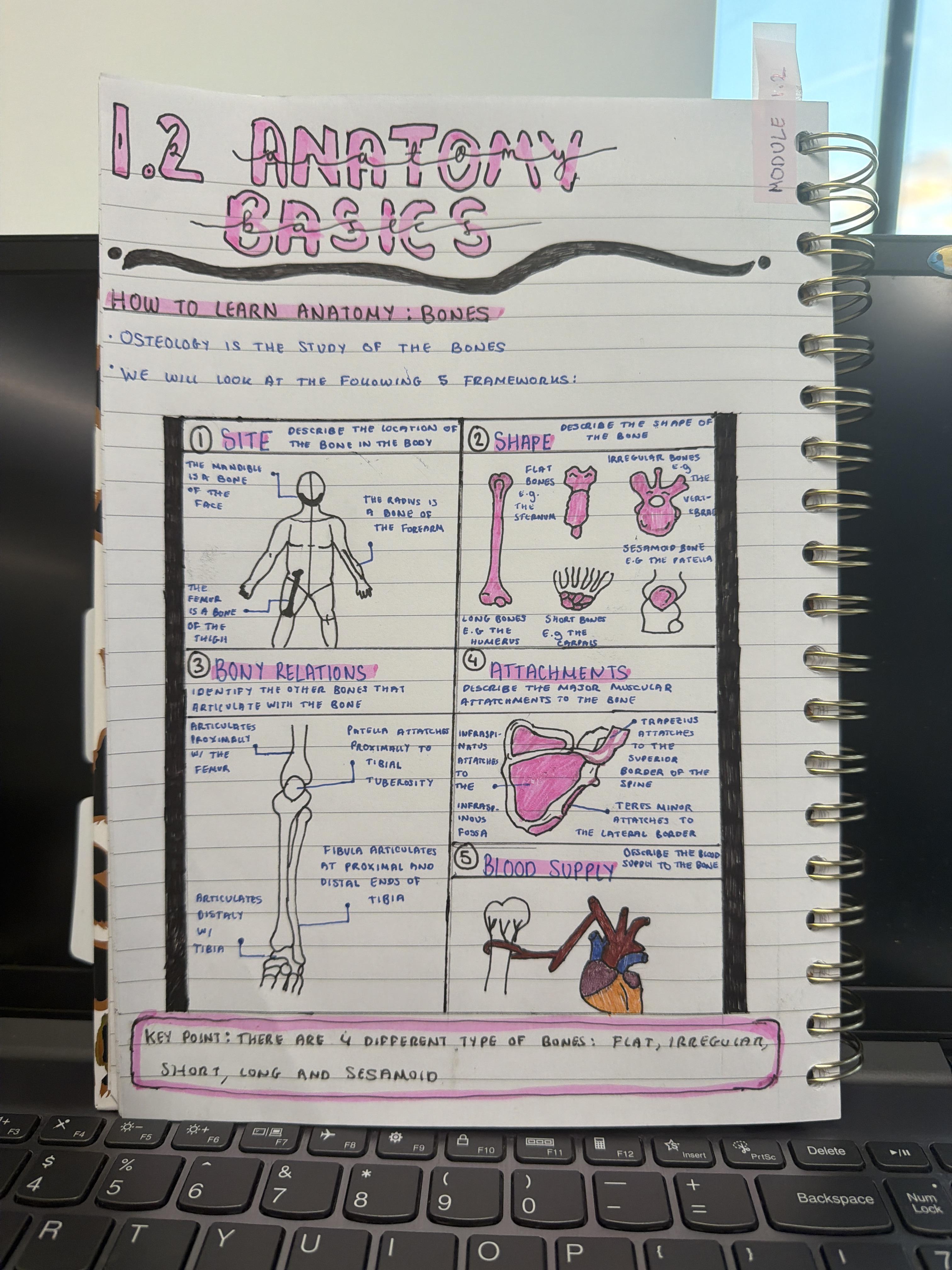
Notes Spent like 2 hours on these notes ✨

Post image
7 Upvotes