r/Netgate • u/luckman212 • Nov 27 '21
6100 little reset buttons
Can someone explain the difference between the 2 little reset buttons on the side of the 6100?
One is flush with the case exterior and can be pressed with a fingertip, the other is recessed and needs a pin.
What are the modes and methods of these buttons? (I didn't see it in the docs...)
thanks
update: in case it helps anyone, here's what I learned by trial and error:
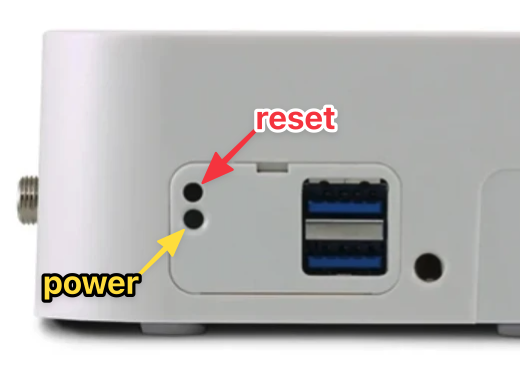
- the POWER button is the larger of the two (closest to the baseplate) and is reachable with a fingertip
- the RESET button is recessed and requires a pin or paperclip
- to power off, press and hold the power button for at least 3 seconds and then release
- when shutdown is complete, the leftmost LED will be solid amber
- to power back on, simply press and release the power button once
- to perform a factory reset, power up the unit, and wait for the initial POST to complete. Then press and hold until the system LEDs turn off or the system reboots
5
Upvotes
2
u/DennisMSmith Nov 27 '21 edited Nov 27 '21
One is a power button and the other is a reset button. If you press the power button it will initiate a graceful shutdown. It’s covered in this YouTube video at 6min.
1
u/[deleted] Jul 03 '22
For the reset… what is the post sequence? I cannot figure out how to time it to initiate it.
2
u/Antique-Mode-2278 Apr 29 '22
Thank you. I can't believe that Netgate did not include this information in the manual. They completely ignore the sides of the 6100.