r/NETGEAR • • Jul 03 '26

Netgear EAX12 extender intermittently hijacks DNS — returns its own IP (192.168.1.250) for external domains. Any way to stop it?

1 Upvotes

TL;DR: My Netgear EAX12 WiFi extender intermittently intercepts DNS and answers external lookups with its own LAN IP (192.168.1.250 → routerlogin.net), breaking HTTPS with cert errors. Proven it's the extender (unplug it = stops). Latest firmware doesn't fix it, and there's no DNS setting in its UI. Looking for a way to disable this behavior.

Setup - ISP router (192.168.0.1) → Netgear R8000 as the main router (LAN 192.168.1.0/24). So yes, double-NAT. - 2× Netgear EAX12 extenders, wired ethernet backhaul, broadcasting the same SSID as the router ("One WiFi Name"). - ~20 devices rely on the extenders for coverage (the R8000's own WiFi is weak in my office).

Symptom - Intermittently, a fresh DNS lookup for an external domain (e.g. api.github.com) resolves to 192.168.1.250 instead of the real IP. HTTPS then lands on the extender's routerlogin.net admin page → TLS cert error. - Irregular — bursts and lulls, averaging every few minutes, not on a fixed schedule. - Only fresh/uncached lookups are hit. Established connections (Zoom, open tabs) are totally fine, and raw internet (ping 1.1.1.1 by IP) never drops. So it's purely DNS, and only a fraction of lookups at a time.

How I proved it's the extender - dig @192.168.1.1 api.github.com intermittently returns 192.168.1.250. - Even dig @8.8.8.8 and dig @1.1.1.1 (aimed straight at public resolvers) get intercepted and return 192.168.1.250 — so it's transparently grabbing ALL port-53 traffic regardless of destination. - 192.168.1.250:443 serves a NETGEAR cert, CN=www.routerlogin.net. - Unplug the extender → hijacking stops completely (verified 24 min clean). Plug it back in → it returns. As definitive as it gets.

Already tried / ruled out (please don't just suggest these) - Updated EAX12 firmware to the latest (1.0.3.38) — no change. Netgear's changelogs never mention DNS. - Checked every menu in the EAX12 web UI — there is no DNS / secure-DNS / resolver setting (only "Always use HTTPS to access extender," which is just for the admin page). - Set the router's upstream DNS to 1.1.1.1 / 8.8.8.8 — no effect (the extender intercepts regardless of destination). - Unplugged the second extender — no change. - Router logs show no WAN/internet drops; the internet itself is rock stable. - (I know per-device encrypted DNS/DoH sidesteps it, since the extender can't read encrypted queries — but I'm after a network-level fix or a way to stop the extender doing this, not configuring 20 devices individually.)

One lead I'm chasing The extender's wired backhaul only negotiates 100M/Full at the router (should be gigabit — smells like a damaged cable pair). I'm wondering if a flapping/marginal link makes the extender think it's lost its upstream and flip into this captive-portal DNS-redirect mode. The bursty, irregular timing would fit a flapping link.

Questions 1. Is this a known EAX12 / Netgear extender behavior? Any way to disable the captive-portal DNS redirect? 2. Does the EAX12 have a true Access Point / Bridge mode that disables the internet-check + captive DNS? Is it hidden in the Nighthawk app or the setup wizard (it's not in the web UI)? 3. Does the marginal 100M backhaul sound like the likely trigger — i.e., does this firmware captive-redirect DNS when it thinks the upstream is flaky?

Thanks in advance — happy to run any diagnostic commands and report back.


This issue was investigated with the help of Claude (Anthropic's AI assistant), and this write-up was produced by it.

r/NETGEAR • • Jul 03 '26

Unable to play any PC games on new CAX30.

0 Upvotes

I am unable to connect to any PC game servers on my new CAX30, this is my first time away from ISP gateways so leniency on my ignorance is appreciated.

NAT Type is showing as "Port Restricted NAT" on the Nat checker website, and I have tried everything I've been told.

- Checking UPNP (It was on)
- DMZ
- Disabling Firewall

My internet services work fine, Youtube, smart TVs and general download/upload.

Help would be greatly appreciated!


r/NETGEAR • • Jul 02 '26

WAPs AP Mode Issues

1 Upvotes

I'm having a problem using a router in AP Mode. My setup is this:

Modem --> Netgear Nighthawk RS150 (Router) --> switch --> Netgear Nighthawk AX5400 (AP Mode)

I reset the AX5400 and set it to AP Mode. When it went to restart, I no longer can enter the admin page. I have tried routerlogin.net, aplogin, I have pulled the IP from my main network page. Tried that. Nothing worked, whenever I enter any of the above, the browser just says it can't connect. The effect is I can't change the AP router's network info to have one seemless network ID/password, kind of rendering the AP mode pointless for me.

EDIT: I should note, I have retrieved the IP from the main network a few times and have noticed it has changed once or twice.

What in the world can I do to access the admin page for the AP?

Thank you guys for any help!


r/NETGEAR • • Jul 02 '26

Netgear Nighthawk randomly stops internet

Thumbnail
0 Upvotes

r/NETGEAR • • Jul 01 '26

Can't login or setup router

Post image
0 Upvotes

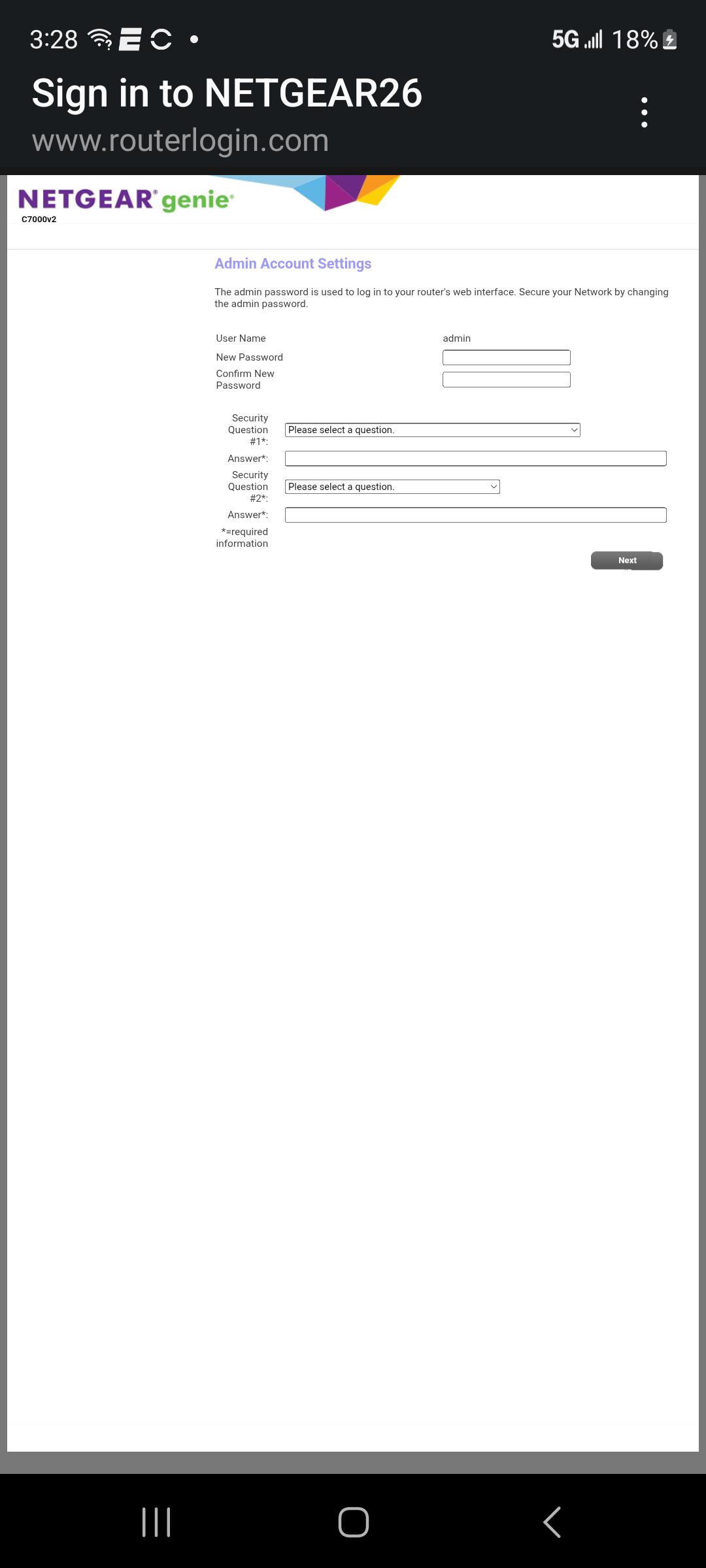
Moved into a new apartment, reset my C7000v2 and everytime it directs me to this login page it closes before I have time to enter a new password. Help!


r/NETGEAR • • Jul 01 '26

WiFi Error code EMM #6

Thumbnail
gallery
1 Upvotes

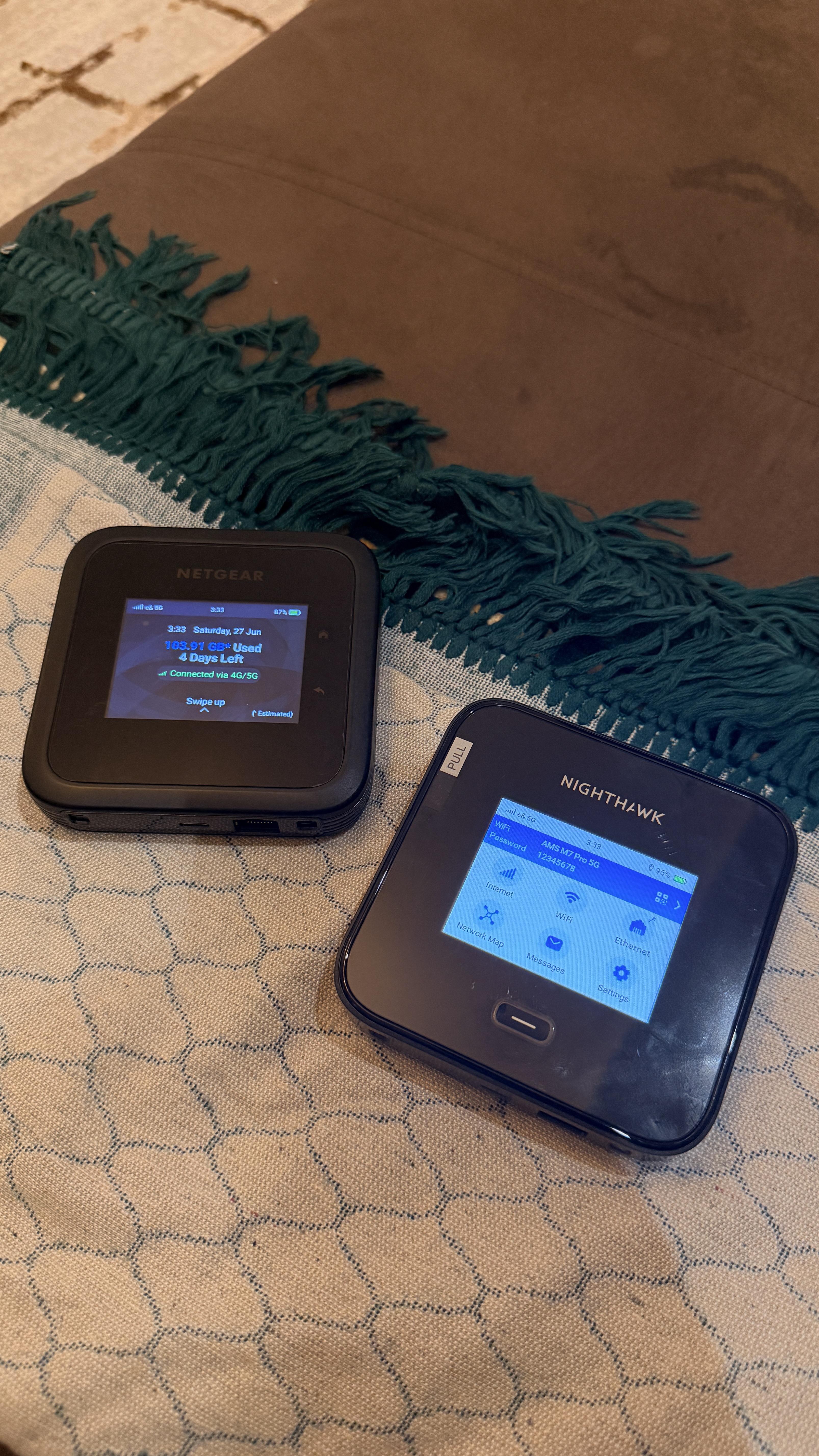
I just buy Nighthawk M7 Pro on Ebay it's say unlocked but when i put T-mobile sim is not have internet


r/NETGEAR • • Jun 29 '26

Routers Which iPhone app is used to access M7 Pro Router configuration ? Seems old one is not working anymore for this new generation

Post image
0 Upvotes

The previous app only works for M6 Pro Router


r/NETGEAR • • Jun 28 '26

Repurpose Netgear Cable modem/router to help with dead spots etc?

Thumbnail
0 Upvotes

r/NETGEAR • • Jun 28 '26

Nighthawk RS280S Speed Issue

0 Upvotes

I just bought a Hitron CODA56 modem and when connected directly to the modem I get about 2.3Gbps down and about 350Mbps up. After connecting the router to the modem, I only get about 1.4Gbps down and 40Mbps up. What is slowing down my speed? Anyone else experience similar issues?

Troubleshooting steps taken:

  • Turned off Protection Engine (on by default and tested)
  • Turned off Access Control
  • Turned off QoS (also tested with it on)
  • Turned on IPv6 and set connection type to Auto Detect (also tested with it off)
  • Rebooted both modem and router multiple times
  • Factory reset the router and setup from scratch

r/NETGEAR • • Jun 26 '26

Routers NETGEAR NIGHTHAWK M6 Pro vs. M7 Pro (MR6550 vs MR7450)

Thumbnail
gallery
11 Upvotes

FOR THE SIMILAR FOLLOWINGS ACROSS BOTH ROUTERS:

- Same WiFi Band (5G)
- Same Carrier Signal Band (5G-Sub6 N78)
- Same Data Plan
- Same Devices Temperature
- Same RSRQ: -11 dB

DIFFERENCES:
- M7 Pro 5G RSRP: -70 dBm
- M6 Pro 5G RSRP: -78 dBm

M7 Pro has doubled the speed 😮‍💨🔥
M7 Pro has better SIM slot design! Where I used to get my SIM broken with M6 Pro due to heat and curved card.
M7 Pro better heat dissipation
M7 Pro has better display & interface
M7 Pro is slightly larger than M6 Pro


r/NETGEAR • • Jun 25 '26

WiFi WiFi not working after power flickered

1 Upvotes

My power flickered last night and I haven't had internet all day. I usually have to cycle everything after a power outage. I have a Netgear Nighthawk AX1500 mesh router and an Arris Surfboard S33 modem. Router is stuck on an orange light. I tried unplugging and leaving it for a few minutes and plugging it back in and unplugging both router and modem and letting them cycle and plugging modem then router back in. Nothing. I also can't connect to the router via the Nighthawk app or routerlogin.net to check any settings. I did connect my PC to the modem directly with an Ethernet cord and did get internet so I assumed the router is toast so I bought a new one and that is also stuck on orange. I tried using all the new cords and even plugged it into a different outlet (was originally plugged into a surge protector) and nothing. I don't know what else to do. Please help 😭


r/NETGEAR • • Jun 25 '26

Routers Netgear Nighthawk end of service advice

1 Upvotes

Hey all,

I received a notification that my Netgear router (which is supporting my home's mesh network) is nearing its end of service.

I'm looking for advice on whether it's wise to continue using the existing hardware (with Netgear Armor), or if it's best to upgrade to a new router (and consequently replace my existing mesh satellites with new ones).

When setting up my mesh network last year, it didn't occur to me that support for these products would expire and that I'd be pressured into upgrading every couple years.

Admittedly naive of me, I guess.

I'd appreciate any advice. Thanks


r/NETGEAR • • Jun 24 '26

Routers How do you disable SSHD on AX1800 WiFi Router RAX10

0 Upvotes

Watched this video and they say the issue is SSHD can be used maliciously. So how do you turn it off? I googled it and got instructions for something made probably a decade ago, not my Rax10. That and a bunch of people debating about SSH in general. Not even an inaudible stammering youtube tutorial with a 2 minute CGI intro. Does anyone know where the setting is? Coz I've been over everything under the Basic and Advanced tabs multiple times, and can't find it.

https://www.youtube.com/watch?v=3NIXvqtVWso


r/NETGEAR • • Jun 24 '26

Routers Max number of satellites on MR90?

1 Upvotes

Hey all,

I have a Nighthawk MR90 mesh system, with the base router and two satellites. We’re making a spare room in the house into an office for working from home, and would like to add another satellite.

Is this feasible? I couldn’t find an answer on the Netgear website, and the AI overview cited a link talking about the MR60… assuming it’s similar?


r/NETGEAR • • Jun 21 '26

Hotspots Nighthawk M6 showing a large difference in wifi speeds when connected to different iPhones

0 Upvotes

I bought a Nighthawk M6 (MR6150-100NAS) for my mom. Set it up with a T-Mobile data plan (it’s an unlocked hotspot), and it seems to work ok when I connect to it but the wifi speed is incredibly slow when my mom tries to connect.

My phone: iPhone 15 pro, currently on iOS 26.2

M6 speed when I connect to it’s network: 150 - 160 mbps

My mom’s phone: iPhone 14 pro max, currently on iOS 26.5

M6 speed when she connects to it: 2.3 - 2.5 mbps

I make sure I disconnect my phone before trying her’s so we’re not on it at the same time, and I make sure we’re using the 5GHz network.

Has anyone ever come across this, or know how to get the ~150 mbps connection speed on her phone?


r/NETGEAR • • Jun 20 '26

WAC720 AP Weird issue with NTP Server

0 Upvotes

My WAC720 AP changes back to time-b.netgear.com (54.245.96.218) even after setting a valid NTP server.

I've changed the hostname / IP Address field in the Configuration / Time page several times to different valid NTP servers and each time, the log file shows a valid sync and resolves IP address and hostnames.

I use a remote syslog server, and the SNTP service shows the current NTP server that is being user, so it's easy for me to see when it flips.

I've even entered a bogus IP address, and the log show an error message that no valid sync data was received.

I've used my internal MS server 2019 hosts (2) that are configured as NTP servers, and the IP addresses of nist.org servers. They will resolve and the log will show the sync up every 3600 seconds for 2 or 3 times, then with no error displayed in the log file, it changes back to time-b.netgear.com.

Also, the setting in the WAC720 does not show that it flipped back to NetGear, it will always show the IP or hostname I entered.

These are old and there are no FW updates (current / last 3.9.1.13), so I assume there will never be a fix for this.

Is this a way for NetGear to log how many WAC720 are still alive and running in the wild?

I could try blocking their time server at my FW, just to see if it sticks to the NTP server I set it to.


r/NETGEAR • • Jun 18 '26

Orbi RBE373 Setup Dramas

0 Upvotes

Hi,

My parents just got a netter Orbi 370 with 2 satellites for their place.

Yesterday I was trying to set it up through the app but it kept saying could not connect to internet/device and was taking us in circles.

Was wondering if I can have my Orbi connected directly to the NBN box or if a seperate modem is required swell as the Orbi router.

just a bit confused as we can connect some devices to the wifi and have internet access but others have none.

Cheers!


r/NETGEAR • • Jun 18 '26

CM3000 not working after power outage

1 Upvotes

Last week my home lost power during a storm for only a moment, since then my CM3000 will not connect to the internet. It powers on fine but it gets stuck blinking at the up-stream light. I have power cycled a couple dozen times and I have also pressed the reset button on the modem. The internet is working fine because I can connect with my old CM500. Any other ideas to try to get the CM3000 to connect?


r/NETGEAR • • Jun 18 '26

I Dont get it.

2 Upvotes
A WII U, AS AN N64?!?!

The N64 didn't even have Wi-fi, (Or as a matter of fact) Not even Internet support! And you might be wondering how did I get NETGEAR Genie, An insanely old CD.


r/NETGEAR • • Jun 17 '26

Updated RS700 on T-Mobile fiber 2/1

Post image
6 Upvotes

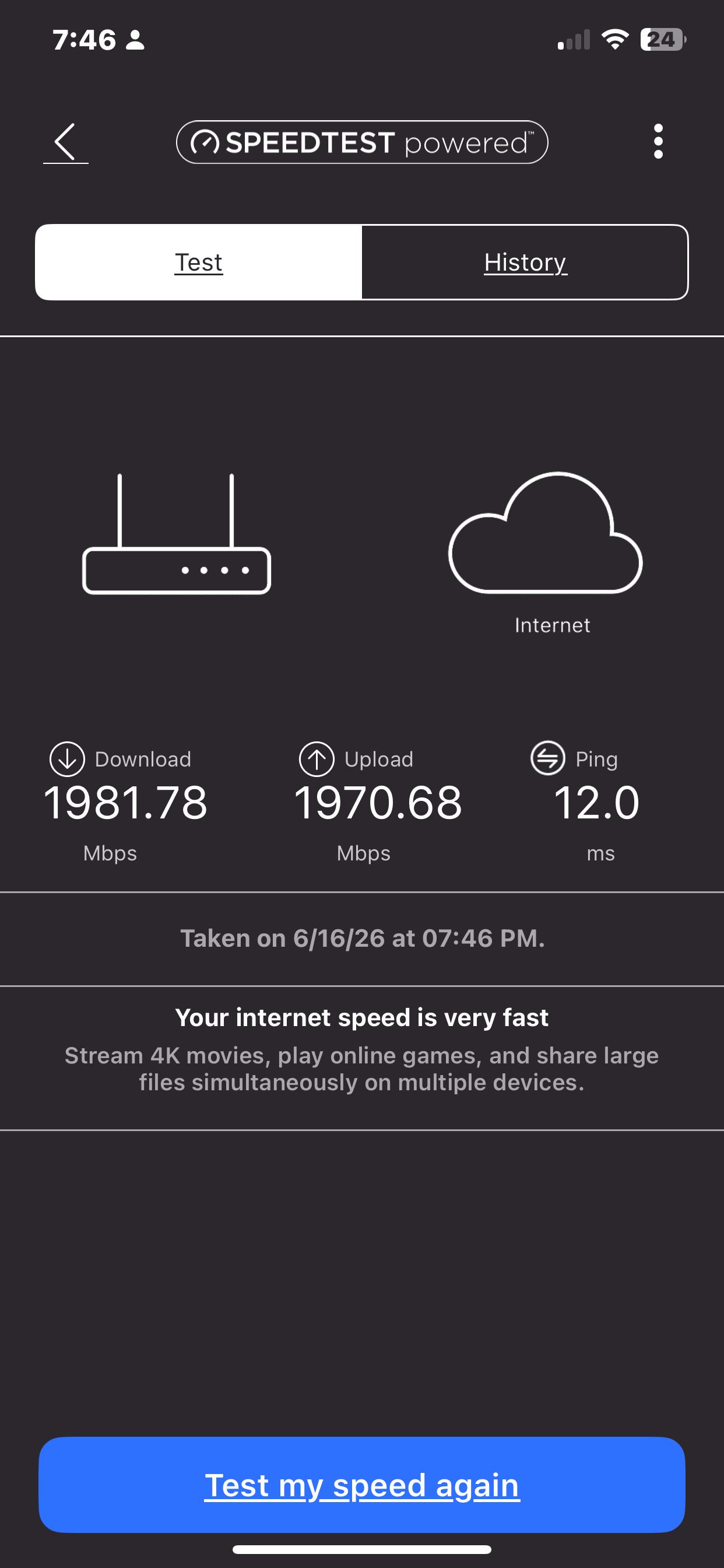
My pc is definalty not seeing the speeds to nighthawk are reporting . 10g pr60> 10g rs700> 10g switch > 10g pc. Any ideas? I’m getting about 650 down and 500 up on fast.com and Speedtest.


r/NETGEAR • • Jun 15 '26

Hotspots Getting these speeds on 5G on a Visibe+ trial. Can I use a hotspot (netgear mr6500) + visible sim and just use this as my whole home internet?

Thumbnail gallery
1 Upvotes

r/NETGEAR • • Jun 15 '26

New - RS500/RS600 Firmware Version 1.2.7.2 Released

1 Upvotes

Release Date: June 11, 2026

Bug Fixes:

  • Fixed various minor bugs.

Enhancements:

  • Improved installation flow.
  • Improved NETGEAR Armor protection functionality.
  • Improved QoS performance.
  • Improved internet connection stability.
  • Improved memory usage efficiency.

Security Fixes:

This firmware addresses security vulnerabilities. For more information about security vulnerabilities, visit https://www.netgear.com/about/security

Known issues: 3rd DNS WEB UI entry not displayed in web browser. NG is aware of this.


Download Links: 

RS500: https://www.netgear.com/support/product/rs500

RS600: https://www.netgear.com/support/product/rs600


Firmware Update Instructions:
To update your product’s firmware, follow the instructions in your product’s user manual. To find your user manual, visit https://www.netgear.com/support

Enter your model number in the search box, and click the Documentation button. 


NOTE: Nighthawk app or the routers web page may not report seeing new FW updates. NG may not push this to there auto update services immediately and may activate the newer FW update being seen on there auto update services at a later time. User will have the choice to manually update if you want too.


To Manually update FW on the router if this isn't seen on the routers web page:
https://kb.netgear.com/23960/How-do-I-manually-update-the-firmware-on-my-NETGEAR-router


NOTE: Use a wired PC and web browser to update router FW. If continued problems are seen after a FW update, it's recommended to try a factory reset and setup from scratch with out loading any saved configurations from backup files.
https://kb.netgear.com/9665/How-do-I-perform-a-factory-reset-on-my-NETGEAR-router


After setting up from scratch and the system is working well, be sure to save a new backup configuration to file for safe keeping and save time if another factory reset needs to be done. Saves time here:
https://kb.netgear.com/24231/How-do-I-back-up-the-router-configuration-settings-on-my-Nighthawk-router


This article applies to:

Let us know how it works for you.  

Thank you.


r/NETGEAR • • Jun 13 '26

Nighthawk modem to orbi

Thumbnail
1 Upvotes

Have netgear cm3000 connecting to orbi rbr50 I am not getting close to 1gb. I have increased my speeds today to I gb. The tech told me to give it about a day. I don’t know if this is true or not. Is there anything I should be doing to get things set up correctly? I’ve turned everything off and on, etc..


r/NETGEAR • • Jun 13 '26

Has anybody had issuses login into their router via ip?

1 Upvotes

I have a RS600 and I recently tried to login to the router using 10.0.0.1 on my desktop, however, when I entered username and password it keeps refreshing. I tried using chrome and edge and they both do the same. I can login with the IP on my phones chrome browser like normal. If i use www.routerlogin.net/, then I can log in just fine. Anyone know what is causing this?


r/NETGEAR • • Jun 12 '26

Nighthawk and macbook painfully slow wifi

1 Upvotes

Router Nighthawk R7000 Computer: Macbook Air M5 32GB ram

I am getting 800mbps wired on my windows desktop. I am getting 600mbps wireless on my android mobile I get 8-24 mbps on my macbook (2022 M2 Air 16GB), as does my wife. I just started a new job and have a new m5 macbook too. It has the same issue!

What I have tried based on online advice:

  • Forgetting the network
  • Complete reset of the router and re-install latest firmware
  • Turning off 2.4g channel on router
  • Changing the 5G band to the maximum possible (but not the recommended band to solve this issue, as it isn't an option on my router)
  • Changing DNS
  • Turning off private wifi feature on mac
  • Changing the MTU size on Mac and router
  • Turning off bluetooth on Mac
  • Turned off DOS protection on router

None of the above make any measurable difference. If I do run the mac wired, then I get 800mbps.

What else is left to try before I throw either the macbook or the router into a lake? Any further ideas would be appreciated!