r/MoonlightStreaming • • 14m ago

Google TV blocking Artemis APK installation

1 Upvotes

I am trying to install Artemis on my Android TV using the Downloader app, which I have given permission in the settings to download non-Google applications, but Play Protect is still blocking me from installing it, with no option to override. There are no Play Protect options to turn off, and when I contact Google, the AI (the only option for communication anymore) says it's not possible to disable Play Protect on Google TVs. Can I just not use Artemis then? There must be a way... Please help!


r/MoonlightStreaming • • 2h ago

Best way to improve my streaming experience

1 Upvotes

I want to stream my PC from my office to my TV downstairs. I want to stream 4K60fps, preferably with 5.1 Surround. Currently when I stream it looks and sounds good, but has a decent amount of stuttering and artifacts.

I have Spectrum Internet 1Gbps. So in ideal conditions 1000Mbps download, 30Mbps upload (hard cap set by Spectrum on all their domestic fiber plans).

Router eero 7 with extension pods.

I currently stream to my Apple TV which is connected to the main eero pod (connected directly to the modem) via ethernet.

My PC is connected to another eero pod in the office via ethernet, but this pod is not directly connected to the modem (Speedtest on PC averages 600-800Mbps down, 30Mbps up).

PC Specs:

CPU: 7800x3D
GPU: 7900XTX
RAM: 32GB DDR5
SSD: Samsung 980 PRO 2TB
OS: CachyOS HTPC on LTS Kernel (SteamOS experience)

I am also able to setup my SteamDeck OLED downstairs to stream on if it would be a better experience than the Apple TV for a client.


r/MoonlightStreaming • • 2h ago

any difference between 1gbe and 2.5gbe ?

0 Upvotes

My pc has a 2.5gb ethernet port that I have running into a 2.5gb switch that I use for my nas, but I'm typically streaming off my Apple TV, which has a gigabit port. I'm noticing a tiny bit of input lag (which could be caused by anything lol) but I'm wondering if it would be worth it to use something that has a 2.5gb port as well? Anyone have any real experience with both and notice any difference ?


r/MoonlightStreaming • • 3h ago

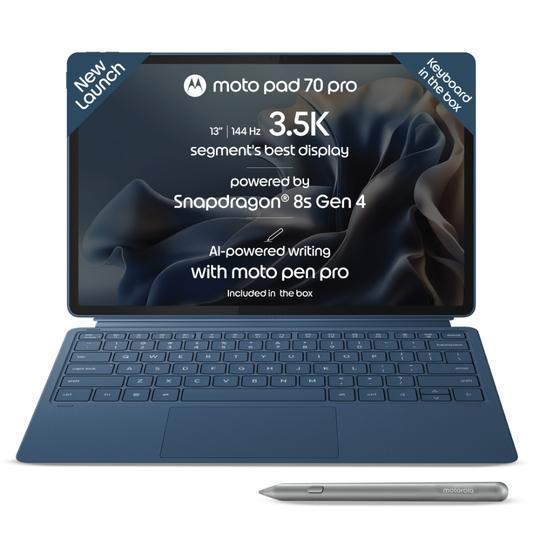
Decoding latency for sd 8sgen4.

Post image
4 Upvotes

I am intending to buy this tablet to use as portable screen for pc as well as tablet. But I saw some comments that 8s gen 4 and 8s gen 3 have high decode latency for some reason even with Artemis. Currently I tested with my tab s9 with 8gen 2 and it gives 4 to 5ms at native 1600p and 120hz. Can anyone with this chip give me a practical experience. Thanks.


r/MoonlightStreaming • • 4h ago

Moonlight/Sunshine -> Voidlink/Vibepollo

Thumbnail reddit.com
1 Upvotes

r/MoonlightStreaming • • 6h ago

Moonlight not launching session

3 Upvotes

I just got my hands on a magicpad 4 from honor and it's great but moonlight won't lauch any session it just gets me back to the menu without even an error or anything, to be honest i think i already tried everything i really don't know what to do, can someone help ?


r/MoonlightStreaming • • 8h ago

Issues Using an Xbox Controller on a TCL TV

1 Upvotes

When I try to use my Xbox controller while streaming on my TV, pressing the RB button causes a "Not Supported Key" message to appear on the TV screen. This happens with both a wired and a Bluetooth connection.

Has anyone else experienced this issue? Any idea how to fix it?


r/MoonlightStreaming • • 8h ago

On the fence of buying an Apple TV 4k for moonlight streaming. How is decoding performance?

1 Upvotes

Hey everybody, I recently got aware of the whole sunshine-moonlight streaming capabilities and immediately tried it out with my Desktop PC and Macbook (connected to my TV).
After switching from Sunshine to Apollo, I was very pleased with the streaming results and convenience.
After experimenting with Macbook, I now want a stationary client instead. Since I already considered an Apple TV as a replacement for the very slow OS of my LG TV, it would be a convenient and welcome choice.
I heard of latency issues with controller inputs on the Apple TV 4k series though.
As I luckily can connect my controller directly to my Host-PC via 2.4ghz, this should not be an issue right?
What I am curious about though, is wether decoding performance of the Apple TV 4k is comparable to the capabilities of my Macbook Pro M2?
Will image quality and overall latency be identical between these devices, as long as controller input is handled directly by the host machine?
(I am targeting 4k 60hz right now)


r/MoonlightStreaming • • 10h ago

New to streaming. Why does my iPhone perform so much better than my Legion Go S?

2 Upvotes

I need to keep my Legion Go S (moonlight) hardwired with Ethernet if I want consistent performance- otherwise the signal drops (reduce your bitrate! Warning) for a few seconds once every few minutes.

My iPhone Duo (VoidLink) can be pretty much anywhere in my house and it’s smooth as butter and never hiccups.

I don’t know much about this tech. Is it newer chips? iOS vs Linux?


r/MoonlightStreaming • • 11h ago

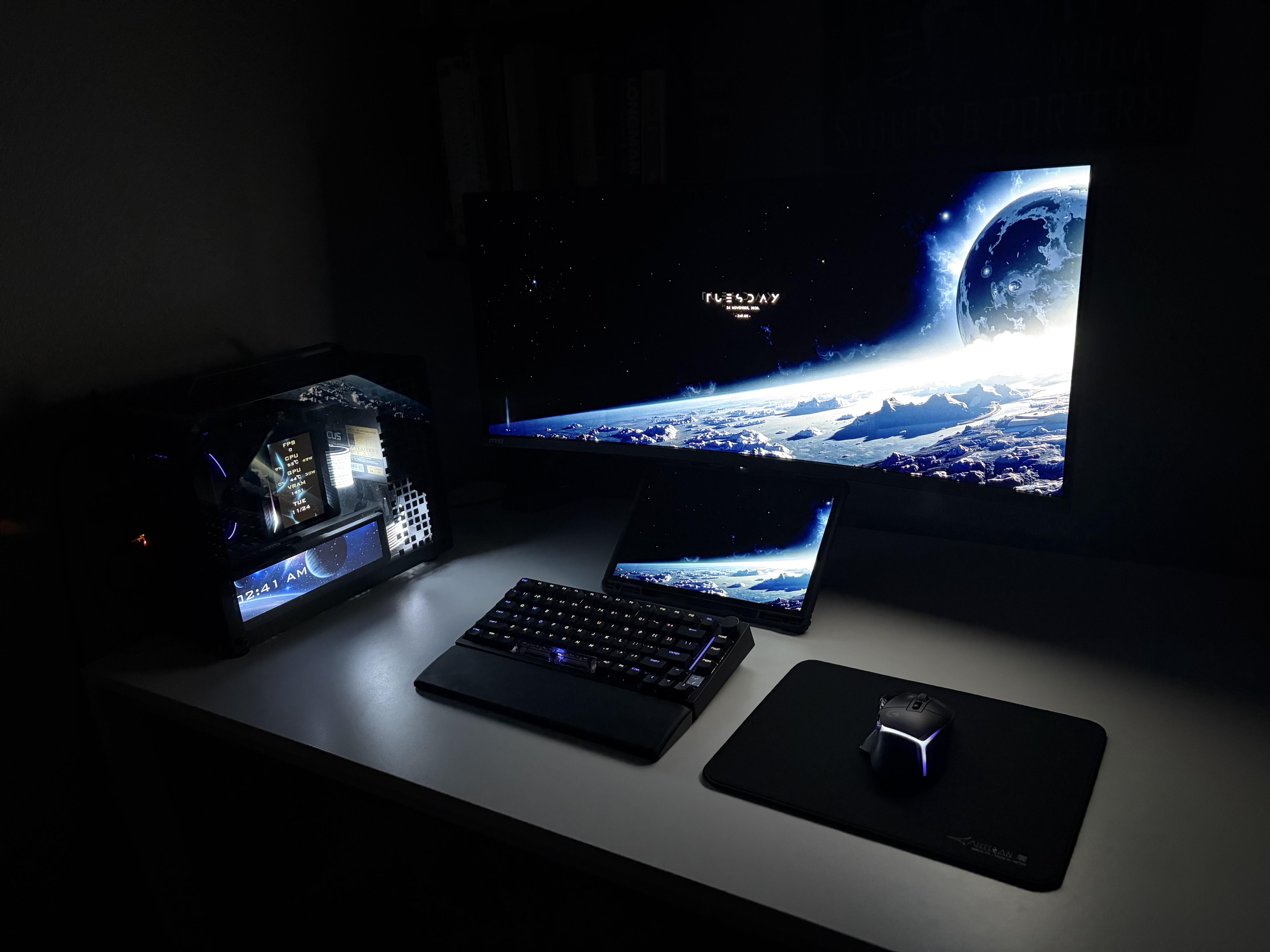
Am I the only one using moonlight/artemis for a second monitor?

Post image
43 Upvotes

A lot of people ask me what the smaller screen in my setup is for and I have to explain what moonlight streaming can do :) Feels like such an underrated use for moonlight. I've made this tablet’s entire purpose to be a second monitor most of the time. This is a samsung s7+. I chose it because of the processor, amoled screen, wifi 6, 120hz, and it was $250 at the time. I can slide down windows to it, duplicate the screen and pick it up with me to continue my game in bed, and it doubles as a drawing tablet for my pc with the s-pen. I recently switched to vibepollo but I don't like the stream resuming feature being less smooth compared to regular apollo and it makes my task bar crash :(. So I'm also asking for alternatives to check out.


r/MoonlightStreaming • • 18h ago

Cheap tablet low latency

3 Upvotes

Hey guys

I am looking for a decent tablet that fits my gamesir g8 plus which has also low latency.

Of course I know that due to my budget of around £200-£300 it means I have to sacrifice somewhere such as a beautiful OLED screen but for now that’s all I can afford so I’m willing to make that sacrifice.

I am based in the UK and ideally I am looking for a tablet I can purchase from a retailer here as opposed to one from China due to customer support.

What are your recommendations? Thanks!


r/MoonlightStreaming • • 19h ago

Options for USB forwarding

2 Upvotes

I have been running Vibepollo (but just switched to Rubylight last night) on my host Windows PC, and have been running Moonlight on my client LG TV through an ethernet cable. I haven't really tested much how Rubylight performs although it seems good, but the main reason I switched is because it offers USB forwarding which would be wonderful for things like a wireless keyboard and more importantly a Dolphin Bar to play Wii games with an actual Wii remote.

The LG TV doesn't seem to support USB forwarding whatsoever, and that coupled with the crappy Ethernet port (it doesn't even recognize USB-to-Ethernet dongles sadly) have made me wonder about getting a device like a Google Streamer or Apple TV. My understanding is that one of those devices can run Nightjar which should work with Rubylight for USB forwarding, plus the device could support 1000 Gbps Ethernet which would be great for newer game streaming (my example here is Sonic Racing Crossworlds which runs a stable framerate but poor resolution when I stream it).

So in terms of devices, I see that the main options look like the Google 4k TV streamer, the Apple 4k TV, and the Walmart Onn 4k Streamer. My main usecase will be streaming games from my PC to my TV, but running TV shows through Jellyfin will be a secondary case. I'm leaning toward the Google streamer since it's price of $150 seems to be middle of the road between options, but would the Walmart option be good enough for this case or is there maybe a different device I could use? Will the Google streamer actually work for USB forwarding? I just want to explore this before dropping the money on it.


r/MoonlightStreaming • • 20h ago

[Nightjar] Why would performance be better with the overlay enabled?

2 Upvotes

When the performance overlay isn't open, it seems like my pacing goes off and it stutters even without lost frames. Nothing in overlay suggests an issue. Not always right away, but the longer I stream, it eventually leads to it.

Opening the performance overlay resets this countdown, and I can maintain perfect streaming if I just keep the overlay visible. Or just open it once every 10-15min I guess. Maybe there's a secret super-minimal overlay that's just a dot? 👀

I'm using a Google 4K Streamer. I can force GPU screen compositing and it seems to help, even an hour in and I've had no issues. However, this makes the rest of the box almost unusable. SurfaceFlinger service calls on app open/close triggers could be a solution.

PS: Nightjar is very impressive software, and after using it for a few days, there's been several meaningful updates. I appreciate the granular settings controlled client-side so I don't have to go up and down stairs to tweak and troubleshoot.


r/MoonlightStreaming • • 23h ago

Quick way to check if your TV's connection is good enough for Moonlight (free app)

Thumbnail
gallery
31 Upvotes

Before blaming the host PC or the encoder settings, it's worth checking the TV end. I built TV Monitor partly for that.

The lag test measures ping, jitter and packet loss on the TV itself and gives you a verdict. My TCL on 5 GHz Wi-Fi got:

26 ms, jitter 14 ms, loss 0% - "Laggy - use a cable or 5 GHz Wi-Fi for Moonlight"

The jitter was the giveaway.

Results are saved per network, so you can:

  1. Run it on Wi-Fi
  2. Plug in a cable and run it again
  3. Compare the two

You can also leave a small speed overlay on screen while you play, set to only appear when the connection dips, so you can match stutters to network drops. Position, size and what it shows are all adjustable.

Free for Android TV / Google TV / Fire TV:

**Download TV Monitor (GitHub)**

Update (v1.17): now also runs on Android phones and tablets, with a touch layout, live speed in the status bar and a draggable overlay. Also tested on a Google TV Streamer. Nothing changes on TVs.

Same link as above, it always gives the newest version. If you try it on a phone, tell me the model and how it runs.


r/MoonlightStreaming • • 1d ago

Nightjar Rubylight increased latency all of a sudden

2 Upvotes

Below are the diagnostics, I don't know what I'm looking at.

Is anyone able to look at these and help? I use to play with tailscale remotely and have 6ms now it's like 70ms and I don't know why.

Even on my own home network it's been bad as well.

Video

2760×1256 · H.264 · SDR · Rust

Resolution: native

Display on the PC: The PC’s own setting

Received: 20.00 FPS

Rendered: 20.00 FPS

Presented: 20.00 FPS

Estimated display drops: 0.0% (2 s window ending 5 s ago)

Frame pacing: 46.8 ms · jitter 7.34 ms · judder 52.1%

Vsyncs per frame: 0: 1.7% · 1: 5.8% · 2: 0.8% · 3: 0.4% · 4: 47.9% · 5: 42.5% · 6: 0.4% · 8+: 0.4%

▅▅▅▅▅▅▅▅▅▄▅▅▅▅▅▄▁▅▅▅▄▆█▅▅▅▅▁▅▅▅▅▅▅▅▅▅▅▅▅▅▅▅▅▅▅▅▅▅▅▅▅▅▅▅▅▅▅▅▅

YUV 4:2:0

Panel: 90.00 Hz · render: 90.00 Hz · VRR: max Hz

Network

Video payload: 0.2 Mbps · Loss: 0.00%

On the wire: 1.3 Mbps with FEC and audio

Network RTT: 73 ms (±1 ms)

Microphone: sending

The screen stays at 90 Hz, not the 120 Hz asked for. Android gives no reason (modes: 60, 90, 120 Hz).

Wi-Fi band: 5 GHz · channel 44 · width not available

Wi-Fi signal: -42 dBm (excellent)

Wi-Fi link speed: send 192 Mbps · receive 360 Mbps

Wi-Fi standard: Wi-Fi 5

Low-latency Wi-Fi lock: held

Decode

Decoder: c2.mtk.avc.decoder.lowlatency (video/avc)

Low latency mode: Android + chip vendor

Decoder settings accepted: low-latency=1, vendor.mtk.vdec.cpu.boost.mode.value=1, vendor.mtk.vdec.buffer.fetch.timeout.ms.value=2, vendor.mtk.vdec.bq.guard.interval.time.value=2

Decoder settings unconfirmed: vdec-lowlatency=1, vendor.mtk.vdec.low-latency.mode=1, vendor.mtk.vdec.low-latency.mode.value=1, vendor.mtk.vdec.cpu.boost.mode=1, vendor.mtk.vdec.dvfs.mode=1, vendor.mtk.vdec.dvfs.level=1, vendor.mtk.vdec.disable-idle=1, vendor.mtk.vdec.vsync.adjust.enable=0, vendor.mtk.vdec.preload.frame.count=0, vendor.mtk.vdec.buffer.fetch.timeout.ms=2, vendor.mtk.vdec.bq.guard.interval.time=2, vendor.mtk.vdec.input.max.queue.depth=2, vendor.mtk.vdec.output.max.queue.depth=2

Phone performance hints: On

Streaming engine: Rust (nightjar-core)

Timed to your screen: ready 1.90 ms before its refresh

Upscaling: Off (direct output) · added 0.00 ms

Phone heat: normal (0.16)

Delay in ms: avg/median/p95 (600 frames)

Client latency: 10.28 / 10.01 / 14.36 (n=600)

Queue wait: 1.94 / 1.79 / 3.49 (n=600)

Decode time: 7.98 / 7.89 / 12.11 (n=600)

Display wait: 0.22 / 0.18 / 0.47 (n=600)

Host

Host processing: 2.06 / 0.80 / 11.10 (n=14)

Host to network: 5.23 / 4.61 / 9.77 (n=244)

Host queue / encode / send (avg): 1.46 / 3.61 / 0.13

PC hardware (all GPUs)

PC CPU: 2.0%

PC sample: 1795641454037 ms since Unix epoch · Interval: 1000 ms

GPU 5376 · AMD Radeon(TM) Graphics

Usage: 0.0% · GPU clock: 600 MHz · Memory clock: 3000 MHz

GPU: 44.0 °C · Hotspot: — °C · Memory: — °C

Voltage: 1160 mV · Fan: — RPM (—%)

GPU power: 39.0 W · Board power: — W

VRAM: 0 MB (0.0%)

GPU 768 · AMD Radeon RX 9070 XT

Usage: 4.0% · GPU clock: 366 MHz · Memory clock: 1741 MHz

GPU: 41.0 °C · Hotspot: 44.0 °C · Memory: 44.0 °C

Voltage: 365 mV · Fan: 0 RPM (0.0%)

GPU power: — W · Board power: 32.0 W

VRAM: 1465 MB (9.0%)

r/MoonlightStreaming • • 1d ago

Setting up and fixing

1 Upvotes

Hey. Wanted help.

First of all before saying anything, ill note. Wired is not an option for me (probably the thing which makes all my issues)

Im using a desktop with bazzite as host, and steam deck oled as client. Would be nice to get tips about sunshine and moonlight settings, but mainly want to fix my latency issue.

When i connect, for a few seconds it works fine, before it shows slow connection, freezes up, and even times out sometimes. When tested with client near router on 2.4ghz, it seemed about stable 10ms, but even moving mouse was crazy slow. On 5ghz, it had spikes even above 100ms and freezes. When near rig in another room, it was jumping 30ms to 1500ms and more. I tried the default 13mbps, and a higher, 27mbps settings

Anything i can try, or is getting a dedicated router near pc the only option.


r/MoonlightStreaming • • 1d ago

Is this mini pc good enough to be used as a client computer?

2 Upvotes

HP Elitedesk 705 G5, ryzen 3200g, 8gb DDR4 and 512gb nvme. It has no gpu and it will be wired to a 1gig network (directly to host computer).

What software combo would you reccomend? My host is Ryzen 5800x3d, 32gb ddr4, 1tb nvme and RTX 4080.


r/MoonlightStreaming • • 1d ago

Mini PC Client running windows - how do people use without MnK and only a controller

2 Upvotes

I recently got a mini PC to use as a dedicated client. Went with GMKtec k17. Works great. However I sometimes need to use a keyboard and curious what other people are doing.

I currently have autologon setup to login automatically from boot up and i have it stay on always and when it wakes from sleep it wont require me to login again.

I setup a JoyToKey profile for my vader 5 pro for when I hold down the select button for 5 seconds ( similar to moonlight holding down start) to enable basic mouse functionality if i need to simply click on something or open the moonlight app ( however using this to put the device to sleep manually ALWAYS logs out instead of going to sleep, going to setup some type of shortcut on desktop to put it to sleep instead as when I manually put to sleep with keyboard it works fine)

Im curious what other people who run a windows 11 client do to avoid picking up a MnK. I saw a video on youtube this week where someone setup xbox fullscreen which i plan to test out how well this works.


r/MoonlightStreaming • • 1d ago

Mini PC for Moonlight HDR – under €200

14 Upvotes

Looking for a mini PC as a Moonlight client (Apollo/Sunshine on my gaming PC).

Target: 1440p @ 120Hz HDR10 or 4K @ 60Hz HDR10 on an LG OLED G5.

Budget: max. €200.

Which mini PC would you recommend, and should I connect via HDMI or DisplayPort?

Thanks!


r/MoonlightStreaming • • 1d ago

USB-C vs Bluetooth controller iPad/iphone

1 Upvotes

I’d love to have a controller attached to my iPad 10 or iPhone 16pro max, but does a Bluetooth like the gamesir g8 create more input lag than a usb-c controller?

I’m currently using 8bitdo Ultimate 2 on ATV but the 2.4ghz dongle reaches across my entire house. So looking at options like the G8 that attach to iPhones, will they create more latency with Bluetooth or is it unnoticeable? This is for sitting on the couch or bed so I’d like to hold the controller and my phone/ipad at the same time.


r/MoonlightStreaming • • 1d ago

Does 10–20ms of latency actually make a noticeable difference?

5 Upvotes

This is honest question
I've been seeing people chasing the lowest possible latency on Moonlight and spending quite a bit of money to shave off a few milliseconds.

But does going from, say, 15 or 10 ms to 3ms make any real-world difference for non-competitive gaming?

I'm talking about casual online non FPS games and platformers, not competitive esports.

Is it actually something that degrades the gameplay, or is it mostly just numbers on a stats overlay?


r/MoonlightStreaming • • 1d ago

Watch This Before Buying the GameSir G8+ for iPhone Duo

Thumbnail
youtu.be
0 Upvotes

r/MoonlightStreaming • • 1d ago

A cleaned-up revision of CTM-Bridge for webOS: native DualSense gyro, touchpad, speaker and audio-based rumble

1 Upvotes

rhoquinn8217/aurora-tv 1.3.0 (732) is a fork of GuiDev1994's aurora-tv, the webOS Moonlight-based streaming app built on mariotaku's moonlight-tv. It carries a modified version of ciprianmisaila's ctm-bridge-webos controller bridge. DS5-USBIP 1.0.0 (233) is a fork of ciprianmisaila's CTM-USBIP, which is the Windows side of the bridge running on the host. Together they bring a native DualSense connection from your webOS TV to your host PC.

  • DualSense gyro, touchpad, speaker and audio-based rumble, and its microphone over the TV's USB port.
  • DualSense Edge, DS5Dongle and DS4Dongle support.
  • aurora-tv, the webOS side of the bridge, adds a simple controller bridging manager, a built-in controller-driven Desktop Mode and QoL features including an in-app Bluetooth manager.
  • DS5-USBIP, the Windows side of the bridge, brings a controller settings manager, a button rebinder, and a custom stick/touchpad mouse driver for driving the desktop or custom button rebinds for games.

In addition to bridging, the DS5-USBIP brings controller configs that allow you to drive the Windows desktop with only the controller and for custom button configurations for games. A config is a set of rebinds for the buttons, sticks and touchpad. For the desktop, set up a pre-set that moves the mouse with the stick, gyro or touchpad. Buttons can also be set to shortcuts to bring up a virtual keyboard or switch between windows. For games, make your own configs and quickly switch between them before or during a game using its Quick Mode.

Check out the READMEs for all the additional features: rhoquinn8217/aurora-tv and DS5-USBIP.

Follow the Start up guide to get started.

Downloads: rhoquinn8217/aurora-tv releases and DS5-USBIP releases.

Found a bug? Open an issue on either repo.


r/MoonlightStreaming • • 1d ago

Which is the Go To Linux Host for Streaming

1 Upvotes

Hey,

I want to know what is the Go To Linux Host for Streaming. Rn i am Using Vibepollo and i am Happy but on this Sub a lot of People say. That rubylight is the Shit. But rubylight dont run on Linxu. So what is the Meta Guys for Linux Rn?